also @ TechSpot: Apple iOS 'Absinthe' jailbreak: 1 million downloads and counting

TechSpot

Computer will not turn on..

Discussion in 'Overclocking, Cooling and Modding' started by hatcht, Nov 19, 2006.

Thread Status:
Not open for further replies.
  1. hatcht Newcomer, in training

    This is the first time I have posted here, so I would like to give an advance big thanks for any help you can give me. The computer I am working on will not turn on, checked through the forum, and tried these tricks, PSU, patched in a new one, did not help, bought a new CPU, (socket type) Did not help, Cleared the CMOS ( reversed the battery). no help. removed the ram, no help... in other words, I left the CPU,PSU, removed the periphials. and the ram,, all that happens is, If I hold the power button in, power lite on the motherboard comes on and "the fans" give a small movement. I have tried a new powercord... Is there anything else I should try? the CPU is and AMD, I am not sure what the Mother board is, I have not had it out.. I am at a loss, so anything I can try would be a great help,, Oh by the way, this was one of those " you turn the computer off and go to bed, and get up in the morning, and it would not turn back on things.... so it was working.
  2. DonNagual TechSpot Ambassador

    Hello, and welcome to Techspot!

    Take a look at your motherboard's capacitors. Any of them swelling or leaking?
    [IMG]
  3. hatcht Newcomer, in training

    Thanks for the help Don, I checked the over the best I could, I did not take the motherboard out, so I don't know about the other side, but as far as what I can see, I don't see any buldges. Don, Can the CMOS battery, ( if it is dead) stop the computer from coming on? thanks again!
  4. hatcht Newcomer, in training

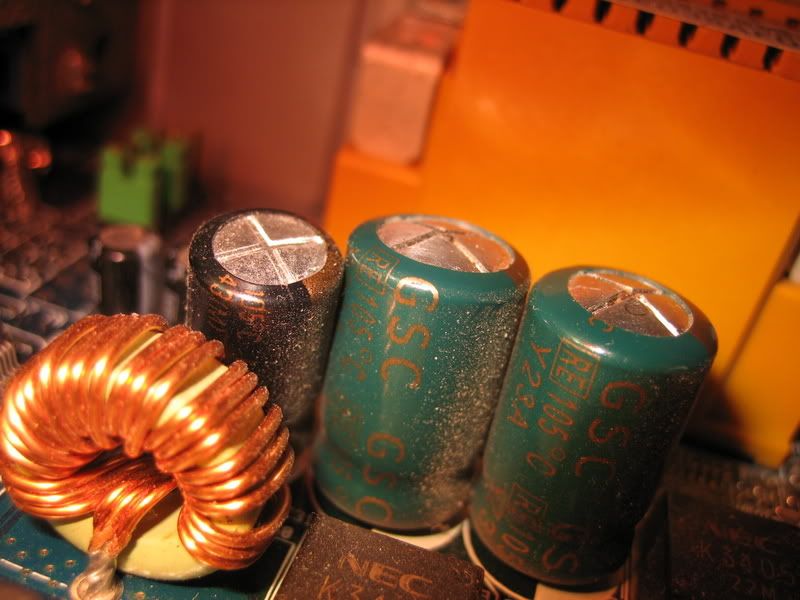
    Don, I took a closer look at the capacitors, I think there may be some that are bulgding. They are not quite as bad and the ones in your picture, but Would that stop it from coming on?
  5. hatcht Newcomer, in training

    here is a quick pic of what I am looking at:


    [IMG]


    What do you think? are these buldging?
  6. dmill89 TechSpot Guru

    Yes those are defently buldgeing, the tops should be flat. Your options are now to replace the bad capacitors (involves desoldering the old ones and soldering new ones in) or to replace the motherboard.
  7. Mictlantecuhtli TS Special Forces

    Hmm, I've never seen a PC that would boot without memory.
  8. dmill89 TechSpot Guru

    A computer can't boot with out memory but it should atleast give a POST error instead of just doing nothing.
  9. Mictlantecuhtli TS Special Forces

    Hmm, I don't think I've seen one post without memory either. Then again, I don't think I've tried many times.
  10. dmill89 TechSpot Guru


    It will fail post giveing a long continious beep for an error message. If you get nothing there is likely a problem with the motherboard.
Thread Status:
Not open for further replies.