
LookinAround
Posts: 6,429 +186
[CENTER]How To Report Your Computer's Device Manager Data[/CENTER]
Follow these instructions when asked to report your computer's Device Manager data
The DevManView tool has both a 32- and 64-bit version
Follow these instructions when asked to report your computer's Device Manager data
The DevManView tool has both a 32- and 64-bit version
> Determine which version you need. See How to determine if your computer is running a 32-bit or 64-bit version of Windows
> For 32-bit Windows, download DevManView
> For 64-bit Windows, download DevManView for x64 systems
Next, run DevManView. In the DevManView window- Press Ctrl+A to select all devices (All devices should be highlighted in the DevManView window!)
- Press Ctrl+Sto save all the selected devices
- For File name, enter any file name
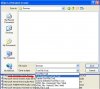
- For Save as type, use the pull down menu. Be sure to Save As Tab Delimited Text File (*.txt) (see thumbnail below)
....==> This save format may not look readable but when it's imported to Excel - I can read it quite well!
- Click Save and save the file on your Desktop
- Finally, upload the file to your next TechSpot post


