also @ TechSpot: Intel Haswell-E enthusiast chip to carry eight cores and support DDR4

My computer has an error screen

Discussion in 'Other Hardware' started by franz samillano, Feb 24, 2013.

Post New Reply
  1. franz samillano Newcomer, in training

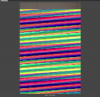
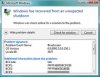
    My computer has computer error screen like this the picture I attach and it keeps on coming back after I restart my computer. sometimes it will start normally and then I viewed the event viewer there are a lot of errors, criticals, warning and etc. what shall I do? I don't even know how to fix this please help me thanks :(

    Attached Files:

  2. St1ckM4n TechSpot Maniac Posts: 1,680   +240

    Lol. What's that? A photo of your monitor?

    If yes, monitor could be dying. Or graphics card...
  3. baN893 TechSpot Member Posts: 69   +9

    Run your anti-virus, download malware removal tools etc. I would also suggest backing up all your important files on an external harddrive. Maybe a windows reinstall could help? Oh, obviously before doing that download all the newest drivers for your graphics card etc.
  4. St1ckM4n TechSpot Maniac Posts: 1,680   +240

    No, don't do this. This is a blanket-fix that probably won't fix anything at all.

    Having a backup of files can never hurt, though.
  5. baN893 TechSpot Member Posts: 69   +9

    Yes it's a blanket fix, but it isn't going to harm him from running an anti virus program. I really think the key is downloading the newest graphics drivers.
  6. franz samillano Newcomer, in training

    Yes that's the photo of my monitor. it suddenly appears even thou were playing simple games or just multi task. and then after I restarted the pc, a blue screen of death information like this suddenly appears (that photo I attached). Please help me, I don't know what's the real problem of my pc. my monitor is Emx-mcp61d3 and it has a built in video card. thanks :)

    Attached Files:

     
  7. franz samillano Newcomer, in training

    I
    I mean my motherboard tsk2. :p
  8. learninmypc TechSpot Guru Posts: 3,158   +111

    Might I ask how the OP can do the above if all the OP sees is that screen?
    I know nothing about it, but my first suggestion would be to try another monitor first.
    If its better then proceed with with prior suggestions. Good luck. :)
  9. jobeard TS Ambassador Posts: 12,334   +132

    FYI: those diagonal lines are a dead give away that horizontal sync is awry - - typically that's a video card failure.
  10. St1ckM4n TechSpot Maniac Posts: 1,680   +240

    And since you have build-in graphics, it's probably the chipset on your motherboard. Which, if screwed, can also cause issues with a dedicated graphics card.. hmm..
  11. franz samillano Newcomer, in training

    Can I fix this errors without replacing my mobo? or buying another stuffs?
  12. franz samillano Newcomer, in training

    A fatal hardware error has occurred.

    Component: AMD Northbridge
    Error Source: Machine Check Exception
    Error Type: 11
    Processor ID: 0

    The details view of this entry contains further information.

    In my event viewer I keep on receiving this error, what does this mean also?
  13. syntaxbreaker Newcomer, in training Posts: 16

    Hey franz, your graphics card may be faulty.. try mo get some graphics card or try to re-install your graphics driver ;)
  14. franz samillano Newcomer, in training

    thanks for viewing this thread, okay2 I'll try your suggestions thanks :)
  15. St1ckM4n TechSpot Maniac Posts: 1,680   +240

    Heh, northbridge contains the graphics chipset on mobo, so it's probably busted like I said.

    See if you can get a spare graphics card from someone to try. If it is the mobo, you can't really fix it without getting a new one.
  16. franz samillano Newcomer, in training

    I'll try to buy another vcard thanks for your help :)
  17. St1ckM4n TechSpot Maniac Posts: 1,680   +240

    I wouldn't buy one.. could be a waste of money. If mobo is dead, it's time to upgrade the whole rig probably.
  18. Any PC Trouble Newcomer, in training

    You could probably get a cheaper deal if you upgrade your entire rig anyway. Just make sure to back up any important files before doing this since you may have to reformat the OS after the upgrade (if you choose to retain the HDD that is). :)
  19. franz samillano Newcomer, in training

    Our professor in computer diagnosed the problem and he told me that probably the motherboard is faulty. huhu. tsk2. :(