also @ TechSpot: Rumor: Sony to acquire a cloud gaming company

TechSpot

Problems with my new Geforce 7600 GS

Discussion in 'Audio and Video' started by Kaizers, Jan 6, 2007.

Thread Status:
Not open for further replies.
  1. Kaizers Newcomer, in training

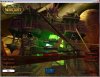
    I have a strange problem with my Nvidia Geforce 7600 GS card. Think I've tried everything.. The latest driver, latest direct x and tried adjusting all grafical options, but whatever I do it still looks like this when I'm playing 3d-games

    Any suggestions?

    Thank for all the help I can get

    Attached Files:

  2. DonNagual TechSpot Ambassador

    Kinda hard to tell from that screenshot, as I am not familiar with the game. I assume those bars are not supposed to be there?

    I don't see any pixelation, so I don't think it is an overheat problem, but might as well rule that out first. Open up the case and aim a house fan at the insides. Does that lessen the problem?

    Has this card ever worked for you? In other words, is this a sudden new problem, or a problem that has always happened since you popped that card in?

    If it is a new problem, then it's likely not a driver issue. Either your video card ram is dying, or your PSU is dying (not giving the graphics card enough power).

    If it is a problem that has always happened, then it may be a driver issue. Have you updated your board's chipset drivers as well?
  3. raybay TechSpot Addict

    Be nice to know what has been tried already
  4. Kaizers Newcomer, in training

    Hi, and thanks for the quick reply.

    This problem startet as soon as I inserted the card. I've checked the temp. but it's still in the green sone. The strange thing is that if I restart the computer, the 3d grafics starts out allright, but it gets worse every minute. All those 'tubes' flicker and follows the motions of most characters ingame, multiplying over time. This happens in all 3d games, but the funny thing is, it's not showing up in 3d studio max..

    My power supply is 400W

    Could you assist me in updating my board's chipset driver? I don't think I've tried that.
  5. DonNagual TechSpot Ambassador

    Your updated motheboard chipset driver would be on the maker's website.

    Two quick questions:

    1. You say the temps are fine. What are you using to check your graphics card temp? Not your CPU temp, but your graphics card.

    2. What make is your PSU? How many amps on the +12v rail (you can find this info on the sticker attached to the PSU.
  6. Kaizers Newcomer, in training

    1. I'm using the software that came with the card. Nvidia Control Panel.

    2. +12v=15A (yellow)
  7. DonNagual TechSpot Ambassador

    Did you try updating your chipset drivers?

    Also, can you run speedfan and tell us what it is reporting for your +3.3v, +5v and +12v rails?
  8. cfitzarl TechSpot Chancellor

    The amperage is low on your +12v rail and can provide trouble if your video card does not give enough power.
  9. F1N3ST Newcomer, in training

    It looks like artifacting, a defective card to me.
  10. Ritwik7 TechSpot Chancellor

    Less Amps?

    Well the 7600 GS requires a 350W PSU with atleast 20A on the 12V rail...Try another PSU...
  11. Tedster Techspot old timer.....

    your PSU is too low. A 400W PSU is rarely 400W. In actuality it is less. This is due to thermal loss. Also reduce the power by age as well. A 2 year old PSU produces 30% less power on average due to capacitor aging.
  12. raybay TechSpot Addict

    Defective card is a lot more likely than the power supply. It has a 12% failure rate. The power supply is plenty good enough for normal use... unless it, too, is defective.
  13. cfitzarl TechSpot Chancellor

    The 7600GS on my secondary computer only requires 300Watts, what brand is it?
  14. Ritwik7 TechSpot Chancellor

    XFX...But I presume most brands require the same 350W...Wat brand is urs?
  15. cfitzarl TechSpot Chancellor

    I have a PNY. Hmm :suspiciou ... No matter the case, it is recommended that you have at least 18A on the +12V rail in my opinion to run a video card properly. You can try a new power supply (or place it in another computer) and see, although there is still a chance that the card is defective.
  16. Ritwik7 TechSpot Chancellor

    I dunno...see it on der website...or anywhere else for d minimum requirements...

    Check out their website...Evn the 7300 LE (as written on the box) requires a 350W PSU with 20A on the 12V rail...
  17. cfitzarl TechSpot Chancellor

    It doesn't matter the power requirement for the card, we have already figured out that your power supply is not sufficient although as I said there is a chance that the card is defective as well.
  18. Kaizers Newcomer, in training

    Thanks for all your help guys. But I can't seem to locate where to find the minimum requirements for any grafic cards. Can anyone point me in a direction?
  19. Ritwik7 TechSpot Chancellor

    Usually the minimum requirements are written at the side of the box in which your card is packed. In general they print the minimum power required.
    You could also try a search in Google like "GeForce 7600 GS Power Requirement".
    Good Luck...
  20. tweakboy TechSpot Guru

    Possibly PSU or motherboard incompatibiliy,, buddz,
Thread Status:
Not open for further replies.