Welcome to the TechSpot OpenBoards. Please read the FAQ if you have any questions. Sign up or Login to participate.
|
|||||||
Download Now:
Yet another victim of PC-antispyware
|
|
Thread Tools | Search this Thread |
|
#1
|
|||
|
|||
|
Yet another victim of PC-antispyware
Running vista service pack 1 on an HP pavilion m7750n with no hardware or software changes. Have run Malware-bytes and smitfraudfix as well as several other attempts to kill this thing, getting all sorts of rouge spyware and system tool popups.
Here are my latest MWG and HJt logs taken 10 min ago. running Kaspersky Online Scanner right now will post log when compleate Last edited by cliffside81; 04-04-2008 at 12:09 AM.. |
|
#2
|
||||
|
||||
|
Combofix
Combofix will automatically save the log file to C:\combofix.txt |
|
#3
|
|||
|
|||
|
combo fix log
here is the log when it finished i got this alert from my trendmicro software
System Change Risk Level: Low Description: Windows Service programs can run even when you have not logged in, often with administrative access to your computer. Spyware can use Windows Services to hijack your computer for illegal purposes. Details: Display Name: PROCEXP90 Program: C:\Windows\system32\Drivers\PROCEXP90.SYS Recommendation: Although suspicious, this new software or change may serve a legitimate purpose. Please investigate further before taking steps to correct this possible problem. |
|
#4
|
||||
|
||||
|
Download\install 'SuperAntiSpyware Home Edition Free Version' from HERE
Scan with SuperAntiSpyware
CFScript Open notepad and copy/paste the text in the code box below into it: NOTE* make sure to only highlight and copy what is inside the quote box nothing out side of it. Also .. Pay particular attention to this :- Make sure the word File:: is on the first line of the text file you save (no blank line above it, & no space in front of it) Quote:
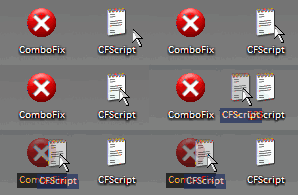
Then drag the CFScript.txt into ComboFix.exe as you see in the screenshot below. ![]() This will start ComboFix again. After reboot, (in case it asks to reboot), post the contents of Combofix.txt in your next reply together with a fresh HJT log. |
|
#5
|
|||
|
|||
|
more logs
here is the data you requested
|
|
|
|
#6
|
||||
|
||||
|
Getting better from the looks of the logs, how is your computer doing? Any symptoms?
CFScript Open notepad and copy/paste the text in the code box below into it: NOTE* make sure to only highlight and copy what is inside the quote box nothing out side of it. Also .. Pay particular attention to this :- Make sure the word File:: is on the first line of the text file you save (no blank line above it, & no space in front of it) Quote:
Then drag the CFScript.txt into ComboFix.exe as you see in the screenshot below. ![]() This will start ComboFix again. After reboot, (in case it asks to reboot), post the contents of Combofix.txt in your next reply together with a fresh HJT log. |
|
#7
|
|||
|
|||
|
pc doing far better thank you
here are the new logs. no symtoms since previous cleaning.
|
|
#8
|
||||
|
||||
|
Ok, thanks for your patience, your logs are looking good.
Download and Run ATF Cleaner Download ATF Cleaner by Atribune to your desktop. Double-click ATF Cleaner.exe to open it. Under Main choose: Windows Temp Current User Temp All Users Temp Cookies Temporary Internet Files Prefetch Java Cache *The other boxes are optional* Then click the Empty Selected button. Firefox or Opera: Click Firefox or Opera at the top and choose: Select All Click the Empty Selected button. NOTE: If you would like to keep your saved passwords, please click NO at the prompt. Click Exit on the Main menu to close the program. Run Kaspersky Online AV Scanner Order to use it you have to use Internet Explorer. Go to Kaspersky and click the Accept button at the end of the page. Note for Internet Explorer 7 users: If at any time you have trouble with the accept button of the licence, click on the Zoom tool located at the right bottom of the IE window and set the zoom to 75 %. Once the license accepted, reset to 100%.
|
![]() |
| Similar Topics | ||||
| Topic | Replies | Forum | ||
Another victim to Spyware
|
3 | Virus and Malware Removal | ||
Yet another WHATABOUTADOG victim
|
10 | Virus and Malware Removal | ||
Another CiD ad victim
|
6 | Virus and Malware Removal | ||
Another vundo victim
|
3 | Virus and Malware Removal | ||
Another CiD Victim
|
1 | Virus and Malware Removal | ||
| Thread Tools | Search this Thread |
|
|
All times are GMT -4. The time now is 01:29 PM.


Another victim to Spyware