Welcome to the TechSpot OpenBoards. Please read the FAQ if you have any questions. Login to participate.
|
|||||||
Trojan, trojan & more trojans. My kingdom for a fix
![]() |
|
|
|
Thread Tools |
|
#1
|
|||
|
|||
|
Trojan, trojan & more trojans. My kingdom for a fix
Dear TechSpot.
I'm new to the site & would appreciate your assistance. AVG has found 8off Trojans but I guess they are camped out in the reg & can't be removed without expertise. The pc runs slower than me & I'm getting on. I've also ran Spysweeper which got rid of some adaware, but it's these trojans that are corrupting the show. When I run ATF cleaner or try & delete the browsing history, the pc shutsdown? Can you please help wrt cleaning the reg & speed this dam thing up. Attached is the HJT log. Regards, Krusty. |
|
#2
|
||||
|
||||
|
Download and Run Malwarebytes' Anti-Malware
Please download Malwarebytes' Anti-Malware to your desktop.
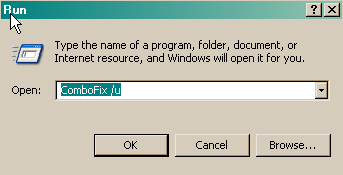
Download and Run ComboFix WARNING: Do not mouseclick combofix's window whilst it's running. That may cause it to stall |
|
|
|
#3
|
|||
|
|||
|
Kritius,
Cheeres for the prompt reply. What I'm having to do is respond to you on another pc cos the other is really poorly. I'll d/wload as suggested, save to my pen drive then run theninstall on the other. The other (bad one) is just sat as a paperweight at the mo & is not connected to the net. Will do, but will have to wait till tomorrow now. Ta again. Krusty. |
|
#4
|
||||
|
||||
|
Ill be waiting.
|
|
#5
|
|||
|
|||
|
Kritius,
Sorry for the delay. Please find attached both logs. Thanks again, Krusty. |
|
#6
|
||||
|
||||
|
Its going to take me a while to get through this so hang tight.
|
|
#7
|
||||
|
||||
|
COMBOFIX-Script
ATF Cleaner
Manually clear cache
Next please follow these instructions. Your version of Hijackthis is out of date First please go to Start -> Control Panel -> Add/remove programs and uninstall Hijackthis. Highjackthis Instructions
Update your Java Runtime Environment
If for some reason you couldn't update through the above instructions.
|
|
#8
|
|||
|
|||
|
Kritius,
I shall do this either later tonight or it will be sometime tomorrow. Wrt ATF, as said in my first post, the pc powered down when I tried to delete all selected (apart from Re/Bin). Do you think this will work now? I've now d/loaded Java 7 will install. I'll also look for the latest HJT. I do these via other pc. Really appreciate your help. Krusty. |
|
#9
|
||||
|
||||
|
A lot of nasty stuff was gutted out of your system so I figured that it would be worth a shot.
Ill keep an eye out for the results. |
|
|
|
#10
|
|||
|
|||
|
Morning Kritius,
Firstly let me explain this set up. The pc I'm on now is not the infected one. That one is here with me as a stand alone. It belongs to my neice & I'm the uncle who's been ask to help with the fix. However, as you're aware, I too need your expertise. I tend to use this pc to download all the stuff & the Txfer via a usb drive to the bad machine. I've just dragged the CFscript onto the Comofix icon & the following happened. a, The start bar began followed by a blue box, then nothing. The scan did not happen. Task manager shows nothing.Not even not responding or running. Should I try a manual scan? Ant hope the text has been inputted? I've also noticed that the pc has the latest Java installed. Please advise, Krusty. |
|
#11
|
||||
|
||||
|
Try it again and then reboot, if not let me know and ill think of another way to get them.
|
|
#12
|
|||
|
|||
|
Hi Kritius,
Have tried a few times & cannot get Combofix to scan. Tried Unistall then re-installed but wont scan. Just runs the start bar then goes to C\ drive (blue box) for a few seconds then it closes. Same with a manual start Ie double click. However, on the bright side. Managed to run ATF with success, aswell as the Man clear Cache, that too is now empty & should remains so, as pc is not connected to the net. Have also attached latest copy of HJT for you, if you could be so kind to assess. Regards, Krusty. |
|
#13
|
||||
|
||||
|
Lets try this then,
Please download the OTMoveIt2 by OldTimer.
|
|
#14
|
|||
|
|||
|
Back again,
Please find attached OTMoveIt results. I see that it couldn't find some, is that a problem? Cheers, Krusty. |
|
#15
|
||||
|
||||
|
Not sure,
Can you run ComboFix and HJT again and post the logs back here? We'll see how it looks then, how is the computer running? |
|
#16
|
|||
|
|||
|
Helloa,
Combo won't scan still???? As was, goes to small 'blue screen of death' then bobs out??? What happened wrt the combo? Herewith latest HJT. does it look clean? Wrt the pc, after I've ammended the selective start up & removed the crape that was clogging it, it seems a lot better. Just left it with AVG running in the background. Shall I perform AVG and Spysweeper scans now? cheers again, Krusty. |
|
#17
|
|||
|
|||
|
Dear Kritius,
Don't we need to at some time dissable restore, perform a clean, then activate restore? Do we need to do anything in safe mode? Otherwise won't the reg revert to corrupt when power is re-applied? Krusty. |
|
#18
|
||||
|
||||
: Move hijackthis : Your copy of HijackThis needs to be in a folder of it's own. When HJT fixes anything, it makes backups of the original files in the folder it is in. For this reason it cannot be run from the desktop. Having the backups could be VITAL to restoring your system if something went wrong in the FIX process! 1. Please go to you're 'My Documents' folder, right-click and select 'New > Folder' then name the folder 'HJT'. 2. Copy and paste HijackThis.exe to the new folder. 3.right click on hijackthis.exe and select send to > desktop this will make a new shortcut Fix entries using HiJackThis
O4 - HKLM\..\Run: [UADC_2185716454] "C:\Program Files\AdvancedCleaner Free\UADCcw.exe" -c O8 - Extra context menu item: &Search - http://edits.mywebsearch.com/toolbar...p=ZRxdm690YYGB O9 - Extra button: (no name) - {CD67F990-D8E9-11d2-98FE-00C0F0318AFE} - (no file)
Delete Files and Folders
***DO NOT USE MSCONFIG TO BOOT INTO SAFE MODE*** You should get a firewall as well, either, these firewalls are all free, Rename HijackThis.exe to krusty.exe by doing the following;
: Download and Run DSS Download Deckard's System Scanner (DSS) to your Desktop. You must be logged onto an account with administrator privileges.
|
|
#19
|
|||
|
|||
|
Hi Kritius,
Thanks once again. a, Combofix still won't run? Still bombs out at the blue box? Can't understand why? b, It is my intention to install Zone Alarm once we have a fix. c, Did the HJT move, ran & checked the 4off entries, then clicked the fix button. d, No folders were evident, even tried in Safe Mode with all hidden folders visable. Hopefully Advanced Cleaner has been removed. e, Why did we rename HJT? Done so as requested. f, Attached both txts from DSS. Cheers again, Krusty. |
|
#20
|
|||
|
|||
|
Kritius,
Have downloaded Combo again & have copied to My Docs. Put S/Cut to desktop & ran. This time it has run. I will post result along with a krusty HJT log tomorrow. Regards, Krusty. |
![]() |
| Thread Tools | |
|
|
| Similar Topics | ||||
| Topic | Category | Replies | Last Post | |
| trojan horse lop.AS Trojan, Unable To Work Out. | Virus & Malware removal | 9 | 01-18-2007 12:00 AM | |
| plz help: Trojan.dropper,Dialer.trojan | Virus & Malware removal | 3 | 09-17-2006 11:10 AM | |
| Dialer.Trojan, Trojan.Dropper etc... | Virus & Malware removal | 1 | 09-11-2006 11:11 AM | |
| Trojan.dropper and Dialer.trojan, plz help =( | Virus & Malware removal | 8 | 09-07-2006 04:01 PM | |
| Greetings from Rowan in East Timor Kingdom of the Viruses | Introduce yourself | 1 | 03-21-2006 09:28 AM | |
All times are GMT -4. The time now is 05:00 PM.