You are using an out of date browser. It may not display this or other websites correctly.
You should upgrade or use an alternative browser.
You should upgrade or use an alternative browser.
Slow Google search
- Thread starter VVVVV
- Start date

Blind Dragon
Posts: 3,774 +4
pop up blocker just masks the problem
Can you run a scan for me from normal mode instead of safe mode
Can you run a scan for me from normal mode instead of safe mode
Blind Dragon
Posts: 3,774 +4
There is a program to kill this infection however it's not vista compatible yet. There is a rather nasty worm on there, that is suggested to open a backdoor.
-------------------------------------------------------------
Malwarebytes' Anti-Malware
-------------------------------------------------------------
Combofix
Combofix will automatically save the log file to C:\combofix.txt
--------------------------------------
Attach back here:
1) MBAM log
2) C:\combofix.txt
3) Fresh Hijackthis
-------------------------------------------------------------
Malwarebytes' Anti-Malware
- Please download Malwarebytes' Anti-Malware to your desktop.
- Double-click mbam-setup.exe and follow the prompts to install the program.
- At the end, be sure a checkmark is placed next to
- Update Malwarebytes' Anti-Malware
- and Launch Malwarebytes' Anti-Malware
- then click Finish.
- If an update is found, it will download and install the latest version.
- Once the program has loaded, select Perform full scan, then click Scan.
- When the scan is complete, click OK, then Show Results to view the results.
- Be sure that everything is checked, and click Remove Selected.
- When completed, a log will open in Notepad. please attach this log with your reply
- If you accidently close it, the log file is saved here and will be named like this:
- C:\Documents and Settings\Username\Application Data\Malwarebytes\Malwarebytes' Anti-Malware\Logs\mbam-log-date (time).txt
-------------------------------------------------------------
Combofix
- Download Combofix to your desktop.
- Double click combofix.exe & follow the prompts.
- A window will open with a warning.
- When the scan completes it will open a text window. Please attach that log back here together with a fresh HJT log.
Combofix will automatically save the log file to C:\combofix.txt
--------------------------------------
Attach back here:
1) MBAM log
2) C:\combofix.txt
3) Fresh Hijackthis
Blind Dragon
Posts: 3,774 +4
Run CFScript
Open notepad and copy/paste the text in the code box below into it:
NOTE* make sure to only highlight and copy what is inside the quote box nothing out side of it.
Also ..
Pay particular attention to this :-
Make sure the word File:: is on the first line of the text file you save (no blank line above it, & no space in front of it)
Save this as CFScript.txt
Then drag the CFScript.txt into ComboFix.exe as you see in the screenshot below.
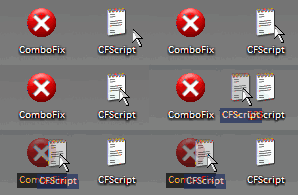
This will start ComboFix again. After reboot, (in case it asks to reboot), post the contents of Combofix.txt in your next reply together with a fresh HJT log.
Open notepad and copy/paste the text in the code box below into it:
NOTE* make sure to only highlight and copy what is inside the quote box nothing out side of it.
Also ..
Pay particular attention to this :-
Make sure the word File:: is on the first line of the text file you save (no blank line above it, & no space in front of it)
File::
C:\fooool.exe
C:\Users\V\lsass.exe
C:\Users\V\AppData\Local\Temp\egkwuput.dll
C:\Users\V\AppData\Local\Temp\etckdsxc.dll
C:\Users\V\AppData\Local\Temp\rQHyxWMe.dll
H:\32e2.com
F:\fooool.exe
D:\NokiaInstaller.exe
C:\fppg1.exe
Registry::
[HKEY_CURRENT_USER\SOFTWARE\Microsoft\Windows\CurrentVersion\Run]
"LSA Shellu"=-
[HKEY_LOCAL_MACHINE\SOFTWARE\Microsoft\Windows\CurrentVersion\Run]
"MSConfig"=-
[-HKEY_LOCAL_MACHINE\software\microsoft\shared tools\msconfig\startupreg\b0533d68]
[-HKEY_LOCAL_MACHINE\software\microsoft\shared tools\msconfig\startupreg\BMb3600ef4]
[-HKEY_LOCAL_MACHINE\software\microsoft\shared tools\msconfig\startupreg\cmds]
[-HKEY_CURRENT_USER\software\microsoft\windows\currentversion\explorer\mountpoints2\{3050ed1b-1c45-11dd-bda5-001a920f47b0}]
[-HKEY_CURRENT_USER\software\microsoft\windows\currentversion\explorer\mountpoints2\{a3b3ea06-2ee3-11dd-a952-001a920f47b0}]
[-HKEY_CURRENT_USER\software\microsoft\windows\currentversion\explorer\mountpoints2\{a3b3ea2f-2ee3-11dd-a952-001a920f47b0}]
[-HKEY_CURRENT_USER\software\microsoft\windows\currentversion\explorer\mountpoints2\{b4fc5ee6-f620-11dc-abc7-806e6f6e6963}]
[-HKEY_CURRENT_USER\software\microsoft\windows\currentversion\explorer\mountpoints2\{fec84e19-1923-11dd-b3d2-001a920f47b0}]
Save this as CFScript.txt
Then drag the CFScript.txt into ComboFix.exe as you see in the screenshot below.
This will start ComboFix again. After reboot, (in case it asks to reboot), post the contents of Combofix.txt in your next reply together with a fresh HJT log.
Blind Dragon
Posts: 3,774 +4
How is the computer running now? I think you may have either an external hard drive, a thumb drive, or some type of removal media that is currently not plugged in that also has infection on it. You should scan any of the above with AVG when we are done.
Do a scan only with Hijackthis and fix the following entries by checking then selecting fix checked.
O2 - BHO: (no name) - {AA58ED58-01DD-4d91-8333-CF10577473F7} - (no file)
O3 - Toolbar: (no name) - {2318C2B1-4965-11d4-9B18-009027A5CD4F} - (no file)
--------------------------
Download and Run ATF Cleaner
Download ATF Cleaner by Atribune to your desktop.
Double-click ATF Cleaner.exe to open it.
Under Main choose:
Windows Temp
Current User Temp
All Users Temp
Cookies
Temporary Internet Files
Prefetch
Java Cache
*The other boxes are optional*
Then click the Empty Selected button.
Firefox or Opera:
Click Firefox or Opera at the top and choose: Select All
Click the Empty Selected button.
NOTE: If you would like to keep your saved passwords, please click NO at the prompt.
Click Exit on the Main menu to close the program.
---------------------------------
You aren't running Firewall Software. Please download and install one of these first!
Use a Firewall - It is very important that you use a Firewall on your computer. If you use the Windows Firewall you might think that's enough but it only controls inbound traffic. Simply using a Firewall in its default configuration can lower your risk greatly. Here are some firewalls which are free for personal use and most commonly used:
Comodo (Vista Compatible)
Kerio
Online Armor
Zonealarm (Vista Compatible)
---------------------------------------
Run Kaspersky Online AV Scanner
Order to use it you have to use Internet Explorer.
Go to Kaspersky and click the Accept button at the end of the page.
Note for Internet Explorer 7 users: If at any time you have trouble with the accept button of the licence, click on the Zoom tool located at the right bottom of the IE window and set the zoom to 75 %. Once the license accepted, reset to 100%.
--------------------------
Do a scan only with Hijackthis and fix the following entries by checking then selecting fix checked.
O2 - BHO: (no name) - {AA58ED58-01DD-4d91-8333-CF10577473F7} - (no file)
O3 - Toolbar: (no name) - {2318C2B1-4965-11d4-9B18-009027A5CD4F} - (no file)
--------------------------
Download and Run ATF Cleaner
Download ATF Cleaner by Atribune to your desktop.
Double-click ATF Cleaner.exe to open it.
Under Main choose:
Windows Temp
Current User Temp
All Users Temp
Cookies
Temporary Internet Files
Prefetch
Java Cache
*The other boxes are optional*
Then click the Empty Selected button.
Firefox or Opera:
Click Firefox or Opera at the top and choose: Select All
Click the Empty Selected button.
NOTE: If you would like to keep your saved passwords, please click NO at the prompt.
Click Exit on the Main menu to close the program.
---------------------------------
You aren't running Firewall Software. Please download and install one of these first!
Use a Firewall - It is very important that you use a Firewall on your computer. If you use the Windows Firewall you might think that's enough but it only controls inbound traffic. Simply using a Firewall in its default configuration can lower your risk greatly. Here are some firewalls which are free for personal use and most commonly used:
Comodo (Vista Compatible)
Kerio
Online Armor
Zonealarm (Vista Compatible)
---------------------------------------
Run Kaspersky Online AV Scanner
Order to use it you have to use Internet Explorer.
Go to Kaspersky and click the Accept button at the end of the page.
Note for Internet Explorer 7 users: If at any time you have trouble with the accept button of the licence, click on the Zoom tool located at the right bottom of the IE window and set the zoom to 75 %. Once the license accepted, reset to 100%.
- Read the Requirements and limitations before you click Accept.
- Allow the ActiveX download if necessary.
- Once the database has downloaded, click Next.
- Click Scan Settings and change the "Scan using the following antivirus database" from standard to extended and then click OK.
- Click on "My Computer"
- When the scan has completed, click Save Report As...
- Enter a name for the file in the Filename: text box and then click the down arrow to the right of Save as type: and select text file (*.txt)
- Click Save - by default the file will be saved to your Desktop, but you can change this if you wish.
--------------------------
Blind Dragon
Posts: 3,774 +4
please scan and attach 1 more Hijackthis log, for a final look over then we can clean up and secure the work we have done.
Blind Dragon
Posts: 3,774 +4
Launch Hijackthis -> scan only -> put checks next to:
O2 - BHO: (no name) - {AA58ED58-01DD-4d91-8333-CF10577473F7} - (no file)
O3 - Toolbar: (no name) - {2318C2B1-4965-11d4-9B18-009027A5CD4F} - (no file)
Close any open windows and select Fix Checked
---------------------------------------------------------
Uninstall Combofix
* Click START then RUN
* Now type Combofix /u in the runbox
* Make sure there's a space between Combofix and /u
* Then hit Enter.
* The above procedure will:
* Delete the following:
* ComboFix and its associated files and folders.
* Reset the clock settings.
* Hide file extensions, if required.
* Hide System/Hidden files, if required.
* Set a new, clean Restore Point.
-----------------------------------------------------------------------
OTCleanit! by Oldtimer
---------------------------------------------------------------------------
Now that you are clean, please follow these simple steps in order to keep your computer clean and secure:
here are some additional utilities that will enhance your safety
O2 - BHO: (no name) - {AA58ED58-01DD-4d91-8333-CF10577473F7} - (no file)
O3 - Toolbar: (no name) - {2318C2B1-4965-11d4-9B18-009027A5CD4F} - (no file)
Close any open windows and select Fix Checked
---------------------------------------------------------
Uninstall Combofix
* Click START then RUN
* Now type Combofix /u in the runbox
* Make sure there's a space between Combofix and /u
* Then hit Enter.
* The above procedure will:
* Delete the following:
* ComboFix and its associated files and folders.
* Reset the clock settings.
* Hide file extensions, if required.
* Hide System/Hidden files, if required.
* Set a new, clean Restore Point.
-----------------------------------------------------------------------
OTCleanit! by Oldtimer
- Download OTCleanIt
- Click the CleanUp! button.
- It will go thorugh the list and remove all of the tools it finds and then delete itself (requiring a reboot).
---------------------------------------------------------------------------
Now that you are clean, please follow these simple steps in order to keep your computer clean and secure:
- Set correct settings for files
- Click Start > My Computer > Tools menu (at top of page) > Folder Options > View tab.
- Under "Hidden files and folders" if necessary select Do not show hidden files and folders.
- If unchecked please check Hide protected operating system files (Recommended)
- If necessary check "Display content of system folders"
- If necessary Uncheck Hide file extensions for known file types.
- Click OK
clear system restore points
This is a good time to clear your existing system restore points and establish a new clean restore point:- Go to Start > All Programs > Accessories > System Tools > System Restore
- Select Create a restore point, and Ok it.
- Next, go to Start > Run and type in cleanmgr
- Select the More options tab
- Choose the option to clean up system restore and OK it.
- Make your Internet Explorer more secure - This can be done by following these simple instructions:
- From within Internet Explorer click on the Tools menu and then click on Options.
- Click once on the Security tab
- Click once on the Internet icon so it becomes highlighted.
- Click once on the Custom Level button.
- Change the Download signed ActiveX controls to Prompt
- Change the Download unsigned ActiveX controls to Disable
- Change the Initialize and script ActiveX controls not marked as safe to Disable
- Change the Installation of desktop items to Prompt
- Change the Launching programs and files in an IFRAME to Prompt
- Change the Navigate sub-frames across different domains to Prompt
- When all these settings have been made, click on the OK button.
- If it prompts you as to whether or not you want to save the settings, press the Yes button.
- Change the Download signed ActiveX controls to Prompt
- Next press the Apply button and then the OK to exit the Internet Properties page.
- Use an AntiVirus Software - It is very important that your computer has an anti-virus software running on your machine. This alone can save you a lot of trouble with malware in the future.
See this link for a listing of some online & their stand-alone antivirus programs:
Virus, Spyware, and Malware Protection and Removal Resources
- Update your AntiVirus Software - It is imperitive that you update your Antivirus software at least once a week (Even more if you wish). If you do not update your antivirus software then it will not be able to catch any of the new variants that may come out.
- Use a Firewall - I can not stress how important it is that you use a Firewall on your computer. Without a firewall your computer is succeptible to being hacked and taken over. I am very serious about this and see it happen almost every day with my clients. Simply using a Firewall in its default configuration can lower your risk greatly.
For a tutorial on Firewalls and a listing of some available ones see the link below:
Understanding and Using Firewalls
- Visit Microsoft's Windows Update Site Frequently - It is important that you visit http://www.windowsupdate.com regularly. This will ensure your computer has always the latest security updates available installed on your computer. If there are new updates to install, install them immediately, reboot your computer, and revisit the site until there are no more critical updates.This is done in Vista through control panel -> windows updates.
- Install SpywareBlaster - SpywareBlaster will added a large list of programs and sites into your Internet Explorer settings that will protect you from running and downloading known malicious programs.
A tutorial on installing & using this product can be found here:
Using SpywareBlaster to protect your computer from Spyware and Malware
- Update all these programs regularly - Make sure you update all the programs I have listed regularly. Without regular updates you WILL NOT be protected when new malicious programs are released.
here are some additional utilities that will enhance your safety
- IE/Spyad <= IE/Spyad places over 4000 websites and domains in the IE Restricted list which will severely impair attempts to infect your system. It basically prevents any downloads (Cookies etc) from the sites listed, although you will still be able to connect to the sites.
- MVPS Hosts file <= The MVPS Hosts file replaces your current HOSTS file with one containing well know ad sites etc. Basically, this prevents your coputer from connecting to those sites by redirecting them to 127.0.0.1 which is your local computer
- Google Toolbar <= Get the free google toolbar to help stop pop up windows.
- Winpatrol <= Download and install the free version of Winpatrol. a tutorial for this product is located here:
Using Winpatrol to protect your computer from malicious software
Blind Dragon
Posts: 3,774 +4
Can anyone help!!!
Symptoms
Slow google search, 13-20 secs in IE and Firefox on computer 1.
Fast search, 5-8secs, on computer 2 in IE and Firefox.
Both use same connection.
Other actions to clear computer 1
Removed all temp/cache/cookies
Run Spyware Doctor over the whole drive, removed advised spy/malware
Cleaned registry with MS regclean
Run a couple of other spy/malware software packages across drive and removed as advised
Still slow
This is driving me nuts!!
See hijack log
Symptoms
Slow google search, 13-20 secs in IE and Firefox on computer 1.
Fast search, 5-8secs, on computer 2 in IE and Firefox.
Both use same connection.
Other actions to clear computer 1
Removed all temp/cache/cookies
Run Spyware Doctor over the whole drive, removed advised spy/malware
Cleaned registry with MS regclean
Run a couple of other spy/malware software packages across drive and removed as advised
Still slow
This is driving me nuts!!
See hijack log
Blind Dragon
Posts: 3,774 +4
Similar threads
- Replies
- 1
- Views
- 89
- Replies
- 0
- Views
- 106

Latest posts
-
Happy Birthday, Intel 8086: World's first x86 processor debuted exactly 48 years ago today
- Theinsanegamer replied
-
 Sam Altman's other startup is laying off workers
- midian182 replied


-
TechSpot is dedicated to computer enthusiasts and power users.
Ask a question and give support.
Join the community here, it only takes a minute.