also @ TechSpot: Asus P7P55D Deluxe Motherboard Review
Welcome to the TechSpot OpenBoards. Please read the FAQ if you have any questions. Login to participate.

Go Back   TechSpot OpenBoards > Operating Systems & Software > Software & Utilities in General

Found 2 gems to make XP look better than Vista

Reply
Page 1 of 3 1 23
Bookmark Thread Tools
  #1  
Old 08-12-2008
tipstir's Avatar
TechSpot Guru
 
Location: USA
Member since: Jan 2006, 2,422 posts
System specs
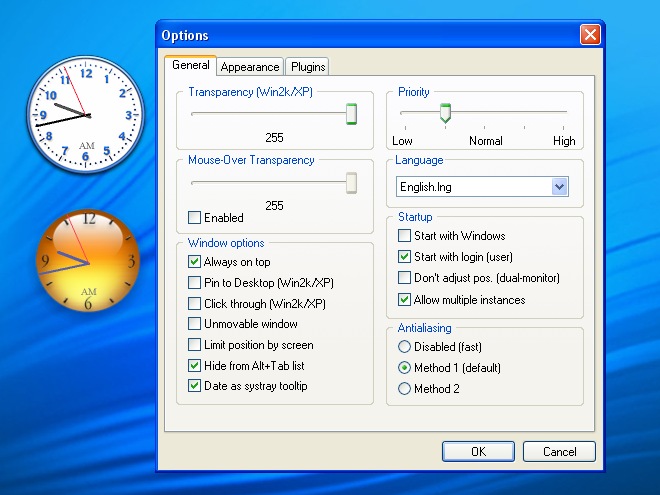
Well as you all know by now about Black Royal Noir for XP, but I found two other gems found today well I knew about Rocket Dock but the others two are very neat!.

ClockX - set the clock to Nxxx.png
http://www.clocx.net/


Click to Maximize

RocketDock -
http://www.rocketdock.com/

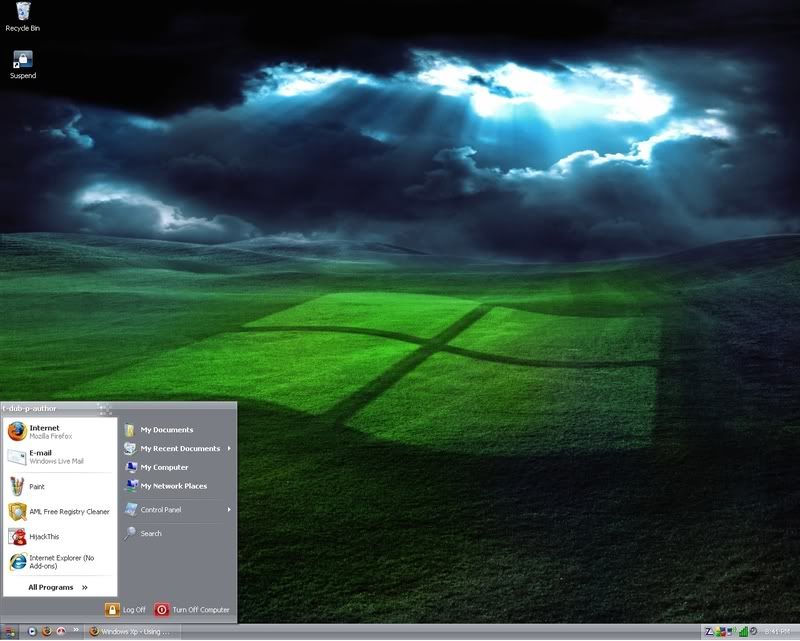
One cool looking background can be found here and use Firefox 3.01 to set it as your background.


Click to Maximize

http://www.vistawallpaper.com/details.php?image_id=548

Let know how low system resources are with these above: Even on 10 year old Laptop running Windows XP Pro SP2 on Toshiba Tecra 8000, Intel PII 266MHz with L2 Cache 512KB and 256MB SDRAM, 256-bit Video with 2.5MB of RAM with 40GB HDD. I've taken the laptop a part and made it into something I can use it's now 10 years old made in 1998, but still goes strong. Runs Firefox 3.01, Sunbird, ThunderBird and OpenOffice 2.4.

I'll be posting youtube video to show of what the final looks like...

Last edited by kimsland; 04-25-2009 at 03:58 AM.. Reason: reduced all pics in thread and merged all recent posts
Reply With Quote
  #2  
Old 08-13-2008
tw0rld's Avatar
TechSpot Enthusiast
 
Member since: Oct 2007, 551 posts
Go her for xp Skins and themes. http://www.deviantart.com/#catpath=c...style&order=24
Reply With Quote
To remove this ad, sign in. To register for a new account, click here.
  
  #3  
Old 08-13-2008
tipstir's Avatar
TechSpot Guru
 
Location: USA
Member since: Jan 2006, 2,422 posts
System specs
Looks good I know about that site, but there graphics use too much system resources, can bog down the system. Still thanks for posting..

Make XP Now Looks Like This..

Click to Maximize

1. Download the background using Firefox right click image then- Save Link as...
2. Download/Install/Run ClocX
3. Download/Install/Run RocketDock

Rocket dock is easy to configure as all your icons on your desktop can be drag to the Rocket dock you see above. I also had dragged them to Quicklinks next to the Start button. I only kept what I needed to use daily in the Rocket Dock above. When you scroll through them you'll see your icon get big and displays the text of the item. This can be mounted to the bottom and left to right. Make sure you use the Rocket Dock control Panel to turn on the extra features like when you min window it will not go to the task bar it will go to Rocket Dock instead. This is an option though.

Again what you see doesn't hose, hog or waste system resources, as I can run it on old laptop with Intel PII 266MHz with only 256MB RAM. Looks the same as you see it above as I also run i on AMD x64 also can be done on Windows Server 2003, I just use a different background.

Enjoy!

Windows Server 2003 - New Look for 2008

Click to Maximize

Windows XP Pro with MAC OS X Leopard 3D

Click to Maximize

This doesn't have the ClocX program as Rocket Dock has it's own Clock shown above in the MAC OS X Leopard 3D Skin for Rocket Dock.Does look cool with the icons in 3D. Image captured in 16x9 Widescreen.. Note: If you prefer there is a Vista Black one that uses Transparent over the background that really looks very good.

Enjoy ...

PS For the backgrounds you can go here: www.fantom-xp.com (word of warning on that site don't click on the random images on the upper right hand corner) just stick with the ones in the middle of the screen) Now with the ones in the middle just double click then click on the one you want, then right click and use Firefox to download the image with the save image as or Set As Desktop Background... Your done enjoy!

To make XP Pro, Server 2003 and Media Center 2005 look like the above you'll need to get Royal Noir found here:
http://www.istartedsomething.com/20061029/royale-noir/

This will give you the back look in the task bar and menus. I use Firefox Add-on called Black NASA to really make things look cool in black. Microsoft Office 2007 with Outlook 2007 also has Black Skin Style feature.

Last edited by kimsland; 04-25-2009 at 03:58 AM.. Reason: reduced all pics in thread and merged all recent posts
Reply With Quote
  #4  
Old 08-22-2008
fullmetalvegan's Avatar
TechSpot Member
 
Location: Australia
Member since: Oct 2006, 270 posts
System specs
I still think Vista looks better. =P

I hate that Mac shortcut stuff too, it's so tacky looking. I also prefer having the least icons I can on my desktop area, having that many is so unneccesary for me. Everything I need automatically starts up with Windows, wlm, etc... Games are all located in the games browser... and I only need Firefox/Thunderbird in my taskbar really. Anything else is something I don't use very often and so don't need a shortcut to it, clicking twice to get it really doesn't bother me.

I'm not that worried over saving five seconds of my life.
Reply With Quote
  #5  
Old 08-22-2008
tipstir's Avatar
TechSpot Guru
 
Location: USA
Member since: Jan 2006, 2,422 posts
System specs
Quote:
Originally Posted by fullmetalvegan View Post
I still think Vista looks better. =P

I hate that Mac shortcut stuff too, it's so tacky looking. I also prefer having the least icons I can on my desktop area, having that many is so unneccesary for me. Everything I need automatically starts up with Windows, wlm, etc... Games are all located in the games browser... and I only need Firefox/Thunderbird in my taskbar really. Anything else is something I don't use very often and so don't need a shortcut to it, clicking twice to get it really doesn't bother me.

I'm not that worried over saving five seconds of my life.
Vista okay if you have the system to run it though a lot of system can only load XP, you can make XP look likeVista but some drawbacks doing so. But Rocket Dock can be adjusted to anything you want size an etc, just go and get it from them.ClocX is cool also to use. I am not a MAC guy so I more Windows OS guy, but the idea of having that animated icon station looks great! Everyone going to say yeah an nah to new things. I use Rocket Dock with Quick Launch can't fit everything on the both though. Really don't like see all those icons on the desktop like some user have the entire desktop screen full with icons uses a lot of system resource and makes the OS take longer to load up those icons. Worst if you have a folder or large zip on the desktop make is really slow.

Rocket Dock Diamond Plated
Rocket Dock add-on called Task Tacks

Click to Maximize

Have fun!

Found here
http://rocketdock.com/addons/skins/3726

150 skins for the ClocX
I've gone back tot he ClocX the one is Rocket Dock is too small.. But here I found 150 skins for the Clocx:


http://www.excusemyewah.co.uk/

Last edited by kimsland; 04-25-2009 at 03:58 AM.. Reason: reduced all pics in thread and merged all recent posts
Reply With Quote
  #6  
Old 08-26-2008
TechSpot Member
 
Member since: Oct 2006, 138 posts
System specs
I'd rather stick to Windowblinds, excellent lil program.
Reply With Quote
  #7  
Old 08-26-2008
tipstir's Avatar
TechSpot Guru
 
Location: USA
Member since: Jan 2006, 2,422 posts
System specs
Quote:
Originally Posted by waterproof View Post
I'd rather stick to Windowblinds, excellent lil program.
Windowsblinds okay I've use it.. But all this stuff above is freeware just have to install the ClocX and Rocket Doc those are the only two that get install and they're small apps. Windowsblinds lot more too it. ClocX v1.5b2 full one has all the skins. You can resize the clock make it transparent. The Rocket Dock is easy to use and works. Just not static icons they animate.


Click to Maximize

Last edited by kimsland; 04-25-2009 at 04:06 AM.. Reason: reduced all pics in thread and merged all recent posts
Reply With Quote
  #8  
Old 09-02-2008
TechSpot Booster
 
Location: Germany
Member since: Aug 2006, 826 posts
System specs
could you share or link the bg picture, please?
Reply With Quote
  #9  
Old 09-04-2008
tipstir's Avatar
TechSpot Guru
 
Location: USA
Member since: Jan 2006, 2,422 posts
System specs
Quote:
Originally Posted by mscrx View Post
could you share or link the bg picture, please?
This one...


Found here http://wallpapers.free-review.net/wa...appy-faces.jpg
Reply With Quote
To remove this ad, sign in. To register for a new account, click here.
  
  #10  
Old 09-04-2008
TechSpot Booster
 
Location: Germany
Member since: Aug 2006, 826 posts
System specs
thanks for the pic. too sad its not available for widescreen
Reply With Quote
  #11  
Old 09-04-2008
tipstir's Avatar
TechSpot Guru
 
Location: USA
Member since: Jan 2006, 2,422 posts
System specs
What size do you want? I use wide screen?
Reply With Quote
  #12  
Old 09-05-2008
TechSpot Booster
 
Location: Germany
Member since: Aug 2006, 826 posts
System specs
its 1024x768 there and I would like it to be 1280x800. stretched doesn't look too good
Reply With Quote
  #13  
Old 09-12-2008
tipstir's Avatar
TechSpot Guru
 
Location: USA
Member since: Jan 2006, 2,422 posts
System specs
High end graphic program might be able to work, I'll give it a shot and see if goes. I got 1440x900 and 1280x1024.
Reply With Quote
  #14  
Old 09-12-2008
TechSpot Booster
 
Location: Germany
Member since: Aug 2006, 826 posts
System specs
ok great. let me know if you could change the resolution.
uh, you got 1440x900 and 1280x1024 on your screens or did you already modify the pic?
Reply With Quote
  #15  
Old 09-15-2008
tipstir's Avatar
TechSpot Guru
 
Location: USA
Member since: Jan 2006, 2,422 posts
System specs
1440x900 is wide-screen 19" LCD
1280x1024 is normal screen 19" LCD

I've re-sized the image to 1280x1024 it looks like this now:


I think you wanted 1280x800


You should be able to download the image. If you have problems let me know?

Last edited by tipstir; 09-15-2008 at 01:45 AM..
Reply With Quote
  #16  
Old 09-15-2008
TechSpot Booster
 
Location: Germany
Member since: Aug 2006, 826 posts
System specs
thanks for your work. thats what i get if I use the 1024x768 in stretched position on my 1280x800.
I was more curious if there is a real widescreen version or if it can be converted or re-made.
with the stretched one the smilie heads dont look good - well stretched, you know.
Reply With Quote
  #17  
Old 09-15-2008
tipstir's Avatar
TechSpot Guru
 
Location: USA
Member since: Jan 2006, 2,422 posts
System specs
One way I could do this was to remove the faces then resize the background to what you need then re-apply the faces to the new background leaving the faces as the orignal not stretched.
Reply With Quote
  #18  
Old 09-16-2008
TechSpot Booster
 
Location: Germany
Member since: Aug 2006, 826 posts
System specs
yeah, maybe I will just enlarge the picture and then cut 1280x800 out of it - would be like zooming it.
Reply With Quote
  #19  
Old 09-30-2008
tw0rld's Avatar
TechSpot Enthusiast
 
Member since: Oct 2007, 551 posts
My Win Xp Look.


Click to Maximize

Clean Is how I like it. No icons cluttering the desktop, it is just pleasing to the eyes.

Last edited by kimsland; 04-25-2009 at 03:39 AM..
Reply With Quote
  #20  
Old 09-30-2008
captaincranky's Avatar
TechSpot Evangelist
 
Member since: Oct 2006, 3,484 posts
Quote:
Originally Posted by tipstir View Post
High end graphic program might be able to work, I'll give it a shot and see if goes. I got 1440x900 and 1280x1024.
I can rework the "Smilie' file for 1440 X 900, with no stretching.

Last edited by captaincranky; 09-30-2008 at 11:46 PM..
Reply With Quote
Reply
Page 1 of 3 1 23

Tip: Download Advanced SystemCare 3 Freeware - 1 Click A Day to Clean, Repair, Protect & Optimize your PC.

Thread Tools


Similar Topics
Topic Category Replies Last Post
SpySheriff and a few other gems Virus & Malware removal 14 07-01-2008 09:40 PM
How to Make Vista Sound Scheme Louder? Windows OS 1 10-01-2007 11:11 AM
applications on Vista and iGoogle make users vulnerable Virus & Malware removal 1 09-18-2007 04:33 PM
HELP! Hard disk not found! XP/vista Storage & Networking 6 09-02-2007 05:09 AM
Vista after cold boot - new hardware found everytime Processors, Chipsets and Motherboards 1 08-30-2007 10:02 PM


All times are GMT -4. The time now is 03:11 AM.