also @ TechSpot: Asus P7P55D Deluxe Motherboard Review
Welcome to the TechSpot OpenBoards. Please read the FAQ if you have any questions. Login to participate.

Go Back   TechSpot OpenBoards > Operating Systems & Software > Virus & Malware removal

Trojans/helper.dll/helper.sig

Closed Thread
Page 1 of 3 1 23
Bookmark Thread Tools
  #1  
Old 08-20-2008
TechSpot Member
 
Location: Ca
Member since: Jul 2008, 51 posts
System specs
Trojans/helper.dll/helper.sig

Ok, so in the last few days when I start my machine or restart it a window pops up. C:\Program Files\Common In the window are Helper.dll, Helper.sig, _helper.dll and _helpre.sig. Ive run Ad-Aware full scan as well as SuperantiSpyware and so far the only file other than spyware that has been deleted is _helper.dll. Im still going through the steps that are advised in UPDATED 8-step Viruses/Spyware/Malware Preliminary Removal Instructions


Any help would be appreciated


Dave
Last edited by PsychoDave; 08-20-2008 at 09:33 PM..
  #2  
Old 08-20-2008
TechSpot Member
 
Location: Ca
Member since: Jul 2008, 51 posts
System specs
Ok, ive stopped on step 9. I downloaded CCleaner and ticked all the boxes but got tones of warning messages upon doing so...now im not so sure I want to run that. Will not ticking every box leave a possibility of missing some sort of spyware/malware/virus?
To remove this ad, sign in. To register for a new account, click here.
  
  #3  
Old 08-20-2008
TechSpot Member
 
Location: Ca
Member since: Jul 2008, 51 posts
System specs
I ended up running the CCleaner a few times untill 0 files were found and deleted...

Last edited by PsychoDave; 08-20-2008 at 09:34 PM..
  #4  
Old 08-20-2008
TechSpot Member
 
Location: Ca
Member since: Jul 2008, 51 posts
System specs
Ran Panda Antirootkit programme, no rootkits found
  #5  
Old 08-20-2008
xxdanielxx's Avatar
TechSpot Addict
 
Location: Southern CA
Member since: Aug 2006, 1,212 posts
once you finish post the 3 logs here

hijackthis
SAS or MBAM
ComboFix
  #6  
Old 08-21-2008
TechSpot Member
 
Location: Ca
Member since: Jul 2008, 51 posts
System specs
Here is the HJT Log, SAS and ComboFix to follow
Attached Files
File Type: txt hijackthis log.txt (14.5 KB, 4 views)
  #7  
Old 08-21-2008
xxdanielxx's Avatar
TechSpot Addict
 
Location: Southern CA
Member since: Aug 2006, 1,212 posts
Post a fresh hijackthis log after you have ran SAS and ComboFix
  #8  
Old 08-21-2008
TechSpot Member
 
Location: Ca
Member since: Jul 2008, 51 posts
System specs
Just ran ComboFix and reran SAS...here are the logs

Rerunning HJT now...
Attached Files
File Type: log SUPERAntiSpyware Scan Log - 08-21-2008 - 12-11-11.log (2.5 KB, 3 views)
File Type: txt combofix log.txt (22.2 KB, 2 views)
  #9  
Old 08-21-2008
TechSpot Member
 
Location: Ca
Member since: Jul 2008, 51 posts
System specs
Here is the new HJT log
Attached Files
File Type: txt hijackthis log.txt (14.9 KB, 3 views)
To remove this ad, sign in. To register for a new account, click here.
  
  #10  
Old 08-21-2008
xxdanielxx's Avatar
TechSpot Addict
 
Location: Southern CA
Member since: Aug 2006, 1,212 posts
* Click here to download FindAWF.exe and save it to your desktop.
  • Double-click on the FindAWF.exe file to run it.
  • It will open a command prompt and ask you to "Press any key to continue".
  • Press any key and the FindAWF tool will begin scanning your computer for the infected AWF files and the backups the trojan created.
  • It may take a few minutes to complete so be patient.
  • When it is complete, it will open a text file in notepad called AWF.txt which will automatically be saved to your desktop or whatever location you ran the file from.
  • Come back here to this thread and attach the AWF.txt file in your next reply.
  #11  
Old 08-22-2008
TechSpot Member
 
Location: Ca
Member since: Jul 2008, 51 posts
System specs
heres the AWF log file...
Attached Files
File Type: txt awf.txt (5.4 KB, 4 views)
  #12  
Old 08-22-2008
xxdanielxx's Avatar
TechSpot Addict
 
Location: Southern CA
Member since: Aug 2006, 1,212 posts
post a fresh hijackthis log
  #13  
Old 08-22-2008
TechSpot Member
 
Location: Ca
Member since: Jul 2008, 51 posts
System specs
fresh HJT log as of 9:55pm 8/21
Attached Files
File Type: txt hijackthis log.txt (14.9 KB, 5 views)
  #14  
Old 08-23-2008
TechSpot Member
 
Location: Ca
Member since: Jul 2008, 51 posts
System specs
any verdict?
  #15  
Old 08-23-2008
xxdanielxx's Avatar
TechSpot Addict
 
Location: Southern CA
Member since: Aug 2006, 1,212 posts
Right click Here and select Save As to download WinHelp2002's DelDomains.inf. Please save the file somewhere you can find it like on the desktop. To run the inf file, right click on it and select Install.

=================================================

Now run hijackthis and place a check next to the items below then click on fix items then exit hijackthis and reboot.

O15 - Trusted Zone: *.whataboutadog.com
O16 - DPF: {1E54D648-B804-468d-BC78-4AFFED8E262E} (System Requirements Lab) - http://www.srtest.com/srl_bin/sysreqlab3.cab
O16 - DPF: {C915801D-6F00-49CD-8A9A-8DE5C11ADDC1} (Pixami Drag/Drop Upload UI Control) - http://www.photoworks.com/pixami/DragDropUploader.cab
O16 - DPF: {F229AB32-7BF9-4225-B78F-B4680AE6FC23} (Snapfish File Upload ActiveX Control) - http://www.snapfish.com/SnapfishUpload.cab

====================================

Please run an on-line virus scan at http://www.kaspersky.com/virusscanne...can</font></b> or if that doesnt work, you can use TrendMicro or BitDefender. (Please make sure to post the results of the scan(s) in your next reply)
  #16  
Old 08-23-2008
Newcomer, in training
 
Member since: Aug 2008, 3 posts
Dave if you resolve it can you let me know the steps. I have the exact same problem as you. My computer keeps restarting also.
  #17  
Old 08-24-2008
TechSpot Member
 
Location: Ca
Member since: Jul 2008, 51 posts
System specs
here is the new HJT Log

The virus scan detected and deleted a bunch of infected files but for some reason the log didnt save...

There were a ton of Trojans and some worms
Attached Files
File Type: txt hijackthis log.txt (14.5 KB, 3 views)
  #18  
Old 08-24-2008
xxdanielxx's Avatar
TechSpot Addict
 
Location: Southern CA
Member since: Aug 2006, 1,212 posts
Download & Install SDFix
  • Download SDFix & save it to your Desktop.
  • Double click SDFix.exe & it will extract the file to %systemdrive%
    (Drive that contains the Windows Directory, Typically C:\SDFix)

Boot into Safe Mode
  • Restart your computer & start pressing the F8 key on your keyboard.
  • Select the Safe Mode option when the Windows Advanced Options menu appears, & then press Enter.

Run SDFix
  • Open the extracted SDFix folder & double click RunThis.bat to start the script.
  • Type Y to begin the cleanup process.
  • It will remove any Trojan Services and Registry Entries that it finds then prompt you to press any key to Reboot.
  • Press any Key and it will restart the PC.
  • When the PC restarts the Fixtool will run again and complete the removal process then display Finished, press any key to end the script and load your desktop icons.
  • Once the desktop icons load the SDFix report will open on the screen & also save into the SDFix folder as Report.txt
  • Attach Report.txt back here
  #19  
Old 08-24-2008
TechSpot Member
 
Location: Ca
Member since: Jul 2008, 51 posts
System specs
Ok, I ran SDFix, here is the report...not sure what it says but after rebooting and finishing the Common folder opened and still has the helper.dll, helper.sig and _helper.sig files
Attached Files
File Type: txt sdfix.txt (5.0 KB, 1 views)
  #20  
Old 08-24-2008
xxdanielxx's Avatar
TechSpot Addict
 
Location: Southern CA
Member since: Aug 2006, 1,212 posts
ComboFix

Go to Microsoft's website => http://support.microsoft.com/kb/310994
Select the download that's appropriate for your Operating System


Download the file**& save it as it's originally named, next to ComboFix.exe.


Now close all open windows and programs, including all anti virus and anti malware programs so they do not interfere with the running of ComboFix.
  • Drag the setup package onto ComboFix.exe and drop it.

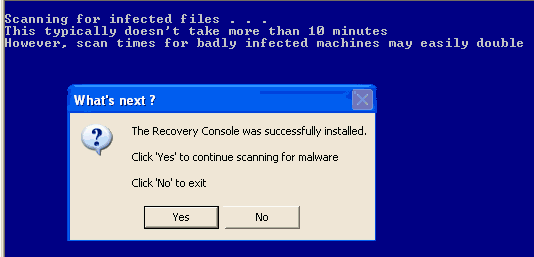
  • Follow the prompts to start ComboFix and when prompted, agree to the End-User License Agreement to install the Microsoft Recovery Console.

  • At the next prompt, click 'Yes' to run the full ComboFix scan.


  • When the tool is finished, it will produce a report for you.

Please post the C:\ComboFix.txt along with a new HijackThis log for further review.

Caution - do not touch your mouse/keyboard until the scan has completed. The scan will temporarily disable your desktop, and if interrupted may leave your desktop disabled. If this occurs, please reboot to restore the desktop. Combofix is a very powerful tool so please do NOT do anything without instruction
Closed Thread
Page 1 of 3 1 23

Tip: Download Advanced SystemCare 3 Freeware - 1 Click A Day to Clean, Repair, Protect & Optimize your PC.

Thread Tools


Similar Topics
Topic Category Replies Last Post
Please help me. I have 2 trojans :( Virus & Malware removal 6 05-15-2007 05:00 PM
Trojans! Virus & Malware removal 3 04-03-2007 03:22 PM
IM trojans on net ... Virus & Malware removal 8 02-13-2007 09:42 PM
Trojans R Us atm lol Virus & Malware removal 9 10-23-2006 06:32 PM
A BHO ( Browser helper object) Virus & Malware removal 2 10-23-2006 07:48 AM


All times are GMT -4. The time now is 09:40 PM.