Welcome to the TechSpot OpenBoards. Please read the FAQ if you have any questions. Login to participate.
|
|||||||
I am uploading my logs for the 8 step removal process
![]() |
|
|
|
Thread Tools |
|
#1
|
|||
|
|||
|
I am uploading my logs for the 8 step removal process
Hi we where surfing the net when our antivirus (nod32) got crazy trying to block an attack, we decided to turn the computer off right away, we restarted it and next thing we know, we had a series of windows when it rebooted, on said Dos 5 File Compare Utility, blocking for security, another which said NT AUTHORITY\SYSTM c:\windows\system32\services x 1073741819, saying it needed to reboot the system in 60 seconds, while all this happened you couldn’t even get to the start button although the system did not reboot after 60 seconds. We have a Mac, so the attack was made to the windows partition, and we were able to get into the net through Mac os, so after a lot we found the 8 step cleaning method, we were only able to run cc cleaner and malwarebytes antimalware through safe mode, but without any update. We were not able to install the super antispyware through safe mode, so we had to go back to a normal log, at first nothing jumped, I was able to update malwarebytes and install antispyware but when we tried to update antispyware, the message with the reboot in 60 seconds showed again, I had to go back to safe mode and run the updated malwarebytes, and after this the not yet updated antispyware, then in normal mode we were able to update antispyware and go through the next steps, we also ran the antivirus a couple of times just to make sure, so finally we had different logs of the programs du to the way we had to run them so I am uploading one log for each program with its two results, I thank you very much and hope you can tell me if there is something else to be done to clean the computer, best regards and hope to hear from you soon,
Rodrigo Langarica |
|
#2
|
||||
|
||||
|
I find it interesting that one of your 020 entries was not removed as SAS obviously has definitions on it.
http://www.superantispyware.com/definition/reset5e/ Make sure you were able to update it. -------------------------------- Disable NOD32 real time monitoring by right clicking it in the system tray and disabling the real time protection. It should be enabled after your first restart --------------------------------
Combofix will automatically save the log file to C:\combofix.txt |
|
|
|
#3
|
|||
|
|||
|
Hi thanks for your answer, I followed all your directions, though I am not sure ASA actually removed the file you talked about, I only saw some cookies removed, here are the three logs, I will await your reply, best regards,
|
|
#4
|
||||
|
||||
|
It appears you ran combofix more than once can I see the other logs as well
C:\ComboFix-quarantined-files.txt C:\ComboFix2.txt |
|
#5
|
|||
|
|||
|
sure sorry i had a hard time locating them
|
|
#6
|
||||
|
||||
|
Looking much better.
Update your Java Runtime EnvironmentMany types of malware like to exploit out of date Java versions!
*The current version is Java 6 update 10 ---------------------------------------------------------- CCleaner
------------------------------------------------------------- Run Kaspersky Online AV ScannerIn order to use it you have to use Internet Explorer. Go to Kaspersky and click the Accept button at the end of the page. Note for Internet Explorer 7 users: If at any time you have trouble with the accept button of the licence, click on the Zoom tool located at the right bottom of the IE window and set the zoom to 75 %. Once the license accepted, reset to 100%.
|
|
#7
|
|||
|
|||
|
here is the log for the kaspersky scan what do you suggest I should do now?
|
|
#8
|
||||
|
||||
|
Looks good, just one installer that we should remove, after you post the logs we can clean up and secure the system.
Run CFScript Open notepad and copy/paste the text in the code box below into it: NOTE* make sure to only highlight and copy what is inside the quote box nothing out side of it. Also .. Pay particular attention to this :- Make sure the word File:: is on the first line of the text file you save (no blank line above it, & no space in front of it) Quote:
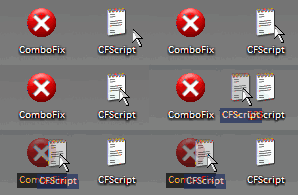
Then drag the CFScript.txt into ComboFix.exe as you see in the screenshot below. ![]() This will start ComboFix again. After reboot, (in case it asks to reboot), post the contents of Combofix.txt in your next reply together with a fresh HJT log. |
|
#9
|
|||
|
|||
|
great everything worked I hope we are able to secure the computer now, thank you very much, i am uploading the logs
|
|
|
|
#10
|
||||
|
||||
|
Remove bad HijackThis entries
============================================= Uninstall Combofix * Click START then RUN * Now type Combofix /u in the runbox * Make sure there's a space between Combofix and /u * Then hit Enter. * The above procedure will: * Delete the following: * ComboFix and its associated files and folders. * Reset the clock settings. * Hide file extensions, if required. * Hide System/Hidden files, if required. * Set a new, clean Restore Point. ----------------------------------------------------------------------- OTCleanit! by Oldtimer
--------------------------------------------------------------------------- Now that you are clean, please follow these simple steps in order to keep your computer clean and secure:
here are some additional utilities that will enhance your safety
|
|
#11
|
|||
|
|||
|
I can not thank you enough for everything, I will follow all your recommendations to secure the system, best regards,
langs |
|
#12
|
||||
|
||||
|
Anytime
![]() |
|
#13
|
|||
|
|||
|
hi there, I have a question, I have another computer and I am running some of the programs just to check if it is clean, and I can not manage to run Kaspersky it says I need to hav java 1.5 or later eventhough I hav the latest version installed, any suggestions? or should I stop running these programs?
thank you, best regards |
|
#14
|
||||
|
||||
|
attach a hijackthis scan from it
|
|
#15
|
|||
|
|||
|
hi there, sorry to keep boring you, here is the hjt log from my other computer
|
|
#16
|
||||
|
||||
|
not boring me at all
![]() interesting, did you delete old java version through add/remove programs? are you using IE for the scan? |
|
#17
|
|||
|
|||
|
yes to both of your questions, first when I did the 8 step process, I did it parallel to the other computer, I did all the updates for java, and I manually deleted previous versions leaving just the 6-10 from add/remove programs, and for your other question yes i am using ie 7 the same browser i use with the other computer and the only difference between both is that this second runs in windows xp pro and the other in windows xp home edition
|
![]() |
| Thread Tools | |
|
|
| Similar Topics | ||||
| Topic | Category | Replies | Last Post | |
| Followed 8 step Viruses/Spyware/Malware Preliminary Removal | Virus & Malware removal | 12 | 10-07-2009 11:39 PM | |
| 8 step process | Virus & Malware removal | 11 | 10-31-2008 01:19 PM | |
| Step 8 of the 8-step Viruses/Spyware/Malware Preliminary Removal Instructions | Virus & Malware removal | 1 | 10-09-2008 11:50 AM | |
| I have "b.exe" step 11 of malware removal, and step 12 | Virus & Malware removal | 5 | 03-14-2008 01:14 AM | |
| Done removal process, logs attached, please help! | Virus & Malware removal | 1 | 07-04-2007 02:02 PM | |
All times are GMT -4. The time now is 07:13 PM.


Update your Java Runtime Environment
CCleaner
Run Kaspersky Online AV Scanner