Welcome to the TechSpot OpenBoards. Please read the FAQ if you have any questions. Login to participate.
|
|||||||
Dell Dimension E310 Video Card Upgrade
![]() |
|
|
|
Thread Tools |
|
#1
|
||||
|
||||
|
Dell Dimension E310 Video Card Upgrade
I have finally decided to upgrade my ram and video card for my PC.
I own a Dell Dimension E310 I'm running a 128MB (Total Memory) Video card and would like to upgrade this to either a 512MB or 1GB. I found this one before coming to this forum newegg.com/Product/Product.aspx?Item=N82E16814187042 (sorry bout space in link) The reason I like that one is because in the first reveiw it is stated it works with my PC model. It also is a 512MB, 64-bit. Now when it comes to software and PC work once its turned on, i'm a whiz. But once you get to hardware: I just am simply left in the dark. Anyways, I would like to have a 1GB, 128-bit, fanned card. I get confused when it comes to ports on my computer. When I searched on Newegg I think I searched for something called PCI? I found this one other than the one that I "know" works with my model: newegg.com/Product/Product.aspx?Item=N82E16814187058 (again sorry) I will happily upgrade the power supply as I need my computer and if a power supply will lessen a chance of anything happening then I will do it. Can someone please inform me whether the 1GB card will work with my model and ports. Thanks. On a side note im going from 512mb of ram to 2GB. (There isnt much of a choice for my model). Again thank you so much Last edited by Hockeydude; 07-06-2009 at 11:36 AM.. |
|
#2
|
||||
|
||||
|
Looked up your model, it has pci express, which is a faster interface than "pci," I'd advise this
http://www.newegg.com/Product/Produc...82E16814130502 It has what you want and will perform everything you need, along with a 15 dollar mail in rebate. |
|
|
|
#3
|
||||
|
||||
|
Looked up your model, it has pci express, which is a faster interface than "pci," I'd advise this
http://www.newegg.com/Product/Produc...82E16814130502 It has what you want and will perform everything you need, along with a 15 dollar mail in rebate. |
|
#4
|
||||
|
||||
|
Thank you so much. But just to make sure. You know this will work with my dell? I will read the reviews on how easy it is to install but if you could also give me a run through of that, it would be amazing.
Thanks again, you don't know how much you helped me. EDIT: I was just looking at the one you posted and it has this interface: PCI Express 2.0 x16 I read something on these forums that my model doesn't have a x16 slot, just PCI and PIC-e or something like that, I will open up my comp and look at the slots now just to check things out. I was also looking at the online manual and found this Your Dell™ computer provides the following slots for PCI and PCI Express cards: * Two PCI card slots * One PCI Express x1 card slot (Not x16, so I don't think the one you posted will work) I ALSO JUST FOUND THIS! Would this work? britecomputers. com/shop/product_info.php?products_id=503214 Last edited by Hockeydude; 07-01-2009 at 02:53 PM.. |
|
#5
|
||||
|
||||
|
Please reply, I really need help.
|
|
#6
|
||||
|
||||
|
OK I already double posted and now I have to triple because I'm being ignored. Can someone please just look at my problem and help me. I look at all these other threads going by and your happy to help and help and help, but I get one response and now nothing? please guys come on. Thanks again
|
|
#7
|
||||
|
||||
|
Some PCI cards for you
http://www.newegg.com/Product/Produc...82E16814187084 http://www.newegg.com/Product/Produc...82E16814139050 The Jaton earlier 6200 worked on a Dell 3100 I read a review and it's looks like a Universal slot. Dell under rate there power supplys don't need to upgrade the PSU. Last edited by electromagnetic; 07-03-2009 at 03:10 PM.. |
|
#8
|
||||
|
||||
|
Now are you sure these will work on my model, I'm really close to asking my parents for a birthday advance. I want to get my comp running at a speed that I like.
Edit: Again I looked at the inside of my computer and it looks as if the ones you posted will also not fit on my model Edit 2: Ok i'm just gonna take a pic of my slots. hold on a few min Edit: 3 Finally! now can people please post some that will actually look like they fit in my comp! (sorry i couldn't find the spoiler code) OK now heres what I don't get, if you look at the first reveiw for this one, its said to work on my computer, but it looks as if it wont fit http://www.newegg.com/Product/Produc...82E16814187042 ![]() Last edited by Hockeydude; 07-05-2009 at 11:32 PM.. |
|
#10
|
|||
|
|||
|
You may have forgotten that discriminatory comments are a no-no on any computer forum... and this is one... "...I'm like a 65 year old school teacher being forced to use a computer for the first time to enter my student's grades. (yes i had a teacher liek that this year... it was hilarious)"... There are a lot of us old folks in our 60's, 70's and 80's on this forum... and a lot of teachers. We perhaps led the way for young twerps in the computer world and we do somethings as well as anybody.
You simply do not know with whom you are discussing a problem... |
|
#11
|
||||
|
||||
|
I am truly sorry for posting that, I was just trying to get a point a cross on how illiterate I am with hardware. I shouldn't have used that as an example and I apologize. Thank you very much electromagnet, I will be getting this one very soon. I appreciate ALL your help so much and I will be back here in the future if I need ANYTHING. You guys rock.
Oh and on a side note, are you sure the power supply will be ok? I trust you with what you said about dell underating their PSU's but I don't want to mess anything up, thanks. Are you sure the power supply will be ok? I have a 230W power supply with a 12V = 14A (or somtin like that) and the Video card that im gonna get (one of the ones you posted) requires a Minimum 350W or greater system power supply (with a minimum 12V current rating of 18A) Last edited by Hockeydude; 07-07-2009 at 12:31 AM.. |
|
#12
|
||||
|
||||
|
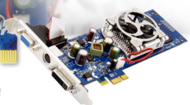
Bump... Just this last question lol :P sorry for numping this thread so much.
|
|
#13
|
||||
|
||||
|
Read this about similar one.
http://www.tigerdirect.com/applicati...y=REVIEWS#tabs Try it. Disable Intel Integrated media accelerator 82915G/GV/910GL before adding card. The Intel GMA 900. |
|
#14
|
||||
|
||||
|
I don't seem to understand your point.
All I want to know is if http://www.newegg.com/Product/Produc...82E16814187084 will work with my power supply. |
|
#15
|
||||
|
||||
|
It will not need a new power supply.
Sparkle GeForce 9400 GT Video Card - 1GB DDR2, PCI, DVI, VGA in Dell Dimension 3100 Ive been using this card for an old Dell Dimension E310. 3g of processer, 2g of ram. It cant play streaming movies in fullscreen, it lags and eventually freezes until you minimize and bring back to full screen. Once back in fullscreen, it takes about 3 minutes to freeze again. DvD playback has me stumped as everytime i open any media application, it gives a driver crash (i have the most recent drivers to date) and goes immidately into a blue screen. Mpeg playback is about good as you can expect. Games such as Fallout 3 play like a champ and is pretty impressive. Games such as World of Warcraft is a waste of time, on the lowest settings across the board, i couldnt get more than 8fps no matter how you fiddled with Nvidias control panel (such as going to high performance, turning off all antialiasinig, etc etc) It seemed to have a hard time rendering content in WoW. to sum it up, you can spend better money on a different card. |
|
#16
|
||||
|
||||
|
Ok I found EXACTLY what I am looking for. I think I understand how the slots and everything work. I found this which is BY FAR perfect for what I need.
http://www.newegg.com/Product/Produc...82E16814130498 If you want to follow up to reassure me that it works with my model then go ahead. But I am nearly positive it will. Thanks again all! I think I'm gonna end up getting this monitor also! http://www.newegg.com/Product/Produc...82E16824009163 Last edited by Hockeydude; 07-08-2009 at 12:00 AM.. |
|
#17
|
||||
|
||||
|
The pci 9400gt should work fine in your system, as long as you have a pretty basic system (not too many additional power drawing devices).
That said, if I was upgrading an e310 and cared about graphics performance, I'd buy an x1 to x16 slot adapter (like you mentioned above), which allows any x16 low profile card to be installed. My reasoning for this, is that the pci-e x1 slot is going to be about twice as fast as pci. Also, pci-e is a dedicated link, unlike pci, which shares it's bandwidth between the slots. Now running the x16 card in an adapter will naturally reduce the cards performance to pci-e x1 levels, but it would still be better than using a pci card. So, for example, you could get this adapter and pair it up with a card like this. Just a thought though, as a pci card would be "fine," it's just severely limited in bandwidth to the system. |
|
#18
|
||||
|
||||
|
Quote:
http://forums.nvidia.com/index.php?showtopic=82789 http://www.techpowerup.com/73862/Spa...xpress_x1.html |
|
#19
|
||||
|
||||
|
Since the adapter acts as a small riser, a low profile card is then used. The adapter is designed to be the proper height so that a low profile card's bracket can be secured in the machine. There will be a small open gap in bracket slot, because the low profile bracket will only cover 2/3 of the slot.
After looking at your link, it may be that the e310 has issues using the x1 slot for graphics (bios limitation or something), or it could be a case of a defective card. If the e310 really does have issues using any pci-express cards, then obviously pci is the only option. The reason why that's what I would do is because pci-e x1 is a faster, bi-directional, dedicated link, so it outperforms pci. I recommend the adapter so that a person can use any low profile x16 card, which opens up a wide variety of cards to use, instead of the like 2 available x1 cards on the market. |
|
#20
|
||||
|
||||
|
It wont be secure, anyone tried that in any PC's. ?
Look at this, stick with pci express x1 only. ![]() vnf4ultra how did you mod your pci express x1 slot, post a picture of it with the x16 card if you got one please. Last edited by electromagnetic; 07-09-2009 at 12:55 PM.. |
![]() |
| Thread Tools | |
|
|
| Similar Topics | ||||
| Topic | Category | Replies | Last Post | |
| Dell Dimension E310 Series Video Card Upgrade | Audio and Video | 22 | 06-20-2009 12:14 PM | |
| Dell E310 Video Card upgrade help | Audio and Video | 6 | 05-28-2009 08:08 AM | |
| Dell E310 Video Card upgrade | Audio and Video | 14 | 06-16-2008 11:49 PM | |
| Dell Dimension E310 Graphics Card Upgrade | Audio and Video | 16 | 06-16-2008 12:11 PM | |
| Video Card Upgrade for Dell Dimension E310 | Audio and Video | 56 | 04-17-2007 04:10 AM | |
All times are GMT -4. The time now is 03:58 AM.


