also @ TechSpot: Tech Tip: Turn Off your Display Using a Windows Shortcut and More
Welcome to the TechSpot OpenBoards. Please read the FAQ if you have any questions. Login to participate.

Go Back   TechSpot OpenBoards > Hardware & Tweaking > Audio and Video

Multiple Monitors... multiple problems...

Closed Thread
Bookmark Thread Tools
  #1  
Old 05-17-2004
liquidfire's Avatar
Newcomer, in training
 
Member since: Jan 2004, 23 posts
Multiple Monitors... multiple problems...

I have a Ti 4600 8x and everything was running smoothly...

The only video game I play is Unreal Tournament 2004, and one day it started acting funny. For maybe 30 or so seconds it runs smoothly and then things just freeze for 2 or 3 seconds... i can run the same but i can't see my bullets, and if i a person was moving to the right, they keep moving to the right. Then it goes back to normal for 30 or so seconds and then glitches up for 2 or 3 again... repeat. Same all on servers.

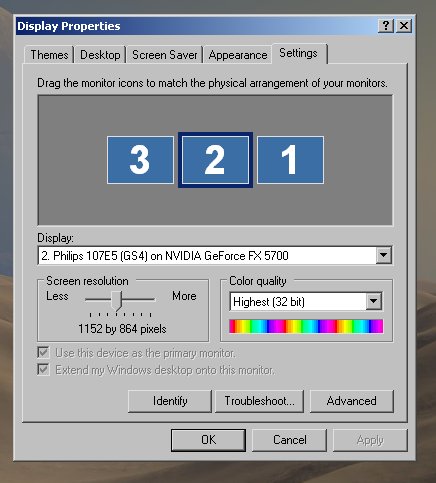
So I rebooted my computer after reinstalling my video driver and now what was originally display 1 is now display 2 and vice versa. Normally I'm a pretty flexible guy and could care less and did care less about that till i tried to move to my 2nd monitor (now display 1 on my right side)... so to go to the right monitor i have to move my mouse left and to get back to my left monitor i have to go right. I ran into the wall in the middle a couple of times out of habbit, snapped, and now I'm posting a thread.

Thanks for reading.
  #2  
Old 05-17-2004
LNCPapa's Avatar
TS Special Forces
 
Location: Duke University, North Carolina, USA
Member since: Feb 2002, 2,361 posts
System specs
Open up your display properties and under Settings where it shows two monitors grab one and move it to the other side. Should be as simple as that.
To remove this ad, sign in. To register for a new account, click here.
  
  #3  
Old 05-17-2004
Phantasm66's Avatar
TechSpot Evangelist
 
Location: Glasgow, Scotland
Member since: Feb 2002, 6,703 posts
I have 3 monitors and it can get annoying when things like that happen.

What LNCPapa says to do is completely true. Just drag the monitors about into the order you want them in.
  #4  
Old 05-18-2004
poertner_1274's Avatar
TS Special Forces
 
Location: Saint Louis, MO, USA
Member since: Feb 2002, 4,643 posts
System specs
That is a great piece of information I never knew that. Thanks a lot guys.

And I hope that helped liquidfire
  #5  
Old 05-18-2004
Didou's Avatar
TechSpot Evangelist
 
Location: Brussels, Belgium
Member since: Feb 2002, 5,836 posts
System specs
Yep, you simply drag the screen from one side to another. You can also click on the screen which was previouslly primary monitor & tick "Use this device as Primary Monitor" so you're setup is back the way it used to be.

  #6  
Old 05-20-2004
liquidfire's Avatar
Newcomer, in training
 
Member since: Jan 2004, 23 posts
but the game still skips...

Thanks for the answer... that did fix which monitor UT2k4 played on.

Unfortunately it's still skipping for me. for 30 seconds it's fine and then for a few seconds it's like amnesia I imagine... Everything is new to me... enemies are different, i didn't know i was ever here before, my tank is turned around, etc.

Thanks again.
  #7  
Old 05-20-2004
Arris's Avatar
TechSpot Evangelist
 
Location: Aberdeen, Scotland, UK
Member since: Feb 2002, 3,033 posts
If you disable nview so that you only have one monitor receiving a signal does it still do this?
  #8  
Old 05-25-2004
liquidfire's Avatar
Newcomer, in training
 
Member since: Jan 2004, 23 posts
yes, i have everything disabled... i stoped using my second monitor. When Unreal Tournament 2k4 first came out I never had a problem. I hooked the 2nd monitor up and things were still smooth. Then one day it just started being glitchy. Still stumped

Thanks again, again.
  #9  
Old 05-25-2004
Phantasm66's Avatar
TechSpot Evangelist
 
Location: Glasgow, Scotland
Member since: Feb 2002, 6,703 posts
To remove this ad, sign in. To register for a new account, click here.
  
  #10  
Old 05-25-2004
Phantasm66's Avatar
TechSpot Evangelist
 
Location: Glasgow, Scotland
Member since: Feb 2002, 6,703 posts
I just felt like posting that
  #11  
Old 07-26-2005
Newcomer, in training
 
Location: cape town, south africa
Member since: Jul 2005, 3 posts
multiple monitors

ja, but guys i dont want to see 1 and 2 i want to see 1 monitor, and i hate that drop down where you have to choose which one.... Ooh ja i forgot to tell you this not for me its for a client, yes... you can imagine, so how should i go about uninstalling this devil's replica?
Closed Thread

Tip: Download Advanced SystemCare 3 Freeware - 1 Click A Day to Clean, Repair, Protect & Optimize your PC.

Thread Tools


Similar Topics
Topic Category Replies Last Post
More Ati Radeon 9600tx Problems Audio and Video 1 11-26-2004 11:10 PM
Should I be having problems with BF Vietnam? PC Gaming and Consoles 8 03-24-2004 10:49 PM
EU to impose 14% tax on PC monitors Old Frontpage News & Comments 3 01-27-2004 07:50 PM
Display says multiple monitors, but really just one. Audio and Video 12 11-03-2003 11:46 AM
Flat Panel monitors taking over Old Frontpage News & Comments 12 03-14-2003 05:55 PM


All times are GMT -4. The time now is 02:50 PM.