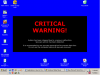
Hi. my PC has got a blue screen with a desription "critical warning". I have followed the instruction from https://www.techspot.com/vb/topic17297.html but it's still there. if someone could help me I'd be really greatfull. I have also attached a logfile frOm HIJACKTHIS.
You are using an out of date browser. It may not display this or other websites correctly.
You should upgrade or use an alternative browser.
You should upgrade or use an alternative browser.
Blue screen with "critical warning" -how do i get rid of it?
- Thread starter czajnikow
- Start date
RealBlackStuff
Posts: 6,450 +3
Move HJT to its OWN proper directory!
C:\DOCUME~1\mick\LOCALS~1\Temp\Rar$EX00.125\HijackThis.exe
Boot in Safe Mode.
Switch System restore OFF, see how here.
In Windows Explorer, turn on "show all files and folders, including hidden and system". See how here.
Press Ctrl/Alt/Del simultaneously, select Taskmanager/Processes, select the process (if there), click "End Process" for:
IBISCont.exe
winstall.exe
Next, try to UNinstall anything to do with (not delete yet!):
D:\bin\IBISCont.exe
Next, run a HJT scan and place a tick-mark in the little square before (if still there):
...................................................................................................
R0 - HKCU\Software\Microsoft\Internet Explorer\Main,Start Page = http://www.google.co.uk/
R0 - HKCU\Software\Microsoft\Internet Explorer\Main,Local Page =
R3 - Default URLSearchHook is missing
O2 - BHO: QUICKfind BHO Object - {C08DF07A-3E49-4E25-9AB0-D3882835F153} - C:\PROGRA~1\TEXTware\QUICKF~1\PlugIns\IEHelp.dll
O4 - HKLM\..\Run: [BT Broadband] D:\bin\IBISCont.exe
O4 - HKCU\..\Run: [Windows installer] C:\winstall.exe
O4 - Global Startup: Adobe Acrobat Speed Launcher.lnk = ?
...................................................................................................
Now click on the Fix Checked button in HJT.
When done, from between the above dotted lines, delete the highlighted bold files.
When a \directory-name\ is bold, delete everything in it, including that directory itself.
Delete all files and directories from: C:\Documents and Settings\[username]\Local Settings\Temp
Repeat this for ALL [usernames].
Delete all files and directories from: C:\WINDOWS\Temp (except files dated from TODAY).
Boot normal. When all OK, switch System Restore back on.
C:\DOCUME~1\mick\LOCALS~1\Temp\Rar$EX00.125\HijackThis.exe
Boot in Safe Mode.
Switch System restore OFF, see how here.
In Windows Explorer, turn on "show all files and folders, including hidden and system". See how here.
Press Ctrl/Alt/Del simultaneously, select Taskmanager/Processes, select the process (if there), click "End Process" for:
IBISCont.exe
winstall.exe
Next, try to UNinstall anything to do with (not delete yet!):
D:\bin\IBISCont.exe
Next, run a HJT scan and place a tick-mark in the little square before (if still there):
...................................................................................................
R0 - HKCU\Software\Microsoft\Internet Explorer\Main,Start Page = http://www.google.co.uk/
R0 - HKCU\Software\Microsoft\Internet Explorer\Main,Local Page =
R3 - Default URLSearchHook is missing
O2 - BHO: QUICKfind BHO Object - {C08DF07A-3E49-4E25-9AB0-D3882835F153} - C:\PROGRA~1\TEXTware\QUICKF~1\PlugIns\IEHelp.dll
O4 - HKLM\..\Run: [BT Broadband] D:\bin\IBISCont.exe
O4 - HKCU\..\Run: [Windows installer] C:\winstall.exe
O4 - Global Startup: Adobe Acrobat Speed Launcher.lnk = ?
...................................................................................................
Now click on the Fix Checked button in HJT.
When done, from between the above dotted lines, delete the highlighted bold files.
When a \directory-name\ is bold, delete everything in it, including that directory itself.
Delete all files and directories from: C:\Documents and Settings\[username]\Local Settings\Temp
Repeat this for ALL [usernames].
Delete all files and directories from: C:\WINDOWS\Temp (except files dated from TODAY).
Boot normal. When all OK, switch System Restore back on.
RealBlackStuff
Posts: 6,450 +3
You have not done half of what I advised you!
Boot in Safe Mode.
Switch System restore OFF, see how here.
In Windows Explorer, turn on "show all files and folders, including hidden and system". See how here.
Press Ctrl/Alt/Del simultaneously, select Taskmanager/Processes, select the process (if there), click "End Process" for:
winstall.exe
Next, run a HJT scan and place a tick-mark in the little square before (if still there):
...................................................................................................
R0 - HKCU\Software\Microsoft\Internet Explorer\Main,Start Page = http://www.google.co.uk/
R0 - HKCU\Software\Microsoft\Internet Explorer\Main,Local Page =
R3 - Default URLSearchHook is missing
O4 - HKCU\..\Run: [Windows installer] C:\winstall.exe
...................................................................................................
Now click on the Fix Checked button in HJT.
When done, from between the above dotted lines, delete the highlighted bold files.
When a \directory-name\ is bold, delete everything in it, including that directory itself.
Delete all files and directories from: C:\Documents and Settings\[username]\Local Settings\Temp
Repeat this for ALL [usernames].
Delete all files and directories from: C:\WINDOWS\Temp (except files dated from TODAY).
Boot normal. When all OK, switch System Restore back on.
Boot in Safe Mode.
Switch System restore OFF, see how here.
In Windows Explorer, turn on "show all files and folders, including hidden and system". See how here.
Press Ctrl/Alt/Del simultaneously, select Taskmanager/Processes, select the process (if there), click "End Process" for:
winstall.exe
Next, run a HJT scan and place a tick-mark in the little square before (if still there):
...................................................................................................
R0 - HKCU\Software\Microsoft\Internet Explorer\Main,Start Page = http://www.google.co.uk/
R0 - HKCU\Software\Microsoft\Internet Explorer\Main,Local Page =
R3 - Default URLSearchHook is missing
O4 - HKCU\..\Run: [Windows installer] C:\winstall.exe
...................................................................................................
Now click on the Fix Checked button in HJT.
When done, from between the above dotted lines, delete the highlighted bold files.
When a \directory-name\ is bold, delete everything in it, including that directory itself.
Delete all files and directories from: C:\Documents and Settings\[username]\Local Settings\Temp
Repeat this for ALL [usernames].
Delete all files and directories from: C:\WINDOWS\Temp (except files dated from TODAY).
Boot normal. When all OK, switch System Restore back on.
blue screen with "critical warning"
hi it's me again.
I have followed the instructions, but I can't remove the blue screen. perhaps I have made a mistake. quite possible as I'm new with computers.
I booted in a safe mode, switched off system restore, turned on "show all files and folders, including hidden and system".
I have deleted everything from C:\Documents and Settings\[username]\Local Settings\Temp ;C:\WINDOWS\Temp and
R0 - HKCU\Software\Microsoft\Internet Explorer\Main,Start Page = http://www.google.co.uk/
R0 - HKCU\Software\Microsoft\Internet Explorer\Main,Local Page =
R3 - Default URLSearchHook is missing
I could'n find O4 - HKCU\..\Run: [Windows installer] C:\winstall.exe
then rebooted and the blue screen is still there.
if you could have a look at my hijackthis logfile again and give me any other instructions it would be great.
I have also attached a hijackthis logfile in a safe mode and in normal mode.
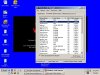
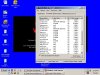
I have also attached windows task manager- processes in safe mode and normal mode.
everything is in a file called task "manager safe mode"
thanks a lot.
hi it's me again.
I have followed the instructions, but I can't remove the blue screen. perhaps I have made a mistake. quite possible as I'm new with computers.
I booted in a safe mode, switched off system restore, turned on "show all files and folders, including hidden and system".
I have deleted everything from C:\Documents and Settings\[username]\Local Settings\Temp ;C:\WINDOWS\Temp and
R0 - HKCU\Software\Microsoft\Internet Explorer\Main,Start Page = http://www.google.co.uk/
R0 - HKCU\Software\Microsoft\Internet Explorer\Main,Local Page =
R3 - Default URLSearchHook is missing
I could'n find O4 - HKCU\..\Run: [Windows installer] C:\winstall.exe
then rebooted and the blue screen is still there.
if you could have a look at my hijackthis logfile again and give me any other instructions it would be great.
I have also attached a hijackthis logfile in a safe mode and in normal mode.
I have also attached windows task manager- processes in safe mode and normal mode.
everything is in a file called task "manager safe mode"
thanks a lot.
Attachments
RealBlackStuff
Posts: 6,450 +3
Your logs are clean. You probably have a screen-saver or background picture permanently showing.
Rightclick anywhere on the desktop and select Properties.
Under the Desktop tab, check the entry under Background, replace it with (None) and make a note of what was there, if it was NOT none.
Under the Screensaver tab, also replace any found entry with (None) and make a note of what was there, if it was NOT none.
Click on OK or Apply.
Then report back please with whatever was there.
Mojam
Please read his post again before you give any more useless advise, he does NOT have a BSOD
Rightclick anywhere on the desktop and select Properties.
Under the Desktop tab, check the entry under Background, replace it with (None) and make a note of what was there, if it was NOT none.
Under the Screensaver tab, also replace any found entry with (None) and make a note of what was there, if it was NOT none.
Click on OK or Apply.
Then report back please with whatever was there.
Mojam
Please read his post again before you give any more useless advise, he does NOT have a BSOD
i tried what you advised.
right clicked went to desktop, but background,positon and browse are frozen. only the color option works and even when i tried to apply a color it won't apply it. in the background option(which i can't change) are five original desktop pictures files and 'e' icon with the word 'desktop'
the screen saver works and is on the (none) option.
the blue screen and critical warning sign is still there.
do you have any other suggestions?
thanks for your help so far.
right clicked went to desktop, but background,positon and browse are frozen. only the color option works and even when i tried to apply a color it won't apply it. in the background option(which i can't change) are five original desktop pictures files and 'e' icon with the word 'desktop'
the screen saver works and is on the (none) option.
the blue screen and critical warning sign is still there.
do you have any other suggestions?
thanks for your help so far.
RealBlackStuff
Posts: 6,450 +3
Download Ewido Security Suite (trial) from http://www.ewido.net/en/download/
When installing, under "Additional Options" uncheck "Install background guard" and "Install scan via context menu".
Start Ewido. When you run it the first time, you get a warning "Database could not be found!". Click OK.
On the main screen, click on Update in the left menu, then click the Start Update button.
After the Update finishes, the status bar at the bottom will display "Update successful".
Now run scan with the program, let it delete what it finds.
Fingers crossed!
If you have problems updating see here: http://www.ewido.net/en/download/updates/
When installing, under "Additional Options" uncheck "Install background guard" and "Install scan via context menu".
Start Ewido. When you run it the first time, you get a warning "Database could not be found!". Click OK.
On the main screen, click on Update in the left menu, then click the Start Update button.
After the Update finishes, the status bar at the bottom will display "Update successful".
Now run scan with the program, let it delete what it finds.
Fingers crossed!
If you have problems updating see here: http://www.ewido.net/en/download/updates/
i have instaled the program, updated, scanned and kept my fingers crossed but nothing has changed.
i have remembered something perhaps it may help you: i got a pop up called 'spy doctor' and it installed by itself on my PC. when i removed it i got the blue screen.
thanks for your help. any other ideas? i'm willing to try anything to get this crap of my computer.
i have remembered something perhaps it may help you: i got a pop up called 'spy doctor' and it installed by itself on my PC. when i removed it i got the blue screen.
thanks for your help. any other ideas? i'm willing to try anything to get this crap of my computer.
RealBlackStuff
Posts: 6,450 +3
Can you perhaps take a 'Print Screen' with that blue screen and attach it as a .jpg?
May get a better idea that way.
One more option if you use Active Desktop:
Go to Control Panel > Display. Click on the "Desktop" tab then click
the "Customize Desktop" button. Click on the "Web" tab. Under "Web Pages" you may see an entry checked called something like "Security info" or similar.
If it is there, select that entry and click the "Delete" button. Click OK
then Apply and OK.
And I just found this as well:
TO FIX YOUR WALLPAPER:
Here's what you're going to do: Cut & paste the entire text I post below in the Quote into "notepad" then save the text file to your desktop (or c:\) and name it "fix.reg"....(please make sure its not named with a .txt extension). Quit notepad. Now double-click on "fix.reg" to MERGE these clean registry entries into your PC. Now you can go and do what you want with the background, wallpaper, etc...
This is a Forum-quirk, not my doing!
May get a better idea that way.
One more option if you use Active Desktop:
Go to Control Panel > Display. Click on the "Desktop" tab then click
the "Customize Desktop" button. Click on the "Web" tab. Under "Web Pages" you may see an entry checked called something like "Security info" or similar.
If it is there, select that entry and click the "Delete" button. Click OK
then Apply and OK.
And I just found this as well:
TO FIX YOUR WALLPAPER:
Here's what you're going to do: Cut & paste the entire text I post below in the Quote into "notepad" then save the text file to your desktop (or c:\) and name it "fix.reg"....(please make sure its not named with a .txt extension). Quit notepad. Now double-click on "fix.reg" to MERGE these clean registry entries into your PC. Now you can go and do what you want with the background, wallpaper, etc...
Remove the blank space (4x) within \Curre ntVersion\ so that it reads \CurrentVersion\REGEDIT5
[-HKEY_CURRENT_USER\Software\Microsoft\Windows\CurrentVersion\Policies\System]
[HKEY_LOCAL_MACHINE\Software\Microsoft\Windows\CurrentVersion\Policies\Explorer]
"NoViewContextMenu"=-
[HKEY_CURRENT_USER\Software\Microsoft\Windows\CurrentVersion\Policies\Explorer]
"NoViewContextMenu"=-
"NoActiveDesktop"=-
"ForceActiveDesktopOn"=-
[HKEY_CURRENT_USER\Software\Microsoft\Windows\CurrentVersion\Policies\ActiveDesktop]
"NoChangingWallPaper"=-
"NoComponents"=-
"NoAddingComponents"=-
"NoDeletingComponents"=-
"NoEditingComponents"=-
"NoHTMLWallpaper"=-
This is a Forum-quirk, not my doing!
I have merged the registry entries into my PC, but nothing have changed.
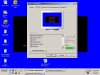
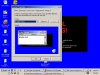
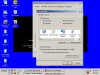
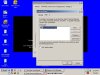
when I start my PC I get my standard wallpaper and after a few seconds it changes back into the blue screen with "critical warning" sign.
I have done a few 'print screens' and I will send them one by one.
sorry for the inconvienience.
when I start my PC I get my standard wallpaper and after a few seconds it changes back into the blue screen with "critical warning" sign.
I have done a few 'print screens' and I will send them one by one.
sorry for the inconvienience.
Attachments
RealBlackStuff
Posts: 6,450 +3
That is exactly as I suspected.
For starters, go here and let it scan/clean your system:
http://housecall.trendmicro.com/
If that does not fix it, install the MS Antispyware
Once you have it installed, make sure that you run the system-setup.
Then run the "Full System Scan", it will find all the other crap that may still be on your system.
http://download.microsoft.com/downl...-fca2f2c6f0cc/MicrosoftAntiSpywareInstall.exe
For starters, go here and let it scan/clean your system:
http://housecall.trendmicro.com/
If that does not fix it, install the MS Antispyware
Once you have it installed, make sure that you run the system-setup.
Then run the "Full System Scan", it will find all the other crap that may still be on your system.
http://download.microsoft.com/downl...-fca2f2c6f0cc/MicrosoftAntiSpywareInstall.exe
i went the 'housecall' and used: 'spyware scanner', 'CWshredder', 'scan your PC'.
'scan your PC' detected 24 vulnerabilities. in order to remove them i have to install windows xp sofware hotfix. after installing hotfix i have to restart my PC( this would take some time) . is it NECESSARY to do it?
i have also installed MS and performed a 'full system scan'. i don't know what you mean by " run the system-setup" (can you please explain?)
the blue screen is still on, in its favorite place- my desktop and doesn't want to go away.
'scan your PC' detected 24 vulnerabilities. in order to remove them i have to install windows xp sofware hotfix. after installing hotfix i have to restart my PC( this would take some time) . is it NECESSARY to do it?
i have also installed MS and performed a 'full system scan'. i don't know what you mean by " run the system-setup" (can you please explain?)
the blue screen is still on, in its favorite place- my desktop and doesn't want to go away.
RealBlackStuff
Posts: 6,450 +3
Never mind the instruction for M$-Antispyware, I just copied that text from somewhere.
The only other item I can come up with in your PC is this:
Uninstall MSN Messenger, it may be of the WORM_RBOT.KX variant, as described here:
http://www.trendmicro.com/vinfo/virusencyclo/default5.asp?VName=WORM_RBOT.KX&VSect=T
To get rid of it, follow these instructions:
http://www.trendmicro.com/vinfo/virusencyclo/default5.asp?VName=WORM_RBOT.KX&VSect=Sn
If that does not do it, I'm afraid I have no more advise, other than:
- backup your personal stuff on another harddisk
- zero-fill the harddisk (go to your harddisks manufacturer's website and get the specific tool for YOUR harddisk model.)
- install from scratch
The only other item I can come up with in your PC is this:
Uninstall MSN Messenger, it may be of the WORM_RBOT.KX variant, as described here:
http://www.trendmicro.com/vinfo/virusencyclo/default5.asp?VName=WORM_RBOT.KX&VSect=T
To get rid of it, follow these instructions:
http://www.trendmicro.com/vinfo/virusencyclo/default5.asp?VName=WORM_RBOT.KX&VSect=Sn
If that does not do it, I'm afraid I have no more advise, other than:
- backup your personal stuff on another harddisk
- zero-fill the harddisk (go to your harddisks manufacturer's website and get the specific tool for YOUR harddisk model.)
- install from scratch
czajnikow for U From JATT
Hey czajnikow
how r u
am not that smart but if u dint fix ur Prob i seen ur desktop pic
i mean try all da scaner watever u got thne
go download This File on U r Desktop
copy and paste http://metallica.geekstogo.com/smitfraud.reg
or click here u know tht
http://metallica.geekstogo.com/smitfraud.reg
thne clilk that smitfraud on u r desktop
thns it go to regstry , instll there thnen restart ur computer thne u can change u r desktop property
ok bye enjoy
Hey czajnikow
how r u
am not that smart but if u dint fix ur Prob i seen ur desktop pic
i mean try all da scaner watever u got thne
go download This File on U r Desktop
copy and paste http://metallica.geekstogo.com/smitfraud.reg
or click here u know tht
http://metallica.geekstogo.com/smitfraud.reg
thne clilk that smitfraud on u r desktop
thns it go to regstry , instll there thnen restart ur computer thne u can change u r desktop property
ok bye enjoy
Similar threads
- Replies
- 3
- Views
- 126

- Replies
- 16
- Views
- 150


-
TechSpot is dedicated to computer enthusiasts and power users.
Ask a question and give support.
Join the community here, it only takes a minute.