Welcome to the TechSpot OpenBoards. Please read the FAQ if you have any questions. Sign up or Login to participate.
|
|||||||
Download Now:
GeForce FX 5200 (128 MB) Open GL problems
|
|
Thread Tools | Search this Thread |
|
#1
|
||||
|
||||
|
GeForce FX 5200 (128 MB) Open GL problems
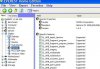
I use Everest Home edition 2.0 and it's telling me that there is something wrong or missing when I go to the display function of it there is a blue circle with a yellow X. so I went to the device manager and it says that my accerated 3D graphics aren’t working properly, so I went to Nvidia’s web site to see if I could download the version of Open GL that I need to get my video card up and running. Well needless to say that did not work out the way that I had planed it to. So I was wondering if anyone has had something like this happen to him or her before. And what are the steps to resolve this issue. Here are the specs, and a screen shot of what I’m seeing
Display: Video Adapter NVIDIA GeForce FX 5200 (128 MB) 3D Accelerator nVIDIA GeForce FX 5200 Monitor EPI EnVision EN-S1995A [19" CRT] (1211114592) |
|
#2
|
||||
|
||||
|
Fx 5200
If you note in your picture, the DirectX is showing fault too.
I have the same card in my other computer. I loaded DirectX9.0 and then had to go to nVidia and try a few versions of the drivers. (I think 77.77 is the lastest). This did not work and I backed off to earlier version 76.13 or something. I'm at work so can't post the exact driver version. If I remember when I get home , I'll check it for you. Also consider updating your chipset drivers for your mobo, the conflict could be there too. Cheers, |
|
#3
|
||||
|
||||
|
so the latest drivers are causing problems, with your motherboard, I thought that updating it would help. guess it made thigns worse for me. when you do get the chance, let me know what version on the driver that makes it work.I guess that I will roll back my drivers to see that does something to it. when I went to the properties of the card it said that the 3D is not working .
Last edited by Jwdmgj101; 09-16-2005 at 02:27 PM.. |
|
#4
|
|||
|
|||
|
Nvdia Gforce latest driver 78.03 version
My name is bradd
saikamal@rediffmail.com if sending a mail put subject as Game Nvdia 78.0378. driver link http://download.nvidia.com/Windows/7...2k_english.exe |
|
#5
|
||||
|
||||
|
driver version for my FX 5200
Jwdmgj101
My driver version was 61.76, but that was for Win98. (this was the OS I had to roll back to pervious version) I have upgraded to WinXp Pro and have installed the 77.77 version, with no problems. Make sure you update DirectX to 9.0 or reinstall it. Sorry I know this probably doesn't help you. |
|
|
![]() |
| Similar Topics | ||||
| Topic | Replies | Forum | ||
Nvidia GeForce FX 5200 problems maybe
|
18 | Audio and Video | ||
GeForce FX 5200 Color Problems
|
1 | Audio and Video | ||
GeForce FX 5200 Problems
|
2 | Audio and Video | ||
Geforce FX 5200 Problems Is this as fast as it will go ?
|
6 | Audio and Video | ||
Problems with GeForce FX 5200
|
1 | Audio and Video | ||
| Thread Tools | Search this Thread |
|
|
All times are GMT -4. The time now is 04:58 AM.


Nvidia GeForce FX 5200 problems maybe