You are using an out of date browser. It may not display this or other websites correctly.
You should upgrade or use an alternative browser.
You should upgrade or use an alternative browser.
Banner
- Thread starter mickzer
- Start date
howard_hopkinso
Posts: 21,238 +17
What banner are you refering to?
What is your screen resolution?
Maybe try a resolution of 1024x768.
Regards Howard
What is your screen resolution?
Maybe try a resolution of 1024x768.
Regards Howard

poertner_1274
Posts: 3,874 +3
Advertisement is a big part of the site upkeep. I don't think it is that big, or annoying. I've definately seen worse.
BTW
:wave:Welcome to TechSpot:wave:
BTW
:wave:Welcome to TechSpot:wave:
howard_hopkinso said:What banner are you refering to?
What is your screen resolution?
Maybe try a resolution of 1024x768.
Regards Howard
I am currently on 1024x768!!
To poertner_1274.
I mean the banner on the top of every page.I don't mind advertising but the thing is HUGE and all that is on it is :Bandwith by the Planet.

poertner_1274
Posts: 3,874 +3
The Planet happens to be the ones hosting the site. And they are doing a wonderful job for us. As Nodsu said I don't see it as that big.mickzer said:I am currently on 1024x768!!
To poertner_1274.
I mean the banner on the top of every page.I don't mind advertising but the thing is HUGE and all that is on it is :Bandwith by the Planet.
Only s****tion, from now on as soon as you go to a page, hit the space bar. That should page down and you won't see it anymore.
Nodsu said:Huge? Looks like the standard banner size to me.. Maybe your browser has some rendering issues?
Well, it must be something on my side,then. If I had to guess at the size of the grey banner I would say 8 inches. It's only with this site. I'm using Avant Browser on Win XP Home.How would I go about fixing this?
TIA mickzer.
poertner_1274 said:The Planet happens to be the ones hosting the site. And they are doing a wonderful job for us. As Nodsu said I don't see it as that big.
Only s****tion, from now on as soon as you go to a page, hit the space bar. That should page down and you won't see it anymore.
I only asked because I didn't know whether it was on the site or on my computer(which it seems to be).It's only happening for about a week, I think.
See also reply to Nodsu.
TIA mickzer.
RealBlackStuff
Posts: 6,450 +3
How about dumping Avant? It is still the crappy IE with a pretty dress!
Go to www.getfirefox.com
Using FF, that banner is only 1.5" high on a 19" CRT with 1024x768
Go to www.getfirefox.com
Using FF, that banner is only 1.5" high on a 19" CRT with 1024x768
RealBlackStuff said:How about dumping Avant? It is still the crappy IE with a pretty dress!
Go to www.getfirefox.com
Using FF, that banner is only 1.5" high on a 19" CRT with 1024x768
RBS,
I forgot I had Firefox (Tried it ,didn't like it) Trouble is--- This site is exactly the same with Firefox as with Avant!!!!! Now what?
mickzer.

I think you have done a good work at troubleshooting, it seems however the problem is just mickzer still believes the leaderboard banner is too big. If you are seeing a 728x90 pixels banner, then the size is right, and is the only banner we show to forum members on each page... a very low amount by net's standards. If you visit any other website you will probably find this, and many other banners displayed on the same page.
Julio said:I think you have done a good work at troubleshooting, it seems however the problem is just mickzer still believes the leaderboard banner is too big. If you are seeing a 728x90 pixels banner, then the size is right, and is the only banner we show to forum members on each page... a very low amount by net's standards. If you visit any other website you will probably find this, and many other banners displayed on the same page.
I'm sorry, I mustn't be explaining myself clearly.
I thought at first that it was a problem with this site.
Now I realise that it's something at my end (ie. on my computer).
What I don't know is:
What is causing it?
How can I fix it?
To give you all an idea of the size,when I open this site all I can see is the banner and it takes three clicks of the scroll mouse before I can see anything else. I hope I am making myself a bit clearer now.
By the way, I was NOT criticising this site in any way.I have learned a lot browsing here.
mickzer.
Attachments
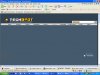
Holy s... heh... that's certainly not normal. I would say, remove all banner blockers you've got (if any), run at least 2-3 spyware apps (Adaware, Spybot and MS Antispyware recommended), then try restoring your browsers to defaults, just a few ideas.
Julio said:Holy s... heh... that's certainly not normal. I would say, remove all banner blockers you've got (if any), run at least 2-3 spyware apps (Adaware, Spybot and MS Antispyware recommended), then try restoring your browsers to defaults, just a few ideas.
Hi Julio,
I've just noticed something....I've been downloading what seems to be a large Windows Update (For about the last week on slow dial-up) and it suddenly stopped for awhile .During that time the banner appeared normally. Then the update started again and the banner started appearing huge again.Would (could) the update downloading at the same time be causing this? I will have to wait awhile to find out.....the download is still at 56%.
mickzer
RealBlackStuff
Posts: 6,450 +3
Could it be that you're downloading 256MB of XP-SP2?
You can get that for FREE on a CD from M$
Or ask your friends if they got that CD, then borrow it.
You can get that for FREE on a CD from M$
Or ask your friends if they got that CD, then borrow it.
RealBlackStuff said:Could it be that you're downloading 256MB of XP-SP2?
You can get that for FREE on a CD from M$
Or ask your friends if they got that CD, then borrow it.
Hi RBS, No, I already have SP2 (Got it from M$, like you said) No, I think it's a critical update for Office XP.It's only about 54MB and M$ maintain it should download in 5hrs+ byt it seems to be taking a lot longer than that.
Just checked with Win Update:
I have 3 critical updates
1)Security Update for Win XP (KB896424)
2)Malicious Soft. Rem> Tool (KB890830) and
3) Office XP SP3
Total=54.2MB
Download time=5hrs. 35mins.
I guess I just sit and wait.!!
TIA. mickzer.
Final "Update"
Hi All,
Well I hope this is the end of it!!
I went to Win Update to manually d'load the updates, hoping it would take up where the automatic left off (which it did @ 37mb out of >54Mb)
Came back here and lo and behold!--the banner is back to what I think is the normal size. The only other thing I did was empty Temp. Internet Files, so one of those fixed it.Which, I don't know What's the betting,then??
Thanks to any who tried to help,
mickzer.
Hi All,
Well I hope this is the end of it!!
I went to Win Update to manually d'load the updates, hoping it would take up where the automatic left off (which it did @ 37mb out of >54Mb)
Came back here and lo and behold!--the banner is back to what I think is the normal size. The only other thing I did was empty Temp. Internet Files, so one of those fixed it.Which, I don't know
What's the betting,then?? Thanks to any who tried to help,
mickzer.
poertner_1274
Posts: 3,874 +3
Similar threads
- Replies
- 23
- Views
- 438

- Replies
- 16
- Views
- 848
Latest posts
-
AV2 promises 30% better compression than AV1 and costs nothing to use
- GeoffreyA replied
-
 007 First Light sells 3 million copies in two weeks as Amazon and MGM eye sequel
- Daniel Sims replied
-
Microsoft admits Game Pass price hike drove away "millions" of subscribers
- Neatfeatguy replied


-
TechSpot is dedicated to computer enthusiasts and power users.
Ask a question and give support.
Join the community here, it only takes a minute.