Welcome to the TechSpot OpenBoards. Please read the FAQ if you have any questions. Login to participate.

Go Back   TechSpot OpenBoards > OS & Software > Misc. Software & Utilities

Connection Refused everytime I try to access Paypal

Reply
Bookmark / Share this page
Thread Tools
  #1  
Old 11-18-2005
TechSpot Member
 
Location: Surrey England
Member since: Nov 2005, 117 posts
Connection Refused everytime I try to access Paypal

everytime i try to access paypal i get, Connection Refused... it used to work fine, but now i just cant access paypal at all. I can from my bro's pc but not mine. I use Firefox.

Can anyone help me to solve this??

thanks alot, matt
Reply With Quote
  #2  
Old 11-18-2005
Rick's Avatar
TS Special Forces
 
Location: Los Angeles, CA
Member since: Feb 2002, 4,841 posts
This can happen with Internet Explorer if your "secure" settings get mucked up. I can't reproduce this in Firefox though.. not with the symptom you have.

Are you able to access PayPal via Internet Explorer?
Reply With Quote
You can remove this banner by registering, join the TS Community for free.
  #3  
Old 11-18-2005
TechSpot Member
 
Location: Surrey England
Member since: Nov 2005, 117 posts
Nope, it wont let me do it through IE.
Reply With Quote
  #4  
Old 11-18-2005
Rick's Avatar
TS Special Forces
 
Location: Los Angeles, CA
Member since: Feb 2002, 4,841 posts
I don't know why this would happen, but maybe Paypal has been added to your hosts file. Addresses that are added to your hosts file can block certain websites or computers from accessing your computer... And it also works the other way around.

Assuming you're using Windows XP, click on Start / Run. Copy and paste this in the run box and press [enter]

notepad C:\WINDOWS\system32\drivers\etc\hosts

The first two dozen lines or so should be some text on what is the hosts file and how to use it. Below these lines, you may see addresses. If you see any web addresses or ip addresses after 127.0.0.1 localhost, delete them all. Make sure you save the file once these entires are deleted. (File / Save) and you should be okay.

If there were no extra entries, then obviously something else is happening. If there were entries after 127.0.0.1 localhost, then I might look into why/how that appeared there. It might be a sign of malware or a virus meddling with your system files.
Reply With Quote
  #5  
Old 11-18-2005
TechSpot Member
 
Location: Surrey England
Member since: Nov 2005, 117 posts
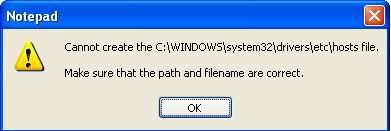
I have done that there were plenty of addresses in that file, including paypal and amazon. I try to save and i get this.

Reply With Quote
  #6  
Old 11-18-2005
Rick's Avatar
TS Special Forces
 
Location: Los Angeles, CA
Member since: Feb 2002, 4,841 posts
That is telling you the file is set to "Read Only". Now you know something is up, because that file is not read only by default...

I'm going to give you another command to copy and paste in the same place as before..

attrib C:\Windows\System32\drivers\etc\hosts -s -h -r

This will remove hidden, system and read-only status.. Allowing you to do whatever you'd like with the file now. Then repeat the instructions above.

Next, you may want to run a free anti-spyware program like spybot (www.safer-networking.org) or ad-aware (www.lavasoftusa.com) to make sure there's no malware on your system. I also recommend a free online virus scan from http://housecall.trendmicro.com/, which will require you use Internet Explorer... Just to make sure there's nothing nasty on your computer playing with your hosts file.

It doesn't have to be a malicious program either... Some spam blockers and firewall softwares (Spybot even has this feature) will make addition entries in the hosts files. Maybe it got mixed up somewhere along the way and blocked sites you use.

Oh, and the reason I'm giving you commands is to avoid any confusion over having to enable hidden files etc... It's probably easier & faster for you to copy and paste anyway. . But, you are perfectly welcome to do this maually if you'd like.

Last edited by Rick; 11-18-2005 at 06:26 PM.
Reply With Quote
  #7  
Old 11-18-2005
TechSpot Member
 
Location: Surrey England
Member since: Nov 2005, 117 posts
It is running the free online scan now

ill copy and paste it into the box, bit easier... thanks alot for your help, much appreciated... ill post again once the virus scan is done.
Reply With Quote
You can remove this banner by registering, join the TS Community for free.
  #8  
Old 11-18-2005
TechSpot Member
 
Location: Surrey England
Member since: Nov 2005, 117 posts
EXCELLENT, all working perfectly.... thanks alot dude, your a legend, much appreciated
Reply With Quote
  #9  
Old 01-04-2008
Newcomer, in training
 
Member since: Jan 2008, 1 posts
Cheers Rick sorted my paypal prob, it has taken days to make my ebay payment via paypal cheers ghoak27
Reply With Quote
  #10  
Old 01-13-2008
Newcomer, in training
 
Member since: Jan 2008, 5 posts
I can accessed paypal with no problems although it was bit slow. Does you have any problems accessing other site?. I think there might be some problems with your connection.
Reply With Quote
  #11  
Old 08-25-2008
Newcomer, in training
 
Member since: Aug 2008, 2 posts
I know That this is Old But any Help...

Guys,,Any Help on this with Vista I am having the same Issue
Reply With Quote
  #12  
Old 08-26-2008
TechSpot Member
 
Location: Surrey England
Member since: Nov 2005, 117 posts
It should work in the same way. I currently have Vista on my PC and I am still able to access the notepad document mentioned above. Have you tried opening the document that Rick mentioned above, and deleting any addresses beneath the IP address?
Reply With Quote
  #13  
Old 08-26-2008
Newcomer, in training
 
Member since: Aug 2008, 2 posts
I tried all of that process and it doesn't work..Should I erase though the 127.00 part also or leave it, Because thats the part that I dont understand..
Reply With Quote
  #14  
Old 08-26-2008
jobeard's Avatar
TechSpot Evangelist
 
Location: Southern Calif.
Member since: Apr 2005, 6,614 posts
ALWAYS leave "127.0.0.1 localhost" in the host file.
Reply With Quote
Reply
Thread Tools

Forum Jump

Similar Topics
Thread Thread Starter Forum Replies Last Post
Firefox. No connection with paypal or amazon. LucyR Security and the Web 2 04-27-2008 09:55 PM
BF2 server has refused connection D@nny Gaming and Consoles 1 04-18-2006 09:16 PM
why is my web access refused?! shmancy Security and the Web 4 12-01-2005 03:28 AM
Connection refused on wireless Spike Storage & Networking 3 09-30-2005 10:39 AM
connection was refused--now what? acker1 Windows OS 6 08-09-2004 11:31 PM


All times are GMT -4. The time now is 07:08 PM.