also @ TechSpot: AMD Radeon HD 7770 & Radeon HD 7750 Review
Welcome to the TechSpot OpenBoards. Please read the FAQ if you have any questions. Sign up or Login to participate.

Go Back   TechSpot OpenBoards > Tech Support > Device Drivers

Begin your free trial now Pay-as-you-go options starting at $10/user/month

cd and dvd not found

Thread Tools Search this Thread
  #1  
Old 09-09-2006
TechSpot Member
 
Member since: May 2006, 55 posts
cd and dvd not found

Hello,
I have a cd and dvd in my computer, that runs xp. I don't know if the dvd ever worked, but the cd is no longer working. When I start up windows, and look in the bios, it shows the dvd as master and cd as slave. I checked, and that is the way the actual drives are set up. When I get into xp, the cd and dvd do not show up in My Computer, and in device manager there is a yellow ! next to both. I thought that maybe I needed new drives, since my computer is 4 years old. So, I put in the new drives, and same problem. Do you have any ideas??
Thank you for your help! Maggie
  #2  
Old 09-09-2006
peterdiva's Avatar
TechSpot Ambassador
 
Location: Western Australia
Member since: Oct 2005, 1,202 posts
System specs
The drivers aren't installed, easily fixed.

Open Device Manager and then open IDE ATA/ATAPI Controllers, right click the first entry (the Controller) and select uninstall, click ok, then reboot. Windows should then find a new device and install the drivers.
  #3  
Old 09-09-2006
TechSpot Member
 
Member since: May 2006, 55 posts
I did this, and the drives are still not working. In device manager, it says that it loaded the drivers, but could not find the hardware assoc. with the drivers. This is odd, because when I boot up the computer, it tells me that it finds new hardware!
Any ideas? By the way, the lights come on on both drives when boot. Does it make any difference the order that the drives are plugged into the same cable?
Thank you for all of your help! Maggie
  #4  
Old 09-09-2006
peterdiva's Avatar
TechSpot Ambassador
 
Location: Western Australia
Member since: Oct 2005, 1,202 posts
System specs
Yes it does, the master goes on the end and the slave in the middle.

Open the IDE ATA/ATAPI Controllers section in device manager and check that you have 3 entries, the controller, then a primary and a secondary IDE channel.
  #5  
Old 09-10-2006
TechSpot Member
 
Member since: May 2006, 55 posts
There are 3 entries, the controller, then primary, then secondary. I have had the master on the end and the slave in the middle, so that is not a problem. I guess that the IDE cable could be bad. Unfortunately, I do not have another cable. I am wondering if the drives needed replacing after all. And, I am wondering if I should just take the computer someplace else instead of trying to fix it myself! This seems more than I can handle. What do you think?
Thank you for all of your help!! Maggie
  #6  
Old 09-10-2006
TechSpot Member
 
Member since: May 2006, 55 posts
I was looking under google, and found a similar problem posted at algesa.com. The advice there was to change the registry. Have you heard of doing this? The problem posted was for a cd. Would this also work for the DVD? Thankyou!
  #7  
Old 09-10-2006
peterdiva's Avatar
TechSpot Ambassador
 
Location: Western Australia
Member since: Oct 2005, 1,202 posts
System specs
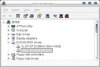
We'll give it one more go. Do the drives show up in device manager as what they are i.e make and/or model as below?

Right click on one of the drives and then select properties, now copy and paste what it says in the device status window, it should include an error code.

Can you post a link or what it says to do. And yes, they are both the same.
Attached Images
File Type: jpg 09-10-2006_20-54-10.jpg (29.6 KB, 7 views)
  #8  
Old 09-10-2006
TechSpot Member
 
Member since: May 2006, 55 posts
I just put on a different IDE cable. I still get the same error message:
Windows successfully loaded the device for this hardware but cannot find the hardware device (Code 41).
I can tell I am getting frustrated!! Any ideas?
Maggie
  #9  
Old 09-10-2006
TechSpot Member
 
Member since: May 2006, 55 posts
Another thing that may help. I found this page online. What do you think?
http://www.hardwareanalysis.com/content/topic/35761/
Also,looked at more programs installed on computer. FileCD, PowerDVD,and CD-maker 2000 are on computer. Didn't think they would matter, so never mentioned them.
Maggie
  #10  
Old 09-11-2006
peterdiva's Avatar
TechSpot Ambassador
 
Location: Western Australia
Member since: Oct 2005, 1,202 posts
System specs
I would try it... well I did. After taking that screenshot I deleted that entry (only had the upper), rebooted and everything still works, plus it hasn't put the entry back.

Click start then run and type in regedit then ok. Follow the tree down as listed in that post until you reach that key, click on it to open the right hand pane. The first entry should be DVD/CD-ROM drives (see screenshot), right click each entry if you have both and select delete. Whether you need to just reboot or uninstall the drives I don't know. Try rebooting first.
Attached Images
File Type: jpg 09-11-2006_21-45-16.jpg (57.3 KB, 4 views)
  #11  
Old 09-11-2006
TechSpot Member
 
Member since: May 2006, 55 posts
Hi,
I went on and did it yesterday, and it made no difference. So, I put the old drives back in, the old ribbon back in, the old power cord back on, and said, "It's time to forget about fixing this. It isn't worth it!". I've discovered through all this that the power supply seems to be going out too, so since the computer is over 4 years old, time to buy new, I think. Thank you for all of the help you gave me. Would be nice to know what the problem is, but not worth spending any more time on.
Thank you so much! Maggie
Closed Thread

Similar Topics
Topic Replies Forum
Internet not working, computer says no networks found, cmd not found 3 Virus and Malware Removal
Explorer.exe error | Wininet.dll was not found and Urlmon.dll was not found 4 Windows OS
Emachine "Operating System Not Found"/"No Hard Drive Found" 0 Windows OS
OS not found. 4 Storage and Networking
WEBNTACCESS new hardware 4 MSI found by XP but no driver found 0 Device Drivers

Thread Tools Search this Thread
Search this Thread:

Advanced Search
All times are GMT -4. The time now is 12:41 PM.