also @ TechSpot: Fair Labor Association begins inspections of Foxconn at Apple's request
Welcome to the TechSpot OpenBoards. Please read the FAQ if you have any questions. Sign up or Login to participate.

Go Back   TechSpot OpenBoards > Hardware > Other Hardware

Begin your free trial now Pay-as-you-go options starting at $10/user/month

Very slow startup

Thread Tools Search this Thread
  #1  
Old 07-20-2003
ptitterington's Avatar
TechSpot Booster
 
Location: Channel Islands
Member since: Feb 2002, 368 posts
Very slow startup

I have been happy with my setup for a while now but startup has slowed down a lot.
I have installed and dumped loads of stuff but dont really want to wipe and start again.

I get to the desktop and then things load for about 2 mins before the hourglass goes away and everything is ok.

I am a little nervous about deleting things that may or may not be important.

I have run a number of spyware progs and removed any that were detected.
I run norton systemworks and regscrub and regcleaner.

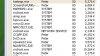
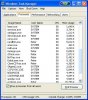
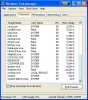
I have taken some screenshots of the processes in taskmanager in the hope that you can spot something wrong going on.
Attached Images
File Type: jpg screen03.jpg (52.3 KB, 35 views)
  #2  
Old 07-20-2003
ptitterington's Avatar
TechSpot Booster
 
Location: Channel Islands
Member since: Feb 2002, 368 posts
cant work out how to insert 3 screenshots doh;
Attached Images
File Type: jpg screen01.jpg (23.4 KB, 22 views)
  #3  
Old 07-20-2003
ptitterington's Avatar
TechSpot Booster
 
Location: Channel Islands
Member since: Feb 2002, 368 posts
and again ... what one post every 75 seconds there must be some fast typers out there...
Attached Images
File Type: jpg screen02.jpg (52.8 KB, 16 views)
  #4  
Old 07-20-2003
olefarte's Avatar
TechSpot Ambassador
 
Location: Arkansas, USA
Member since: Dec 2002, 1,425 posts
System specs
Here's a good place to start, right here at TechSpot. Look at this and see if it gives you any help.
  #5  
Old 07-20-2003
JSR's Avatar
JSR JSR is offline
Banned
 
Location: socal
Member since: Jan 2003, 730 posts
make sure

no programs are loading together with your os at start up.........either msconfig the start up menu, or do as i do and use a start up manager..........if you're os is xp, you can use a tool called bootvis, supplied by msft to expediate boot times
  #6  
Old 07-20-2003
dani_17's Avatar
TechSpot Enthusiast
 
Location: Santo Domingo, Dominican Republic
Member since: Jan 2003, 208 posts
I think you have to many programs starting with your computer. Not "programs programs" but some of theese icons and memory resident programs.

You should take out everything you can. SAgent2.exe, CloneCDTray, InCD, nisum.exe... etc. All of that programs normally have an option to disable the tray icon or the "start up with windows" checkbox. Be aware that any process that starts with windows will increase the time you'll have to wait untill you can use your pc.

Most of the programs like clonecd, kazaa, msn messenger by default start to with windows when you install them. Just think wich programs you will need at startup and which you won't. Clonecd can go out, msn maybe, kazaa can also go, as you won't be using it just at startup.
  #7  
Old 07-21-2003
ptitterington's Avatar
TechSpot Booster
 
Location: Channel Islands
Member since: Feb 2002, 368 posts
thanks for the replies,
Im working my way through.
It would be nice to find an easy way to find out what some things are, I know when I run reg cleaner that I have some unknown registry entries but last time i dumped stuff I had a lot of problems some that did not show up for a while.
  #8  
Old 07-23-2003
ptitterington's Avatar
TechSpot Booster
 
Location: Channel Islands
Member since: Feb 2002, 368 posts
well I have been working through the suggestions win xp through msconfig selective startup and have been checking out each item through pacsportal.co.uk a really good site but have not cut down the startup at all.

Could the main culprit be norton system and internet?

I had a similar problem once before when I had a HD connected but no power to it.

specs.

A7N8X gold duluxe
xp 2400
maxtor 30 gig 7200
maxtor 120 gig 7200
Ti 4200 graphics
onboard sound
IIyama vision master pro 454 19"
usual cd burner, dvd
connected to broadband 24/7
xp home all up to date
Latest bios

Thanks
  #9  
Old 07-27-2003
Mictlantecuhtli's Avatar
TechSpot Special Forces
 
Location: Finland
Member since: Feb 2002, 4,886 posts
System specs
Maybe you have the same hotfix installed?

system running slowly! aaarrrgggghhhh!
  #10  
Old 08-21-2003
ptitterington's Avatar
TechSpot Booster
 
Location: Channel Islands
Member since: Feb 2002, 368 posts
Ill give it a try when I get back from my hols thanks for the link.
Closed Thread

Similar Topics
Topic Replies Forum
Slow startup "running startup scripts" 1 Windows OS
Slow XP startup 33 Windows OS
Very Slow Startup 8 Windows OS
Own Build Desktop slow on startup, slow to open programs 4 Virus and Malware Removal
slow startup 14 Windows OS

Thread Tools Search this Thread
Search this Thread:

Advanced Search
All times are GMT -4. The time now is 06:28 PM.