also @ TechSpot: Nortel's internal network "owned" by hackers for almost a decade
Welcome to the TechSpot OpenBoards. Please read the FAQ if you have any questions. Sign up or Login to participate.

Go Back   TechSpot OpenBoards > Tech Support > Windows BSOD, Freezing, Restarting Help

Download Now:

BSOD error...info inside

Thread Tools Search this Thread
  #1  
Old 01-24-2007
Newcomer, in training
 
Member since: Jan 2007, 13 posts
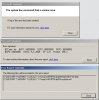
Hello all, I recently bought a used T42 thinkpad laptop. I am getting the infamous BSOD on rare occasions...but about twice a day...when im not running anything intensive, just aim and firefox to the bes tof my knowledge.... it is a Pentium M 1.7ghz with 2GBs of Kingston ram...the ram sticks were in my previous laptop and i simply moved them both to this one....I never had a BSOD once on my previous computer...here is the error, and minidumps, any and all help is greatly appreciated. Thanks in advance!


BCCode : 4e BCP1 : 00000099 BCP2 : 00000000 BCP3 : 00000000
BCP4 : 00000000 OSVer : 5_1_2600 SP : 2_0 Product : 256_1


C:\DOCUME~1\ADMINI~1\LOCALS~1\Temp\WER9754.dir00\Mini012407-02.dmp
C:\DOCUME~1\ADMINI~1\LOCALS~1\Temp\WER9754.dir00\sysdata.xml

I would just like to add something I forgot to mention..

I read something about SoundMAX causing the problem of this sort on microsoft.com

I have SoundMAX and I also have a problem that I dont have sound from my speaker, only headphones when plugged in...and when I adjust the external sound buttons above the keyboard on my T42, it sometimes causes a lag spike so to speak
Attached Images
File Type: jpg error.JPG (40.9 KB, 5 views)
Attached Files
File Type: zip primaMinidump1.zip (64.7 KB, 4 views)
File Type: zip primaMinidump2.zip (62.2 KB, 3 views)

Last edited by howard_hopkinso; 01-26-2007 at 11:52 AM.. Reason: POSTS MERGED: PLEASE USE THE EDIT BUTTON, RATHER THAN MAKING A NEW POST WHEN THERE ARE NO OTHER REPLIES INBETWEEN.
  #2  
Old 01-25-2007
TechSpot Evangelist
 
Location: HK
Member since: Jan 2005, 2,044 posts
Accordiing to the stack trace of the minidumps. I believe that the culpit is ram. Run memtest to stress test the ram.
  #3  
Old 01-25-2007
Newcomer, in training
 
Member since: Jan 2007, 13 posts
alright...i went to download it, its an iso file? so i have to burn the image im assuming? i didnt see a setup file unless im mistaken...i just want to make sure and get the right thing
  #4  
Old 01-25-2007
peterdiva's Avatar
TechSpot Ambassador
 
Location: Western Australia
Member since: Oct 2005, 1,202 posts
System specs
See HERE for instructions.
  #5  
Old 01-25-2007
Newcomer, in training
 
Member since: Jan 2007, 13 posts
Quote:
Originally Posted by peterdiva
See HERE for instructions.

Thank you, that helped. I'm currently running the tests right now and im on a desktop...so far 50% complete and 0 errors..I will post all the results when I am finished with everything
  #6  
Old 01-26-2007
Newcomer, in training
 
Member since: Jan 2007, 13 posts
alright so i ran the memory test, chk disk, set page file to 0 defraged then set it to 1.5 etc etc etc i did the entire thing....everything did come back normal with no errors, and since i did all the i havent gotten the bsod....

im just updating you guys because didnt want to be the average noob that came and leeched for help and left without even saying thank you...

so, thanks for your help!
  #7  
Old 01-30-2007
TechSpot Evangelist
 
Location: HK
Member since: Jan 2005, 2,044 posts
Hi primacarne,

Thanks for your update. Did you reseat the memory module to another memory slot? If you didn't reseat the ram, the root cause is bad paging space.
  #8  
Old 01-30-2007
Newcomer, in training
 
Member since: Jan 2007, 13 posts
actually i did not reseat the ram modules and it was working A OK...but then instead of getting a BSOD i would get random freezes every once in a while....and then all of a sudden yesterday I get the dreaded bsod again.....so as soon as i can locate a can of compressed air im going to open up the laptop clean everything out the best i can and swap the ram sticks after cleaning them...i will update my results in due time
  #9  
Old 02-02-2007
Newcomer, in training
 
Member since: Jan 2007, 13 posts
alright i opened the laptop and switched the ram....so far so good i hope i dont jinx it though lol....and i didnt have compressed air to clean it but it was clean as new inside...not a single spec of dust!!!
Closed Thread

Similar Topics
Topic Replies Forum
Can someone please give me a link to update my video drivers(info inside) 9 Audio and Video
Numerous Crashes/BSOD's... info inside 8 Windows OS
BSOD problem..(minidumps inside) 9 Device Drivers
I fried something trying to install a ram module, info inside 6 Other Hardware

Thread Tools Search this Thread
Search this Thread:

Advanced Search
All times are GMT -4. The time now is 07:30 PM.