Welcome to the TechSpot OpenBoards. Please read the FAQ if you have any questions. Login to participate.
BIG PC Games Problem
|
|||||||
![]() |
| Thread Tools |
|
#1
|
||||
|
||||
|
BIG PC Games Problem
Counter Strike will sometimes load and work for a while but then it loads and freezes or just crashes out of the blue. I use Garry's Mod alot aswell but that usually freezes while loading aswell. I also have GTA 3 and that worked up up until now. All it does is when I click the icon to start it, the little hourglass appears next to the cursor for like a second then nothing happens. None of my games work properly now. It is really weird because before all of them worked totally great, with absolutely no lag at all. I have the latest video card drivers. This happened to me on another user so I made a new one(it had a really cluttered desktop anyways) and then the games all worked. Now they're screwing up again and I have no idea what's happening. PLEASE HELP!
|
|
#2
|
||||
|
||||
|
Hmmm..... So your system could run them but now they dont work? And your sure you installed your latest drivers...
Maybe it's something you did recently to your computer, Do you have viruses or something like Norton Antivirus running? ( Norton can take up ALLLOOOTT of resources making your computer run real slow ) |
|
|
|
#3
|
||||
|
||||
|
I shut off pretty much everything, including my firewall(which also is not Norton).
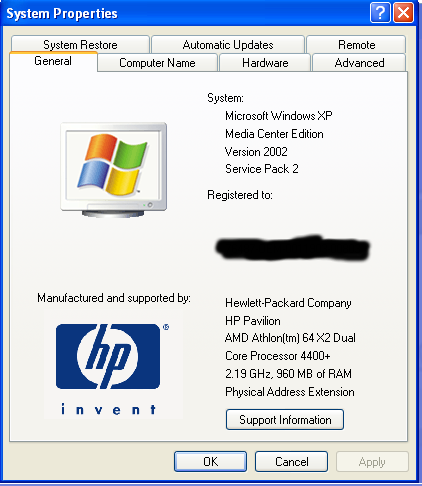
Before it would run all my games and would run absolutely perfect. I could minimize the game and it wouldn't really have an effect. It couldn't be anything I recently did to my computer because this has happened to my twice. Here are my specs. ![]() I have an ATI RADEON XPRESS 200 series video card with the drivers up to date(95% sure). Last edited by Autologic; 03-26-2007 at 03:44 AM. |
|
#4
|
||||
|
||||
|
For GTA3, go to your "My Documents" folder, zip the "GTA3 User Files" folder for backup purposed & then delete the folder. Try running GTA3 again & see if it works (it did for me when GTA3 stopped working for no apparent reason).
|
|
#5
|
||||
|
||||
|
Thanks, I'll try that. Turns out my Steam games only stopped working for a little bit. GTA 3 is still not working though.
|
|
#6
|
||||
|
||||
|
Damn, it was so close. I tried deleting the save files and when I started GTA 3, the screen went black for like 3 seconds then went back. Before I deleted the files nothing would happen exept an hourglass would appear right next to the cursor and now the screen goes black for a couple seconds. That made a difference but I don't know what to do now!
EDIT: It works now. I just put the reolution all the way down to the worst. Seems like it had trouble setting the right resolution, that's why it would go back tot the screen instead of starting. Thanks everybody! Last edited by Autologic; 03-27-2007 at 01:39 AM. |
|
#7
|
||||
|
||||
|
Have you patched GTA3 to 1.1 ? Also try running dxdiag & see what it says.
|
|
|
|
#8
|
||||
|
||||
|
GTA 3 works now, but my Steam games keep freezing. They just randomly freeze too.
|
![]() |
| Thread Tools | |
|
| Similar Topics | ||||
| Thread | Thread Starter | Forum | Replies | Last Post |
| problem with a lot of games | sleonhart | Audio and Video | 6 | 10-10-2006 06:21 PM |
| Serious problem with PC games | Jamestopheles | Gaming and Consoles | 1 | 03-21-2006 08:53 AM |
| Serious problem with games... all games | KShaver | Audio and Video | 1 | 10-04-2005 03:24 AM |
| Problem with lan set-up for playing games | dannyboy_bear | Gaming and Consoles | 2 | 08-19-2005 12:28 PM |
| I have a Problem with my games... | DragonZ911 | Gaming and Consoles | 5 | 07-24-2004 07:31 AM |
All times are GMT -4. The time now is 12:20 AM.