Welcome to the TechSpot OpenBoards. Please read the FAQ if you have any questions. Login to participate.
|
|||||||
Processor Overheating?
![]() |
|
|
|
Thread Tools |
|
#1
|
|||
|
|||
|
Processor Overheating?
After trying to figure out what the hell is wrong with my computer i think i narrowed it down to the processor. When i run a program called SpeedFan it tells me (after playing a high-end video game) that my "core" is overheating so i assume this is my processor. The side of my case is off and i have blown condensed air all inside the computer.
Should I reformat? IS the core = processor? Should i try to take off the heatsink even though i don't know how haha |
|
#2
|
|||
|
|||
|
Hi
I would make sure speedfan is referencing the cpu or the gpu, gpu being the vid card core, cpu being your system core processor. If it's the cpu overheating, I would look into a better hsf. What symptoms does the system display other than heat? |
|
|
|
#3
|
||||
|
||||
|
I agree with Blakhart above
! What is the temperature report? Also remember for the GPU Core; it's not unusual to have it running at extremely high temperatures. Also make sure that your fans for everything in your computer are on, and on correctly. Also, go into your BIOS (usually by hitting Delete on startup or one of the F keys), and see if you can read the temps in there. Good Luck ! |
|
#4
|
||||
|
||||
|
software temp programs like speedfan are not accurate. it is not uncommon for them to read as much as 10°C or more off the actual temp (+ or -), I've seen speedfan report more than a 15°C difference from what my BIOS and hardware display reads).
the BIOS is more reliable than any windows program. however, the problem with the BIOS temp reading is that your processor isn't really doing anything. never-the-less you can still use it to try and match temps in programs like speedfan. write down the CPU and system temps that your BIOS displays, then boot up and try to match them to what speedfan says to see what is what. also, try another program like MM5 or Everest and see what they read. cheers ![]() |
|
#5
|
|||
|
|||
|
hmmm...well hypothetically lets see it was overheating..how do i fix it?
and if its not overheating..then why does my computer randomly freeze..like first my game or a program will freeze..then my mouse and music or whatever sounds that are playing |
|
#6
|
||||
|
||||
|
This could also be a power supply unit issue. Check out the link in my signature and tell us both your wattage, and amps on the +12V Rail....also tell us how old it is as well. Good Luck
! |
|
#7
|
|||
|
|||
|
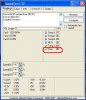
Here is an image of the speedfan, and the red circled one is what usually turns into a flame when i am playing Guild Wars
|
|
#8
|
||||
|
||||
|
Quote:
|
|
#9
|
|||
|
|||
|
The -5V and -12V rails are completely off. This might have something to do with your freezing.
But just to make sure its not overheating, it might be a good idea to stress your CPU and take a temp reading AT MAX. This means running a program (orthos is good) and let it run for maybe 5 mins, or whenever the CPU temp doesn't seem to go up for a significant amount of time (1 minute?). Given that its also a great program to test for stability, maybe you'd be interested in running it for a much longer period of time (measured in hours), but its obvious your computer's not stable, so run it for as long as you can, and take a reading. And if you need to refer to whats normal temp, there's a good list I just added to my overclocking guide. |
|
|
|
#10
|
|||
|
|||
|
I ran a program that tested my video card max power. Sigh...I don't know exactly what i need to do. can anyone give me a play by play on what i need to ****ing do before i hit this computer with a bat?
|
|
#11
|
||||
|
||||
|
Check my guide that is linked in my signature and tell us your PSU Specs! Good Luck
! |
|
#12
|
|||
|
|||
|
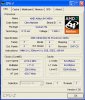
here ya go.
|
|
#13
|
||||
|
||||
|
Hmm, no
![]() We need you to take a look at your Power Supply Unit (PSU). Tell us how many amps it has on the +12V rail(s). That info is usually located on its sticker ![]() |
|
#14
|
||||
|
||||
|
Okay, follow the pictures below to locate the Power Supply Unit (PSU) in your computer to give us the specs shown:
This is the location of your PSU ![]() These are the things we need to know from the PSU Label ![]() |
|
#15
|
|||
|
|||
|
My Power supply has 0 stickers on it describing what your looking for. However on the box it says
Aluminum & Arcrylic Moded Gaming Power Supply Support Intel ATX 12V Ver 1.1 & 2.03 Standard Compliant with AMD Athlon K7 Dual Led Fans for Cooling Improvment Work with Always "on" applications Comply with FCC req. State of the art circuit design and clean PCB layout |
|
#16
|
|||
|
|||
|
Quote:
|
|
#17
|
|||
|
|||
|
Well, I built this pc but awhile ago I don't remember...It's Glaciar brand I think
|
|
#18
|
|||
|
|||
|
ALRIGHT! I found it!
It was on the top part covered by the case. Logisys MAX OUTPUT POWER: 500W Model: PS5000CLA 12V ATX Power Supply Output: +3.3v +5v +12v -12v -5v +5vSB Max(A): 30A 50A 25A 0.8A 0.5A 2.0A AC Input: 100v-127v/6A 60Hz 200v-240v/3A 50Hz This is everything...now what |
|
#19
|
||||
|
||||
|
That PSU should be good enough for your system.
Try reseating the CPU's heatsink, and apply fresh thermal compound (preferably Arctic Silver 5 or another good one). Make sure it's properly installed. |
|
#20
|
|||
|
|||
|
Yeah..i know this sounds dumb but i don't remember how to take off the heatsink. and i don't know what this thermal compound does. Are we positive that its my gfx card overheating? or my CPU? My computer usually only freezes when entering Guild Wars or during game play..and each time i restart my computer and go back into the game i get less and less game time in
|
![]() |
| Thread Tools | |
|
|
| Similar Topics | ||||
| Topic | Category | Replies | Last Post | |
| CPU overheating | Processors, Chipsets and Motherboards | 6 | 05-21-2007 04:24 AM | |
| PC Overheating I think | Overclocking, Cooling and Modding | 9 | 04-28-2006 11:26 AM | |
| pc overheating | Processors, Chipsets and Motherboards | 1 | 03-30-2006 05:55 PM | |
| Video card, Processor overheating problems. | Overclocking, Cooling and Modding | 10 | 09-16-2005 02:30 PM | |
| Pc Possible Overheating | Overclocking, Cooling and Modding | 10 | 08-06-2005 11:22 AM | |
All times are GMT -4. The time now is 06:33 PM.


! What is the temperature report? Also remember for the GPU Core; it's not unusual to have it running at extremely high temperatures. Also make sure that your fans for everything in your computer are on, and on correctly. Also, go into your BIOS (usually by hitting Delete on startup or one of the F keys), and see if you can read the temps in there. Good Luck
!