|
#1
|
||||
|
||||
|
Vista Transformation Pack 6.0 Final
Vista Transformation Pack is a program that changes system and registry files to transform the looks of XP into Vista/Vista Basic.
I will give a ratings out of 5, 5 being best, 1 being worst. Ease of Installation: 4 It is pretty easy to install, aside from the fact that if you are running a large DPI text, you won't be able to read a certain few windows that appear. This can cause some confusion, so lower your DPI before you start this! Ease of Use: 5 This program is surprisingly easy to use once installed. A few programs appear in the task bar that you can use to change many visual preferences. Features: 5 This thing has so many things it's hard to list them all. It has the sidebar, Icon changes, Task bar changes, and window changes that make it look very much like a real Vista OS. Bugs: 1 This is the downfall of this program. I am not sure if this will occur on all systems, but it did on mine, which is why I no longer use this program. First of all, attempting to use Dual monitors and changing primary desktops might as well have crashed the computer. If you have Dial Up, or anything you need to hover over in the task bar to view the text, good luck. None of mine worked aside from the clock. It also caused problems with a few minor things that drove me nuts. If you hate little stuff going wrong, I wouldn't think about downloading/installing this program. Performance:3 This takes up a decent, yet still too large amount of system resources. It can, and will, cause lag in games such as CNC Generals and Company of Heroes. If you are a gamer, and don't have a high end system, I don't recommend this. If you just use it for net/email, then I do recommend it. Over all, I'd say it would get a 3.5/5 because of all of the bugs, and the fact that it caused the games to lag pretty bad. Thanks for reading my review, as this is my first review. Mopar Man 44 Last edited by mopar man; 06-12-2007 at 10:04 PM.. |
|
#2
|
||||
|
||||
|
Nice review
! The only thing that I don't like about the transformation packs is that they change registry files :eek: . |
|
|
|
#3
|
||||
|
||||
|
Per your post I know you have already uninstalled the Transformation Pack but I thought I would still ask if at all possible if you could post a few screenshots showing off the effects using the pack.
|
|
#4
|
||||
|
||||
|
Just so mopar doesn't have to reinstall it, I'll take some pics of my friends computer, which has it
. |
|
#5
|
||||
|
||||
|
Thanks cfitzarl, but I can get him some. If you still want to, you can (of course)!
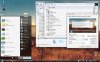
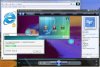
Note that these are not from my comp, and are v.5.5, but looks just like 6 to me. I really don't see a difference. To get the start button to go above the task bar, there is another program you must download, but luckily right after the install it tells you about it. |
|
#6
|
||||
|
||||
|
Nice review mopar man. I'm tempted to try it, though I think my specs would probably be unable to handle it lol.
|
|
#7
|
||||
|
||||
|
Actually momok. looking over your specs, I think you should try it. 512 should be enough.
Thanks btw. |
|
|
|
#8
|
|||
|
|||
|
If I didn't run Linux regularly I might be tempted to try it
![]() Nice review though. If I get tired of Ubuntu and go back to XP I might use it. |
|
#9
|
||||
|
||||
|
I'm probably going to go buy a crappy $50 computer and install linux so I can learn a new OS
![]() |
|
#10
|
||||
|
||||
|
Version 8 is more stable than 6.0 was...I use it so far so good for a few months now.
|
|
#11
|
||||
|
||||
|
Errr, Tipstir, just so you know, you quadruple posted......
(And I thought Geometry would never leave school) :P :X :/ Wait a second.......... Anyway, I thought they meant they wouldn't have anymore releases after 6.0final.... |
|
#12
|
||||
|
||||
|
Vista Transformation Pack 8.0.1
Quote:
Not too often.. Anyway... That's the pitch!~ Get the Vista Transformation Pack 8.0.1 today! It's on Windows X's Shrine 8.0.1 http://www.windowsxlive.net/?page_id=15 Well it seems to work very well.. Looks very well down also. You can choose to integrate the pack into XP, but that's a no going back deal though. Or just layer XP kernnel with that pack. Then you can always remove it. I did that on 3 systems then removed it. One the icons for all Vista stick around, because I wasn't there to watch the uninstall and my firewall found some activity it was trying to call home (this pack) and blocked it, but I kind of like the icons better in Vista for drives look 3d than prior XP or XP MCE. I only run this one the best laptop in the house. I did try some old DELL D600 series PIII 1GHz and 850MHz both have faster HDDs and memory that's why they can run this stuff. Anyway they work great you don't get some features like the Window Objects for the clock, an etc.. So one system has it no problems with it.. Nice backgrounds. There is no Screensavers for it. I found another guy who made screensavers for Vista worked okay then I had not screensavers again. So that was pulled. Vista Ultra Screensaver it was called suppose to work on XP hey right... Last edited by tipstir; 02-28-2008 at 04:26 PM.. |
|
#13
|
||||
|
||||
|
I use 6.0 on my laptop, but I cannot get any later versions to work. I suspect it is due to my integrated graphics on my laptop. 8.0 simply will not install.
|
|
#14
|
||||
|
||||
|
Cool
Ive looked into changing XP to look like Vista and all ive been able to do is change my themes into vista themes. Looks nice and doesnt lag, even on a really crappy computer. Its just like an xp theme that looks like vista.
Email at hfhfdjsk at gmail if you want it oh right how can you get the Vista window flip on xp withought the transformation pack? My comp can't handle it first and most importantly. I also hesitate because it seems so extreme.... i dont wanna have my regestry changed! Does system restore get rid of it? How easy it it removed? i know there are programs that sorta do that but their not very good. Gliches and crap like topdesk by otaku software and Shock Aero by some wereird guy lol Last edited by hellokitty[hk]; 03-01-2008 at 04:11 PM.. |
|
#15
|
||||
|
||||
|
6.0 doesn't have a windows aero flip. It is basically just a theme change. Also I was able to change my start up splash screen.
|
|
#16
|
||||
|
||||
|
hmm that doesnt sound as large as i thought it was i can do that on my computer with my vista themes. Just not the startup screen. Well i found the startup screen picture in my windows directoy and i changed the black to white but i didnt watch the startup don't know if it did anything.
How large is the download? @#*($ i like the aero flip thingy |
|
#17
|
||||
|
||||
|
both 6.0 and 8.0 are rather large.
6.0 is 30.2MB |
|
#18
|
||||
|
||||
|
Hmm...oh thats not as bad as i thought. i thought it would be almost in the hundreds. like a third pary service pack lol. My computer already looks like vista, except no vista aero flip and no altered startmenu for my current theme but i think it does for some other themes. i gues i dont really need this...... i thought it would be more than that.
|
|
#19
|
||||
|
||||
|
I like the new look, except I don't like the thumbnail pop-ups on the bottom toolbar. I still don't know how to permanently turn them off.
|
|
#20
|
||||
|
||||
|
Quote:
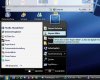
In 8.01 you get WinFlip which replaces task manager, but you really don't have to use 8.01 to get WinFlip to work. I can only get these vista packs to work on laptops when it comes to desktop they go screwy. I just removed 8.01 from my video production box. I was able to get WinFlip installed and just press alt-tab and have the same effect you get in vista like this below in xp without the vista pack: ![]() |
![]() |
| Thread Tools | |
|
|
| Similar Topics | ||||
| Topic | Category | Replies | Last Post | |
| Question about Vista Transformation Pack 6.0 FINAL | Other Software & Utilities | 0 | 06-07-2007 07:47 PM | |
| vista transformation pack 6.0 | Windows OS | 1 | 01-19-2007 09:52 AM | |
| I cannot unistall Transformation Pack 9 | Windows OS | 0 | 11-21-2005 07:57 PM | |
| Longhorn Transformation Pack, is it safe? | Other Software & Utilities | 1 | 06-17-2005 09:25 AM | |
| Longhorn Transformation Pack | Other Software & Utilities | 1 | 09-21-2004 02:56 PM | |
All times are GMT -4. The time now is 04:08 PM.


! The only thing that I don't like about the transformation packs is that they change registry files :eek: .
.