Welcome to the TechSpot OpenBoards. Please read the FAQ if you have any questions. Login to participate.

Go Back   TechSpot OpenBoards > Hardware & Tweaking > Mobile Computing

Advent 7086 Overheating, your opinions and help, please.

Reply
Bookmark / Share this page
Thread Tools
  #1  
Old 06-20-2007
Absinthe Minded's Avatar
Newcomer, in training
 
Member since: Mar 2007, 29 posts
Advent 7086 Overheating, your opinions and help, please.

Hi all,

I'm repairing the above laptop for a friend - it seems to be overheating and shutting itself down.

Normally, Word, Outlook Express and an internet connection is running, nothing demanding in terms of video runs, i.e.games, etc.

The laptop gets hot above the keyboard, nearly too hot to touch at times - sometimes it runs longer than others before it shuts down but it's generally about an hour. Yesterday, it was running the O/S only, i.e. no open programs and it shut itself down.

Fan is running and I've cleaned out the heatsink (not that it was dirty / dusty), and I've applied a dab of thermal paste to the CPU.

Also, system is running very slowly at times, Word is the biggest problem, it constantly hangs and has error messages, accessing the internet is so slow - It can take minutes to load up, search and load pages, 'AntiVir' Antivirus is installed and updated with no detections.

System info is as follows:

Advent 7086.
40GB HDD (about 30GB free)
Win XP O/S
256MB RAM (but 32MB is allocated to graphics)
System age is approx 15 months
1.4GHz CPU.

Any help much appreciated as usual, if you need any more info, or questions answered, just let me know.

Thanks,
AM.

Last edited by Absinthe Minded; 06-20-2007 at 06:27 AM.
Reply With Quote
  #2  
Old 06-21-2007
TechSpot Enthusiast
 
Member since: Jan 2007, 469 posts
Can you tell directly where the heat is comping from? Like close to a specific part?
Reply With Quote
You can remove this banner by registering, join the TS Community for free.
  #3  
Old 06-21-2007
Newcomer, in training
 
Member since: Jun 2007, 42 posts
get a "nitrogen" cooling system!!!


lol
Reply With Quote
  #4  
Old 06-21-2007
TechSpot Enthusiast
 
Location: Odessa,Ukraine
Member since: Jun 2007, 467 posts
try the mobilemeter program. it can help to know the real temperature of the CPU. if the temp is higher than 70 degrees during the normal work - it's abnormal.
Reply With Quote
  #5  
Old 06-22-2007
Absinthe Minded's Avatar
Newcomer, in training
 
Member since: Mar 2007, 29 posts
gavin,

seems to be coming from above the keyboard (near the hinge that connects the monitor). It's hot all along this section and I know that the cpu is housed underneath on the left. Maybe the heat is conducting along to make the whole of the top section hot.

lamo, I'll get the program, run it, and let you know. Have you a link to it and is it free?

Thanks to you both for taking the time to help me out.

All the best,
AM.
Reply With Quote
  #6  
Old 06-22-2007
TechSpot Enthusiast
 
Location: Odessa,Ukraine
Member since: Jun 2007, 467 posts
yes, it's free. try the Google
Reply With Quote
  #7  
Old 06-23-2007
Absinthe Minded's Avatar
Newcomer, in training
 
Member since: Mar 2007, 29 posts
Hi lamo, thanks - got the download but it is unable to monitor cpu on this laptop. It says something about only being able to measure temperature when ACPI is being used. I looked in the BIOS but found nothing - anything else I can do?

Also, another problem lately, if I plug a USB device in, it sometimes shuts the sytem down instantly - this is getting weirder and weirder. Maybe it's a software error?

Thanks,
AM.
Reply With Quote
You can remove this banner by registering, join the TS Community for free.
  #8  
Old 06-23-2007
TechSpot Enthusiast
 
Location: Odessa,Ukraine
Member since: Jun 2007, 467 posts
well, sometimes the mobilemter don't recognize the thermal monitor system on certain notebooks. you can try everest, but i have some doubts that it can shows the CPU temp too.you can disassembly your notebook and see if there is a dust or something like felt in the radiator rifflings. if so - remove it, don't forget to renew the thermal paste.BUT! if your notebook keeps shutting down when you plug in the USB devices - the southbridge chip(fw82801DBM or NH82801FBM) may be broken and you need to replace it. this procedure can be made only in service center with corresponding equipment and it's quite expensive.
Reply With Quote
  #9  
Old 06-23-2007
TechSpot Enthusiast
 
Location: Odessa,Ukraine
Member since: Jun 2007, 467 posts
also, tell me the exact model of notebook(especially the vendor and the model code)
Reply With Quote
  #10  
Old 06-23-2007
Absinthe Minded's Avatar
Newcomer, in training
 
Member since: Mar 2007, 29 posts
Hi lamo,

Thanks for your continued help - really very nice of you!

Here's the spec from the bottom of the laptop:

Make: Advent
Model: 7086 321-Series
There's a barcode with a long number, I assume this is the serial no.
It's: 98F61000072Q60202888.

Under System Properties (My Computer/Properties) we have:

Advent
7086
Intel[R] Celeron[R] M
processor 1.40GHz
1.40GHz, 224MB of RAM

Not sure if all that's any help to you.

Interesting what you say about the USB fault - I do wonder if it's worth just buying a new laptop as it's in pretty bad shape for a 15 month old machine. There are buttons missing and most of the screws for the casing are missing. Add to that the shutdown problem, possible southbridge repair......

You mention radiator rifflings - are these on the cpu heatsink? If so, I've already cleaned them. Would dust anywhere esle in the machine cause it to shut down like this? If so, I'll take the whole thing apart for inspection.

Cheers,
AM.

Last edited by Absinthe Minded; 06-23-2007 at 09:14 AM.
Reply With Quote
  #11  
Old 06-23-2007
TechSpot Enthusiast
 
Location: Odessa,Ukraine
Member since: Jun 2007, 467 posts
well, can you tell me, what the chipset the notebook has? if Intel, it can be the southbridge problem. the USB contacts are going right into the southbridge chip(except 5v and GND of course ), thus, if you have shutting down device during USB connection - 90% that this is a southbridge faulty. the faulty which appears due to the statical electicity.
Reply With Quote
  #12  
Old 06-23-2007
Absinthe Minded's Avatar
Newcomer, in training
 
Member since: Mar 2007, 29 posts
Hi lamo,

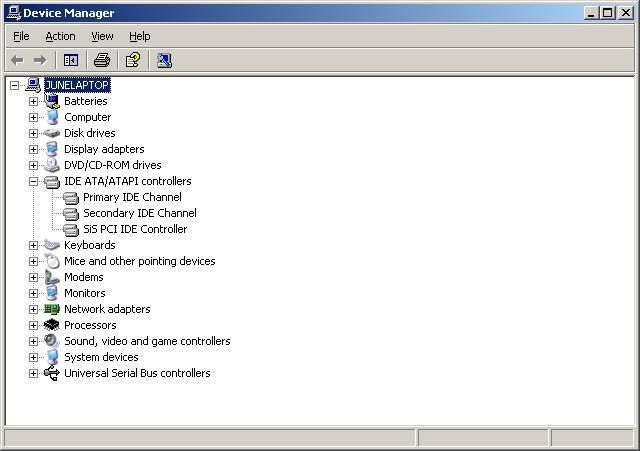
I'm looking in Device Manager.

Also, I notice a lot of ACPI entries in there - does this mean I can enable it to check CPU temp?
All that said, I've had the laptop running all day today and it hasn't shut down once!
Maybe it's fixed itself (but I doubt it)!

Edited to remove useless pic!

Last edited by Absinthe Minded; 06-23-2007 at 04:41 PM.
Reply With Quote
  #13  
Old 06-23-2007
TechSpot Enthusiast
 
Location: Odessa,Ukraine
Member since: Jun 2007, 467 posts
actually, you should go to control panel/system/device manager/IDE-ATAPI controllers and look to the first entry. it can be intel controller or AT controller.
Reply With Quote
  #14  
Old 06-23-2007
Absinthe Minded's Avatar
Newcomer, in training
 
Member since: Mar 2007, 29 posts
Here?

Reply With Quote
  #15  
Old 06-23-2007
TechSpot Enthusiast
 
Location: Odessa,Ukraine
Member since: Jun 2007, 467 posts
yepp! SIS ide controller! reballing will helps you! it's typical problem. and the ODM manufacturer of your machine is probably Uniwill.
Reply With Quote
  #16  
Old 06-23-2007
Absinthe Minded's Avatar
Newcomer, in training
 
Member since: Mar 2007, 29 posts
Hi lamo,

Thanks for taking a look at that for me.
A bit confused by your post,

reballing: do you mean re-installing?
Uniwill: do you mean uninstall?

Cheers,
AM.
Reply With Quote
  #17  
Old 06-23-2007
TechSpot Enthusiast
 
Location: Odessa,Ukraine
Member since: Jun 2007, 467 posts
=)
reballing - is the process of repairing BGA balls of the chip(i.e. SiS southbridge). it can be done only if you have the needed equipment(the reballing board, and the special IR soldering station). I can't tell you the technology because this is "classified" information. but i'm sure, that there are some service centers in your country or city that can do right diagnostics and can do those things i've described.and of course - this procedure is quite expensive.
well, or course i can make mistakes, saying that the problem is really in the bad southbridge(or northbridge!!)BGA soldering. I can't do the complete diagnostics of your machine distantly but all symptomes tell me that this is soldering problem.
Uniwill - is the ODM manufacturer of your notebook. I mean, that the company named "Advent" is not real manufacturer of your machine.
Reply With Quote
Reply
Thread Tools

Forum Jump

Similar Topics
Thread Thread Starter Forum Replies Last Post
Advent 7038 Willie Small Other Hardware 9 02-14-2008 06:38 PM
Advent T1 Problems (Shutsdown) mscwd Windows OS 5 08-26-2007 02:13 PM
I need spares for an Advent 7086 laptop. Absinthe Minded Other Hardware 0 06-14-2007 06:53 PM
Advent 7038 laptopprobarm Storage & Networking 1 04-15-2006 11:17 AM
How to upgrade RAM in Advent 7012? Pal CPUs, Chipsets and Mobos 4 04-24-2005 06:50 PM


All times are GMT -4. The time now is 10:29 AM.