
Phantasm66
Posts: 4,909 +8
Okay, in this post I am going to tell you how to install Ximian GNOME for linux.
http://www.ximian.com/
In my example I used Red Hat Linux 7.2 but everything should be fine for lots of other *IX operating systems. In fact, Ximian GNOME runs on the following:
Debian Linux.
Mandrake Linux.
Solaris 8 for SPARCS (don't know about Intel...)
SUSE Linux
Yellow Dog Linux....
And of course Red Hat Linux.
....and I am sure that it installed on FreeBSD as well, but don't quote me on that. I've seen it on the web site, but when I have just checked here it was gone.
Now, in order to do this, you will need three things I should imagine:
1)A working OS installed from the list above.
2)A nice fast Internet Connection. You 56Kr's can try it, but I think you are pushing it a bit
3)Lets say (being generous) 500 MB free disk space on your linux partition.
With all of these three things in place, and connected to the net, open and terminal window and type this:
su -
(This will let you become root. the " - " bit makes it carry root's environment - such as PATH - as well, its good practice.)
Now, if you have to go through a proxy server where you are (such as work) then you will have to tell the command prompt about that as well, so export is as an environment variable like this:
export http_proxy="http://myproxy.mydomain.com:8080/"
where myproxy.mydomain.com is your http proxy server, and 8080 is the port. you can get all of this info from your browser's network connection settings if its needed.
you enter this command:
lynx -source http://go-gnome.com/ | sh
This will use Lynx to download the install script and then pipe it into sh for execution.
Isn't this stuff cool??
This will then lead you to a series of simple questions, the most important of which is which mirror site to download the installer software from. Pick one that looks near to you.
When the installer software has finished downloading it will execute. Again, this is just a series of simple questions. Tell it about an http proxy if needed, and also what mirror site and how much of XIMIAN GNOME you want to install. I would just take the whole thing.
If you do take the whole thing, I think it was about a 250 MB download or so. So go and watch the TV or something, unless you manage to hit it lucky and get a great connection.
When it has finished downloading and installing it will tell you. Restart your X session, or just reboot if you are not sure how to do that.
A Doorman will ask for your username, e-mail, etc, when you start up. Again its easy.
What can you do now??
Well, XIMIAN is a lot cooler an interface in my opinion to a lot of those bundled with some Linux versions.
But one of its strength is a program called Red Carpet (go to top pull down menu and click SYSTEM, choose "GET SOFTWARE").
Red Carpet is a bit like a cross between Add Remove programs and http://windowsupdate.microsoft.com but for Linux. You can add and remove programs as well as download and install new ones. Subscribe to all of the channels, and see what's there! Plenty of games, software, all kinds of stuff....
It will keep you up to date with XIMIAN stuff but also Red Hat updates, and so forth, as well.
Have a good look and have fun! Its a great GUI in my opinion...
http://www.ximian.com/
In my example I used Red Hat Linux 7.2 but everything should be fine for lots of other *IX operating systems. In fact, Ximian GNOME runs on the following:
Debian Linux.
Mandrake Linux.
Solaris 8 for SPARCS (don't know about Intel...)
SUSE Linux
Yellow Dog Linux....
And of course Red Hat Linux.
....and I am sure that it installed on FreeBSD as well, but don't quote me on that. I've seen it on the web site, but when I have just checked here it was gone.
Now, in order to do this, you will need three things I should imagine:
1)A working OS installed from the list above.
2)A nice fast Internet Connection. You 56Kr's can try it, but I think you are pushing it a bit
3)Lets say (being generous) 500 MB free disk space on your linux partition.
With all of these three things in place, and connected to the net, open and terminal window and type this:
su -
(This will let you become root. the " - " bit makes it carry root's environment - such as PATH - as well, its good practice.)
Now, if you have to go through a proxy server where you are (such as work) then you will have to tell the command prompt about that as well, so export is as an environment variable like this:
export http_proxy="http://myproxy.mydomain.com:8080/"
where myproxy.mydomain.com is your http proxy server, and 8080 is the port. you can get all of this info from your browser's network connection settings if its needed.
you enter this command:
lynx -source http://go-gnome.com/ | sh
This will use Lynx to download the install script and then pipe it into sh for execution.
Isn't this stuff cool??
This will then lead you to a series of simple questions, the most important of which is which mirror site to download the installer software from. Pick one that looks near to you.
When the installer software has finished downloading it will execute. Again, this is just a series of simple questions. Tell it about an http proxy if needed, and also what mirror site and how much of XIMIAN GNOME you want to install. I would just take the whole thing.
If you do take the whole thing, I think it was about a 250 MB download or so. So go and watch the TV or something, unless you manage to hit it lucky and get a great connection.
When it has finished downloading and installing it will tell you. Restart your X session, or just reboot if you are not sure how to do that.
A Doorman will ask for your username, e-mail, etc, when you start up. Again its easy.
What can you do now??
Well, XIMIAN is a lot cooler an interface in my opinion to a lot of those bundled with some Linux versions.
But one of its strength is a program called Red Carpet (go to top pull down menu and click SYSTEM, choose "GET SOFTWARE").
Red Carpet is a bit like a cross between Add Remove programs and http://windowsupdate.microsoft.com but for Linux. You can add and remove programs as well as download and install new ones. Subscribe to all of the channels, and see what's there! Plenty of games, software, all kinds of stuff....
It will keep you up to date with XIMIAN stuff but also Red Hat updates, and so forth, as well.
Have a good look and have fun! Its a great GUI in my opinion...
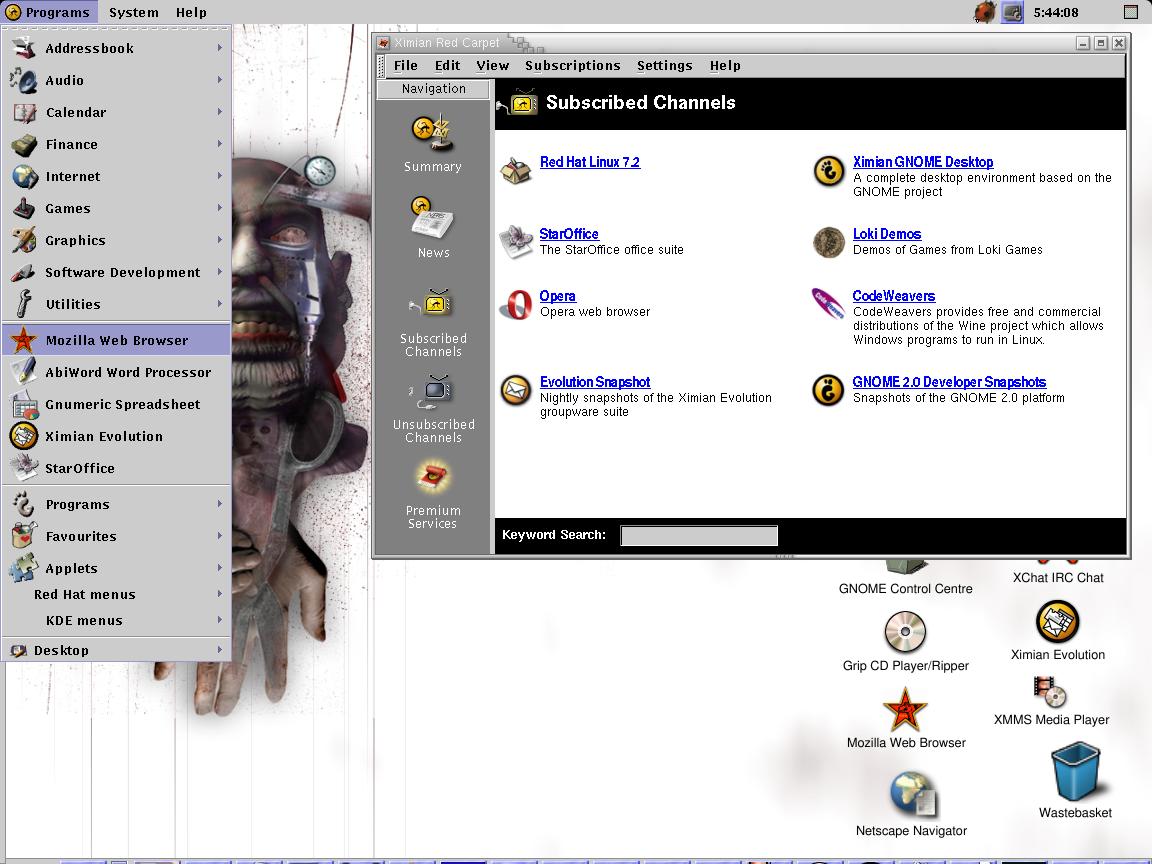

 icon driven interface Linux has resorted to?


