Welcome to the TechSpot OpenBoards. Please read the FAQ if you have any questions. Login to participate.
Crysis Demo my video! tell me what y'all think
|
|||||||
![]() |
| Thread Tools |
|
#1
|
||||
|
||||
|
Crysis Demo my video! tell me what y'all think
http://www.gametrailers.com/player/u...es/123102.html
Running this game on everything max except shadow on my 2 year old rig without a slow down or shutter, but if Frap is on there would be a slightly ljerkness. Give this game a try on yall system and see if your PC can play it. Beautiful FPS game i must say! ^_^ |
|
#2
|
||||
|
||||
|
Nice, my system has it as low (lol) but Imma see if I can turn things up. Also this is the first game that still looks beautiful on low settings.
*Edited* - I now have them on Med and high.... Sweet... Last edited by Nick Lee; 10-28-2007 at 01:37 PM. |
|
|
|
#3
|
||||
|
||||
|
I saw quite a bit of stutter, but whatever... nice run!!!
BTW:Are you running on XP or Vista? |
|
#4
|
||||
|
||||
|
I couldnt get it to run at 1600x1200 with Athlon X2 5000 and 7900GTs in SLI. Hopefully its just a driver issue. I can play Bioshock with everything on high.
|
|
#5
|
||||
|
||||
|
Very nice.
|
|
#6
|
||||
|
||||
|
Quote:
![]() My specs are the same as yours except I have 512mb RAM so I might have to play with medium instead of max like you |
|
#7
|
||||
|
||||
|
You're playing on High in DX9 yeah? Is shadows the only thing you've turned off, I don't see motion blur when you turn quickly and it doesn't seem to look like mine does on high. I have Q6600 Quad core, 2900PRO, 2GB RAM and I play on high in DX10 and it runs very well but the game slows down a lot when I turn! It does this on all settings, low/medium/high/very high so I have my fingers crossed its a driver issue (I read 2900XT/Pro suck in crysis at the moment)
|
|
|
|
#8
|
||||
|
||||
|
Doesnt really look all that impressive to me, I think bioshock still has the best graphics currently.
|
|
#9
|
||||
|
||||
|
You can't really tell graphics quality when you are watching something shrunk down to that size and converted to flash.
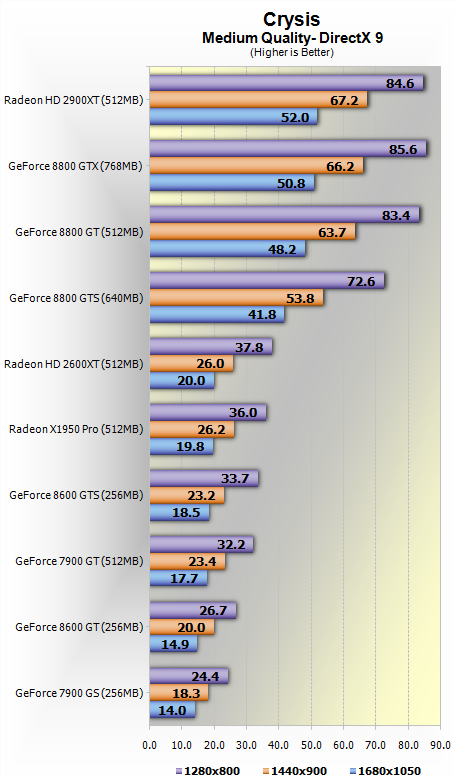
I'm interested in how you got it to run on 'max' settings. I've got an 8800GTS and while I only played it at 1280x800 I had the game do a best guess for my hardware and it defaulted everything to Medium, with possible choices of Very High, High, Medium, and Low. Based on how it played I think I could get by with either 1440x900 on Medium, or bump most or all of the things to High at 1280x800. But I certainly don't expect a 1900XT to do that well. Not bashing your card, but it shouldn't be running it all that well unless you really killed the resolution. From the TS Review ![]() As you can see the 1950 is quite a bit below the 8800GTS. Other benchmarks (as you can see in the review) follow similarly. |
|
#10
|
||||
|
||||
|
I need to put my card to some use. I play one online game and I still feel like my card is collecting dust.
|
|
#11
|
||||
|
||||
|
Quote:
![]() |
|
#12
|
||||
|
||||
|
Quote:
For those that wanna watch a real in-game video without compression, dl this High Quality video (99MB) here: Made by tweakguides.com owner. http://www.megaupload.com/?d=GDRO6NWK Quote:
i sorta killed the solution.I always set my resolution to 1024x168 [ Running on Window XP Pro btw] ss: ![]() and my advance setting look like this, try that on your system and see if it can run on all high except turning off shadow and Postprocessing Quality. ss: ![]() when Frap is off, shutter or lag won't be notice much unless the game doing their checkpoint auto saving. PS. i wonder if adding other gig of ram, will it reduce the shutters when Frap is activated? Last edited by Condor; 10-30-2007 at 04:46 PM. |
|
#13
|
||||
|
||||
|
Quote:
The game just sees the extra resources and gobbles them up too! Maybe going from 1gb to 2gb won't have this effect... I get around a 25% framerate drop when I'm recording, if I just look in a single direction I can record at 20-30fps but as soon as I start turning it drops to 10-15fps! (and it looks like even less to me...)Last edited by Schmutz; 10-31-2007 at 08:19 AM. |
|
#14
|
||||
|
||||
|
Quote:
Edit: Almost forgot, CPU usage during gameplay looks different than I'd expect. Early on I paid attention to what was happening and one CPU core was full of spikes, taking it from 60-95%, while the other core was much lower. Average usage was around 55%. Later on in the game though, the core that was lower usage before had increased, not sure whether this is due to the game better using both cores... or whether Windows felt like it needed to do some stuff in the background. I think the high core did drop some, because I don't recall seeing overall CPU usage up any significant amount. Last edited by SNGX1275; 10-31-2007 at 02:31 PM. |
|
#15
|
||||
|
||||
|
i heard they disable sli/crossfire on the demo, but not sure getting the most from duo core.
|
![]() |
| Thread Tools | |
|
| Similar Topics | ||||
| Thread | Thread Starter | Forum | Replies | Last Post |
| Crysis Demo Locking Up | Wolvman | Gaming and Consoles | 13 | 10-31-2007 07:03 PM |
| Crysis Demo Coming Next Month | Maikeru | Gaming and Consoles | 4 | 08-29-2007 08:37 PM |
| curiosity crysis | shalashaska123 | Audio and Video | 1 | 08-11-2007 10:27 PM |
| CRYsis Officail release date | Rilla927 | News & Interesting links | 0 | 08-04-2007 12:17 PM |
| Will My Computer Run Crysis? | Dilmog | Gaming and Consoles | 8 | 11-24-2006 02:51 PM |
All times are GMT -4. The time now is 08:19 AM.


i sorta killed the solution.

The game just sees the extra resources and gobbles them up too! Maybe going from 1gb to 2gb won't have this effect... I get around a 25% framerate drop when I'm recording, if I just look in a single direction I can record at 20-30fps but as soon as I start turning it drops to 10-15fps! (and it looks like even less to me...)