You are using an out of date browser. It may not display this or other websites correctly.
You should upgrade or use an alternative browser.
You should upgrade or use an alternative browser.
Blue Screen STOP: 0x0000007B (OxF8968640, 0xC0000034, 0X00000000, 0x00000000)
- Thread starter fbm2themex
- Start date

fbm2themex
Posts: 16 +0
how can i create minidumps???
but the problem is i cant even go 2 the desktop n the computer im building...it keeps going to the blue screen every time i try to install xp...
but the problem is i cant even go 2 the desktop n the computer im building...it keeps going to the blue screen every time i try to install xp...
howard_hopkinso
Posts: 21,238 +17
Hello and welcome to Techspot.
What do you mean by "I have the same problem"? Are you trying to use your old hard drive with a new motherboard?
If the hard drive already has Windows installed, it wont work with your new mobo. This is because it will still have the old mobo drivers on it and will make the Windows intallation incompatible with the new mobo.
There are two possible ways to fix this.
One is to try a Windows repair as per this thread HERE.
If that doesn`t help. You will need to reformat the hard drive and reinstall from scratch.
If that`s not what you mean. Can you be a little more specific?
Regards Howard :wave: :wave:
fbm2themex said:i have the same problem to, how did u solve it??
What do you mean by "I have the same problem"? Are you trying to use your old hard drive with a new motherboard?
If the hard drive already has Windows installed, it wont work with your new mobo. This is because it will still have the old mobo drivers on it and will make the Windows intallation incompatible with the new mobo.
There are two possible ways to fix this.
One is to try a Windows repair as per this thread HERE.
If that doesn`t help. You will need to reformat the hard drive and reinstall from scratch.
If that`s not what you mean. Can you be a little more specific?
Regards Howard :wave: :wave:
fbm2themex
Posts: 16 +0
howard_hopkinso said:Hello and welcome to Techspot.
What do you mean by "I have the same problem"? Are you trying to use your old hard drive with a new motherboard?
If the hard drive already has Windows installed, it wont work with your new mobo. This is because it will still have the old mobo drivers on it and will make the Windows intallation incompatible with the new mobo.
There are two possible ways to fix this.
One is to try a Windows repair as per this thread HERE.
If that doesn`t help. You will need to reformat the hard drive and reinstall from scratch.
If that`s not what you mean. Can you be a little more specific?
Regards Howard :wave: :wave:
My bad, well, i just builded a computer from scratch(everything new). as soon as turn the psu on, everything was running great. as i fix the bios and wat not, i inserted the xp cd, and went ahead and tried installing it....as it was ABOUT to install, the blue screen pops up
here is wat pops out...and i dont know wats wrong...its been 2 days now, i cant figure out wats wrong...
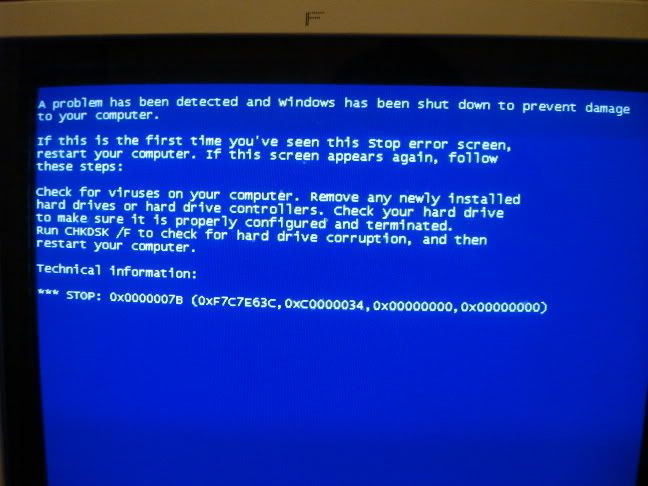
so how can fix this problem?? same way as the other dude?
howard_hopkinso
Posts: 21,238 +17
Check for any short circuits between the mobo and case.
Disconnect anything not required to run the system.
Check all cables and connections.
Make sure the hard drive if jumpered correctly.
Did you format the hard drive, before attempting to install Windows?
Regards Howard
Disconnect anything not required to run the system.
Check all cables and connections.
Make sure the hard drive if jumpered correctly.
Did you format the hard drive, before attempting to install Windows?
Regards Howard
howard_hopkinso
Posts: 21,238 +17
Just to let you know. I have split your posts into their own thread. This will save any confusion.
Regards Howard
Regards Howard
fbm2themex
Posts: 16 +0
howard_hopkinso said:Check for any short circuits between the mobo and case.
Disconnect anything not required to run the system.
Check all cables and connections.
Make sure the hard drive if jumpered correctly.
Did you format the hard drive, before attempting to install Windows?
Regards Howard
ya, i disconnected and reconnected everything....
i set the jump in the HD as master...(WD 300gb IDE)
no, i didnt format it...how can i format it? i can even get to the dos...
fbm2themex
Posts: 16 +0
howard_hopkinso said:Just to let you know. I have split your posts into their own thread. This will save any confusion.
Regards Howard
thanks Howard..
fbm2themex
Posts: 16 +0
when the mobo scan devices, everything goes great, but then i get this error
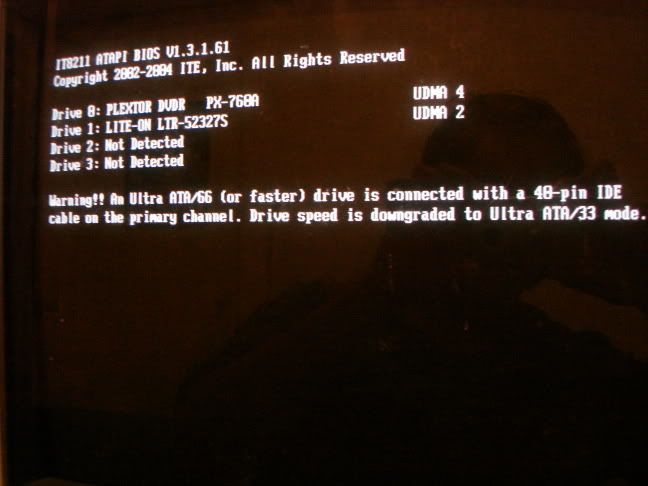
maybe this is the cause of the blue screen...right??
maybe this is the cause of the blue screen...right??
howard_hopkinso
Posts: 21,238 +17
According to that screenie, you have no hard drive connected.
The hard drive should be connected as master to the primary ide channel, using an 80 wire forty pin ide cable. Your dvd and cd drives should be set to master and slave on the secondary ide channel. At the moment they are connected to the primary ide channel.
Once you have the hard drive and optical drives connected properly do the following.
1 restart your computer and go to setup usually by pressing the F2 or delete key.
2 Once you get into setup look for the boot menu and make sure you set it to boot from cd first followed by your hard drive.
3 Put the Windows xp disk into your cd.
4 Now save your settings and exit setup.
5 While your computer is booting you will see a message that says "press any key to boot from cd" press any key.
6 When the welcome to setup screen appears press enter and then press F8 to accept the Microsoft licence agreement.
7 You will be prompted to repair an insallation press the escape key.
8 Now select the partition that you want to reformat and press the D key to delete it you will be asked to confirm that you want to delete the partition.
9 Now press C to create a brand new partition you will be asked what size you want the partition to be in mega bytes. If you just press enter then the partition will be the maximum size that you can have. This is perfectly ok if you don`t want to create multiple partitions.
10 You will now be asked to format the partition select the ntfs file sytem and do a full format.
11 Once the format is complete setup will continue.
Your computer will restart during the remaining setup again you will be asked to press any key to boot from cd DO NOT PRESS ANYTHING. and setup will continue. Once the setup is complete and you are back in Windows remove the Windows cd from your cd drive.
Regards Howard
The hard drive should be connected as master to the primary ide channel, using an 80 wire forty pin ide cable. Your dvd and cd drives should be set to master and slave on the secondary ide channel. At the moment they are connected to the primary ide channel.
Once you have the hard drive and optical drives connected properly do the following.
1 restart your computer and go to setup usually by pressing the F2 or delete key.
2 Once you get into setup look for the boot menu and make sure you set it to boot from cd first followed by your hard drive.
3 Put the Windows xp disk into your cd.
4 Now save your settings and exit setup.
5 While your computer is booting you will see a message that says "press any key to boot from cd" press any key.
6 When the welcome to setup screen appears press enter and then press F8 to accept the Microsoft licence agreement.
7 You will be prompted to repair an insallation press the escape key.
8 Now select the partition that you want to reformat and press the D key to delete it you will be asked to confirm that you want to delete the partition.
9 Now press C to create a brand new partition you will be asked what size you want the partition to be in mega bytes. If you just press enter then the partition will be the maximum size that you can have. This is perfectly ok if you don`t want to create multiple partitions.
10 You will now be asked to format the partition select the ntfs file sytem and do a full format.
11 Once the format is complete setup will continue.
Your computer will restart during the remaining setup again you will be asked to press any key to boot from cd DO NOT PRESS ANYTHING. and setup will continue. Once the setup is complete and you are back in Windows remove the Windows cd from your cd drive.
Regards Howard
fbm2themex
Posts: 16 +0
howard_hopkinso said:According to that screenie, you have no hard drive connected.
The hard drive should be connected as master to the primary ide channel, using an 80 wire forty pin ide cable. Your dvd and cd drives should be set to master and slave on the secondary ide channel. At the moment they are connected to the primary ide channel.
Once you have the hard drive and optical drives connected properly do the following.
1 restart your computer and go to setup usually by pressing the F2 or delete key.
2 Once you get into setup look for the boot menu and make sure you set it to boot from cd first followed by your hard drive.
3 Put the Windows xp disk into your cd.
4 Now save your settings and exit setup.
5 While your computer is booting you will see a message that says "press any key to boot from cd" press any key.
6 When the welcome to setup screen appears press enter and then press F8 to accept the Microsoft licence agreement.
7 You will be prompted to repair an insallation press the escape key.
8 Now select the partition that you want to reformat and press the D key to delete it you will be asked to confirm that you want to delete the partition.
9 Now press C to create a brand new partition you will be asked what size you want the partition to be in mega bytes. If you just press enter then the partition will be the maximum size that you can have. This is perfectly ok if you don`t want to create multiple partitions.
10 You will now be asked to format the partition select the ntfs file sytem and do a full format.
11 Once the format is complete setup will continue.
Your computer will restart during the remaining setup again you will be asked to press any key to boot from cd DO NOT PRESS ANYTHING. and setup will continue. Once the setup is complete and you are back in Windows remove the Windows cd from your cd drive.
Regards Howard
Thanks alot
I did what you said, and bam, the blue screen was gone....but the black screen is still there.
i successfully installed windows. its working perfect. but theres a problem...
when i took the windows cd out, restarted the computer, it wouldnt loud, it would just stay black, with a white blinking underscore....
then i inserted the windows cd back, restarted, n bam, windows started running...which is really wierd.....
how can fix this problem?? what should i do?
howard_hopkinso
Posts: 21,238 +17
fbm2themex
Posts: 16 +0
howard_hopkinso said:
thanks, it worked!!!
took me 3 or 4 hrs...but it worked
still, as i rebooted the comp, the xp was inserted...the evil blue screen popped out again(i cant get ride of it, keeps coming back)...so i tryied not going to the windows setup, and just went the desktop, where i went to cmd, and installed recovery console from there...then rebooted, and the console was one of 2 choices, bam, started typing the commands, and 4 hours...reboots without a cd...thanks....
ps
i still get this message in the startup...the blackscreen displays this...
"Warning!! An Ultra ATA/66 (or faster) driver is connected with a 40-pin IDE cable on the secondary channel. Drive speed is downgraded to Ultra ATA/33"
i notice that my
HD has a 80-pin
and my cd/dvd uses 40-pin....<---is it suppose to be 80??
howard_hopkinso
Posts: 21,238 +17
i notice that my
HD has a 80-pin
and my cd/dvd uses 40-pin....<---is it suppose to be 80??
Edit/Delete Message
To be perfectly honest I use 80 wire 40 pin ide cables for all my devices.
Just go and buy some new cables, they don`t cost very much.
Glad your initial problem is solved.
Regards Howard
fbm2themex
Posts: 16 +0
howard_hopkinso said:To be perfectly honest I use 80 wire 40 pin ide cables for all my devices.
Just go and buy some new cables, they don`t cost very much.
Glad your initial problem is solved.
Regards Howard
i bought a new 40-pin cable for my cd/dvd rom...and bam, that warning error was gone!!!! so it was the cable...thanks alot!!!
so should i do the same for the HD(buy a new cable)?? cause the blue screen still pops out when i try to install xp...
fbm2themex
Posts: 16 +0
howard_hopkinso said:To be perfectly honest I use 80 wire 40 pin ide cables for all my devices.
Just go and buy some new cables, they don`t cost very much.
Glad your initial problem is solved.
Regards Howard
i made a disk driver that contains ITE211 controller...my mobo came with this cd, where it gives me a choice to make bootable floppy drive disks...as windows is setting up, it says to press f6 to install a certain drive...so i press it, with the floppy inserted of course...and the computer detects the controller...installs it...and BAM...after its done...and windows about to install...i dont see the blue screen any more!!!
so for those who may have this...its about upgrading the motherboard with some certain drives...in order for some parts to work..
ps...
for some reason...it takes really kind of long to load to the windows logo....do i have to change a setting to speed up the loading process or what?

hynesy
Posts: 377 +1
I can't help you there, all i know is when i have my secondary HDD connected, windows takes that little bit longer to reach the welcome screen.
Could be improporly installed drivers, they often cause windows boot and shutdown problems including slow loading times.
cheers
hynesy
Could be improporly installed drivers, they often cause windows boot and shutdown problems including slow loading times.
cheers
hynesy
fbm2themex
Posts: 16 +0
could b the floppy disk drive...or the disks ur inserting r defective...check the cables...r they connected well???
hynesy
Posts: 377 +1
For some reason Windows XP just hates floppies, I had the same problem, and the solution to fix this was to meddle with some registry keys. If you use google you should be able to find some answers from the Microsoft knowledge base. If you don't know what you are doing with the registry, then DO NOT tamper with it.
cheers
hynesy:wave:
cheers
hynesy:wave:
hello hynesy
thanks for the reply. i checked the registry, and the info for the floppy disk is in there. i didn't mention before, but i installed a new mbo "A7V880". if i go to contro panel/systems/hardware device/ the floppy drive & floppy controller are there also. everything seems to be in place, but still does not recognize the floppy.
macdonr
thanks for the reply. i checked the registry, and the info for the floppy disk is in there. i didn't mention before, but i installed a new mbo "A7V880". if i go to contro panel/systems/hardware device/ the floppy drive & floppy controller are there also. everything seems to be in place, but still does not recognize the floppy.
macdonr
Similar threads

- Replies
- 1
- Views
- 85

- Replies
- 0
- Views
- 691
- Replies
- 0
- Views
- 23
Latest posts
-
AV2 promises 30% better compression than AV1 and costs nothing to use
- GeoffreyA replied
-
Your DisplayPort 2.1 Monitor Might Not Be Running DisplayPort 2.1
- thewelshbrummie replied

-
TechSpot is dedicated to computer enthusiasts and power users.
Ask a question and give support.
Join the community here, it only takes a minute.