Welcome to the TechSpot OpenBoards. Please read the FAQ if you have any questions. Login to participate.

Go Back   TechSpot OpenBoards > TS Community > Guides and Solved Issues

Tutorial: Suspect a Dead PSU? How to be sure

Reply
Bookmark / Share this page
Thread Tools
  #1  
Old 08-02-2006
kirock's Avatar
kirock kirock is offline
TechSpot Maniac
 
Location: Hamilton, Canada
Member since: Jul 2005, 1,594 posts
Tutorial: Suspect a Dead PSU? How to be sure

So you turn on the computer and nothing happens, it could be a broken case switch and therefore the PSU never gets the signal to turn on. Or it could be a dead PSU or something else dead pulling down the output of the PSU.
Here's what you do:
1) Unplug the leads to the case switch at the mobo and jumper them with a small piece of wire. Now turn on the main power switch at the back of the PSU. If nothing happens, we're a long way to proving the PSU is dead.
2) If above procedure caused nothing to happen, now we get a little more into it. Remove the 20pin PSU connector and the 4pin CPU connector to the mobo, all other psu connections can stay put. Using a small wire (a paper clip will do) jumper pins 14(the only green wire) and any BLACK wire (let's say pin 13 or 15) on the 20 pin PSU connector. Now turn on the main PSU switch. Your PSU should come to life (HDD spins up, and fans spin).
Below is a pic of the 20 pin connector
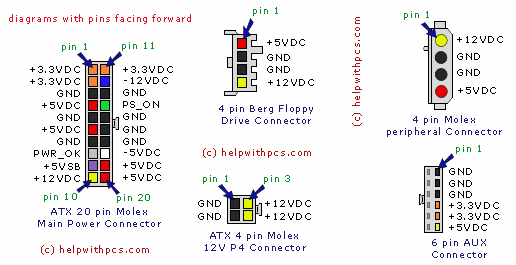
From the pic you can see that pins 13 and 15 are ground pins, that's why you can use either one. You want to ground pin 14. This is all the case switch does via mobo traces out to the case switch leads. Well it does go thru a FET or Bipolar transistor to make the actual connection, this is how Windows can soft shut down the PC.
3) If nothing still happens then start removing 4 pin molexs one at a time, starting with the video card (if it has one). This will eliminate any peripherals "holding" or "pulling" down the PSU. After all connections are removed and still nothing, then your PSU is dead for sure.
4) Edit: I forgot this possibility. If after step 2, all fans spin up and HDD spins, but at step 1 nothing works, then it's most likely a faulty mobo. And most likely that little FET or Bipolar transistor or at least the circuit that turns that on. Either way at this point you're best to take it in for service or RMA your mobo back if applicable.
Hope this helps, Cheers.

Last edited by kirock; 08-04-2006 at 01:32 PM.
Reply With Quote
  #2  
Old 08-02-2006
Tedster's Avatar
Tedster Tedster is offline
TechSpot Evangelist
 
Location: Fort Stewart, GA
Member since: Feb 2005, 8,587 posts
System specs
Antec sells a power supply tester for $12 available at circuit city. It has 5 LEDs to tell you if you're getting good power on all rails plus it has voltmeter ports in the back to plug in a voltmeter.

Good investment and beats swapping out a PSU (time and money) if yours is still good.
Reply With Quote
You can remove this banner by registering, join the TS Community for free.
  #3  
Old 06-14-2007
rav4guy rav4guy is offline
Newcomer, in training
 
Member since: Jun 2007, 2 posts
guid

hi there,
after i put jumper between 14 and ground my HDD kicked in but when i removed jumper my computer still didnt work,my question is if your HDD works when you put jumper what does that mean and what is next step

thanx
Reply With Quote
  #4  
Old 06-14-2007
howard_hopkinso howard_hopkinso is offline
Banned
 
Member since: Aug 2004, 25,949 posts
Hello and w elcome to Techspot.

It means you need to try another psu. If that doesn`t help, there`s a very good chance your mobo is faulty.

Regards Howard
Reply With Quote
  #5  
Old 06-15-2007
rav4guy rav4guy is offline
Newcomer, in training
 
Member since: Jun 2007, 2 posts
Aopen ax6b

when i try to boot my computer you can hear fan running and my dvd ram light flashes and red light on case stays on and no green light which usualy comes on normaly start up,my mobo is Aopen ax6b .any ideas what cause that .prior to that i swapped psu with another psu then when i put psu back on this problem showed up..thanx
Reply With Quote
  #6  
Old 06-16-2007
howard_hopkinso howard_hopkinso is offline
Banned
 
Member since: Aug 2004, 25,949 posts
As I said earlier, if another psu doesn`t solve your problem, your mobo is probably faulty and will need to be replaced.

Regards Howard
Reply With Quote
  #7  
Old 06-17-2007
Ph30nIX's Avatar
Ph30nIX Ph30nIX is offline
TechSpot Member
 
Location: Australia
Member since: Dec 2004, 348 posts
System specs
Good tutorial, I used the same technique on my friends pc after he got his mobo replaced, at the time it was top of the line mobo. Turns out PSU was just bugered so it ended up sending whole pc back to the shop and got fixed.

Maybe someone should include some pictures, or even a video of this just to make it more clear.
Reply With Quote
  #8  
Old 07-13-2007
k.jacko's Avatar
k.jacko k.jacko is offline
TechSpot Enthusiast
 
Location: Nottingham, UK
Member since: May 2007, 597 posts
System specs
I'm a little confused about point 1) in the tutorial. Can anyone translate it better for me please.
Does it mean the 2-pin power switch lead that is attached to the case?

The other points I understand.
Reply With Quote
  #9  
Old 07-16-2007
kirock's Avatar
kirock kirock is offline
TechSpot Maniac
 
Location: Hamilton, Canada
Member since: Jul 2005, 1,594 posts
Yes you are correct. unplug the case switch leads to the mobo. On the mobo where those wires just came off, use a piece of wire to jumper those 2 pins. This is eliminatiing the Case Switch, or faulty leads to it, as the problem. When you turn on master power switch at back of PSU and nothing happens, then you need to continue to step2. If all is fine then it's either a bad case switch or bad leads going to from mobo.

Cheers.
Reply With Quote
You can remove this banner by registering, join the TS Community for free.
  #10  
Old 07-22-2007
pc-essentials pc-essentials is offline
Newcomer, in training
 
Member since: Jul 2007, 1 posts
I made a video tutorial on the same subject how to jump the PSU pins,
If any one needs a visual guide here ya go!
http://www.metacafe.com/watch/729606...er_supply_psu/
Reply With Quote
  #11  
Old 09-17-2007
Oversoulx2 Oversoulx2 is offline
Newcomer, in training
 
Member since: Sep 2007, 8 posts
So i tested my PSU to see if was dead. The test was awesome and learned that there was nothing wrong with the PSU. So I'm assuming what's wrong with my PC is either the CPU? or the mobo. How can you be sure the mobo is faulty? When everything is connected, a green light on the mobo is on.
Reply With Quote
  #12  
Old 09-17-2007
howard_hopkinso howard_hopkinso is offline
Banned
 
Member since: Aug 2004, 25,949 posts
You can have the cpu tested at your local pc repair shop. This should only cost a few dollars.

If that checks out ok, then it has to be the mobo that`s dead. the fact that there`s a green light on the mobo, is no indication that the mobo is ok.

Regards Howard
Reply With Quote
  #13  
Old 09-18-2007
kirock's Avatar
kirock kirock is offline
TechSpot Maniac
 
Location: Hamilton, Canada
Member since: Jul 2005, 1,594 posts
Howard is correct, but I just want to be clear.
Step 1: removed case switch leads......: what happened?
Step 2: removed 20pin connector........: what happened?

If the PSU doesn't come on after Step1, but does come on at Step2, there's a really good chance the mobo is screwed. But there's noway of telling if the CPU is dead (it's part of mobo) or other parts of mobo. So best thing now it take CPU to some where and have it power up a PC. All you need is a friend with the same socket type mobo (but be careful, if your CPU is really dead you might damage his mobo/PSU).

Cheers.
Reply With Quote
Reply

Thread Tools

Posting Rules
You may not post new threads
You may not post replies
You may not post attachments
You may not edit your posts

BB code is On
Smilies are On
[IMG] code is On
HTML code is Off
Forum Jump

Similar Threads
Thread Thread Starter Forum Replies Last Post
Power supply suspect user63 Other Hardware 3 04-20-2008 06:19 PM
help, suspect ishost.exe aolifuyu Security and the Web 2 07-17-2006 07:38 AM
IE Pop-ups while using FIREFOX...I suspect DNS catcher... Sp00ky_E. Security and the Web 11 12-11-2005 03:08 AM
Suspect RAID 0 error Hodsocks Storage & Networking 0 02-28-2005 03:52 AM
Suspect BIOS problem Hodsocks Misc. Software & Utilities 3 11-13-2004 07:06 PM


All times are GMT -4. The time now is 12:08 AM.