Hello! I just download 3dmark06 and when I try to run it it completely freeze my computer and I have to shut it down manually, I don't really know why, I was just looking to see the score my computer will have but still have no luck runing these tests. I went looking on my temps and I'm concerned about the CPU temp. Should I be concerned or this has nothing to do with the 3dmark06. The Bios Temp where CPU-65C, MOBO 39C, now i've run everest and give me: CPU-54C, MOBO 37C, GPU 45C, I've run prime95 and give me no errors for more than 4 hours, I'll overnight today with primer95 to see if my computer have any problems. BTW You can see my computer specs on my signature, All input will be appreciate it! Thanks!
You are using an out of date browser. It may not display this or other websites correctly.
You should upgrade or use an alternative browser.
You should upgrade or use an alternative browser.
Can't run 3dmark06
- Thread starter rmdl51
- Start date
- Status
- Not open for further replies.

I'd trust the BIOS temp over Everest.
More importantly, Asus has a hardware monitor made for that motherboard. You can download it at:
http://www.softpedia.com/get/System/System-Info/ASUS-PC-Probe.shtml
You can better monitor CPU temps using this tool. It would be a good idea to run Prime95 in it's worst torture test for about an hour with this running on Record mode. You can then inspect the graphs for temps, voltages and such.
Lastly, I'd also burn a cd or floppy with memtest86+ (which you can google/websearch and download). It comes in both a bootable floppy image or bootable cd iso. Let this run overnight for like 6-8 full passes to ensure you dont just have some flakey memory that is in a range not commonly used.
More importantly, Asus has a hardware monitor made for that motherboard. You can download it at:
http://www.softpedia.com/get/System/System-Info/ASUS-PC-Probe.shtml
You can better monitor CPU temps using this tool. It would be a good idea to run Prime95 in it's worst torture test for about an hour with this running on Record mode. You can then inspect the graphs for temps, voltages and such.
Lastly, I'd also burn a cd or floppy with memtest86+ (which you can google/websearch and download). It comes in both a bootable floppy image or bootable cd iso. Let this run overnight for like 6-8 full passes to ensure you dont just have some flakey memory that is in a range not commonly used.
I trust the BIOS too, that's why I'm concerned. Yes it's a prescott core and I been told that those run hotter than the Northwood, not sure about that but just in case I haven't overclock my CPU so far. I will run those tests this night and let you know what happen, thank you for your help. BTW, I don't know how to use prime95 very well, I just download a few days ago and run some tests but can't find where is the worst torture test and record mode. I will keep looking when I get home.
Thanks for the software recommendation! I downloaded and the temps are: CPU-52c MOBO-37c, the weird thing is that if I restart the computer to check the BIOS it will give me 60c on the CPU and then exit and load up windows and ASUS PROBE give me 59c and keeps going down intil 52, is that ok? besides, prime95 no errors, memtest+86 no errors after 8 passes running for about 10 hours, is there any chance that maybe the 3dmark06 that I downloaded could be damaged? anyone know a good reliable source where it can be downloaded? I'm still concerned about my CPU temp? how can I drop that temp? new heatsink?? fan?
who freeze on last test? 3dmark06? no, it freeze on load up, I just double click it and it says it's performing an analize of my system and then everything locks up.
ok now i'm scared. I believe I'll get on fire. I was just playing AOE 3, and the ASUS Probe was running and give me a warning for 73c on CPU. why? my GPU wasn't even that hot, GPU-47c.
This issues and being unable to run 3dmark06 makes me think that my system have a big problem, but all the tests run good. what else can I do?
ok now i'm scared. I believe I'll get on fire. I was just playing AOE 3, and the ASUS Probe was running and give me a warning for 73c on CPU. why? my GPU wasn't even that hot, GPU-47c.
This issues and being unable to run 3dmark06 makes me think that my system have a big problem, but all the tests run good. what else can I do?
Guys! Now I really need your help with this. First, how can i tell how many FPS i'm getting? NFS Carbon runs like a slideshow on max settings, improves when I lower the resolution but I don't want to.
Second, 3dmark06 doesn't work on my PC, why? do you think it's too old? I don't really think is a bad system for gaming, it's sure 2 years old but I believe the GPU I have should handle NFS Carbon on MAX, what do you think?
Third, I've run all tests suggested and have no errors, the only issue that really have me concerned it's my CPU temp, idle is 52-54c but when gaming is over 70c, why? even GPU is around 50c when I'm playing. what can I do to lower that temp? new heatsink? more fans? I have 3 Fans installed on my case (besides the one for the CPU). Please help! I do want to run 3dmark06 and do something about my FPS.
Second, 3dmark06 doesn't work on my PC, why? do you think it's too old? I don't really think is a bad system for gaming, it's sure 2 years old but I believe the GPU I have should handle NFS Carbon on MAX, what do you think?
Third, I've run all tests suggested and have no errors, the only issue that really have me concerned it's my CPU temp, idle is 52-54c but when gaming is over 70c, why? even GPU is around 50c when I'm playing. what can I do to lower that temp? new heatsink? more fans? I have 3 Fans installed on my case (besides the one for the CPU). Please help! I do want to run 3dmark06 and do something about my FPS.
It sounds like you have a CPU temp problem. This isn't too uncommon with the Prescott cores. Is it the stock heatsink/fan?
I would recommend a two-stage approach:
1) Pick up a tube of Arctic Silver. You can mail-order these for about $6 US or buy it at Comp USA or Best Buys for about $10 US.
2) Using Isopropyl Alcohol, clean both your CPU and Heatsink and apply Arctic Silver as per the instructions you can find on their website.
3) Re-affix your heatsink/fan making sure it's seated properly and flush on the CPU.
Most of my P4/478's will idle around 33-35C and peak in the mid to high 40's. Prescotts can run a little hotter but 65-70C is too hot peak. You ideally want this in the low 50's peak.
If the above doesnt fix your problem, I'd look into a 3rd party cooler/heatsink.
I would recommend a two-stage approach:
1) Pick up a tube of Arctic Silver. You can mail-order these for about $6 US or buy it at Comp USA or Best Buys for about $10 US.
2) Using Isopropyl Alcohol, clean both your CPU and Heatsink and apply Arctic Silver as per the instructions you can find on their website.
3) Re-affix your heatsink/fan making sure it's seated properly and flush on the CPU.
Most of my P4/478's will idle around 33-35C and peak in the mid to high 40's. Prescotts can run a little hotter but 65-70C is too hot peak. You ideally want this in the low 50's peak.
If the above doesnt fix your problem, I'd look into a 3rd party cooler/heatsink.
Hello!
peterdiva: what 3 setting enabled? you mean direct draw-direct3d and agp texture acc? if is that so, yes all three are enabled, otherwise I wouldn't be able to even play any game I guess. and what do you mean with old card?
Sharkfood: I do have a 3rd party heatsink but I don't remember the brand I think is Aerocool or something like that. I really want to buy a good heatsink/fan to get this CPU cool down at least 10c, but I will need suggestions. Well in the mean time I think I'll get the artic silver tomorrow and re-affix the CPU.
I think you are right, my whole problem is gonna be a temp issue. I was playing NFS Carbon 20 minutes ago and suddenly game shutdown and took me back to desktop, ASUS PC-probe was giving me a 71c temp on my cpu and right now is 63c.
Just one more question, Do you really think the CPU Temp issue is causing a very low FPS when playing a game? I Mean if all my hardware is in good working condition I believe I should be getting a decent FPS right? my system as you can see on my signature is max-out. 3GB RAM, the best AGP Card, I was told this MOBO is one of the best for 478's. what else to improve FPS?
Ok thanks. and please suggest any heatsinks you had good experience with.
peterdiva: what 3 setting enabled? you mean direct draw-direct3d and agp texture acc? if is that so, yes all three are enabled, otherwise I wouldn't be able to even play any game I guess. and what do you mean with old card?
Sharkfood: I do have a 3rd party heatsink but I don't remember the brand I think is Aerocool or something like that. I really want to buy a good heatsink/fan to get this CPU cool down at least 10c, but I will need suggestions. Well in the mean time I think I'll get the artic silver tomorrow and re-affix the CPU.
I think you are right, my whole problem is gonna be a temp issue. I was playing NFS Carbon 20 minutes ago and suddenly game shutdown and took me back to desktop, ASUS PC-probe was giving me a 71c temp on my cpu and right now is 63c.
Just one more question, Do you really think the CPU Temp issue is causing a very low FPS when playing a game? I Mean if all my hardware is in good working condition I believe I should be getting a decent FPS right? my system as you can see on my signature is max-out. 3GB RAM, the best AGP Card, I was told this MOBO is one of the best for 478's. what else to improve FPS?
Ok thanks. and please suggest any heatsinks you had good experience with.
CPU Temp can cause cpu throttling, but I'm unsure if the threshold is as low as 70C (it's usually a bit higher).
I'd say get your CPU temps under control first, THEN see if performance improves due to it. If not, we can then start examining other things to find the issue.
If you have a 3rd party cooler, chances are good it's just poor contact or generic thermal compound. Even the best cooler wont keep your cpu cool if it can't transfer heat. Arctic Silver 5 is great stuff and should cure nicely on your heatsink/cpu.
I'd say get your CPU temps under control first, THEN see if performance improves due to it. If not, we can then start examining other things to find the issue.
If you have a 3rd party cooler, chances are good it's just poor contact or generic thermal compound. Even the best cooler wont keep your cpu cool if it can't transfer heat. Arctic Silver 5 is great stuff and should cure nicely on your heatsink/cpu.

peterdiva
Posts: 1,086 +3
I replaced an ATI card with a 7800GS (the + version), and I had to reinstall Windows to get it to work. There was a problem with the AGP driver, I just can't remember what the symptoms were. I can remember that 3Dmark05 and 06 wouldn't run; they gave me a specific error though.
Removing the AGP driver fixed all the problems, the only problem was that I couldn't reinstall it, so I had to reinstall Windows.
Removing the AGP driver fixed all the problems, the only problem was that I couldn't reinstall it, so I had to reinstall Windows.
I'm here again! Hey Sharkfood Thanks! Artic Silver 5 really help a lot! my CPU temp drop by 10c and more while idle, I'm getting 42-43c idle and when playing games 58-60c, is that ok? or should I drop it a little bit more? and Yeah my 3rd party heat sink is AeroCool, is like this one
http://www.ubuyitdirect.com/aerocool-aeroflow-quad-blue-120mm-case-p-3461.html
but the metal frame is blue, couldn't find the exact model. is that ok or I should buy a bigger model?.
The Sad part is that I still can't run 3Dmark06, why? could it be that I have a corrupt file from 3dmark06? I'm thinking on downloading again. which site is the most reliable one to download 3dmark06?
I'm still getting very low FPS at NFS Carbon on Max settings 1280x1024.
Please Help with any suggestions to improve my system performance on gaming matter. Thanks
http://www.ubuyitdirect.com/aerocool-aeroflow-quad-blue-120mm-case-p-3461.html
but the metal frame is blue, couldn't find the exact model. is that ok or I should buy a bigger model?.
The Sad part is that I still can't run 3Dmark06, why? could it be that I have a corrupt file from 3dmark06? I'm thinking on downloading again. which site is the most reliable one to download 3dmark06?
I'm still getting very low FPS at NFS Carbon on Max settings 1280x1024.
Please Help with any suggestions to improve my system performance on gaming matter. Thanks
peterdiva
Posts: 1,086 +3
There's been a patch released for 3DMark06 - Build 1.1.0. See if you can get it to run with this first.
Thanks peterdiva!! That patch help! now I can run 3dmark06, but guess what, I got 2811 score  only 9 FPS, why? what can I do? please check my specs and tell me where is the bottleneck if there is one, which component I should upgrade or is it really necessary to move on PCI-express to get a good FPS, no right? any tweak suggested?
only 9 FPS, why? what can I do? please check my specs and tell me where is the bottleneck if there is one, which component I should upgrade or is it really necessary to move on PCI-express to get a good FPS, no right? any tweak suggested?Hello! here is the information on the screenshots I hope it uploads correctly I never upload pictures before into a forum.
If you need to know anything else to provide help let me know. I'm very thankful for your time helping me out about this issue.
:wave:
If you need to know anything else to provide help let me know. I'm very thankful for your time helping me out about this issue.
:wave:
Attachments
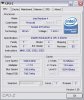
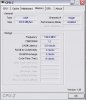
hi rmdl,
Look at the top of your 2nd attachment. See channel: single? There's part of your problem!
You have your memory arranged in single-channel. That's a dual-channel/ddr400 mainboard starving that processor for bandwidth.
Run SiSoft Sandra's memory bandwidth tests. They should be around ~5000mb/sec. Single channel wont be able to deliver the performance of that mainboard that way.
If your 3 gigs is in 3 sticks, try removing one stick and using matching colored slots for the remaining two. In order for dual-channel to work, memory must be in pairs of matched sticks. You should see your Sandra (and other benchmarks) take a big jump up from dual-channel.
Look at the top of your 2nd attachment. See channel: single? There's part of your problem!
You have your memory arranged in single-channel. That's a dual-channel/ddr400 mainboard starving that processor for bandwidth.
Run SiSoft Sandra's memory bandwidth tests. They should be around ~5000mb/sec. Single channel wont be able to deliver the performance of that mainboard that way.
If your 3 gigs is in 3 sticks, try removing one stick and using matching colored slots for the remaining two. In order for dual-channel to work, memory must be in pairs of matched sticks. You should see your Sandra (and other benchmarks) take a big jump up from dual-channel.
Hi Sharkfood! you know it's so funny how things come out. I bought this MOBO because I want to use 4 - 1 GB sticks that I have. but then I was told my platform is 32-bit and wont support the 4 GB only 3GB, so I took out 1GB stick, and I thought it will be ok, i was concerned before that my memory was running at 200mhz speed, so I ask and someone in the forum told me it was ok because it DDR, so two channels at 200 are the 400mhz supposed to be running at. Right now I'm gonna have to take out another stick to run the memory at the right speed.
Well, that's another story, I think I'll be ok with 2 GB running dual channel right? I mean for gaming purposes. When I get home today I will download and run the SiSoft Sandra's memory and let you know what happen, right now Im at work and this computer is runing 2-512 DDR-400 and I download CPU-Z and yes it shows dual in the channel field. :wave:
Well, that's another story, I think I'll be ok with 2 GB running dual channel right? I mean for gaming purposes. When I get home today I will download and run the SiSoft Sandra's memory and let you know what happen, right now Im at work and this computer is runing 2-512 DDR-400 and I download CPU-Z and yes it shows dual in the channel field. :wave:
Yes, 2x1gig (2 gig total) in dual-channel will ROCK For gaming and gaming performance. Even the biggest memory hog games (Battlefield2, EQ2, etc.) run great with "only" 2 gigs hehe.
You can indeed run 4 gigs memory, but you'll have to do some tweaking in the boot.ini/do some tweaks with virtual memory extensions. It's generally not worth it though unless you're working with video or massive image editing (not gaming).
I'd try running SiSoft Sandra's memory bandwidth test first when you get home, then use CPU-Z's "SPD" tab to look at the 200mhz ratings area of your currently installed memories. Remember that when you go to 2 sticks, both sticks will run at the speed of your SLOWEST memory, so it's advised to choose the two with the lowest CAS latency/ratings if all three are not identical. Then it'll just be a case of putting two in the same-color slots on the motherboard (2 in the blue slots only, or 2 in the black slots)... boot up, verify dual-channel in CPU-Z then re-run SiSoft Sandra memory bandwidth test to observe a big jump in performance.
You can indeed run 4 gigs memory, but you'll have to do some tweaking in the boot.ini/do some tweaks with virtual memory extensions. It's generally not worth it though unless you're working with video or massive image editing (not gaming).
I'd try running SiSoft Sandra's memory bandwidth test first when you get home, then use CPU-Z's "SPD" tab to look at the 200mhz ratings area of your currently installed memories. Remember that when you go to 2 sticks, both sticks will run at the speed of your SLOWEST memory, so it's advised to choose the two with the lowest CAS latency/ratings if all three are not identical. Then it'll just be a case of putting two in the same-color slots on the motherboard (2 in the blue slots only, or 2 in the black slots)... boot up, verify dual-channel in CPU-Z then re-run SiSoft Sandra memory bandwidth test to observe a big jump in performance.
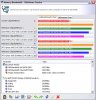
Wow! Thanks! I definitely learn something today about DDR RAM, here I'll upload the pictures to share the experience with others. It really boost the performance. Unfortunately I still have low FPS, I just run 3dmark06 again and it just improves to 2818, I've read that the score isn't a big deal, but what really bothers me is getting 10-12 FPS, when at least jumps to 20FPS it looks smooth and ok. but again it lowers my FPS to 12..10 even 8 FPS. definitely the tweak on the RAM was a great shot! I can even tell that my systems runs faster. But games aren't what I expect from a High-end GPU.
Well I leave you the pictures of Sandra and the new one from CPU-Z, BTW I still have a question, why is now saying disabled on the performance field?
Well I leave you the pictures of Sandra and the new one from CPU-Z, BTW I still have a question, why is now saying disabled on the performance field?
Attachments
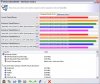
Hmmm.. it's bizarre that performance mode is now disabled. This is a neat Asus-only trick (known as "Hypermemory") that bypasses a locked down feature in the i865 chipset.
Every little bit helps so it will likely be in your best interests to try and get this feature working again.
Be forewarned though, these Asus P4P800 series can get.. confused.. when making these kinds of BIOS changes. They may fail to boot-up and require being powered off/on a couple times to activate the overclock protection (even if you're not overclocking.. it just allows the BIOS to reset some settings to post once more). So if you save/exit and the PC just sits there... power down the switch on the PSU and re-power up.. and repeat as needed until the overclock lock-out resets and posts for another shot.
What I usually do if these P4P800's lock-out the Performance mode is:
a) In the Advanced Chipset Settings page, try changing the "Memory Acceleration Mode" from [Auto] to [Enabled]
b) If this doesnt do the trick, then go into Advanced page (where you would overclock) and flip the AI Overclock tuner to [Manual] and put your CPU's normal values in there also. In your case:
External Frequency: 200
(the rest Auto)
While you're not truly overclocking your CPU, manually setting the clock rates is sometimes needed to get Performance mode working once more if the BIOS determines it doesn't think your memory is up to it (with dual-channel seems to cross some auto-config threshold in your case).
Heck, with your newly low CPU temps, maybe you do want to overclock after all.. hehe.. I think 5% would likely be safe if you can keep your CPU peak temp under 60C.
Every little bit helps so it will likely be in your best interests to try and get this feature working again.
Be forewarned though, these Asus P4P800 series can get.. confused.. when making these kinds of BIOS changes. They may fail to boot-up and require being powered off/on a couple times to activate the overclock protection (even if you're not overclocking.. it just allows the BIOS to reset some settings to post once more). So if you save/exit and the PC just sits there... power down the switch on the PSU and re-power up.. and repeat as needed until the overclock lock-out resets and posts for another shot.
What I usually do if these P4P800's lock-out the Performance mode is:
a) In the Advanced Chipset Settings page, try changing the "Memory Acceleration Mode" from [Auto] to [Enabled]
b) If this doesnt do the trick, then go into Advanced page (where you would overclock) and flip the AI Overclock tuner to [Manual] and put your CPU's normal values in there also. In your case:
External Frequency: 200
(the rest Auto)
While you're not truly overclocking your CPU, manually setting the clock rates is sometimes needed to get Performance mode working once more if the BIOS determines it doesn't think your memory is up to it (with dual-channel seems to cross some auto-config threshold in your case).
Heck, with your newly low CPU temps, maybe you do want to overclock after all.. hehe.. I think 5% would likely be safe if you can keep your CPU peak temp under 60C.
Done! Performance mode now enabled after doing points (a) and (b). What's the next step? . Sorry for be so annoying with this issue but for sure this is the first time I'm tweaking memory and CPU, even though I have some experience building computers I was wrong thinking that more memory the better, the high CPU speed the better. Well back to the subject, I just run 3dmark06 and I'm still getting 10-12 FPS , what else can I do to improve this, I have to say that sandra get even better, now I got 4762MB/s. and my system looks to be loading up much faster. So, what do you say...
. Sorry for be so annoying with this issue but for sure this is the first time I'm tweaking memory and CPU, even though I have some experience building computers I was wrong thinking that more memory the better, the high CPU speed the better. Well back to the subject, I just run 3dmark06 and I'm still getting 10-12 FPS , what else can I do to improve this, I have to say that sandra get even better, now I got 4762MB/s. and my system looks to be loading up much faster. So, what do you say...- Status
- Not open for further replies.
Similar threads

- Replies
- 0
- Views
- 341
- Replies
- 0
- Views
- 1K
Latest posts
-
Hemispherical solar cells could significantly improve sunlight absorption
- chrisnfolsom1 replied


-
TechSpot is dedicated to computer enthusiasts and power users.
Ask a question and give support.
Join the community here, it only takes a minute.