also @ TechSpot: Facebook headhunts Apple engineers for 3rd smartphone attempt

TechSpot

Fix backspace key on keyboard

Discussion in 'Mobile Computing' started by kiyhkuj, Jan 20, 2008.

Thread Status:
Not open for further replies.
  1. kiyhkuj Newcomer, in training

    hello. i was typing this morning when my backspace key fell off the keyboard completely! i put it on temporirarily somehow but it's not straight and doesn't look like what it was supposed to be. it's got one metal part and two pieces that connect the key to the keyboard however, i don't know what to do with these pieces to put them in place. any help? thanku very much.
  2. EDollar Newcomer, in training

    depending on the keyboard it should just snap back on, just have to use a little force
  3. kiyhkuj Newcomer, in training

    it doesn't! it has this weird layout and i don't know which of the plastic pieces goes where.
  4. kimsland Ex-TechSpotter

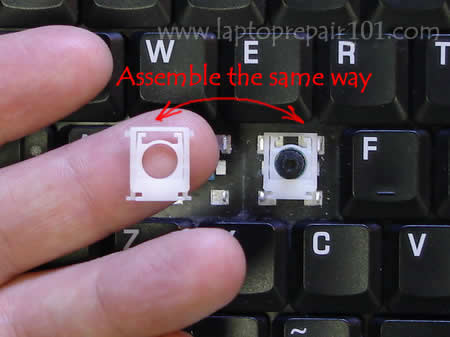
    Remove key
    Put those black squares (plastic springs they're called)
    into the keyboard first \ /
    Place the key evenly on top, and press down, to click back in
  5. kiyhkuj Newcomer, in training

    can you perhaps send me a picture or an illustration? plz thanku
  6. kimsland Ex-TechSpotter

  7. kiyhkuj Newcomer, in training

    my laptop is a compaq presario v6065ea. and that's not totally what i'm looking for because i want the backspace key refitting instructions.
  8. kimsland Ex-TechSpotter

    Um not sure how to answer that, aren't they all the same ? Except some are big and some are small ?

    You could actually carefully lift another key off, and view how it seats, then apply to the backspace key. This is how I learnt.

    Now I know the post back.
    I pulled out my ? key and now I have two keys I can't fit !! So your decision, I'm not resposible for your actions. This is just what I'd do.
  9. kiyhkuj Newcomer, in training

    just leave it i guess i just have to go to the service centres for help
Thread Status:
Not open for further replies.