also @ TechSpot: Google quietly adds conversational search to Chrome 27

How to repair Windows XP/2000 if you are unable to boot into Windows

Discussion in 'Guides and Tutorials' started by Rick, Oct 20, 2003.

Post New Reply
  1. forumq Newcomer, in training Posts: 17

    I had to repair install, xp with my recovery disc just as well described here after being infected by a mal. exe. I knew that I would lose all of my OS updates, but now windows update doesn't want to work at all anymore, Im stuck with the standard (unupdated) version. Although I get notified that there are updates available, it is only "Microsoft Windows Installer 3.1", after thinking it is installed, It always gives the message that the update can't be installed. Ive also tried to manually download and install IE7 but that also doesn't want to work (same with MP11).
    I also end up at the same spot when I use windows update from the browser.
    Could someone help me out, with this one? Thx
    Ask me if you need more details.
  2. Tv.boy Newcomer, in training

    ummm... not sure if this has been mentioned befor(19 pages is little much....)but my windows scred up becasue i held the on button on my Pc while it was installing an update(i know alil noobish) any ways when i try booting from disk it says "Seup is now inspecting your systems configuration" for justa hundredth of a second then it goes blasck and hags so i cant do anything witha a keyboard ands its entirely balnc. Dammit now i cant even reformat

    P.S plz reply bak to me fas t i cant do annnything
    ___
    d--b
  3. Bosco1 Newcomer, in training

    Just as SornyPanafonic, I also recently upgraded from an ASRock mobo, 2.4 Celeron with 1G DDR, to a GeForce 6100/64 bit Dual Core Athlon with 2G DDR2. I conducted a repair vice a new O/S install and only get as far as the Win XP Home Edition logo screen before I get a blue screen with the following stop code:

    ***STOP: 0x0000007E (0x0000005, 0xBA248750, 0xBA4C3450, 0xBA4C3150).

    Everything was working fine prior to the upgrade. Please, if there is anyone that can assist me in getting my system back up and running, I would greatly appreciate it.
  4. Jeff H Newcomer, in training

    Rick (or anyone else for that matter):

    I'll start from the beginning. The other day, the power went out several times in the span of maybe 45 minutes. After the first power loss, I turned my computer back on, thinking nothing of it...when the power went out a second time. I thought that was strange, but I turned it back on shortly after the second outage, and it had barely finished loading my desktop when the power went out again. I gave up trying to turn the computer on for a while after that, and just let it be. However, when I went back to turn it on, I got the familiar symptoms: "Windows couldn't be activated," a list of choices like, "Start Windows in Safe Mode," "Start Windows Normally," etc. and none of them worked. So I found this thread, and followed Rick's instructions until I came to a screen that showed this:

    The following list shows the existing partitions and unpartioned space on this computer

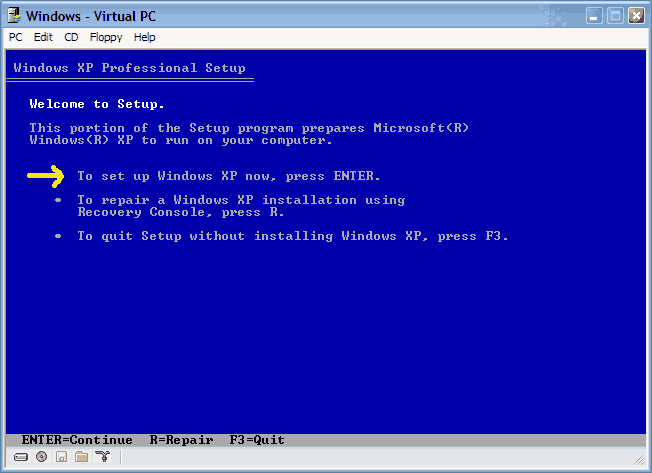
    To set up Windows XP on the selected item press ENTER

    To create a partition in the unpartioned space press C

    To delete the selected partition press D

    and when I selected C: Partition2 (Unknown) 76254MB
    it told me that "The partition is either too full, damaged, not formatted, or formatted with an incompatible file system. To continue installing Windows, Setup must format this partition". So what do I do next? There is an option to "Format the partition using the NTFS file system"...not sure what that means. I'm just trying to figure out how to get my files back without having to take my computer in and pay a few hundred bucks.

    Any help is appreciated (and sorry for the length, but I figured the more details, the easier it would be to help).
  5. N3051M Newcomer, in training Posts: 2,800

    Do NOT use this if you wish to see your files again. You can at this point, if your files are that important try and use the hdd on another pc to transfer the contents off it just in case, otherwise, try the below:

    Load up the bood cd again, instead of going through the installer, hit "R" to get to Recovery Console. Perform these commands in bold (just type in that command when it comes up with C:\>)

    CHKDSK /f - this will check the HDD of any errors present and attempt to fix it
    sfc /scannow - this will check your windows system files to see if they are ok. You will need the Windows XP cd to perform this step (which you've booted from.. so don't worry).

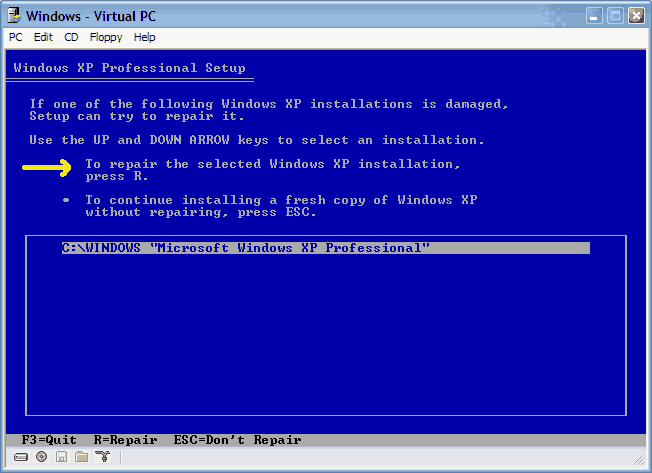
    sfc /scannow might be able to fix up your problem without the need of the repair, so try to boot back into windows again to see if it worked or not. If it still doesn't, then go ahead and try the repair.
  6. Jeff H Newcomer, in training

    I did the CHKDSK command, and it found one or more errors on the volume. sfc /scannow was not a recognized command (did I do it wrong?) And should I run Automated System Recovery when the Windows Setup is starting? (it says press F2 to run ASR when I press any key to boot from the disc)

    Nevermind, the CHKDSK got me back into my computer. Thanks a million, you saved me big time!!
     
  7. tamsicle Newcomer, in training

    Hi I googled this forum as I am having problems with my computer not starting up after we had a power surge. Is the information in this thread what I should follow? as I am really scared of stuffing it up and deleting or losing all my photos and stuff on the computer. The computer doesn't get any further than the first screen and just sounds like its working it's a... off trying to boot up....but nothing!

    Please someone help (not too technically savvy so please no fancy tech talk)

    tamsicle
  8. zipperman Newcomer, in training Posts: 1,423   +7

    First repair

    It's very possible you might need a new Power Supply.
    Would you like an outline of what to do if you have a Power Surge.
    1.Use a Quality Power Surge Power Bar if you hadn't been.
    Mine has $ 10.000 insurance.
    Home insurance might cover this if the computer is destroyed.
    More if you ask.
    :)
  9. ryanbg Newcomer, in training

    Trying to re-install windows xp

    Hello,

    I was trying to re-install windows xp just following the instructions here. The problem is after windows installer uploads file to the computer, the computer crashes (blue screen) it says isapnp.sys. Thanks for any help.
  10. playn2dend Newcomer, in training

    Hey newcomer Will here,
    I have a /windows/system32/config/system problem and i have read previous articles about going into setup but there is not welcome setup screen it goes from first screen to the second where it says to boot from cd (the origional xp cd) press any key and i do but there is no response, and then i go to the window on the config problem....help....and thanks

    Will
  11. radiodoll Newcomer, in training

    windows won't boot and when i follow the directions to repair windows through the setup it says that it is an unrecognisable partition and asks to format the partition in order to install xp :( i ran chkdsk and it got to 25% before it stopped and said their were unrecoverable errors on the disk.

    can anyone help me?
  12. zipperman Newcomer, in training Posts: 1,423   +7

    What i just done

    I was going to try repair,but decided to Format and reinstall XP.
    If you can save all your personal files and things like Favorites to another partition or disk,judgeing by chdsk results that seems best.
    I'm not sorry i did as my computer performs much better.
    But i also updated Mbd and cpu in a new case.
    If you decide to and want to save OExpress email it's very easy.
  13. howard_hopkinso Newcomer, in training Posts: 25,949   +16

    Computer questions/problems are not supposed to be posted in this forum.

    If you have any questions pertaining to any of the topics in this forum, open a new thread in the appropriate forum and ask. I.E for this topic, questions should probably be posted in our Windows OS forum.

    Thread closed.

    Regards Howard :)
  14. Julio Franco TechSpot Editor Posts: 6,051   +121

    Topic reopened, in case people insist on using XP or 2000. You know who you are :)
  15. ravisunny2 TS Ambassador Posts: 2,032   +8

    Thank you, Julio.:)

    I'm still (happily) using XP.