Microphone mirroring my speakers

bjarv

Posts: 11   +0
I have a DP67BG Intel Motherboard and just recently, all of a sudden, my mic stopped working. It works on other computers, just not on this one. Curiously enough, it shows that there are noises that it is receiving only when something plays in my speakers. Such as, if I'm in a skype call, only when someone ELSE speaks, does it show as if my mic is picking up a sound. It's as if my mic is mirroring my speakers. I have the Realtek HD Audio manager if that is any info that is needed.

Any help with this odd issue?
 
Have your run Windows Update manually until no more updates are found, and have you installed all the optional updates as well? Are there any yellow exclamation points in the device manager?
 
There are no warnings in the device manager and all optional updates are installed except for the language packs.
 
Have you checked settings in the Realtek HD Audio manager? Try re-installing the Realtek driver
 
Yeah I just tried reinstalling the driver to no avail. Also there aren't many options in the manager, so there wasn't really anything I could change that would help me.
 
Go to control panel, system, system protection and see if there are restore points already there. System restore is enabled by default. You can turn it off, but every time you install something a restore point is created and dated
 
When I go to windows back-up, it says, "Windows Backup has not been set up.". There is no option to see more restore points there, or in system protection.
 
Well, take a look at this:

Get into control panel and Sounds, under recording what is the default device?
 
There is line in, which has nothing plugged into it, and my webcam's microphone(usb) which I have had to use in replacement. That mic behaves normally. Unplugging the webcam doesn't allow my other mic to work. Plugging my mic into line in also does not work.
 
So when you plugged the microphone, the stereo mix becomes activated and took control of the input channel. you could probably double-check whether both microphone and stereo mix output the same sound, thus indicating the microphone channel is faulty.

Control Panel > Sound > Recording > right-click, tick both options to enable Stereo Mix.

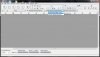
Use free program like Audacity to perform recording using both Stereo Mix and Microphone. Stereo Mix works exactly like what you described, it records "what u hear".

audacity recording.jpg

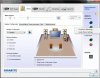
Also, you could try to use "connector retasking" feature in Realtek HD (not all models support this). Plug your microphone to other port color. Open Realtek HD Audio Manager, right click the lit colored jack that you used, and select connector retasking to assign it for microphone.

realtek connector retasking.jpg
 
Yes, it does have the same levels as the Stereo Mix. Also I tried remapping but it seems to allow me to remap anything except to remap another port to mic in.
 
and ofcourse, if anyone has had bio shock or 2, you'll remember the no sound glitch
same situation here. MAKE SURE TO ENABLE "STEREO MIX"
I would recommend having this turned on by default weather you have a microphone or not, it clears up soooo many sound issues the list is endless.
 
Back