also @ TechSpot: Codemasters announces £125,000 special edition of GRID 2

Network Magic 4.7

Discussion in 'Software Apps' started by jobeard, Feb 15, 2008.

  1. jobeard TS Ambassador Posts: 12,235   +123

    Network Magic (trial/purchase + degrades to freeware)

    http://www.networkmagic.com/

    Features / Benefits http://www.networkmagic.com/product/essentials.php

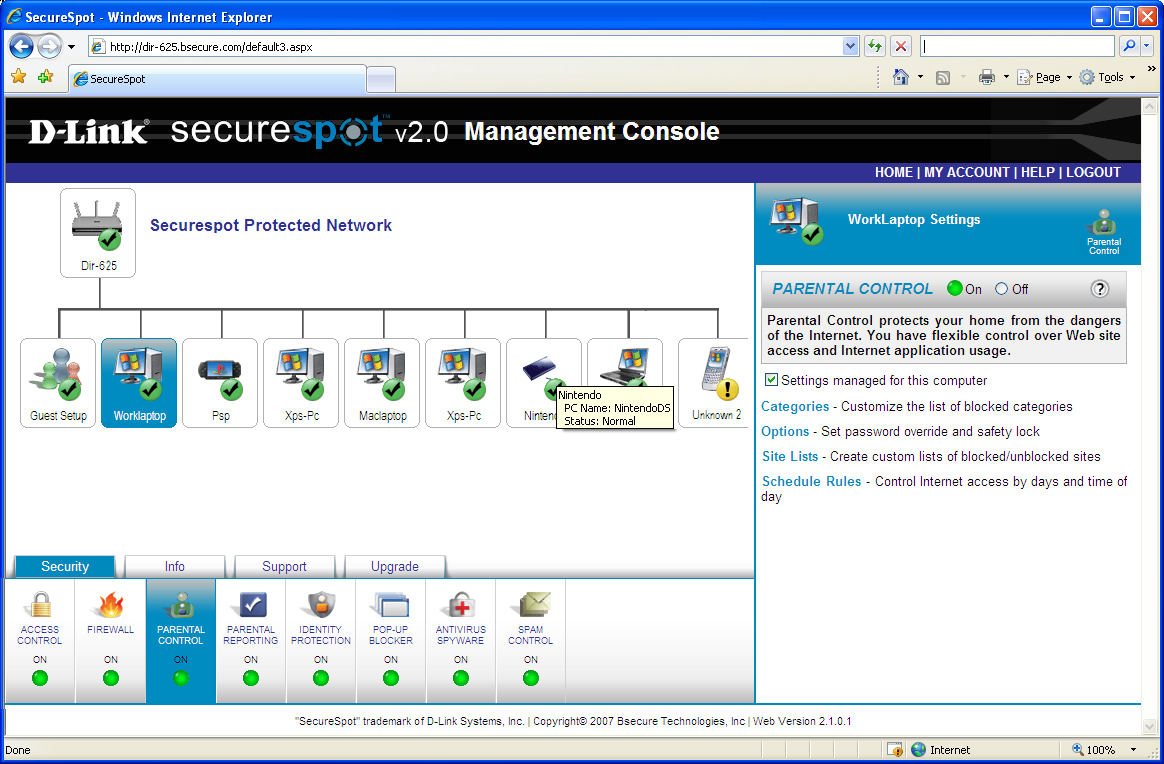
    Nice tool for home users to monitor lan systems. My interest is the network mapping tool, but the product offers much more.
    I did not allow this product to control my router or sharing (as I have them as I like),
    but some users may need / like the assistance offered in this area.

    In the install process, it will scan your network so don't be surprised that your IDS /
    firewall may prompt for permission or fire off alters -- just keep allowing them until it is finished.

    The names and icons for devices / systems can be edited to fit your preferences too.

    I intend to let the trial lapse and see what features are still enabled.
    Attached Files:

  2. LNCPapa TS Special Forces Posts: 3,950   +120

    Very interesting - I think I'll check this out when I get home.
  3. jobeard TS Ambassador Posts: 12,235   +123

    follow-up after trial period lapses:

    The network mapping still works (systems still report when connect/disconnect occurs)
    and is my primary interest.

    Sharing control stops working (but I personally want to control that anyway).
  4. tipstir TS Ambassador Posts: 3,668   +15

    jobeard, I don't think this is such a good product. It crashes and can't detect every device on your network in it's network mapping display. NetworkView does a better job. This program is good for those who don't have Vista and gives XP those features. I had ran these for a test on my entire network for a few weeks. Finally had to remove the software off.
  5. jobeard TS Ambassador Posts: 12,235   +123

    hum; You have XP/Media and I have XP/Pro/Sp2. There have been issues unique to both.

    My XP/Pro SP2 runs quite well and NM finds my Linux, OS X, two routers and an Xbox.
  6. LNCPapa TS Special Forces Posts: 3,950   +120

    I've been running it for 3 days now on an XP Pro SP2 machine - it's been very stable (no crashes or unexpected behavior.) My only problem with it is how it draws the map. I have to scroll right and left to see all the devices it locates. Also, it doesn't see any of my switches and I could have sworn I've seen some applications out there that could.
     
  7. jobeard TS Ambassador Posts: 12,235   +123

    hum; unless the device has an ip-address, I would not expect it to be found, as
    how can it be seen via ping, smnp, or other protocol?
  8. tipstir TS Ambassador Posts: 3,668   +15

    No I have: Windows 2003 Server managing: SMTP Server / Web Mail Client, Web Server to manage intranet Web Site, Print Server ...

    Clients OS: 4x XP Pro SP2 wireless (laptops) and 4x XP MCE 2005 SP2 wired (desktops)

    Media Streaming: 7x Hauppauge Media MVP (1x wireless bridge MVP)

    Everything works here stable.. I wanted to try this talk about tool and there was mention about it a while back here I had reported. But I had both version Free and Pro. After a few weeks I started to notice a slowness in the wireless laptops and then the network mapping tool couldn't find my devices it would drop them.

    But in any case this network tool you already have it with XP just makes it easier for non administrators to use it. Otherwise technically you really don't need it. Except for Network Monitor or you could use NetworkView it will map out the entire network and also monitor what's off and on around the clock.
  9. tipstir TS Ambassador Posts: 3,668   +15

  10. jobeard TS Ambassador Posts: 12,235   +123

    Sorry. I got that from your System Specs. Guess you have other (several :) ) systems.

    Nice screen shot :)
  11. tipstir TS Ambassador Posts: 3,668   +15

    It's okay you didn't know what's going on here.. :) Just for fun I've installed this newer version to see if they have made improvements. Well I did find all my network devices well some it didn't know what the heck it was. None of the wireless access points and wireless drop bridge nor the media streaming devices did get ID! But looks like it can be a manual process. Stil they need to fix the mapping screen for those of use who have more than 15 devices on the network to discover. As you see with NetworkView about it pans downs the list from network nodes after you do a discovery range. By-the-way that NV can be printer out on your laser or color printer.
  12. tipstir TS Ambassador Posts: 3,668   +15

    Gone back with NM 4.1xxx that's seem stable than 4.7 NM. So far.. I'll give it until april to see how it goes..
  13. raybay TechSpot Evangelist Posts: 10,720   +6

    We agree with you Jobeard. Network Magic is a good program. We have it on a large number of client machines where they need the tools it provides. We have not seen crashes or problems. It is handy, also, for dealing with user issues over the phone... allowing us to speak a common language.
  14. tipstir TS Ambassador Posts: 3,668   +15

    Well gone this working with Master Browser and everything I have on the network.

    Best way to install this software is start with the Master Browser Server. Once that is loaded and all shared printers and shared folders are set. Then add the software to each PC. Just finished took a while and found two systems on the network can't share. I'll fix those later.. Well since there really isn't anything else that can monitor the network and display a mapping view, and fix the network well somewhat. Still you got to know what you're doing still. But the software is pretty smart to monitor everything got wired and wireless and plus keep and eye on the Router and modem.
  15. tipstir TS Ambassador Posts: 3,668   +15

    In options then click on advanced

    change:

    normal

    5

    to

    slower

    10

    since this software is like having server or home server 2003 this is the best setting so far.
  16. tipstir TS Ambassador Posts: 3,668   +15

    Going to be testing this on Windows 2003 Server and tie everything into that machine as the main master browser. So far NM working great..
  17. Nirkon TechSpot Enthusiast Posts: 243

    I used it.. it wasn't that great for me..
    it was missing a few network features I needed.
  18. raybay TechSpot Evangelist Posts: 10,720   +6

    What "few network features" were missing?
  19. tipstir TS Ambassador Posts: 3,668   +15

    I've removed it and just go a new router that came with it on CD.. But not needed, if you assigned the main PC on our network as the Master Browser and turn off the feature on the rest on the PCs on the network. I have Server 200e as the Master Browser and the Workstations have Computer Browser not started. I can see all PCs on the network now. Plus replacing main router has also fixed some issues. Network Magic is always running discoveries and if you got more than 8 network devices it can blog down the network.
  20. jobeard TS Ambassador Posts: 12,235   +123

    Did you restrict the IP range to a reasonable number of systems or did you just
    cover the entire subnet x.1-x.254?