You are using an out of date browser. It may not display this or other websites correctly.
You should upgrade or use an alternative browser.
You should upgrade or use an alternative browser.
WD hard drive won't show up in Explorer
- Thread starter sythe827
- Start date
- Thread Starter
- #6
Where the drive is listed in Disc Management does it label it with a letter and name.
In the left colum of the centre pane where it has Disk 0, Disc 1, etc does it show as Active.
If you right click on the drive details and select Open or Explore what happens.
It shows up as an icon only, no drive letter or anything.
Open and Explore are both grayed out.
It says that the drive in healthy but that's it.
The weirdest thing is that it worked just a couple days ago and no prob. I don't think that the comp would have changed its drive letter. But if it did by chance, is there a way to change it with what's going on?

Mark56
Posts: 1,880 +4
It sounds like either the drive or the enclosure has failed.
Try shutting down the PC. Disconnect the external drive from the USB connection and turn it's power off if it has a seperate supply. Reboot the PC and when at the desktop disable any active programs showing next to the clock, especially anti virus software.
Then plug the hard drive back into a USB connection and check in Disc Management again to see if it shows up with it's details displayed.
The next step would be to remove the drive from the enclosure and connect it to the internal connectors of a desktop PC (as a slave dirve) or purchase a USB Hard Drive Adapter (about €10) to plug it into a laptop. Then see if you can access the drive and its contents. If that is successful then it is most probably a problem with the enclosure.
Try shutting down the PC. Disconnect the external drive from the USB connection and turn it's power off if it has a seperate supply. Reboot the PC and when at the desktop disable any active programs showing next to the clock, especially anti virus software.
Then plug the hard drive back into a USB connection and check in Disc Management again to see if it shows up with it's details displayed.
The next step would be to remove the drive from the enclosure and connect it to the internal connectors of a desktop PC (as a slave dirve) or purchase a USB Hard Drive Adapter (about €10) to plug it into a laptop. Then see if you can access the drive and its contents. If that is successful then it is most probably a problem with the enclosure.

LookinAround
Posts: 6,429 +188
You might also try it on a different computer. If it fails again, it's likely hardware problem. Otherwise there may be a chance at a couple software things to try as well on the problem machine
> [post=875300]How to Cleanup and Remove old USB Storage Drivers[/post]
> [post=815753]CD/DVD or Disk Problems? How to Fix Problems Caused by Filters[/post]
/* edit */
btw... So in Disk Management, does each partition on the drive show it's formatted as either NTFS or FAT?
> [post=875300]How to Cleanup and Remove old USB Storage Drivers[/post]
> [post=815753]CD/DVD or Disk Problems? How to Fix Problems Caused by Filters[/post]
/* edit */
btw... So in Disk Management, does each partition on the drive show it's formatted as either NTFS or FAT?
akannitaoheed
Posts: 78 +0
if the drive doesnt have drive letters assigned to it, it wont show in explorer. Make sure the drive is initialized and active, then assignt an unused drive letter to it. When done run this- (chkdsk /f) without brackets.
- Thread Starter
- #10
You may have a conflict in drive letters. XP is known to do this, I dont know about Win7 or Vista.. From Disc Management assign a different (free) drive letter and see if it shows up in explorer
how can I assign a new driver letter if there isn't one showing up already?
- Thread Starter
- #11
This what I am getting in disk management.
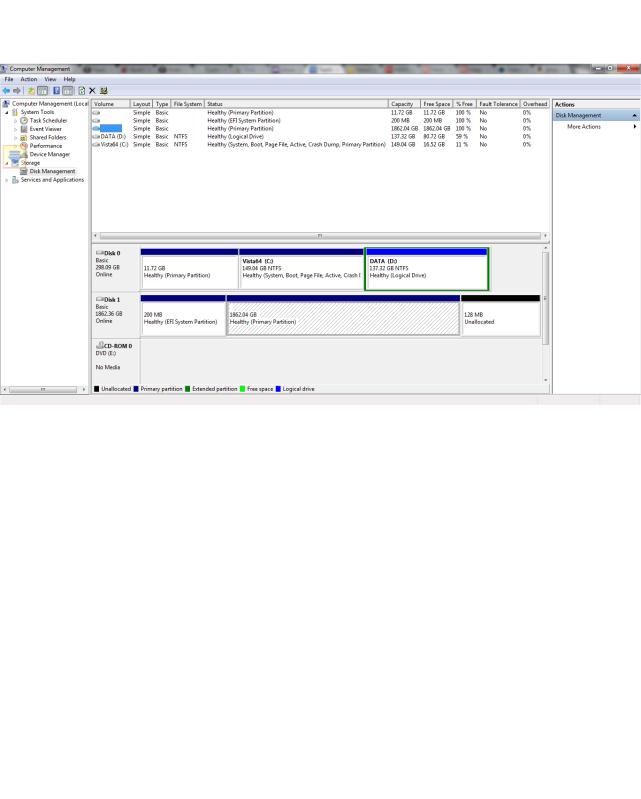
I have tried restarting the comp and everything. I don't know how to assign a different drive letter if a drive letter isn't showing up. As you can see, the drive just shows up in the upper section and the info next to it is blank. And you can see that it is a 2TB hard drive. When I right click on it it only gives me the option to: delete volume or go to Help
In the lower section it shows up as 'Disk 1'. 'Disk 0' is my 'C' drive. Also, you can see that the HD is online. When I right click on it it only gives me the option to: convert to dynamic disk, go to Properties, and Help. There is no where in properties that I can change the drive label.
BTW, my profile is the Administrator on this computer
I have tried another computer, same issue.
I have ordered a SATA docking station that I am going to put the HD in and see if that works.
@ LookinAround: I have done both of the things that you suggested with the registry and the USB cleanup.
Some thing intersesting happened when I ran 'chkdsk'. This is what I got along with the whole scan.
C:chkdsk
The type of the file system is NTFS.
Volume label is Vista64.
WARNING! F parameter not specified.
Running CHKDSK in read-only mode.
Now, I remember the HD coming in as drive F. Does the above message mean that that dive letter is no longer available? Could this be the issue? BTW, 'chkdsk' was ran with the HD unplugged. Also, I went to where I could change the drive letter for the 'Data' partition and all the numbers of the alphabet are there except for 'E'. So maybe it was 'E' and not 'F'? Is there a way to add 'E' to the list? But as I have mentioned, I can't change the drive letter for the HD right now. ******************* See the edit at the bottom.
Just so ya'll know, I really appreciate all the help. I am currently in Afghanistan, so its not like I can just take it somewhere to had the issue fixed. So, thanks again!!
Sorry to ramble like this, but I tried to explain everything that was suggested so far.
********************* EDIT: when I open an MS DOS prompt and try to open drive E, it says that 'the device is not ready.' could this be the issue? In other words, the drive is maybe labeled E, but it isn't pulling it up for some weird reason? If this is it, then do you think it is the HD or the enclosure?
I have tried restarting the comp and everything. I don't know how to assign a different drive letter if a drive letter isn't showing up. As you can see, the drive just shows up in the upper section and the info next to it is blank. And you can see that it is a 2TB hard drive. When I right click on it it only gives me the option to: delete volume or go to Help
In the lower section it shows up as 'Disk 1'. 'Disk 0' is my 'C' drive. Also, you can see that the HD is online. When I right click on it it only gives me the option to: convert to dynamic disk, go to Properties, and Help. There is no where in properties that I can change the drive label.
BTW, my profile is the Administrator on this computer
I have tried another computer, same issue.
I have ordered a SATA docking station that I am going to put the HD in and see if that works.
@ LookinAround: I have done both of the things that you suggested with the registry and the USB cleanup.
Some thing intersesting happened when I ran 'chkdsk'. This is what I got along with the whole scan.
C:chkdsk
The type of the file system is NTFS.
Volume label is Vista64.
WARNING! F parameter not specified.
Running CHKDSK in read-only mode.
Now, I remember the HD coming in as drive F. Does the above message mean that that dive letter is no longer available? Could this be the issue? BTW, 'chkdsk' was ran with the HD unplugged. Also, I went to where I could change the drive letter for the 'Data' partition and all the numbers of the alphabet are there except for 'E'. So maybe it was 'E' and not 'F'? Is there a way to add 'E' to the list? But as I have mentioned, I can't change the drive letter for the HD right now. ******************* See the edit at the bottom.
Just so ya'll know, I really appreciate all the help. I am currently in Afghanistan, so its not like I can just take it somewhere to had the issue fixed. So, thanks again!!
Sorry to ramble like this, but I tried to explain everything that was suggested so far.
********************* EDIT: when I open an MS DOS prompt and try to open drive E, it says that 'the device is not ready.' could this be the issue? In other words, the drive is maybe labeled E, but it isn't pulling it up for some weird reason? If this is it, then do you think it is the HD or the enclosure?
Mark56
Posts: 1,880 +4
If the hard drive was unplugged when you ran chkdsk it will not have run on the external drive without a connection. The information you have in your post "Volume label is Vista64" shows that it ran on your OS partition. "F parameter not specified" does not relate to the drive letter it relates to the parameter you add to the end of the command line chkdsk. You would normally use chkdsk /r or /f.
To run the disk check on a specific drive you would have to use the command in this format chkdsk C: /r where the C: is the drive to run the test on. In your case you would have to replace the C: with the correct drive letter E: But, as the drives letter is not appearing then it would most likely produce an error message.
I suspect that your enclosure has failed, but once you get the new enclosure and try it out we will see what happens.
If you had followed the last paragraph in my earlier post No 7 you could have proved if it was the enclosure or the drive that has the problem.
To run the disk check on a specific drive you would have to use the command in this format chkdsk C: /r where the C: is the drive to run the test on. In your case you would have to replace the C: with the correct drive letter E: But, as the drives letter is not appearing then it would most likely produce an error message.
I suspect that your enclosure has failed, but once you get the new enclosure and try it out we will see what happens.
If you had followed the last paragraph in my earlier post No 7 you could have proved if it was the enclosure or the drive that has the problem.
LookinAround
Posts: 6,429 +188
Thanks for that screen shot! Your problem is sounding / looking familiar
Skim this old thread Drive letters missing. I wonder if you may also be a having a problem with the Disk filter drivers
But before you try changing anything, do this:
> Download and run Filter Order Tool
> Select the WD external in the left pane then click the Clipboard button towards bottom of the window
> Then paste the result into your next post
Skim this old thread Drive letters missing. I wonder if you may also be a having a problem with the Disk filter drivers
But before you try changing anything, do this:
> Download and run Filter Order Tool
> Select the WD external in the left pane then click the Clipboard button towards bottom of the window
> Then paste the result into your next post
LookinAround
Posts: 6,429 +188
Ooops! Just re-read your post. I missed that comment before. If same issue on another computer then it's probably not filters.<snip>
I have tried another computer, same issue.
But let's go ahead and run that tool anyway (should be easy to do). We may as well check filters in any case. It might be a drive or enclosure issue as Mark56 suggests to try...
After the filter check, may also be worth trying
> Checking as Mark suggests
> Running TestDisk - it's a recovery tool. See if it thinks there's any filesystem damage to be repaired
> Can boot into a Knoppix rescue CD (see if it works under Knoppix a Linux OS which checks if it's a windows' problem)
Can provide more detail on the last 2 if/when needed
- Thread Starter
- #15
update
I got the new dock in for the hard drive today. So, I removed the hard drive from the stock enclosure (which is a very shi*** design) and put it in the dock. I followed the instructions and it led me to disk management. See screen shot below:
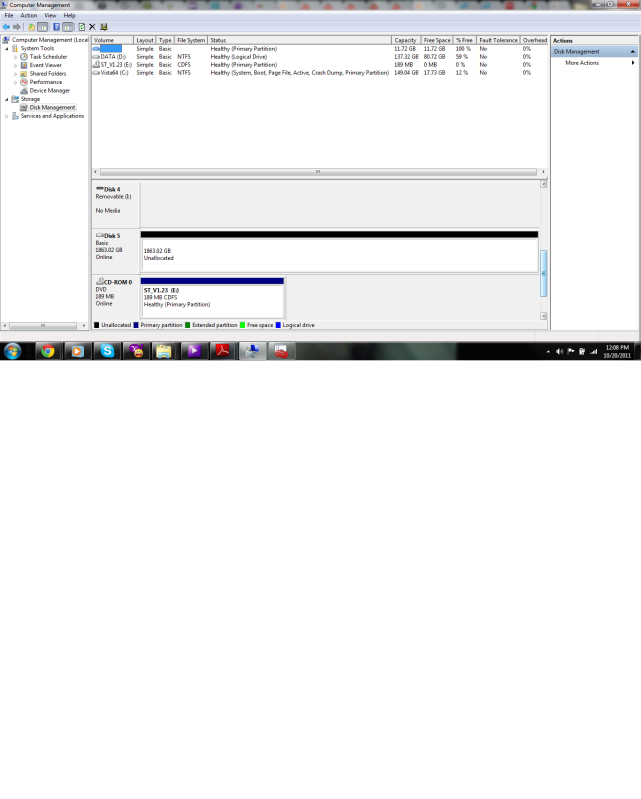
Now when I right click in the above section, my choices are: Delete Volume and Help. (same as before)
The lower section is a little different: convert to dynamic disk, convert to GPT disk, Properties and help. The GPT section is what is new.
I still cant change the drive letter.
@ Mark56, I did try chkdsk and you were right, it didn't work. I even tried all the letters of the alphabet jsut to make sure lol. I couldn't do what you were wanting me to do in post #7. I am on a laptop in Afghanistan and don't have access to a Desktop at all. And I didn't have a USB hard drive connector.
Can anyone think of anything else to try?
@LookinAround: Below are the results from the Filter Order Tool. I did plug in into a computer that I have that is running Ubuntu, it said that the failure was eminent for the HD. I will be trying it again to see if I still get the same errors with Ubuntu later on. I really hope this drive isn't gone. I tried to run TestDisk, but the hard drive did not show up in the list. So, I can't run it?
----------------------------------------------------
Filter Driver Load Order http://www.bustrace.com
----------------------------------------------------
Upper Class Filter: PartMgr
Device Object: WDC WD20 EARS-00MVWB0 USB Device
Lower Filter Drivers: No Lower Filter Drivers specified for this device
Driver Name: partmgr.sys
File Location: c:\windows\system32\drivers
File Description: Partition Management Driver
File Version: 6.1.7600.16385 (win7_rtm.090713-1255) [6.1.7601.17514]
Product Name: Microsoft® Windows® Operating System
Product Version: 6.1.7600.16385 [6.1.7601.17514]
Company Name: Microsoft Corporation
Can anyone think of anything else to try?
***EDIT*** The hard drive isn't showing up in the upper section of disk management, but it is in the lower part. WEIRD!
I got the new dock in for the hard drive today. So, I removed the hard drive from the stock enclosure (which is a very shi*** design) and put it in the dock. I followed the instructions and it led me to disk management. See screen shot below:
Now when I right click in the above section, my choices are: Delete Volume and Help. (same as before)
The lower section is a little different: convert to dynamic disk, convert to GPT disk, Properties and help. The GPT section is what is new.
I still cant change the drive letter.
@ Mark56, I did try chkdsk and you were right, it didn't work. I even tried all the letters of the alphabet jsut to make sure lol. I couldn't do what you were wanting me to do in post #7. I am on a laptop in Afghanistan and don't have access to a Desktop at all. And I didn't have a USB hard drive connector.
Can anyone think of anything else to try?
@LookinAround: Below are the results from the Filter Order Tool. I did plug in into a computer that I have that is running Ubuntu, it said that the failure was eminent for the HD. I will be trying it again to see if I still get the same errors with Ubuntu later on. I really hope this drive isn't gone. I tried to run TestDisk, but the hard drive did not show up in the list. So, I can't run it?
----------------------------------------------------
Filter Driver Load Order http://www.bustrace.com
----------------------------------------------------
Upper Class Filter: PartMgr
Device Object: WDC WD20 EARS-00MVWB0 USB Device
Lower Filter Drivers: No Lower Filter Drivers specified for this device
Driver Name: partmgr.sys
File Location: c:\windows\system32\drivers
File Description: Partition Management Driver
File Version: 6.1.7600.16385 (win7_rtm.090713-1255) [6.1.7601.17514]
Product Name: Microsoft® Windows® Operating System
Product Version: 6.1.7600.16385 [6.1.7601.17514]
Company Name: Microsoft Corporation
Can anyone think of anything else to try?
***EDIT*** The hard drive isn't showing up in the upper section of disk management, but it is in the lower part. WEIRD!
I have the exact..same..problem. Mine just started today. =\ I'll be watching this thread with rapt curiosity to find out what's wrong and if it's fixable without losing all my data.
Mark56
Posts: 1,880 +4
It sounds as if the hard drive is shot but I'll leave LookingAround to confirm this, I'm not sure what the filters check should be showing.
Demonkuga, you may have the same symptoms but the cause may not be the same, you would be better off starting you own thread so it can be dealt with seperately.
Demonkuga, you may have the same symptoms but the cause may not be the same, you would be better off starting you own thread so it can be dealt with seperately.
It sounds as if the hard drive is shot but I'll leave LookingAround to confirm this, I'm not sure what the filters check should be showing.
Demonkuga, you may have the same symptoms but the cause may not be the same, you would be better off starting you own thread so it can be dealt with seperately.
Thanks Mark. I posted a new thread.

LookinAround
Posts: 6,429 +188
1) Your filters are fine. You only have one from Microsoft (the PartMgr filter from M$ should exist with every disk driver)
2) The lower pane of Disk Management displays the physical disk drives that Windows detects. The upper pane in Disk Management are the logical drives (and drive letters). So if you have one physical disk with 2 partitions you can have one physical disk in lower pane and 2 drive letters in upper pane
3) So look at your 2 DiskMgmt screenshots. The first shows 3 partitions (2 allocated) on your physical disk BUT your second shows only ONE unallocated partition! If that's the same physical disk then something is now corrupt! (or did you delete the partitions??)
Install and run CrystalDiskInfo. It's a simple tool to check SMART data on a disk to check for failures (and you get an easy to read display)
/* EDIT */
p.s. Filter problems are local to a machine (since they're software and driver related). Since your disk fails on multiple machines wasn't likely a filter issue but was easy to check with that tool.. just fyi.. so again, it's more likely a h/w issue as Mark56 first suggested
/* EDIT 2*/
Re: drive letter conflicts and changing drive letters as also suggested... fyi: That Drive Cleanup tool posted in earlier post fixes that problem as it removes old USB driver data for any disks not connected at the time you run the tool (old USB driver data includes its old drive letter assignment). Thus, when you next re-connect the USB disk, its driver can be reinstalled and a new drive letter assigned by Windows
fyi: Think of filters as device driver "add-on" parts. Upper/lower filters on a driver are like having upper/lower layers on a cake (where Windows starts with the hardware driver as the single layer cake!) Windows drivers can be one or more layers (just like a single or muti-layered cake).
2) The lower pane of Disk Management displays the physical disk drives that Windows detects. The upper pane in Disk Management are the logical drives (and drive letters). So if you have one physical disk with 2 partitions you can have one physical disk in lower pane and 2 drive letters in upper pane
3) So look at your 2 DiskMgmt screenshots. The first shows 3 partitions (2 allocated) on your physical disk BUT your second shows only ONE unallocated partition! If that's the same physical disk then something is now corrupt! (or did you delete the partitions??)
Install and run CrystalDiskInfo. It's a simple tool to check SMART data on a disk to check for failures (and you get an easy to read display)
/* EDIT */
p.s. Filter problems are local to a machine (since they're software and driver related). Since your disk fails on multiple machines wasn't likely a filter issue but was easy to check with that tool.. just fyi.. so again, it's more likely a h/w issue as Mark56 first suggested
/* EDIT 2*/
Re: drive letter conflicts and changing drive letters as also suggested... fyi: That Drive Cleanup tool posted in earlier post fixes that problem as it removes old USB driver data for any disks not connected at the time you run the tool (old USB driver data includes its old drive letter assignment). Thus, when you next re-connect the USB disk, its driver can be reinstalled and a new drive letter assigned by Windows
LookinAround
Posts: 6,429 +188
Sorry for double post, but to make sure you notice this added info... Note that each of your internal and external USB disks should be displayed along the top part of CrystalDiskInfo window. Select each to see info and check each disk drive status
LookinAround
Posts: 6,429 +188
One more detail i didn't notice in your post before (above) where you said TestDisk didn't detect the disk....@LookinAround: Below are the results from the Filter Order Tool. I did plug in into a computer that I have that is running Ubuntu, it said that the failure was eminent for the HD. I will be trying it again to see if I still get the same errors with Ubuntu later on. I really hope this drive isn't gone. I tried to run TestDisk, but the hard drive did not show up in the list. So, I can't run it?
----------------------------------------------------
Filter Driver Load Order http://www.bustrace.com
----------------------------------------------------
Upper Class Filter: PartMgr
Device Object: WDC WD20 EARS-00MVWB0 USB Device
Lower Filter Drivers: No Lower Filter Drivers specified for this device
The physical disk is showing up in DiskMgmt (in lower pane) and FilterLoadOrder (I highlighted above) so TestDisk should be detecting it too. I advise you run TestDisk first without it (and look at devices), exit, plug in the disk, then run TestDisk again to see the differences in devices it lists
Can you send me the link to your new thread?
https://www.techspot.com/vb/topic172343.html It doesn't look so good on my end. =\
Similar threads
- Replies
- 15
- Views
- 182

- Replies
- 4
- Views
- 155


Latest posts
-
 AMD X870 Motherboard Roundup: 53 Motherboards Tested
- ddferrari replied


-
TechSpot is dedicated to computer enthusiasts and power users.
Ask a question and give support.
Join the community here, it only takes a minute.