also @ TechSpot: Google, NASA join forces to build quantum computing laboratory

Simple hack keeps prying eyes off your LCD monitor

By

On November 28, 2011, 3:01 PM With Video

Have a nosey roommate? Stuck doing work on cramped public transportation? Instructables member and fellow geek Dimovi offers an easy seven-step project that's sure to keep prying eyes off your computer display. The instructions are fully accessible to non-paying members and all you need is an ordinary LCD monitor -- CRTs won't work. The author suggests using an older display so you aren't hacking up your new 30-inch UltraSharp, but virtually any LCD should work.

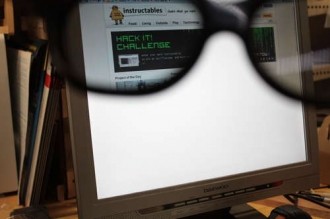
Dimovi notes that most LCD monitors have two films: one that's polarized to filter out unwanted light and another for anti-glare purposes. To get rolling, you'll have to dissect your monitor and carefully salvage the polarized layer. You can scrap the anti-glare film but you still need the monitor in working order and you need a clean chunk of polarized film. After you reassemble the display, it will only show a blanket of glaring white light -- at least to the naked eye, anyway.

Herein lies the beauty of Dimovi's creation: you use the polarized layer to create glasses that let you see the screen. You just have to find a pair of spectacles (he used a set of 3D glasses from a movie theater) and outfit them with custom lenses cut out of the polarized film. He offers a few tips on performing this process and if you ask us, it sounds like the trickiest part. It's noted that regular polarized sunglasses could blow your cover, but few people wear them indoors and they'd have to be looking at the screen on a 45-degree angle to see anything anyway, according to Dimovi.

, , , , , , , ,

Related Products from Product Finder

Dell UltraSharp 2209WA

Read expert reviews, pros & cons, and product information about Dell UltraSharp 2209WA. There are 11 reviews available so far.

7 Reviews

Dell UltraSharp U2711

Dell's UltraSharp U2711 offers a resolution of 2560x1400, 178-degree viewing angles, a 6ms GTG response time, 350cd/m2 brightness, 1,000:1 contrast ratio (80,000:1 dynamic), 0.233mm pixel pitch, and its 12-bit internal processing supports 1.02 billion colors (compared to the typical 16.7 million).

18 Reviews

Dell U3011

Read expert reviews, pros & cons, and product information about Dell U3011. There are 16 reviews available so far.

10 Reviews

Dell U2311H

The Dell UltraSharp U2311H has a resolution of 1920x1080, can display 16.7 million colors, have 178-degree viewing angles, an 8ms GTG response time, VGA, DisplayPort, and DVI-D connectors, as well as four USB 2.0 ports. The screens also have height, pivot, tilt, and swivel adjustability.

8 Reviews

User Comments: 6

Got something to say? Post a comment
  1. Very cool.

  2. man this thing is sweeping the internet fast, receive the e-mail from instructables last week and now im seeing it on all my favorite tech websites!

    Probably gonna do this myself once it looks easy enough ! very ingenious.

  3. Cool. I can now watch porn during class and in public transits.

  4. yeaaaah dont think im gonna pull my monitor apart.

  5. Surely nobody would ever use this to watch teh pornz in public?

  6. Saw this on Lifehacker a day or two ago, I wouldn't do it, but still pretty cool.

Recently commented stories

Post a new comment

Social Login & Guest Posting TechSpot Members
Login here or sign up for free,
it takes about a minute.
Get complete access to the TechSpot community. Join thousands of technology enthusiasts that contribute and share knowledge in our forum. Get a private inbox, upload your own photo gallery and more.
TechSpot on:

Subscribe to TechSpot

Get free exclusive content, learn about new features and breaking tech news.