Read with Formatting | Join TechSpot! (it's free)


How to Open a Sony Vaio PCG-TR5

TechieJustin
05-14-2008, 10:05 AM
Hi folks!
Well... I made the mistake of getting a cheap ultraportable off ebay about six months ago. It has worked well so far but now the hard drive is about to quit.
I have opened laptops before, prety many actually. normally I'm done in half an hour. But this machine is held together by a force I don't understand.
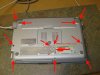
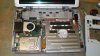
I'm attaching a picture indicating where the mystery force appears to be.

I realize I made a mistake getting Sony but its too late now. This has to last me through the next few months.
lamo
05-14-2008, 10:26 AM
did you disconnect keyboard?

Ad
05-14-2008, 10:26 AM

TechieJustin
05-14-2008, 10:41 AM
did you disconnect keyboard?
I saw the keyboard trick on the other Vaios, but this is the ultraportable.

Note the 12 inch (33cm) ruler.
The bigger Vaios have the speaker slip trick, where when you remove the speakers the keyboard slides up and everything comes apart.
My speakers are at the top of the screen.

Tmagic650
05-14-2008, 10:51 AM
If all the bottom screws are removed, including any hidden screws, the keyboard cover should snap apart. From your first picture, there is still a screw present

lamo
05-14-2008, 11:39 AM
check this link:
http://home.comcast.net/~nw_systems/vgnT.pdf

it's not tr series, but similar to it :)

TechieJustin
05-14-2008, 11:39 AM
That's just it, there isn't... At least not one that I can see.
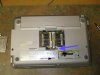
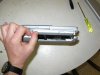
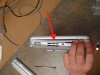
Here are all the screws I removed and a view of the side where the inaccessable one is.

TechieJustin
05-14-2008, 11:51 AM
check this link:


it's not tr series, but similar to it :)


Interesting, however the TR series is different to the point that doesn't apply.
Thanks, though! Hehe...
WHatever is holding it in there, is strong so its obviously a screw. It it was a clip I would have broken it by now; due to the amount of force I applied.

I have also noticed against my little turntable the surface is slippery.

Tmagic650
05-14-2008, 12:08 PM
There's no compartment on the bottom like an memory or WiFi that could be hiding that elusive screw? Can we see a bottom photo?

Ad
05-14-2008, 12:08 PM

TechieJustin
05-14-2008, 01:03 PM
There's no compartment on the bottom like an memory or WiFi that could be hiding that elusive screw? Can we see a bottom photo?


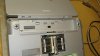
Yes, there is one in the memory compartment. I got that one at first - I've seent hat before on Dells, HPs and pretty much everyone.

Tmagic650
05-14-2008, 02:12 PM
Have you removed the battery and CD ROM to see if any hidden screws reside there in those areas?

TechieJustin
05-14-2008, 09:20 PM
Have you removed the battery and CD ROM to see if any hidden screws reside there in those areas?

The abettery - yes, both screws were removed from there.
No, the DVD rom doesn't appear to be held in place. Its also not where I'm encountering the resistance.

Tmagic650
05-14-2008, 09:47 PM
Boy TechieJustin,
If you ever get this sucker apart, please let us know how you did it... What is the full model number? it sould be located above the keyboard near the LCD hinge

TechieJustin
05-14-2008, 10:40 PM
Boy TechieJustin,
If you ever get this sucker apart, please let us know how you did it... What is the full model number? it sould be located above the keyboard near the LCD hinge


I'm tempted to just pull and whatever breaks can be glued. But that little process has gotten me into trouble. One of my duties is fixing printers and hidden screws are my specialty.

The model number on the bottom is PCG-4B1L
On the top in the upper left corner of the keyboard area is says PCG-TR5AP.

I don't know if I'll ever get another Sony product. I like their cameras, but their proprietaryness is a pain inthe ***. I think I'm going to Canon in that area.

lamo
05-15-2008, 07:21 AM
pcg-4b1l - is the model code. right model name is pcg-tr5 indeed.

TechieJustin
05-15-2008, 11:26 AM
pcg-4b1l - is the model code. right model name is pcg-tr5 indeed.

Yeah. Wish I could find an inside source for a service manual.

TechieJustin
05-19-2008, 10:28 AM
OK kids... I got it it all figured out.
I went to my old friend usenet and was given this site. Here are a fre pictures of my Sony.
The bottom doesn't come off, the top does.

http://www.siliconpopculture.com/articles/review/netegriti_em_500ag/

the only difference is this guy is screwing around with his 802.11.

Ad
05-19-2008, 10:28 AM

TechieJustin
05-19-2008, 11:27 AM
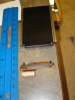
What the heck kind of connection is this?

Tmagic650
05-19-2008, 12:57 PM
Is that larger section of the connector the hard drive connector? If it is, the other end is the motherboard IDE connection. Was it a hidden screw that stopped you from opening the case?

TechieJustin
05-19-2008, 01:51 PM
Is that larger section of the connector the hard drive connector? If it is, the other end is the motherboard IDE connection. Was it a hidden screw that stopped you from opening the case?

Yes, that's the connector, and there's an adaptor that was already in there. I of course broke one of the pegs off - not the conductive ones the plastic mini "boner" sticking out on the right.

Hidden screw? no.
I was trying to remove the bottom when I should have tried going in from the top.
Check out the pictures on the link I posted, it makes sense once one looks at it.

Something else occured to me. If I get a larger capacity/faster HD, it will generate heat.
Either way, this 30G thing is too small.

TechieJustin
05-19-2008, 02:12 PM
Now I'm confised... as long as the replacement drive says IDE or ATA I'm OK, right?
I'm seeing drives like this and their connectors don't look anything like the one I pictured.

Toshiba MK8009GAH Internal 1.8-inch 80GB ATA6 4200rpm 2MB 100Mbits/s Notebook Hard Drive Bulk SKU: MK8009GAH

Capacity - 80 GB
Number of Disks - 2/4
User Data Cylinders - 62,640
Data Transfer Rate - Buffer to Host- PIO :16.6MB/sec , Buffer to Host- Ultra DMA :100MB/sec
Seek Time - Track-to-track 3ms , Average 15ms , Maximum 26ms
Voltage - 3.3V (5%)
Energy Consumption Efficiency - 0.00375W/GB
Rotational Speed - 4,200rpm
Average Latency - 7.14ms
Interface - ATA 6
Buffer - 2Mbytes
Dimensions(W x D x H) - 2.12" (54mm) x 2.79" (71mm) x 0.31" (8mm)
Weight - 2.01 oz (59g)


or the 120 gig version...

MK1214GAH
Specification:

Data Storage Physical:
Per drive, formatted* 120GB
Number of Disks 2
Number of Data Heads 4
User Data Cylinders 77,112
Logical Configuration:
Heads 16
Cylinders 16,383
User Sectors/Track at zone 0 63
Logical Blocks (LBA) 234,441,648
Data Transfer Rate:
Buffer to Host- PIO 16.6MB/sec
Buffer to Host- Ultra DMA 100MB/sec
Maximum Internal 196.7 - 411.1 Mbits/sec
Seek Time:
Track-to-track 3ms
Average 15ms
Maximum 26ms
Nominal Power Requirements:
Voltage 3.3V (???5%)
Energy Consumption Efficiency: 0.0025W/GB
Power Consumption:

 Tech News

 Downloads
Copyright © 1998-2008 TechSpot.com. TechSpot is a registered trademark. All Rights Reserved.