also @ TechSpot: Most Anticipated PC Games of 2010: From A to Z

Read on full site | Join TechSpot! (it's free) | Bookmark / Share this


PC Overheat

paulsif
04-12-2004, 06:17 AM
Hi all,

I replaced my P4 standard CPU fan with a quieter one, its called a cooler master. Only thing is my PC now overheats, i had got a program called Inter Active Monitor and i can view the RPM of the fan, when it gets hot it does not speed up to cool the system down it there a way of sorting this out?

Thanks

Paul

Rick
04-12-2004, 06:26 AM
Usually, more quiet means fewer RPMs. Your fan may be maxed out at whatever speed you are seeing.

Its very difficult to find the right cominbation of cooling and silence.

Ad
04-12-2004, 06:26 AM

paulsif
04-12-2004, 06:42 AM
Would it help if i fixed a fan to the casing on the back to suck the air out or fix one to the front to blow the air in?

Arris
04-12-2004, 07:05 AM
What is your current air flow setup.

Most systems benefit most from an intake fan (usually found mounted at the bottom front of the case) and an exhaust fan (usually found mounted at the top back of the case). These don't have to be high rpm fans, Having a flow of air through the case without excessively tangled cables can result in lower running temperatures without having to get a high rpm fan on the CPU heatsink and suffering noise levels comparable to a jet engine ;)

Arris
04-12-2004, 07:11 AM
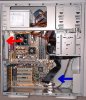
See the basic patronising image attached for details :D
(aren't my PaintShop Pro arrows lovely)

Basically cold air in from the front and as hot air rises the fan at the back pulls it out. So the system should have a flow of cool air passing through it. Often the PSU unit has fans as well which assist further in exhausting the hot air.

If your PSU has 2 fans (one on the bottom to pull air into it as well as one at the back of it) then the best addition would be to have a bottom front case fan attached. An 80mm one at around 2000rpm-2500rpm should be enough.

Post a reply, see related topics & more

 Top Technology News

Weekend Open Forum: Your next hardware upgrade will be...?

4-Way Intel H55 Motherboard Shootout

Tech Tip of the Week: Customize Your Windows 7 Start Menu Button

MSI unveils new business-minded notebook, P600

London hospital opens to Web-addicted "screenagers"

Nintendo: DS rolling out to Japanese schools

Amazon, others to use new color E-ink displays?

HP Slate coming with Atom and Flash in June for €400?

More Tech News

 Software Downloads

Anti Trojan Elite 4.9.0

MSI Afterburner 1.5.1

Google Chrome 5.0.356.0 Beta

ChrisTV Lite 5.51

DVDStyler 1.8.0.2

Miranda IM 0.8.17

RemoveIT Pro XT - SE 19.03.2010

More Downloads


Copyright © 1998-2010 TechSpot.com. TechSpot is a registered trademark. All Rights Reserved.