Read on full site | Join TechSpot! (it's free) | Bookmark / Share this


How should I dual boot vista and linux with 2 hard drives?

¼ of a hotdog
03-23-2009, 01:08 AM
I have been curios about Ubuntu and I want to dual boot it with vista but I noticed on their site they say it’s faster to place it on one of the low numbered cylinders. I want to know if it would make a noticeable difference if I placed it on my other hard drive. I have vista on a 160 GB hard drive and I have a 500 GB hard drive with about 170 GB of random junk on it. Is there any way I can put Ubuntu on the part of the 500 GB hard drive that is fastest without messing up the data that’s already on it or having to place all of that data on a separate hard drive? If it matters I have 64 bit vista and I plan to use 64 bit Ubuntu.

Thanks for any help!

Matthew
03-23-2009, 04:28 PM
Probably won't notice a dramatic performance difference, if at all, and yes you can put it on the 500GB drive without messing your current data up. Create a new partition at the start of the drive in your desired capacity (50GB-100GB is more than sufficient), and the rest of your data should remain untouched as long as you install Linux on the new partition.

Ad
03-23-2009, 04:28 PM
  

¼ of a hotdog
03-24-2009, 02:44 AM
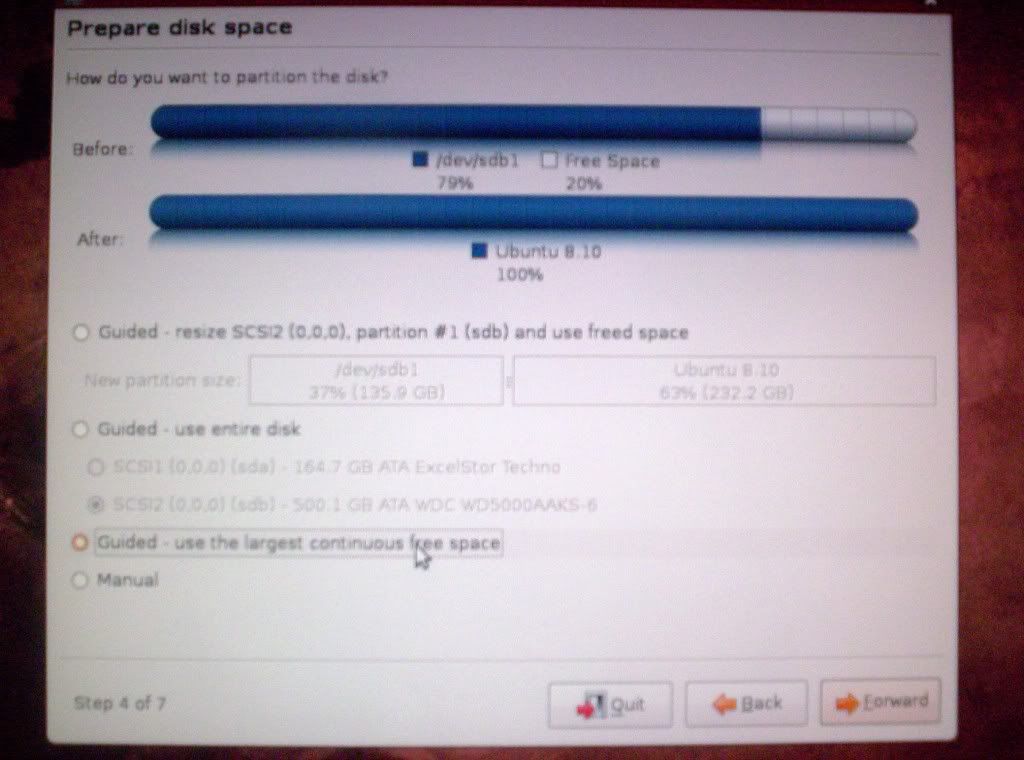
Is this correct or would it replace all of the data? I did make a new 100gb partition in disk management. Sorry for the bad quality.

http://i41.tinypic.com/29nwcvp.jpg (http://i377.photobucket.com/albums/oo220/giganotasaurus/linux003.jpg)
Click to Maximize

BorisandBailey
04-10-2009, 02:35 AM
That looks correct to me, but you know what I'd do first? Back up the data you presently have on the disk before you do anything else!

Matthew
04-10-2009, 03:57 AM
And to think you were only two weeks late, BorisandBailey.

BorisandBailey
04-10-2009, 01:31 PM
Well, you know, Zeno, there's always the chance there are those who may put things on the shelf for awhile and are a little slow to getting around to do things.

Matthew
04-10-2009, 01:46 PM
The screenshot of him showing what's already been done suggests otherwise, but sure.

¼ of a hotdog
04-10-2009, 08:01 PM
Well actually I still have not installed it because I don't have a way to backup 178 GB. I tried compression and it would take at least 17hours to compress it and I'm not even sure if it would get much smaller. I guess I will just wait until I can get a nether hard drive.

captaincranky
04-11-2009, 12:06 AM
My personal experience with installing Linux on a HDD with data has been this; you don't need a large partition for the Linux install, 5 to 10 GB should be plenty. The Linux partition manager seems to have enough sense not to overwrite any data.
With the ratio of free space to used space you have, it probably would be all right to just install Linux on the drive in question.

If you just want to play with Linux, then try using the WUBI installer. It installs from Windows as a program would. You always can make a hard install from a Linux disc later if you decide you actually want to keep it.

What worked for me on a HDD of 140GB of capacity with 40GB used was first defragging the drive, then just installing Ubuntu from it's own disc. I created a 40GB partition, which was way too big, but still, no data was lost. I backed everything up, which wound up being a huge waste of time.

Linux reads NTFS files, and you can always create folders on a drive for any files that are only accessable from Linux. It's actually harder to get rid of Linux, than it is to make the install on a drive with data.

However, absolutely, positively defrag the drive FIRST!

Post a reply, see related topics & more

Tip: Download Advanced SystemCare 3 Free - Clean, Repair, Protect & Optimize your PC.


 Top Technology News

Weekend Open Forum: Google Chrome OS and the future of cloud computing

Tech Tip of the Week: Unearth Region-Specific Windows 7 Themes

Sony: PlayStation 3 to be 3D-capable via firmware update

iSuppli: DDR3 to account for over half of DRAM shipments by Q2 2010

Facebook named third most popular video website behind YouTube and Hulu

Patriot introduces new PS-100 SSD series

Sony working on digital store for music, movies, books

Details of Intel's 32nm Atom emerge, on track for 2011

More Tech News

  
 Software Downloads

Norton Virus Definitions 2003-07 November 20, 2009

AVG Anti-Virus Updates November 20, 2009

Norton Virus Definitions 2008-09 November 20, 2009

avast! Virus Definitions November 20, 2009

McAfee SuperDAT Update 5808

Kaspersky Anti-Virus Update November 20, 2009

Google SketchUp 7.1.6087

More Downloads


Copyright © 1998-2009 TechSpot.com. TechSpot is a registered trademark. All Rights Reserved.