Read with Formatting | Join TechSpot! (it's free) | Bookmark / Share this


Installing Linux for the first time (& dual boot)

Pages : [1] 2 3 4 5 6 7

svtcobra
02-20-2002, 11:05 PM
I need to try it.. I got it successfully installed awhile back on my PII 400 but my nic wasn't compatible so I never got on the web.

What I want to do is install, Mandrake 8.2 on my Gateway laptop. I have a 10GB partition that is pretty much empty on it so I would like to install it there. I want to dual boot with WinXP Pro. I have a million questions but for the most part I am most interested in how to do the install and keep my WinXP in perfect working order. Also, is Mandrake the best for me? It seems so. Well, let me know what I have to do. I am going to dload 8.2 and then wait for instructions. I am also going to do a search around the web. There must be a starter guide out there that can lend me a hand.

Thanks in Advance..

Phantasm66
02-21-2002, 05:30 AM
Okay, what I am going to do, is reinstall Linux on a spare partition later (today probably) and am going to write a step by step guide on installing in alongside Windows XP.

There are several things I want to know first.

1)What version of Linux do you have? Red Hat and Mandrake are the best in my opinion.

2)What is your hard drive configuration (i.e. what's on all of your IDE controllers, primary, master, etc? What partitions do you have on hard drives there? FAT32, NTFS... I want to know all of this please...)

3)What's your system specs, in case I notice something potentially problematic?

4)What's your LAN settings or internet connection settings? Do you have cable with DHCP IP address allocation? Or dial up via modem?

Tell me as much about your system as possible.... Particularly things like whether you have certain partition for certain purposes because if possible we want all of that accessible on your Linux partition as well.

I can write a good guide for either Red Hat or Mandrake. If you have Mandrake, then thats fine, but if you have Red Hat that would be cooler because its my favourate distro and I can tell you a LOT more about it.

If you have a fast internet connection, why not download Red Hat from an ftp mirror site and burn the ISO files to CDs???

Once I hear from you, I am going to rename your post to something like "Installing Linux" or something, so that it serves as a comprehensive guide for others in the future to install this operating system alongside Windows.

Ad
02-21-2002, 05:30 AM

Phantasm66
02-21-2002, 06:31 AM
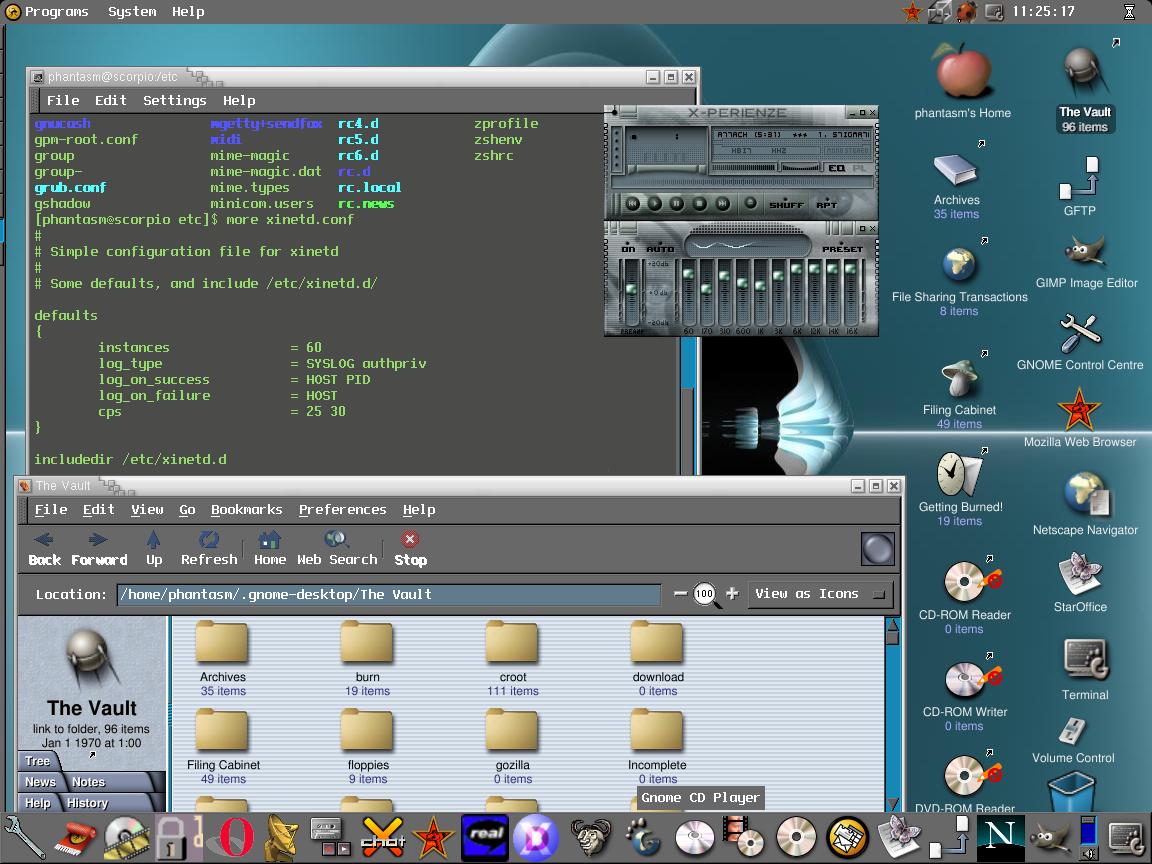
Soon all this mad stuff can be yours:

http://phantazmm.freeservers.com/ximian22.jpg

svtcobra
02-21-2002, 09:54 AM
Thanks for the help Phantasm..Here is what you asked for:

1. I just downloaded Linux-Madrake 8.2 and I am creating CD's while I type this.

2. It is a Toshiba 20GB laptop drive. It is partitioned into 2 10GB drives with WinXP occupying the C: partion using a FAT32 File System.

3. The Laptop is a Gateway 9550. It is a PIII-M 1.06, 32mb Geforce2Go, 256mb Ram, Intel Chipset mobo, DVD (this doesnt have to work), Intel ethernet.

4. I have a cable internet connection. It is obtained through a 4 port Linksys cable router.

Phantasm, If you think it is better (and easier) to go with Red Hat instead, I will. From everything I read it seemed that Mandrake was the best.
If you need more system info, let me know.

svtcobra
02-21-2002, 11:16 AM
Phantasm..I have downloaded Red Hat 7.2 as well so the choice is yours.

Phantasm66
02-21-2002, 12:20 PM
Hmm.... OK let's go with Red Hat since we already have a thread about the new Mandrake 8.2....

Instructions comming VERY soon!!

Phantasm66
02-21-2002, 02:59 PM
Okay, here as promised is a short HOW TO on making your machine dual boot with Linux and

Window XP.

If you are going to try this, it might be a good idea to make a printout of what I have

written here, so that you can refer to it as you do the install.

Ok, you say that your Windows XP partition takes up 10 GB of the 20 GB disk space, and that

its formatted as FAT32. That's cool. Make sure, before you do anything, that the rest of

the hard drive's space (which you want for Linux) is UNPARTITIONED disk space. Its OK if

its an extended partition filling there, or something, just don't create any partitions.

We are going to use Linux's installation program to do that.

TOP PHANTASM TIP: If you are using an operating systems' native file system for use

with that operating system, particularly to install the OS on that partition, always use

that Operating system's native tools and installation program if possible. (i.e. don't go

mucking around with Windows 2000 disk administrator snap-in to create partitions for linux,

etc, let linux's installation program or linux's fdisk do that.)

OK, hopefully your system can boot from CD. If so, pop CD1 in there, and go into your BIOS

and set the machine to boot from CD. If not, post back here for instructions on how to

create a linux installation boot disk.

As you boot from CD, you will see a screen appear of various choices. There's text install

mode, rescue, etc. Don't bother with any of that, and just hit ENTER.

OK, after a short pause, a big blue screen will appear, and linux will tell you that its

running anaconda. Just wait.

Now the graphical installation program begins (hopefully ;) )

Choose your language (english for most, I guess) for the installation process. Then hit

NEXT, on the following screen, choose your keyboard type, model and layout. Test this

first in the little text box provided, so as to ensure that everything is working. Ensure

that the proper characters are displayed when you, for example, hit shift and one of the

numeric keys, and that you get the right " @ ~ # \ ? / and so forth. Otherwise, it might

be a pain. Click NEXT.

Now select mouse type. Try to find something that matches yours. Things marked "GENERIC"

and so forth are always a good bet for some mice that don't seem to fit any categories. If

your mouse has a wheel, then a recommend giving "Microsoft Intellimouse" a go, even if yours

isn't because the chances are that it will work. You might also want to click the "emulate

three buttons" tick box as well. A lot of functions in the XWindows interface expect a

three button mouse. Clicking both buttons together under 3 button mouse emulation kids

Linux on that you have pressed the third, middle button.

A screen will now say "WELCOME TO RED HAT LINUX" blah blah.... Just click NEXT.

Now, the next screen asks for an installation method. The thinking behind this is that

some people might have a virgin machine with no operating system on it at all, and also

might not understand concepts like partitioning, setting up mount points, etc.

However, we are all clever enough to understand that, so click CUSTOM.

If you are dual or multi booting with some other operating systems, ALWAYS choose a

custom install!!!!

Click NEXT, and then choose to "Manually partition with Disk Druid."

Highlight your existing Windows XP partition (which you said was FAT32) and click EDIT.

Give it a mount point like /mnt/winxp or something. You could have any mount point that

you like, but putting it in /mnt is proper UNIX convention.

Linux is reasonably FAT and FAT32 friendly, but not really NTFS friendly. It comes with

NTFS read-only support and experimental write support, but I don't recommend that. If you

are sharing any data partitions with Windows XP and Linux (like partitions containing media

like mp3s, games, etc) then use FAT32 please if possible. Or think up something else....

MAKE SURE That when you are editing the properties for your Windows XP FAT32

partition, that it has "Leave Unchanged" on file system preparation. Otherwise, it will

format your partition. :eek: Click OK.

Now click NEW. Select a file system type of SWAP, and select the hard drive (in your case

probably just hda) you want the swap partition to be on.

Attention The writers of the 2.4 kernel recommend 2 X your physical RAM as swap

partition space for that kernel.

So if you have 256 MB, make a 512 MB partition. Click OK.

Now click NEW again. Make the mount point / (i.e. just "/" on its own!) and give it a

file system type of ext2 or ext3. ext3 is the new system with some better integrity, but

Drive Image software hasn't caught up to it yet, so I use ext2. If you don't use drive

image then there's no reason not to go with ext3. Tick the box that says "Fill to maximum

allowable size" so that disk druid shall automatically use the remainder of your HDD space

for the / partition, which is where you want everything to do.

When you get more experienced with Linux, you will actually consider spreading your Linux

installation over multiple partitions, but that's for the advanced class :)

Phantasm66
02-21-2002, 03:00 PM
Click OK when you are sure that everything is cool.

Now, if you have any other FAT32 partitions that you want to have linux automatically mount

on boot, and make available under /mnt/ then give then mount points as well by highlighting

them and hitting EDIT, again making sure to select "Leave Unchanged" so that disk druid does

not format these.

For example, if you have a partition filled with mp3s you have downloaded, what about

/mnt/mp3 as the mount point?? Or /mnt/games ?? You get the picture....

Now, nothing is actually done until you bypass this screen, so you can take your time

making sure that absolutely everything is set up correctly. And I mean, SURE!!! Make

sure that there is not a single mistake, because disk druid will quite happily follow your

incorrect instructions and format over valid data if you let it!

When totally sure, click NEXT.

The next screen asks you about the boot loader. Select these options:

-Use LILO as the boot loader.
-Install boot loader on first sector of boot partition.

ONLY Install Linux to the MBR if you ONLY have linux installed on the machine, or are

planning on dual booting with Windows 9x, and don't want to use a boot disk.

Click NEXT.

Now, in network settings.... If you:

a) have a static IP address, then untick "Configure using DHCP" and enter all of your

network details there and then click NEXT.

b) have a dynamically assigned address, then untick "Configure using DHCP" for a moment, and

enter a computer name for your machine under "HOST NAME" and then tick "Configure using

DHCP" once again.

Make sure that "Activate on Boot" is ticked, unless you don't want that (which I imagine you

all will want....)

The next screen is firewall configuration. Unless you are TOTALLY paranoid, or are

installing a top secret server, then the defaults are fine. NEXT.

Next screen is "Additional Language Support" Add others if you want, but make sure that

yours is the default. NEXT.

Time Zone config... again, pretty self explanatory.... Just select yours.

Now in account config, enter a root password.

Also create another account, a non-root account. This is because what you should do in

Linux is log in using a normal user account, and then "su" to root when you have to install

software or change configuration settings, or so forth. Logging in a root and running

Xwindows as root is not very cool.

The next screen is authentication config. Unless you are on a network with a linux server,

then just click next because the defaults are fine.


OK, now is the package selection bit. There are MANY programs, utilities, etc, installed

with Linux, but this section puts them into groupings. There is even an "individual

package selection" option, but that is more for advanced users.

Assuming that you have at least 3 GB or so of space for linux, then I usually take

EVERYTHING except for some of the server type things, such as:

News server, NFS Server, SQL Database, Router / Firewall, DNS Name Server....

...So pick EVERYTHING else apart from these (no need for laptop support if not installing to

one, though) INCLUDING the last option which is "EVERYTHING."

Just omit the particular services that I listed above, as I have explained.

In total, you should be looking at about 2,800 MB or so. This is fine.

Click NEXT.

Now in graphical interface section. Select your graphics card, and Video RAM amount. If

its not listed, again start looking at options like generic and so forth.

Don't stress TOO much about settings like graphics, mouse, etc RIGHT now, just make sure

that you can get through the installation process, because all of this can be changed

later....

Click NEXT, NEXT, and now the file copying will begin. Go away and make a cup of tea or

something, because this is probably going to take about half an hour...

You should be asked at one point to insert disk 2, do so.

....Still there??.....

OK, once this is finished, you will be asked to create a boot disk. You should ALWAYS do

this! ALWAYS!!! The boot disk is tailored for your system. Insert a floppy in drive a:

and allow the installation to create the disk.

Now, in monitor config, try to find yours, or something like yours. There are again a

number of generic types that should work with your system. Don't stress TOO much if this

doesn't work, as I said earlier this can later be fixed in the command prompt with some

pretty nifty tools.

Click NEXT, and then select the resolution, colour depth, etc that you want. Test this as

well, and ensure that the selected mode can be displayed. If it doesn't work, post back

here for advice. But it should do. If you are asked do you want to start X on booting, say no. Then click EXIT.

As your machine reboots, go into the BIOS and set the machine to boot now from floppy. As

you reboot, you will be presented with a prompt that looks like this:

BOOT:

Just hit return. It will take a moment or too to boot from the floppy, but in a moment,

when we make it boot from the hard drive, it will boot faster.

As it boots up, you will see a series of messages from the kernel and then a series of tasks

will start. If the task starts OK, then you will get a little green OK on the right hand

side of the screen. If there are any problems, take a note of the task that failed, and

post back here.

If during the boot up process the hardware detection finds any additional devices (such as

sound card) then choose configure. For the most part there should be very little user

intervention involved, and the hardware will be configured automatically.

Finally, you shall be presented with a login prompt.

Log on as root (just this once!) and try :

startx

to start XWindows... Does it work??? If not, post back here.

As a final step, we want to add linux to Window XP's boot menu.

If you chose to mount your XP partition as /mnt/winxp and you installed linux to hda6 then

this is what you do:

/sbin/lilo

-----should say that it has added linux sucessfully...., then:

dd if=/dev/hda6 of=/mnt/winxp/bootsect.lin bs=512 count=1


adapt the dd command for any changes to mount point or device name if applicable.

Then reboot, go into XP, and add this

c:\bootsect.lin="Red Hat Linux"

to the bottom of boot.ini which is located in c:\ (hidden and read only by default.)

If you now reboot again, you will be able to boot linux without the boot disk.

Start X and muck around with your new system....


....You want more??? Then try my XIMIAN GNOME installation instructions :

http://www.3dspotlight.com/vb/showthread.php?s=&threadid=80

Or maybe try your hand at installing the XINE media player :

http://www.3dspotlight.com/vb/showthread.php?s=&threadid=125

Good luck. Post back with any problems.

Phantasm66
02-21-2002, 03:04 PM
Here is it:

Phantasm66
02-21-2002, 03:22 PM
Did it work?? Yes! Well, that's great.

But if not, don't be too down hearted. Just start again from the beginning.

The truth is, the first time I installed Linux, it took me about 8 tries. And I accidentally wiped out some important data in the process, which is why I recommend caution.

You should be fine. Linux has come a long way in recent years from the nasty text based installer mess that it used to be. Its getting pretty easy these days.

Like everything else in this life, experience breeds familiarity, which breeds confidence. After you have done all of this a few times, you will be wondering what all of the fuss was.

But you MIGHT make a mess of it the first time. Don't stress. Just start again, and take it slowly.


EXTRA SPECIAL PHANTASM TOP TIP: If you want to get into all of this Linux stuff, and I mean REALLY get into it, then get a book out on UNIX commands. Read it, and practice it and experiment on the command line. Learn about pipes, environment variables, shell scripts. Try these things out! The BEST way to gain knowledge is to read a book.

Ad
02-21-2002, 03:22 PM

svtcobra
02-21-2002, 05:18 PM
Phantasm, Great guide!! When I get to "manually partition with disk druid" I run into an issue. When I go to create the swap file I get an error that says "Could not allocate requested partitions" Partitioning failed: Could not allocate partitions as primary partitions. I click okay and it just leaves me at that screen.

I currently have a 20gb hard drives fdisked into 2 10gb partitions. I formated the second partiton before I did the install so it would be clean.

What am I doing wrong?

Phantasm66
02-21-2002, 05:25 PM
You should have NOTHING after the first partiton, as I said. When you reach the disk druid stage, the only partition that should exist on your drive is the WinXP partition.

The error can also be caused if, for example, you had WinXP as a primary partition and then an extended partition (with no logical drives, and filling the rest of the hard drive space) and the option to "Force partition to be primary" was ticked in the create partition options in disk druid.

So to reiterate, before beginning the install there should be only 1 partition on your disk, the winxp one. everyone else on the disk should be completely unpartitioned space. Only 1 10 GB partition (FAT32) should exist on your drive before beginning. Everything else should be deleted.

Good luck. Post back if you reach other issues.

svtcobra
02-21-2002, 05:52 PM
Alright..So in fdisk can I just kill the extended partition or do I need to re partition the whole hard drive?

Phantasm66
02-21-2002, 05:57 PM
No, you don't need to repartition the whole drive. You just need to make sure that the partition containing windows xp is the only partition on the drive before you begin setup.

Right click my computer in XP, manage. Go into disk administrator. Ignore your XP partition, and delete anything else.

svtcobra
02-21-2002, 06:00 PM
cool, I'll post back my next issue...

svtcobra
02-21-2002, 06:27 PM
alright the install is going..Seems like it is going to take a bit of time so I let you know how I make out after its done..

Thanks alot for the help.

SNGX1275
02-21-2002, 07:18 PM
Well it seems good, I read and dled it. Maybe if I get some time this weekend I'll give Linux another shot. I'll get Red Hat just so things will be similar until I feel things out well enough to try a different distro.

svtcobra
02-21-2002, 07:25 PM
alright, my next issue is the display setting. Under Generic, I selected a Laptop Display 1024x768. When I got to the customize graphics configuration I select 24bit color and 1024x768 and the screen goes crazy. At 16bit the colors are diffrerent but the screen is still screwed up. If i knock the resolution down to 800x600 I can see the screen fine but I cant see my mouse at all. If I move the mouse around, the Yes and No buttons highlight but I cant see the pointer. Your instructions say not to worry to much because there are some fixes for this but I am wondering if I should leave it at 800x600 for now?

svtcobra
02-21-2002, 07:48 PM
okay, I booted into Linux and I got OK's for everything. There were no issues. When it leaves that screen and goes into the OS all I get is a teal screen that is pulsating and there is nothing there. It is definately screwed up somehow. Let me know what you think I should do next...

Mictlantecuhtli
02-21-2002, 08:10 PM
May I suggest something? Go to Nvidia Linux drivers (http://www.nvidia.com/view.asp?PAGE=linux), download NVIDIA_GLX-1.0-2313.i386.rpm (http://205.158.109.140/XFree86_40/1.0-2313/NVIDIA_GLX-1.0-2313.i386.rpm) and NVIDIA_kernel-1.0-2313.rh72up.i686.rpm (http://205.158.109.140/XFree86_40/1.0-2313/NVIDIA_kernel-1.0-2313.rh72up.i686.rpm). Install them from command line (it's recommended to shut down X server before this):
Go to the directory where the files are, and then:
rpm -iv NVIDIA_kernel-1.0-2313.rh72up.i686.rpm
rpm -iv NVIDIA_GLX-1.0-2313.rh72up.i686.rpm
Go to /etc/X11. Edit XF86Config-4:

In section "Module", comment out (with "#")
Load "GLcore"
Load "dri"
In section "Device", comment out
Driver "nv" (in case your card was detected as such)
Add
Driver "nvidia"
there.
Now you could try if X works. If not, you can kill it (usually) with CTRL-ALT-BACKSPACE.
Check /var/log/XFree86.0.log for errors (lines that begin with (EE)).

svtcobra
02-21-2002, 08:35 PM
Thanks for the info Mictlantecuhtli. I went to dload'ed the two files you linked. My question is how do I boot into the command line instead of the graphical interface. I guess I am just a bit confused right now. Let me tell you what I am getting thus far. When I boot up, it says to hit enter or it will automatically go into red hat in 10 seconds. At this point there is a command prompt. Do I need to do something here?


Thanks for the help.

svtcobra
02-21-2002, 11:18 PM
aliright, so I figured out that when my "pulsating" teal screen pops up I can hit Ctrl-Alt-F2 and I get the login screen. At this point I log on as root and then I try to run startx. Here is the error I get.

Fatal Server Error
Server is already active for display 0
If the server is no longer running, remove /tmp/.X0-lock and start again.

When reporting a problem related to a server crash, please send the full server output, not just the last messages.

Xlib: connection to ":0.0" refused by server
Xlib: Invalid MIT-MAGIC-COOKIE-1 key giving up.
xinit: unable to connect to X server
xinit: No such process (errno 3): Server error.


Okay, so whats my next step?

Phantasm66
02-21-2002, 11:26 PM
OK, slight amendment to my instructions here, which I have corrected but forgot to put in.

When you configure X at the end, and it says "Do you wish to start X on booting" say NO. This means that you will boot to the command prompt on starting and will startx manually, as opposed to starting X automatically.

If its just to the command prompt, then you can run this command:

Xconfigurator

and reconfigure X using a text based program that will give you a chance to fix this.

Its the middle of the night right now, but when it isn't I'll post instructions on editing the /etc/inittab file if that's possible in the GUI to fix these things.

If not, you might as well reinstall again. Its good practice, and you've got no data on that partition yet, and haven't added anything important yet in terms of configuration.

The mouse is also configured with the

mouseconfig

command from the command prompt.


More later..... P66.

Phantasm66
02-21-2002, 11:43 PM
OK, if one has mistakenly (which you didn't, because I missed it from the original draft of my instructions) forgot to tell the x configuration not to start Xwindows on boot, and allow you to boot to the command prompt and not startx automatically, then to change this, we edit this file as root:

/etc/inittab

the top bit looks like this:

#
# inittab This file describes how the INIT process should set up
# the system in a certain run-level.
#
# Author: Miquel van Smoorenburg, <miquels@drinkel.nl.mugnet.org>
# Modified for RHS Linux by Marc Ewing and Donnie Barnes
#

# Default runlevel. The runlevels used by RHS are:
# 0 - halt (Do NOT set initdefault to this)
# 1 - Single user mode
# 2 - Multiuser, without NFS (The same as 3, if you do not have networking)
# 3 - Full multiuser mode
# 4 - unused
# 5 - X11
# 6 - reboot (Do NOT set initdefault to this)
#
id:5:initdefault:

# System initialization.
si::sysinit:/etc/rc.d/rc.sysinit


the

id:5:initdefault:

bit is the bit that tells linux to startx on booting up.

if we just want the command prompt, we edit this to read:

id:3:initdefault:

and then save and reboot.

don't change it to level 6 or it will reboot as soon as it boots, LOL!

pico is a good text editor if you are used to things like edit.exe under DOS, but here is also vi and emacs as well.

If its possible to use the keys to run this

pico /etc/inittab

in your xwindows then do this and edit the file, save and reboot.

on the reboot, you can now run

Xconfigurator

and

mouseconfig

as root from the command prompt to try and figure out how your configs are wrong.

Otherwise, you might as well reinstall again. As I said, you've no software installed or no data there yet.... and its good practice... You will probably make better choices next time because of more familiarity.....

Its up to you.

svtcobra
02-21-2002, 11:43 PM
no prob...I'll get the reinstall started. It should be pretty straight forward.

Phantasm66
02-21-2002, 11:47 PM
Ooops, there is a rescue....

When presented with the lilo screen, press control + x , and then type

linux 3

and then enter

I believe, to boot to command prompt only. Then edit the /etc/inittab file, and then try Xconfigurator and mouseconfig.

You could also do "linux single" if you have forgotten the root password, as this boots you in with root rights without asking for a password.

But you might as well reinstall just for the practice and the familiarity. There are probably other options you chose you might want to revise.

svtcobra
02-22-2002, 12:47 AM
I can log on as root and at the prompt I type /etc/inittab and it says permission denied.

Im going to bed and getting some rest. Maybe tomorrow I'll get this finished. Once I edit the /etc/inittab I can install the newer Nvidia drivers, thanks to Mictlantecuhtli, and hopefully have my video working correctly.

I decided not to reinstall just yet because everything seems to be installed and my existing data is still intact. If I was to do a reinstall, whats the best way to do it? I figured I would boot up via the CD like I am doing an install and when I get to the partitioning section I would delete everything except for my WinXP partition. I did notice that there is a free space partition now that cannot be deleted, but I figured that was there becuase of the format and file system being loaded now.

If you really think a reinstall is best just confirm the above paragraph. I really dont want to screw up my XP partition because I really have no way of reloading it. I would rather fix what I have if possible.

Thanks again phantasm..

Phantasm66
02-22-2002, 05:26 AM
Originally posted by svtcobra
I can log on as root and at the prompt I type /etc/inittab and it says permission denied.

You need to edit it as root.

su
ENTER ROOT PASSWORD, then
pico /etc/inittab

Im going to bed and getting some rest.

That's probably wise. After a while your head will start to spin.

Once I edit the /etc/inittab I can install the newer Nvidia drivers, thanks to Mictlantecuhtli, and hopefully have my video working correctly.

first log on as root and run

Xconfigurator

and see if you can find a better configurator that will give you a running X server. Try installing the latest nVidia drivers later when you have a better hang of things. The stock drivers should work, you just didn't find the right combination of settings yet.

If I was to do a reinstall, whats the best way to do it? I figured I would boot up via the CD like I am doing an install and when I get to the partitioning section I would delete everything except for my WinXP partition.

All you need to do to reinstall is boot from the CD again and then do everything the same, except you don't need to recreate or delete any partitions this time. Just choose assign the mount points again and / will be formatted by default.

If you really think a reinstall is best just confirm the above paragraph. I really dont want to screw up my XP partition because I really have no way of reloading it. I would rather fix what I have if possible.

A reinstall is not necessary, but probably best for now whilst you are still getting the hang of all this. Remember I said familiarity breeds confidence? You'll race through the install more quickly this time, and probably notice things that you missed the first time.

But you will also learn some by trying to fix problems with the installation that you already have. Bare that in mind too.

Don't worry, you're not experiencing anything that I didn't experience the first time I installed linux about 4 years ago. I had all of these problems and more. When you are more familiar with the operating system, these things will seem trivial. But this is the only way to learn.

Don't worry, me and the other Linux heads here (like Mictlantecuhtli) will get you all there!

Good luck!!

svtcobra
02-22-2002, 09:15 AM
Alright, after a goods night sleep Im ready to get this done. Okay, a few things. Last night I played around in pico. I figured out that you just use the arrow keys and go down to the line that I need to edit, change the 5 to a 3 and then save. Well, how do I save? I didnt see anything allow me to save.

The other thing is that when Red Hat boots up, the monitor is unprobed. I think the monitor is the issuse not the video card. I could be wrong but Im gonna try some different monitor setups to see what I get.


Thanks Again...:grinthumb

Phantasm66
02-22-2002, 09:20 AM
Originally posted by svtcobra
Alright, after a goods night sleep Im ready to get this done. Okay, a few things. Last night I played around in pico. I figured out that you just use the arrow keys and go down to the line that I need to edit, change the 5 to a 3 and then save. Well, how do I save? I didnt see anything allow me to save.

The other thing is that when Red Hat boots up, the monitor is unprobed. I think the monitor is the issuse not the video card. I could be wrong but Im gonna try some different monitor setups to see what I get.


Thanks Again...:grinthumb

You save in pico by htting CTRL + X.

A message shall appear asking if you want to save changes, Y/N ???

There is some info on keys at the bottom of the screen, where ^ means CTRL.

More than likely the monitor is your problem.

Try Xconfigurator

It will let you experiment with different monitor and video adapter choices, resolutions and number of colours. Eventually you will hit on something that works and pleases you...

You are progressing well, my dark apprentice...

svtcobra
02-22-2002, 10:06 AM
Alright Ctrl-X is it...

Okay, that worked good. Now when it boots up it doesnt run startx auto.

My issue is the video. I have tried every combo available and there is no correct one. None of them test correctly. Everyscreen looks pretty much the same. It is this greenish color that is a bunch of bars and they are pulsating. I still think its the monitor but I dont know for sure.

Well, let me know what you think..I have tried every conceivable display configuration and have gotten no where. Is it possible that my monitor is uncompatible?

svtcobra
02-22-2002, 10:14 AM
phantasm, check this link out:

http://silkspeed.com/gateway9550.html

This guy has basically the same notebook. His screen is a bit bigger but its all made by the same manufacturer.

He says to install the two nvidia files with instructions by nvidia. Well, I checked out the nvidia site and download the two files but I dont know how to install them. Mictlantecuhtli, stated that I need to:

Go to the directory where the files are, and then:
rpm -iv NVIDIA_kernel-1.0-2313.rh72up.i686.rpm
rpm -iv NVIDIA_GLX-1.0-2313.rh72up.i686.rpm
Go to /etc/X11. Edit XF86Config-4:

In section "Module", comment out (with "#")
Load "GLcore"
Load "dri"
In section "Device", comment out
Driver "nv" (in case your card was detected as such)
Add
Driver "nvidia"
there.
Now you could try if X works. If not, you can kill it (usually) with CTRL-ALT-BACKSPACE.
Check /var/log/XFree86.0.log for errors (lines that begin with (EE)).

I dont even know how to go into a directory. Is it something that I need to run through pico?

Mictlantecuhtli
02-22-2002, 10:34 AM
In command line, cd changes the directory. Remember that Unixes use / instead of \ in directories. ls lists the directory (but dir works, too). Tab-key is always handy!

svtcobra
02-22-2002, 10:39 AM
alright..I'll try that.

Mictlantecuhtli
02-22-2002, 10:40 AM
Btw, if you have problems like "package requires kernel version blah blah", you may need to download driver source files instead and compile them.
If you still have mouse cursor problems, try adding
Option "swcursor" "on"
Option "hwcursor" "off"
into XF86Config-4 file, under that Driver "nvidia" line.

svtcobra
02-22-2002, 10:42 AM
One thing though..Should I use the 386 files or the 686 files? Your original links for the i386 files but in your instructions you reference the i686 files.

Thanks Mic..

Mictlantecuhtli
02-22-2002, 10:49 AM
Typo.. 686 drivers should work with your CPU, if they don't, you have to use 386.

svtcobra
02-22-2002, 11:08 AM
Mictlantecuhtli, I am wondering if you could tell me a little bit more in depth what I need to do to get the vid drivers installed. I am totally lost at this point. I log into root and then what. When I type CD\ I get nowwhere. My vid drivers I dload'ed to my C:\drivers. So I guess I need to get into that folder but Im not having any luck doing so.

Mictlantecuhtli
02-22-2002, 11:22 AM
You've downloaded the drivers to windows partition? Then you'll need access to that partition first. Assuming the XP partition is the first on your hdd, try this:
mkdir /dos
// create "dos" directory to /
mount /dev/hda1 /dos
// mount XP partition to /dos
cd /dos
// go to XP partition
ls
// just to find out how the "Drivers" directory is named, case matters in Unix
cd Drivers
// go to drivers directory
from there, rpm -iv and so on.

svtcobra
02-22-2002, 11:43 AM
thanks...I'll give that a try

svtcobra
02-22-2002, 12:45 PM
Alright guys, IT WORKS!

I downloaded and installed the video drivers and made the changes to the XF86Config-4 file that Mictlantechtli suggested. I typed startx and voila!. This nice little Nvidia screen popped up and then it booted into the OS. I still have to play around with the resolutions because it looks like crap but atleast it runs! Thanks alot guys for all the help thus far.

svtcobra
02-22-2002, 01:01 PM
Btw, Im typing this from Linux. Everything seems to be working fine except for my video resolution issue. Im going to play around with it now. Any suggestions on bumping it up to 1024x768?

svtcobra
02-22-2002, 02:56 PM
Alright, everything is working great. I have my resoution set to 1024x768 and my color depth is set at 16 bit. I dont know how I did this but in Xconfigurator I chose a Gateway EV700 monitor with a 70hz refresh and voila!. In the XFConfig86-4 file I made some changes, saved and rebooted until I got it right. Im getting no errors and it is running very fast and smooth.

My next question is this. At 1024x768, the text is very small at all the websites I visit. 3DS's homepage new is barely readable. Although, I am typing this and it is fine. I can read it and it is very comfortable.

I thought it was a setting in the Appearance page of the NEtscape preferences tab no matter what character I set it at, the text stays small. Not a huge deal but it would be nice to fix this.

Thanks..

SNGX1275
02-22-2002, 03:56 PM
When I ran mandrake there was abotu 4 different web browsers you can use. I dont' remember which one it was but I had a very similar small text problem. I used a different browser and everythign was better. Although I never could make the fonts in ANYthing look good in linux, but that was probably something I could have fixed if I played around with it more.

svtcobra
02-22-2002, 05:23 PM
Yeah, this is the same issue I had with Opera on Win Me. All my fonts look great except for the web text. I'll play around with it. Im thinking thought that it is a Netscape setting but I havent used Netscape for years so it may take me some time to find it.

Mictlantecuhtli
02-22-2002, 08:15 PM
Originally posted by Phantasm66
Also create another account, a non-root account. This is because what you should do in

Linux is log in using a normal user account, and then "su" to root when you have to install

software or change configuration settings, or so forth. Logging in a root and running

Xwindows as root is not very cool.

Why is it not very cool?
Maybe it's just me but I want to control my computers. Sure, /etc/fstab can be edited so that non-root users can mount filesystems, files & directories' permissions can be changed - but wouldn't that be the same as being root?
Honestly, I've never used su command.
Just curious, what kind of an user account do you have, other than root? What are you not allowed to do?

svtcobra
02-22-2002, 09:28 PM
Up to this far, I have only logged in with my root account. I cant see logging in any other way.

btw, I am dloading Ximian now. I live in Boston and I am downloading from a Boston site and Im averaging 10kb per/sec. It is taking all day. Thats alright though..Looks very cool.

svtcobra
02-23-2002, 12:49 AM
Well, Ximian is installed and it is awesome. Great pick Phantasm...Im gonna play around with the Red Carpet.

BTW, with Mozilla my browser is perfect. There are no text issues now. It may have been a Netscape issue.

Phantasm66
02-23-2002, 11:55 AM
Originally posted by Mictlantecuhtli

Why is it not very cool?
Maybe it's just me but I want to control my computers. Sure, /etc/fstab can be edited so that non-root users can mount filesystems, files & directories' permissions can be changed - but wouldn't that be the same as being root?
Honestly, I've never used su command.
Just curious, what kind of an user account do you have, other than root? What are you not allowed to do?


Its 2 am in the morning, at the end of a long evening's working with Linux and the terminal. I'm typing command after command, sipping that nearly cold cup of coffee by my side.... Suddenly I spy a few old files that I want to delete in /tmp. Ok:

rm -fr *

Only, OH NO! What's this..? I am not in the directory I thought I was. Ooops, I have just deleted the contents of /etc recursively. With so many terminal windows open, I have typed the command into the wrong one, where /etc was my pwd, thereby utterly ruining my finely polish, patched and fixed Linux installation. Now that's not funny.

"Ooops," is perhaps not the word I would be using. I would probably get a TOS from Uncleel for the real word I am going to use.

What made this more likely to happen? Well, for a start, I was logging in as root all the time, habitually.

As we both know, UNIX has some VERY powerful commands, and if you are root, the operating system will just let you do them. Not matter how silly or stupid they might be.

In an iconic interface, I would have to be hallucinating to go into my /etc folder and drag the whole lot into the recycle bin. But on the command prompt, mistakes are more easily made of that nature, especially when you are doing something extremely complex or are tired, etc.

Now, I make extensive backups of ALL of my data, including images of all of the operating systems I have installed. But having to wait that 30 mins whilst by Red Hat Linux image is restored byte after byte because I typed something careless is not very good when I had planned to be spending that time posting to 3DS or playing a game on the net.

Furthermore, by running programs as root, you've disabled all the protections that make Linux less vulnerable to viruses than other operating systems. You opened the door for havok.

Running programs as a normal user limits their damage if they have intentional or unintentional security holes, in addition. And as I am sure that many here know, there are LOTS of programs with security holes, in Linux and in all operating systems.

I like to think of the root account as a "magic hat" that you only put on when you are ready to do some system maintenance or administration. Its different in other operating systems like Windows NT where logging on with admin rights or logging on without them is probably going to induce exactly the same level of damage in the event of something malicious.

I like to go on IRC a lot and I've heard of some unpleasant people doing all kinds of untold damage to the machines of others who had logged in as root. In my opinion its a fundamental axiom of UNIX security that certain accounts are not allowed to do certain things; why strip myself of that protection??

You asked what can't I do when I log in as a normal user. Well, apart from changing system configuration (installing software, editing system scripts, etc) pretty much nothing else. I had a bit of a problem writing CDs in Linux with a non-root account until I did some editing here and there.

Actually, I believe the title of one of the chapters I read in a very good UNIX book was "Why you should not log in as root."

But as I've said many times on the forums, different people have different ways of doing things, especially on the computer. If you are working one way and finding it good for you, then basically that's fine.

Incidently, I am pretty sure that you are not aware of this, but I thought that the tone of your post was mildly patronising. I am very sure that this was not what you intended, however I thought it was worth pointing out. No offence taken here, of course. After all, we're all friends here. :) From a karma perspective, I find it on near enough the same level as someone accidentially bumping into me in the street and saying "sorry" and then walking on, so its completely nothing to worry about.

Phantasm66
02-23-2002, 12:24 PM
Originally posted by svtcobra
Well, Ximian is installed and it is awesome. Great pick Phantasm...Im gonna play around with the Red Carpet.

BTW, with Mozilla my browser is perfect. There are no text issues now. It may have been a Netscape issue.

:) :) :)

P.S. I much prefer Mozilla in Linux than the Netscape that's shiped. You get Netscape 6 for Linux but I had probs using it on anything other than 2.2 kernel.

What I like in Mozilla is that you can hit CTRL and + together and it will enlarge the fonts, and CTRL and - shrinks them again. Its useful for certain web sites.

 Top Technology News

 Software Downloads

Copyright © 1998-2008 TechSpot.com. TechSpot is a registered trademark. All Rights Reserved.