Read on full site | Join TechSpot! (it's free) | Bookmark / Share this


Connection Refused everytime I try to access Paypal

mattw
11-18-2005, 05:19 PM
everytime i try to access paypal i get, Connection Refused... it used to work fine, but now i just cant access paypal at all. I can from my bro's pc but not mine. I use Firefox.

Can anyone help me to solve this??

thanks alot, matt :)

Rick
11-18-2005, 05:38 PM
This can happen with Internet Explorer if your "secure" settings get mucked up. I can't reproduce this in Firefox though.. not with the symptom you have.

Are you able to access PayPal via Internet Explorer?

Ad
11-18-2005, 05:38 PM
  

mattw
11-18-2005, 05:41 PM
Nope, it wont let me do it through IE.

Rick
11-18-2005, 05:51 PM
I don't know why this would happen, but maybe Paypal has been added to your hosts file. Addresses that are added to your hosts file can block certain websites or computers from accessing your computer... And it also works the other way around.

Assuming you're using Windows XP, click on Start / Run. Copy and paste this in the run box and press [enter]

notepad C:\WINDOWS\system32\drivers\etc\hosts

The first two dozen lines or so should be some text on what is the hosts file and how to use it. Below these lines, you may see addresses. If you see any web addresses or ip addresses after 127.0.0.1 localhost, delete them all. Make sure you save the file once these entires are deleted. (File / Save) and you should be okay.

If there were no extra entries, then obviously something else is happening. If there were entries after 127.0.0.1 localhost, then I might look into why/how that appeared there. It might be a sign of malware or a virus meddling with your system files.

mattw
11-18-2005, 06:00 PM
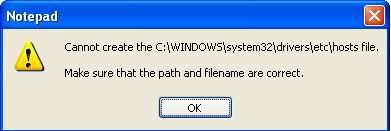
I have done that there were plenty of addresses in that file, including paypal and amazon. I try to save and i get this.

http://i8.photobucket.com/albums/a45/williamw1987/dfe.jpg

Rick
11-18-2005, 06:22 PM
That is telling you the file is set to "Read Only". Now you know something is up, because that file is not read only by default...

I'm going to give you another command to copy and paste in the same place as before..

attrib C:\Windows\System32\drivers\etc\hosts -s -h -r

This will remove hidden, system and read-only status.. Allowing you to do whatever you'd like with the file now. Then repeat the instructions above.

Next, you may want to run a free anti-spyware program like spybot (www.safer-networking.org) or ad-aware (www.lavasoftusa.com) to make sure there's no malware on your system. I also recommend a free online virus scan from http://housecall.trendmicro.com/, which will require you use Internet Explorer... Just to make sure there's nothing nasty on your computer playing with your hosts file.

It doesn't have to be a malicious program either... Some spam blockers and firewall softwares (Spybot even has this feature) will make addition entries in the hosts files. Maybe it got mixed up somewhere along the way and blocked sites you use.

Oh, and the reason I'm giving you commands is to avoid any confusion over having to enable hidden files etc... It's probably easier & faster for you to copy and paste anyway. :). But, you are perfectly welcome to do this maually if you'd like.

mattw
11-18-2005, 06:30 PM
It is running the free online scan now :)

ill copy and paste it into the box, bit easier... thanks alot for your help, much appreciated... ill post again once the virus scan is done.

mattw
11-18-2005, 06:34 PM
EXCELLENT, all working perfectly.... thanks alot dude, your a legend, much appreciated :D

ghoak27
01-04-2008, 05:18 AM
Cheers Rick sorted my paypal prob, it has taken days to make my ebay payment via paypal cheers ghoak27

Softix
01-13-2008, 08:32 AM
I can accessed paypal with no problems although it was bit slow. Does you have any problems accessing other site?. I think there might be some problems with your connection.

Ad
01-13-2008, 08:32 AM
  

anmoreno1226
08-25-2008, 01:52 AM
Guys,,Any Help on this with Vista I am having the same Issue

mattw
08-26-2008, 05:51 AM
It should work in the same way. I currently have Vista on my PC and I am still able to access the notepad document mentioned above. Have you tried opening the document that Rick mentioned above, and deleting any addresses beneath the IP address?

anmoreno1226
08-26-2008, 06:48 PM
I tried all of that process and it doesn't work..Should I erase though the 127.00 part also or leave it, Because thats the part that I dont understand..

jobeard
08-26-2008, 08:16 PM
ALWAYS leave "127.0.0.1 localhost" in the host file.

Post a reply, see related topics & more

Tip: Download Advanced SystemCare 3 Free - Clean, Repair, Protect & Optimize your PC.


 Top Technology News

TechSpot Blog: Disable Windows automatic check for solutions after a program crashes

Weekend Open Forum: Google Chrome OS and the future of cloud computing

Tech Tip of the Week: Unearth Region-Specific Windows 7 Themes

Weekend tech reading: How to run Chrome OS as a virtual machine

Sony: PlayStation 3 to be 3D-capable via firmware update

iSuppli: DDR3 to account for over half of DRAM shipments by Q2 2010

Facebook named third most popular video website behind YouTube and Hulu

Patriot introduces new PS-100 SSD series

More Tech News

  
 Software Downloads

Norton Virus Definitions 2003-07 November 20, 2009

AVG Anti-Virus Updates November 20, 2009

Norton Virus Definitions 2008-09 November 20, 2009

avast! Virus Definitions November 20, 2009

McAfee SuperDAT Update 5808

Kaspersky Anti-Virus Update November 20, 2009

Google SketchUp 7.1.6087

More Downloads


Copyright © 1998-2009 TechSpot.com. TechSpot is a registered trademark. All Rights Reserved.