
You are using an out of date browser. It may not display this or other websites correctly.
You should upgrade or use an alternative browser.
You should upgrade or use an alternative browser.
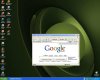
WindowBlinds changed my fonts!
- Thread starter EsTeBaNo
- Start date
 ?
? 


altheman
Posts: 419 +0
Are you sure? If you look at the bottom, it says generating a d/l link. I don't like using rapidshare, I have d/ling problems with them. This is the link: http://www.axifile.com/?4549867
altheman
Posts: 419 +0
EsTeBaNo
Posts: 84 +0
Download-session invalid. Please click here.
Possible reasons:
Download-session expired. Direct-links last a few minutes for free users and a few days for premium-users.
You requested this download-session from a different IP than yours. If you use AOL, try a different browser.
UGH Frikking annoying! Im Gonna try tomorrow!
Possible reasons:
Download-session expired. Direct-links last a few minutes for free users and a few days for premium-users.
You requested this download-session from a different IP than yours. If you use AOL, try a different browser.
UGH Frikking annoying! Im Gonna try tomorrow!
altheman
Posts: 419 +0
Either Segoe UI Bold or Segoe UI. The same thing happened to my fonts after I installed Office beta. New link: http://www.savefile.com/files/76973

Similar threads

- Replies
- 1
- Views
- 126


- Replies
- 11
- Views
- 213


Latest posts
-
Does the Nvidia App Hurt Performance? We Benchmarked It.
- Rapob replied
-
The Real Reason Nvidia Has Abandoned PC Gamers
- Rapob replied
-
 A hollow-core fiber cable just carried 51.3 Tb/s across 200 km
- Endymio replied

-
TechSpot is dedicated to computer enthusiasts and power users.
Ask a question and give support.
Join the community here, it only takes a minute.