Read with Formatting | Join TechSpot! (it's free) | Bookmark / Share this


How to repair Windows XP/2000 if you are unable to boot into Windows

Pages : [1] 2 3 4 5 6 7 8

Rick
10-20-2003, 02:05 AM
HOW TO PERFORM AN 'IN PLACE UPGRADE' / SYSTEM REPAIR

Is your system unable to boot into Windows XP/2000 or even Safe Mode? Whether you get a blue screen or XP/2000 just hangs, then this information is for you. This will allow you to repair your Windows XP/2000 installation (hopefully) without having to losing your data or settings.

Indications:
May allow Windows to load properly if there are critical driver, software or registry problems which have rendered the system unbootable. (Blue screens, hanging, errors etc..)
May repair/reinstall missing Windows components or solve otherwise quirky behavior
May allow drive to be installed on another system or motherboard with different chipset
May allow you to install new motherboards or make other large hardware changes that XP may not readily accept with PnP.


Note: The system repair function will remove any updates you have previously installed that are not included on the CD. Drivers will also be reverted to their original XP versions, as well as some settings (Including by not limited to network & performance settings). It may be necessary to reactivate your Windows XP as well.

Step 1: Determine the problem
First, figure out what CAUSED the problem. Often times, when Windows is rendered unbootable, there is a good reason. This can often be due to hardware failure (bad hard disk, memory or CPU for example). In these cases, the system repair function will not work. System repair will only repair your software.

I strongly recommend you run a disk utility on your hard drive before performing a system repair. You can find more information about disk utilities here:
http://www.techspot.com/vb/showthread.php?s=&threadid=7602

Memory can also cause these problems. A good memory test can be found here: http://www.memtest.org

Step 2: Begin the repair processYou must boot from your XP or 2000 CD. Please make sure it is the same version of Windows that is currently installed on your computer (ex. XP Home cannot repair XP Professional). Place the CD in your CDROM and start your computer. Newer versions will work as well (ie. Windows XP Pro SP2 CD will work on an older WinXP Pro SP1 installation)

Before the Windows logo appears, you will be asked to press any key to boot from CD, so do just that.

If you are unable to boot from the XP/2000 CD, then please check the last step in this short guide.

Step 3: System repair stepsA blue screen will appear and will begin loading XP setup from the CD.

RAID/SCSI/Unsupported UDMA users:
You will be prompted to "press F6 to install any third party SCSI or RAID drivers". Most users will not have to press F6, but if you are running RAID, SCSI or unsupported ATA controllers, then you need your controller drivers on a floppy disk. If you are unsure whether you have RAID/SCSI, then simply let the CD load without pressing F6.

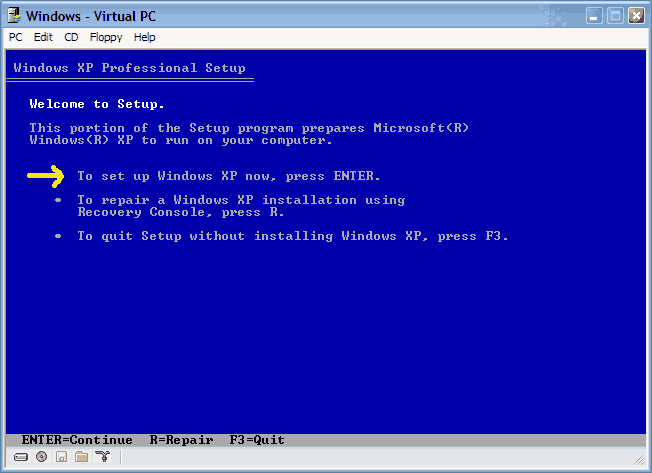
Once completed, you will be confronted with "Windows Setup". You will be asked to setup up Windows, or repair Windows with the recovery console. Choose the FIRST option, NOT recovery console.

http://web.qx.net/rburgess/storage/XPrepair/2.gif


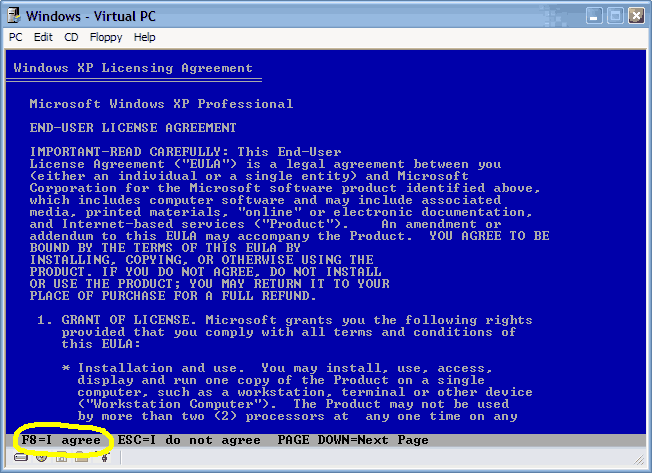
Choose F8 to continue.

http://web.qx.net/rburgess/storage/XPrepair/3.gif

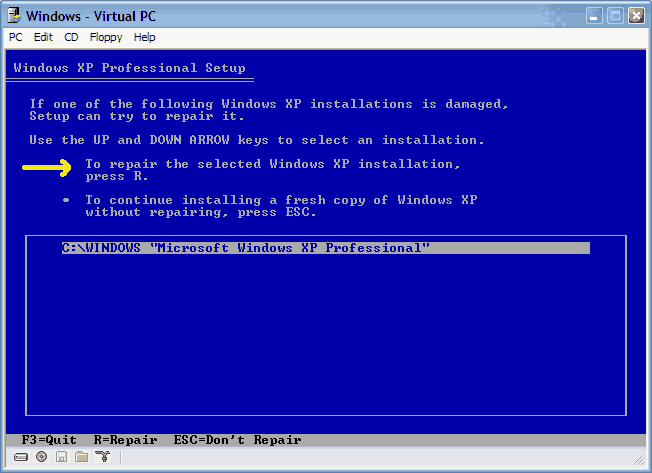
Next, Windows Setup will find existing Windows XP/2000 installations. You will be asked to repair an existing XP installation or install a fresh copy of Windows XP/2000.

If no installations are found, then you will not be given the option to repair. This may happen if the data or partition on your drive is too corrupted.

http://web.qx.net/rburgess/storage/XPrepair/4.gif


That should be it. Windows XP/2000 will appear to be installing itself for the first time, but it will retain all of your data and settings. Just follow the prompts, have your CD-KEY handy and hope for the best!

Rick
10-20-2003, 02:06 AM
CDROM NOT BOOTABLE: If the XP/2000 CD does not boot...Many computers out there are not configured to boot from the CDROM. If you cannot boot from the CDROM, this is probably due to the boot order of your computer being incorrect for CDROM booting.

You have two options:

1.) You can change this in the BIOS during POST, which is usually the very first screen displayed by your computer when you turn it on.

2.) Many newer computers have a selectable boot menu by tapping F8, F10 OR F12 right during/after the first POST screen. This will allow you to temporarily boot from a CDROM.


To enter your BIOS, most users here will press the DEL key.

Most users with Dell, Gateway, Sony & HP systems will press F2.

Many Toshiba laptops are F2 or require you hold the ESC key when you turn the system on. Your notebook will report an error and prompt to press F1 to enter setup. Do exactly that. ;)

Compaq users will usually have to press F10.

IBM typically uses F1 or F2.

Other brands may have different keys to press to enter setup, but F1, F2, Del, Tab and CTRL+S or CTRL + ALT + S are the most common ones I'm familiar with. Often, the BIOS will display what button to press to "enter setup" during POST.

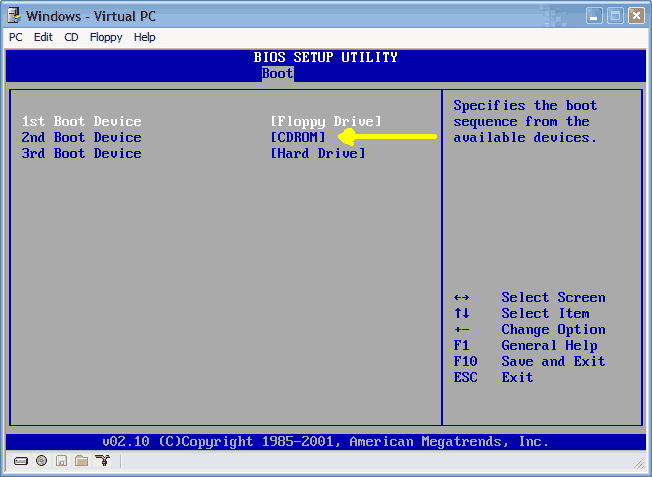
When you enter the BIOS setup, you need to change the boot order. The CDROM should be setup before the Hard Drive. Each BIOS is different, but here is an example:

http://web.qx.net/rburgess/storage/XPrepair/bios.gif

Ad
10-20-2003, 02:06 AM

Phantasm66
10-20-2003, 02:47 AM
Well done, my dark apprentice....

Nic
10-20-2003, 05:04 AM
Don't forget to mention the 87MBs of windows updates (you need to do this several times because there are updates for some of the updates, really!) that will be optionally required after install. I can't wait for winxp sp2 to be released, so that I can slipstream my CD and avoid the large update requirements. Glad I have broadband.

grog
10-25-2003, 05:44 PM
In a lot of the newer computers with 1 gig of ram fast ram, several drives, tons of lights and big coolers can over tax the power supplys that where working just fine before.

Power supplys problem can cause random reboots if theres not enogh power to run everything. This can also blow voltage control Caps. for the memory or 5 volt side.

If your computer shuts off and won't even post the bios, look at your power supply it my be at it's limit.

mere24
11-05-2003, 10:13 AM
i am on the new set up but stuck. it asks for a SISAGP.SYS file to be installed on Silicon Integrated Systems Installation disk. I cannot find what that could be. is it in the Win XP folders somewhere and I cannot find it? Help! Thanks! Meredith

Rick
11-05-2003, 12:46 PM
Originally posted by mere24
i am on the new set up but stuck. it asks for a SISAGP.SYS file to be installed on Silicon Integrated Systems Installation disk. I cannot find what that could be. is it in the Win XP folders somewhere and I cannot find it? Help! Thanks! Meredith
If you are repairing your Windows XP installation, then this can happen. You should be able to just simply cancel the message and it will continue installing as normal.

If this is a fresh installation of Windows XP and not an upgrade/repair, then this may mean your Windows CD is damaged.

mere24
11-06-2003, 06:49 AM
Rick,

Thanks a bunch! It worked and all my files are there! When it kept asking me for that SIS file, I went to the SIS site to download it, but they said it was a custom file on the CD that came with my pc. So I found the CD with the file and went on easily. I am so happy I didn't lose anything. Thanks for your help!It was easy with all of the steps to follow. I saved money for a tech to come and visit!

Meredith

mere24
11-06-2003, 09:38 AM
Now I have only 1 minor problem. All files are still there but I cannot connect to the Internet. When I try to manually set up a connection, it won't let me do so. And everytime I restart, a msg tells me to go to the control panel and configure some stuff but I don't know what it wants me to. Any thoughts? Thanks, Meredith

mere24
11-06-2003, 06:11 PM
I had a problem with WIN XP and recovered everything but I cannot get onto the Internet. I run the Internet Connection Wizrd and try to install a new connection. Here is what happens: I create a new connection and press NEXT and select Copnnect to the Internet. I choose the set up my connection manually selection. When I get to this next screen the first 2 selections won't allow me to click on them for Connect using a dial-up modem. The only one that it selects is connect using a broadband connection. How do I allow the dial up modem selection to be chosen when it won't let me? Can Anyone help? Thanks

Ad
11-06-2003, 06:11 PM

Acidis
11-09-2003, 05:56 PM
When I get to this next screen the first 2 selections won't allow me to click on them for Connect using a dial-up modem. The only one that it selects is connect using a broadband connection. How do I allow the dial up modem selection to be chosen when it won't let me?

If you repaired Windows XP that had Service Pack 1 installed with a CD without Service Pack, your network connections through your ISP will not function. Only direct connections will still work.

You must install Service Pack 1 to fix this problem.

Hopefully you have it burned on some CD or saved it on your HD.

RyonanGT
11-24-2003, 11:09 PM
one question here....
is it the same as formatting ur pc when using the method u list out here????

Rick
11-24-2003, 11:55 PM
Originally posted by RyonanGT
one question here....
is it the same as formatting ur pc when using the method u list out here????

No. Although the process is very simliar, there is a major difference - Formatting destroys ALL of your data. This method of reinstalling XP saves most of your settings and files.

alphnumeric
12-08-2003, 05:34 PM
You can also install the recovery console to your PC and have it show up as a boot option.
To install the Recovery Console as a startup option
With Windows running, insert the Setup CD into your CD-ROM drive.
CLick Start and select Run.
Type the following where D: is the CD-ROM drive letter:
D:\i386\winnt32.exe /cmdcons

Probably won't help if you can't boot into windows but it may save you from having to dig out your cd and it should load pretty fast.

Nice work Rick, well done.

NoisySilence
12-08-2003, 05:43 PM
Install Recovery Console to boot menu (http://www.techspot.com/vb/showthread.php?s=&threadid=8135)

It's a sticky thread too.

alphnumeric
12-08-2003, 06:05 PM
Originally posted by NoisySilence
Install Recovery Console to boot menu (http://www.techspot.com/vb/showthread.php?s=&threadid=8135)

It's a sticky thread too.

DOH :blush:

jago25_98
12-15-2003, 05:21 AM
all very nice but backing up data before possibly losing the lot probably a good idea

- however, not easy to burn cds when you're booting from cd eh?

I'm going to try and make a floppy linux distro that can read ntfs and burn cds... gulp!

SornyPanafonic
01-17-2004, 04:10 AM
hi i installed a new motherboard and now it wont boot windows - all i get is this windows didnt strat properly screen and when it tries to boot all i see is a windows logo with a random blue background for a split second and then it disappears. its a new mobo put into an existing comp. i was told i would have to reinstall windows but i dont want to lose my data cause i love it so (ahem porn ahem). would this work (fixing windows instead of reinstalling) or do i just bite the bullet and redo it . also if i do have to redo it - if i get another hard drive and just install windows on that one is there a way i can get my programs and files transfered over without digging out all the cds and stuff. any help would be greatly appreciated. much thanks.

grog
01-17-2004, 08:53 AM
When installiing a new mobo into a computer that already has windows installed will always be problem matic.

The drivers for the IDE controler will not work if changing from say a VIA chip set to Nvidia or SIS etc.

XP does a better job that the other OS's but it is still hit and miss.

Install the OS disc and boot from it than run through as if you are doing an install.

But when you get to the last window before formating your drive and starting over windows will offer you a chance to repair.

Do this it will look like its installing a new OS but when done, if it works you will be able to start windows. Even if it works You will probly have to reinstall some of your hardware and drivers. So have them ready.

But there is always the chance that it won't even boot. If not booting you will have to do a new install.

As always it is best to backup everything you want to keep before doing this or a new install.

A new install will clean all the junk out but it will mean redoing all your tweaking again.

poertner_1274
01-17-2004, 10:47 AM
SornyPanafonic, please do not double post. Your question will get answered as quickly as possible. Thank you.

SornyPanafonic
01-17-2004, 08:11 PM
i put in the cd and went through the steps to repair windows. it repaired windows (to my knowledge) since it said it was finished and put on a count down to restart. my comp then restarted and went straight to windows installation screen. i thought it was weird but i let it continue. it was installing pretty quickly when an error came up. it said "unregmp2.exe - entry poinjt not found. procedure entry point GetIUMS could not be located in the dynamic link library MSDART.DLL" i restarted my comp and windows tried to install again and the same error came up. any ideas that might save my data or am i screwed and will have to format. any help will be greatly appreciated. much thanks.

grog
01-18-2004, 01:30 AM
Artical on this error unregmp2.exe on MS site.

http://support.microsoft.com/default.aspx?scid=kb;%5BLN%5D;329771

MSDART.DLL try this or from same recovery console try bootfix.

At c promt type dir it will list programs you can run to recover.

At the Welcome to Setup screen, press R to start the Recovery Console.
Press the number key that corresponds to the installation that you want to repair, and then press ENTER.
Type the Administrator password, and then press ENTER.
With the Windows XP CD-ROM still in the CD-ROM drive or DVD-ROM drive, type the following commands, pressing ENTER after each command:
cd system32
ren msdart.dll msdart.old
CD-ROM_or_DVD-ROM_Drive_Letter:
cd \i386
expand msdart.dl_ BootDriveLetter:\windows\system32
exit

This error is the type of errors that make repairing a hit and miss.

Even if you do get it to boot your best bet is to back up everything that you want to keep and than do a clean install. Hope you can get in to recover your programs and files.

SornyPanafonic
01-18-2004, 04:09 PM
thanks grog - i actually got it to install - i just pressed esc + enter and installation moved on and finished. when i boot now tho it seems to take forever. it seems like my comp got slower when it should have gotten faster. ehh. i got the same error in my desktop. but i just pressed ok and it went away. im thinking of just dragging out this problem till im forced to fully reinstall windows. thanks again.

grog
01-18-2004, 05:42 PM
Check your drivers after a system repair some will have to be reloaded. I had to repair a lap top that had picture that the guy didn't want to lose this way. He had picture of his new baby on it. After the repair it too was very slow but found that keyboard wasn't installed or thouchpad. It also had so dll errors. Norton one button check showed 36 errors and repaired them, had to run it a few times.

Like I said before after you get it up and save all your inportant stuff do a clean install.

SornyPanafonic
01-20-2004, 01:49 AM
yeah im def backing up all my data as soon as i install this dvd burner. whats weird is that i tried to update my bios and its says something about the chips not being right or matching. will try again thought. thanks again.

grog
01-20-2004, 06:35 PM
When updating or flashing Bios be sure you get the right one.

There can be more than one board using the same name with some minor differance.

The Bios number should be simpler to the one you have. Mine was 7.2 and the newest was 7.6.

There is another K7N2 board called L not delta and it's Bios numbers our like 5.4.

atlasm
01-21-2004, 11:28 AM
Mere24 the SISAGP file is coming from the discovery phase of the install. It's finding the SIS video Chipset/slot on your mobo and asking for the drivers it needs. It was correct to bypass the driver install unless you where using the on-board mobo AGP port (which I don't think anyone has ever used).

newkid
02-04-2004, 07:45 AM
Hi to all...

Nice to see bunch of information in a single thread.. Good work indeed.. Thanks on the behalf of all new-comers who want to the know all the sfuffs which you guys mentioned at this thread.

I have one little issue in win2k professional.. I was trying to install the IIS on my machine using win2k CD. I wasn't getting any single error during installtion. After Successful installation when i was trying to run the IIS.. it says.." Page can't be display".

In order to rectify the error, i went into Internet Service Manager to find the reason.. What i saw there was that Default Web site under Machine name showing that service(Default Website) is stopped..So is default ftp site. I was trying to start it but after few minutes it prompt me the following error...

The Service didn't respond to Start or Control request in timely fashion

Can any helping soul put some light why i am getting the above mentioned error ? And how i can fix it ?

With thanks !
Newkid

Didou
02-04-2004, 08:56 AM
It can be a number of things from corrupt config files to a firewall blocking its desired port. We can't just guess out of the blue without knowing more about your installation.

PS. I do not think this is the proper thread to talk about this.

newkid
02-04-2004, 09:17 AM
Thanks Didou for reply and Sorry for posting the message at this thread which i perceived the right place to asked the same question.

Now, From here, http://www.techspot.com/vb/showthread.php?s=&threadid=10795 (URL). you can post your comments

With Thanks!
NewKid

whcoombs
03-11-2004, 08:07 PM
I tried to repair of my windows XP O/S and it got 3/4 of the way thorugh and hit a fatal error.
It says,
"An error has been encountered that prvents setup from continuing. One of the components that Windowes needs to continue setup could not be installed. Incorrect Function"

So I press OK to see the log and I get this.
Fatal error could not register OLE control C:\Windows\system32\rsaenh.dll because of the following error Load Library returned error 193(cl).
The signature for Windows XP Home edition Upgrade is invalid. The Error code is 800b0100.

This all happens on the Installing Windows part of the repair. I then press ok and the computer restarts and continues to do the same think.

Can any one help.

Thanks

grog
03-11-2004, 08:32 PM
Check the CD sounds like it might have some smugges on it which will cause this kind of error.

edsel918
03-19-2004, 06:16 PM
I've got a problem similar to the one described but with a twist. After copying a drive with drive image 7, I rebooted and everything seemed fine. That is until I tried to disconnect an external firewire drive. After that, whenever I try to logon to my user in XP, the computer beeps once and then I've got to hit ctrl-alt-del in order to get to the desktop. If I reconnect the external drive the problem goes away. I've pretty much isolated to a problem with the pagefile, or the lack thereof. The pagefile.sys on the c-drive is gone and the only one that exists is on the d-drive. I've attempted every conceivable way to reconfigure it to the c-drive but no luck. The registry says it's on c, but the computer will only work if the d-drive (external) is connected. Is this possibly a case where a re-install would work.

Ed

System Specs:

AMD Athlon 1400MHZ
Asus A7M266
512mb Mushkin DDR Ram
WDC 80GB HD (NTFS)
Maxtor 8GB on external firewire drive kit (FAT32)
PNY Geforce4 4200 video card
SB Audigy
Linksys NIC
WinXP w/SP1 and all updates

StormBringer
03-19-2004, 06:30 PM
try connecting D: then boot into windows(so you don't get any beeps) and change the PF settings, make sure you set the PF setting for D: to none, as well as setting the PF size on the C drive. If you still have a setting in there for D: it will continue to look for a PF on D:

Rick
03-19-2004, 08:12 PM
Originally posted by whcoombs
I tried to repair of my windows XP O/S and it got 3/4 of the way thorugh and hit a fatal error.
It says,
"An error has been encountered that prvents setup from continuing. One of the components that Windowes needs to continue setup could not be installed. Incorrect Function"

So I press OK to see the log and I get this.
Fatal error could not register OLE control C:\Windows\system32\rsaenh.dll because of the following error Load Library returned error 193(cl).
The signature for Windows XP Home edition Upgrade is invalid. The Error code is 800b0100.

This all happens on the Installing Windows part of the repair. I then press ok and the computer restarts and continues to do the same think.

Can any one help.

Thanks

There's a few nasty possibilities why this happened.

One being bad hard disk. Others being corrupted file system, bad CD or if you used a different version of XP home (a different disc than your original). While most XP home discs are the same, if you try to upgrade using an OEM like Dell with a different service pack version, you may have simliar problems.

edsel918
03-20-2004, 01:59 PM
I had already tried that combination of disabling the pf on D: and activating it on C: It won't delete it from D or even allow me to delete it. The registry even shows the location of the pf on C: .I'm starting to think that when I cloned the main drive with DI 7, it copied everything but the pf from C: If all else fails I may be left with no alternative than to do a repair install (unless someone knows of a way to put a copy of pagefile.sys on the drive manually.

I appreciate the help. I had asked Microfrost for help. Well 2 days and $35 later I'm still waiting for a reply to the original solution they had given me (which I had also tried).

acenumba
03-21-2004, 02:23 PM
i did everything you told me to do in order to boot from cd-rom,i put it in front of my hardrive as 2nd boot device and it doesnt even give me an option to boot from cd it just keeps going back to the sorry for the incconvince,and i dont think i have bad hardisk or anything.I think thr problem is a program i installed called battle craft vetinam,a modding tool for battlefield veitnam...but im sure that is the problem...i hope you understand me!:D

anthonyarena
04-06-2004, 08:12 PM
I don't get the option to recover after I press Enter to install instead of selecting 'r' for recover. I do get the license screen, and I hit F8. I then get a screen that requires me to choose between the partitions I created when I originally set up the XP installation. I can set up Windows XP on the selected partition, delete the selected partition or create a partition in the unpartitioned space. If I select the large partition and shoose to set up Windows XP on the large partition, I get a screen that gives me a warning that I may not want to install windows twice on the same partition. This is where I stop, because I am scared that I will wipe out my data if I select to continue at this point.

If I select r for recovery, Windows XP asks me for the administrators password. I don't remember what the password is that I set. After three tries, I have to reboot and go through the setup again.

Does anyone know how to get a password that will override my administrator's password?

What do I do?

Rick
04-06-2004, 09:41 PM
Your Administrator password should be blank. Try pressing enter without typing anything.

If Windows does not give you the option to repair, then you may have some very large problems. This is generally caused by the inability for Windows XP or 2000 to properly detect a previous version. This may be because many of your system files have been deleted.

anthonyarena
04-06-2004, 10:22 PM
Originally posted by Rick
Your Administrator password should be blank. Try pressing enter without typing anything.

If Windows does not give you the option to repair, then you may have some very large problems. This is generally caused by the inability for Windows XP or 2000 to properly detect a previous version. This may be because many of your system files have been deleted.

I have tried the blank password with no success. I am going to try purchasing new RAM as was suggested in another post.

anthonyarena
04-07-2004, 12:41 PM
I have tried new RAM and it still does not fix the problem. Has anyone else had success with any other fixes to this error message?

anthonyarena
04-08-2004, 02:33 PM
I have hired someone to access the hard drive and he was able to get some info off of the drive, although it keeps freezing up. The hard drive is bad and will be replaced. Fortunately, I have a back up for most of what was on the hard drive and I was able to get the important files that were not backed up.

Rick
04-09-2004, 12:36 AM
Originally posted by anthonyarena
I have hired someone to access the hard drive and he was able to get some info off of the drive, although it keeps freezing up. The hard drive is bad and will be replaced. Fortunately, I have a back up for most of what was on the hard drive and I was able to get the important files that were not backed up.

I'm very glad you had a backup! Disk failure is a sad, sad thing.

MrGaribaldi
04-09-2004, 04:38 PM
Just a quick Q...

As my primary harddrive is slowly dying (it's freezing up for a couple of mins with strange sounds, then working ok (no corrupted files so far: ))), I'm going to install w2k on another harddrive to replace it.

I've currently got the new harddrive in another system with a motherboard based on a totally different chipset than what it will be used on.

Can I use the installation I've done on the other system in my main rig, by repairing the installation?
(Would be nice to "just" boot up the new harddrive on my primary system, without having to install w2k once again)

Did anyone understand that?

Rick
04-09-2004, 09:03 PM
Yes, this is very possible. About 19 out of 20 times, this will work.

I have done many, many repairs with both XP and 2000 and I have only had perhaps 2 scenarios where a repair did not work after transferring system components.

Of course, it is always best to do a fresh installation though.

MrGaribaldi
04-10-2004, 04:28 AM
Thank you, you've saved me from yet another installation :)

I've been using the new drive to troubleshoot another system, and put 2k on it 2 days ago. (And I just don't feel like installing it once again if I can avoid it)

So thanks Rick :)

bakertime361
04-17-2004, 09:08 AM
Originally posted by grog
When installiing a new mobo into a computer that already has windows installed will always be problem matic.

The drivers for the IDE controler will not work if changing from say a VIA chip set to Nvidia or SIS etc.

XP does a better job that the other OS's but it is still hit and miss.

Install the OS disc and boot from it than run through as if you are doing an install.

But when you get to the last window before formating your drive and starting over windows will offer you a chance to repair.

Do this it will look like its installing a new OS but when done, if it works you will be able to start windows. Even if it works You will probly have to reinstall some of your hardware and drivers. So have them ready.

But there is always the chance that it won't even boot. If not booting you will have to do a new install.

As always it is best to backup everything you want to keep before doing this or a new install.

A new install will clean all the junk out but it will mean redoing all your tweaking again.

I used to have a 120 GB Western Digital HD and a 20GB IBM (slave) hooked up to my computer, but just the other day i replaced the 20GB slave with a 3.5 GB slave to hold a few files. Well, right after I replaced it, i turned it on and also saw the "windows did not boot properly screen" When I press start windows normally, or any of the options to start Safe Mode, The XP Home screem begins to appear, then it restarts the computer. This just happens over and over. My question is would the repair that you recomended for the problem above also work for this? Obviously im trying to avoid having to reformat. Also, because my computer only shipped with a certificate of authenticity and no XP cd, will the repair work with another XP cd as long as i used my key? Thanks for the help,
-Baker

poertner_1274
04-17-2004, 09:38 AM
It sounds to me like you could have that 3.5GB disk not set properly. Try hooking it up as slave instead of cable select.

bakertime361
04-17-2004, 05:01 PM
Originally posted by poertner_1274
It sounds to me like you could have that 3.5GB disk not set properly. Try hooking it up as slave instead of cable select.
Tried that already. It was set on slave, but i also tried it on cable select. I put it back to the setup that was running orginally and it would still not boot. It did the same thing on other computers when it ran as the master :-/. Anyone know if doing the repair installation will help the problem?

bakertime361
04-17-2004, 10:15 PM
Ok, so I mentioned the problem i was having before, but I'm going to go through the whole thing since ive had more serious problems since i originally posted.

Ok, so I first posted because when i booted my computer, I got the screen that said "Sorry for the inconvienance, but Windows did not boot properly..." so on, etc. It gives the options to "Start Windows Normally" "Run in Safe Mode" "Safe Mode with networking" and i belive one more option with safe mode. So i tried each and every one of this with the same result. After clicking on it, the XP screen appeared faintly for a fraction of a second before the whole computer restarted and did the whole thing over again. I let it go many times and it just repeated itself the whole time. The setup that I had was a 120 GB Master and a 20 GB slave. The problem occured when i switched the slave with a 3.5 gb slave to hold some files for a friend. Ive had many people offer solutions with jumper cables, bios, etc, but ive tried all that. The jumpers were right, and bios looked normal. So, while trying to find an XP disk from a friend or family member, I connected the 120 GB drive to another computer as a slave. It ran fine as a slave, except for one thing. On startup, a screen would come up saying that Windows wanted to check the drive for errors. Many times I had pressed Enter to skip it, but one time i did not. It deleted a number of "corrupt files" and continued with a normal boot. So, desperate, I decided to try the boot on my normal computer one last time. I used the original setup that used to run properly (120 Master, 20 Slave), but an even larger problem occured: the computer didnt recognize the presence of the hardrives. It tried to boot from my DVD drives, so i restarted and entered bios. Well...bios can't recognize 'em either! I'm in desperate need of help!!!! This situation went from fixable to...."oh $%#@". I'd appreciate ANY ideas. Thanks in advance.

-Baker

 Top Technology News

 Software Downloads

Copyright © 1998-2008 TechSpot.com. TechSpot is a registered trademark. All Rights Reserved.