Read on full site | Join TechSpot! (it's free) | Bookmark / Share this


How to repair Windows XP/2000 if you are unable to boot into Windows

Pages : 1 2 3 [4] 5 6 7 8

poertner_1274
03-15-2005, 09:06 AM
That needs to be the very first thing you do is get a firewall and activate it, then go directly to Windows Update and update everything. Then once that is done get your scanners, then use your internet carefully. This will help keep all that spyware and such out.

apell
03-17-2005, 02:53 PM
.hey Rick i just read thru your solution which is what i have been trying to do the whole week before coming here but i failed to start still . so anyway i decided to use the A drive to boot my Pc but i am going as far as A:/> ....... then it asks me to type a command ... so what command should i type from that DOs prompt to reboot my PC from the A drive ?

Ad
03-17-2005, 02:53 PM
  

apell
03-17-2005, 05:35 PM
Hey Rick i am kind of new here .. did you get my message about failure to Boot win XP from A drive after getting the A:/>... prompt ...... ?i dont know what command to type ..if you did my apologies

apell
03-17-2005, 06:11 PM
Thanks .....will do

poertner_1274
03-18-2005, 01:24 AM
Um....I'm assuming you are responding to an email sent to Rick, and will let this go :.p

BTW
:wave:Welcome to TehcSpot apell:wave:

apell
03-18-2005, 06:38 PM
Y eah kind of >> i also just wanted to share my experience .....thanks

XApemanX
05-29-2005, 02:27 PM
But i seem to be having the same problem as everyone else in this thread and wondered if there was anyone patient enough to try and help me out. I did everything up until it got to the repair screen after loading all of the windows files from the cd. However, once there it just had the command prompt and I had no idea what to type. So I just tried resetting, but was still presented with Windows not fully loading, a blue screen flashing, and then my computer restarting. Can anyone please help?

Thank you!
this problem could be from your keyboard. some keyboards have a button called F keys and its like numlock with the light or something like that its to enable the F buttons because the default are shotcut keys like to open programs and such.i have also experienced this problem with my sisters comptuer.

Internet Clean
06-07-2005, 08:06 PM
how about if try another reinstall , it might get further
and might help and give you an idea what is wrong.

Internet Cleaning Tool (http://www.internetcleaningtool.net/)

l00percent
06-13-2005, 06:07 PM
Hi... this seems like the right forum that I should be on but I'm not sure so I'm sorry if I am on the wrong one.

Anyway... I really don't know anything at all about computers, and I need help with a lot of details please.

I have Windows XP Home. My power went out the other night while my computer was in the middle of restarting. It was connected to the surge protector but when the power came back and I went to start up, my computer wouldn't work. When I turn it on it goes to the "your computer was not shut down properly" screen (I don't know what the technical name for that screen is, I'm sorry). I went though each of the options (start up normally, last known good configuration, safe mode, etc) and every time (except with the safe modes... I'll get to that in a second) it would start to start up (with the little flag and the bar under it with the blue things scrolling across while you wait for it to start up... again I don't know the technical name) but then in the middle of that (before it got to the screen where you pick a user and type in your password) the screen would just go black, shut down, turn itself on again, and go back to the "your computer was not shut down properly" screen again. In safe mode, it would start to do all the comand prompts (I think that's what they're called... the little words and codes that show up in white font on the black screen while you are starting up in safe mode) and then in the middle it would just stop, go black, shut off, turn back on, and go back to that screen where you choose the startup mode. I tried all of the different start up modes, gave up for a few days, went back and tried again, and now when I try to start in regular mode it does all the same things but right before it turns black and shuts off, a blue screen with something written on it in white pops up for literally like half a second and then my computer shuts down again, etc. I have absolutely no idea what to do about it. I talked to my dad (he's not a realy computer whiz either) but he said to take it to CompUSA. I just took it there and they want to charge me $200 to save my files, delete my entire hard drive, and then only reinstal the original Windows XP Home programs. I don't want to pay $200, have all of my programs deleted (some are downloaded from forever ago and others I have no idea where the installation CDs are), and I don't want people playing with my computer if I can possibly do it myself. As soon as I found out I came home and stearched on google, found this site, read a little, and it seems like this site is very helpful.

So PLEASE help me!! Before I do anything, should I go back to CompUSA and take my coputer back? Once again, I'm sorry that I don't know any technical terms and that I am so unfarmiliar with computers. I'm also sorry if this is the wrong place for me to be posting. Please, help help help!!!

poertner_1274
06-13-2005, 10:46 PM
Well I think you posted this in the correct thread. But did you read the beginning part of it? I think a repair of XP should take care of your problem. Go back to page one and read the first few posts.
BTW
:wave:Welcome to TechSpot:wave:

Ad
06-13-2005, 10:46 PM
  

wrathall
06-16-2005, 03:35 PM
it wont let me push f8 so i cant get past that window please help :eek:

wrathall
06-16-2005, 04:09 PM
never mind ifound the flock button on my keyboard hold thumbs its fixing it now

Saphire
06-26-2005, 05:28 PM
I was installing a program the other day and once done it says I need to restart the computer, so I did and it wouldn't boot, it said ntldr is missing press ctrl+alt+del to restart. I do this and it is just a loop going back to the same message. I change the settings to boot from CD and put in Win XP and follow everything you stated in the beginning of this thread to do a repair. I arrived at a screen with options not mentioned and need to know which one to choose so I do not lose my data. This is what it says:

CAUTION: A \WINDOWS folder already exists that may contain a Windows installation. If you continue, the existing Windows installation will be overwritten.
All files, subfolders, user accounts, applications, security and desktop settings for that Windows installation will be deleted. The "My Documents" folder may also be deleted.
To use the folder and delete the existing Windows installation in it Press L

To use a different folder press ESC

To quit Setup press F3

What do I do at this point?

IronDuke
06-26-2005, 06:25 PM
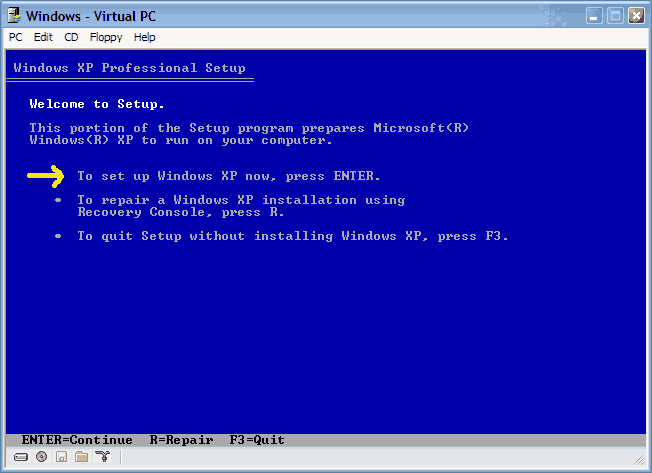
In setup the first choice should be [Enter] to set up XP.

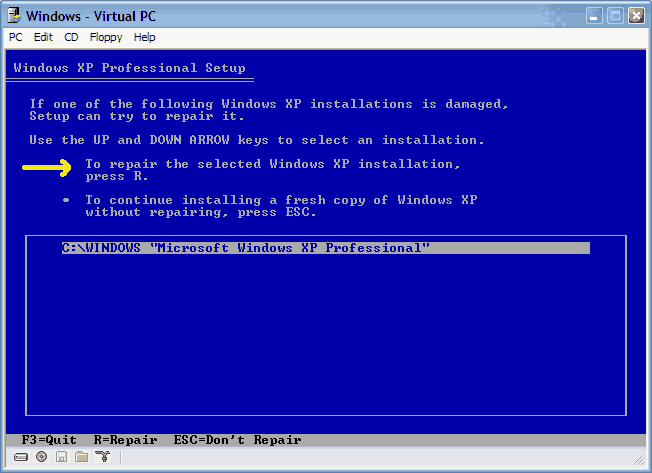
The next choice should be [R] for a repair on this screen if should be offering you C:\WINDOWS.

Try again and see if you arrive here.

Saphire
06-26-2005, 07:31 PM
I was following the steps recommended at the beginning of this thread which is what brought me to the screen I mentioned.

Now I have started over and am at the Windows XP recovery console screen

it asks which windows installation I want to log onto

C:\WINDOWS being my only choice, then past administrators password
now at
C:\WINDOWS>

What do I do at this point?

IronDuke
06-26-2005, 07:45 PM
1 Step to far. You should have pressed [Enter] instead of [R].

Welcome to setup = [Enter]
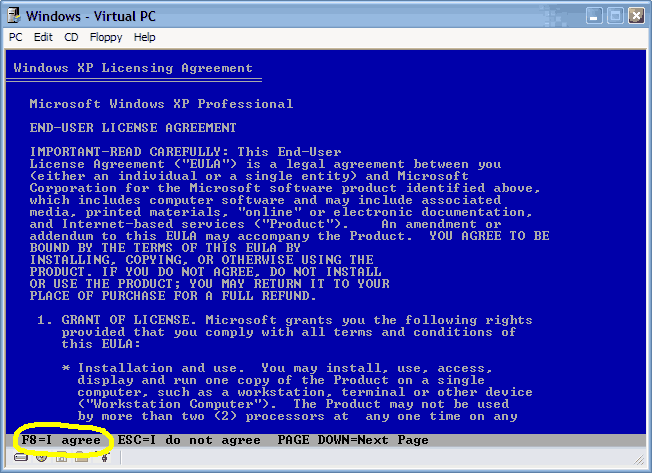
F8 - to agree licence
XP Professional Setup - I think Home is the same.
Here you should see C:\Windows highlighted = [R]
Now it should setup replacing its files on top of the existing.

I hope this is OK.

Saphire
06-26-2005, 08:32 PM
Thats not what I get, it says:

The following list shows the existing partitions and unpartioned space on this computer

To set up Windows XP on the selected item press ENTER

to create a partition in the unpartioned space press C

to delete the selected partition press D

C: Partition1 (NTFS) - is the only option I have to select

poertner_1274
06-27-2005, 11:32 AM
For some reason to me it sounds like it isn't recognizing your current Windows installation. There could be any number of reasons that cause this, but at this point I would suggest taking that HDD out and putting it into another computer and backing up all your important data, then reinstalling windows.

BTW
:wave:Welcome to TechSpot:wave:

BillGates
06-27-2005, 06:21 PM
Good idea, and if it still doesn't work on that computer, back all that stuff up on another harddrive and take it down to one of your local computer stores and ask them to erase everything foryou.

That should get rid of the problem (maybe is a bad sector on the disk in the os partition)
Its not encrypted is it

If the drive is encrypted (the files and folders labels are green instead of black) Windows partition then the bios will not read it because it can't ( on the computer that encrypted it )

So if you can't get it done there im sure there is a hard drive shreeder or something like that that will bring that baby back to factory condition

Good Luck :)

tears_of_aida
06-28-2005, 06:26 AM
Hello. I am currently having the same problem as Mere24 had with the SISAGP.SYS file but I am having no luck at all. I will explain the current situation.

2 days ago my computer was working pretty much perfectly. Apart from a little lag I could see no symptoms of any problems happening with my computer. I left the room to make a cup of coffee and I came back to see a blue screen saying that an unexpected error had occured causing the system to shut itself down.

I tried restarting it several times, but when it got to the Windows Logon screen it stalled for a few seconds before coming up with the blue screen again.

I got out my WinXP (home) CD and ran the recovery setup on the first page when I was asked to locate a SISAGP.SYS file that was on the SiSA CD. On the drop down menu it said it was looking for it in the C:\WINDOWS folder but there's nothing like that there. Not knowing what the file was or where it could be found I pressed ESC and the setup process continued, and completed. The computer restarted and got to the Windows Logon screen again.

Instead of coming up with a blue screen my system does one of 2 things:

1. It stalls for a few seconds, the screen goes black and the system restarts itself.

2. An error message saying something similar to:

"winlogon.exe has encountered an unexpected error. Press OK to terminate or Cancel to Debug"

bug before I get to press either OK or Cancel the system stalls for a couple of seconds and restarts.

I have tried running in safe mode, and I have tried going through the recovery setup countless times but still no luck. I think all I need is this one file, and I have no idea where it is. The only CDs I have that would be of any use is my WinXP CD and a support CD. When I try to run the support CD however, it won't run unless I format, and I really do not want to reformat (I can move all of my essentials to other drives when prompted for the SISAGP file but I would rather I kept it all).

Does anyone know a place where I could find this file, or the directory for the file, or even a way to get around this problem? Any help would be deeply appreciated.
Thank you.

BillGates
06-28-2005, 05:21 PM
Try going on to the enternet and search yahoo for the file that you need.

Download file

Then try putting the file on a disk and installing it or look for "what directory is File suppssed to be in."

doing this has helped me when I accidently erased some dll files.

IronDuke
06-28-2005, 05:31 PM
Looks like the graphics driver. Try here. (http://www.sis.com/)

BillGates
06-28-2005, 11:15 PM
Just take a picture of the inside of your pc and post the pic

IronDuke
06-29-2005, 07:32 AM
If you know where the drivers are you can specify the location when asked.

Mikky G
06-29-2005, 12:44 PM
Hi everyone

I have read all 174 posts in this thread which has proved really informative :giddy:, I have tried lots of the solutions posted here however, I still find that my problem is not solved. Please can anyone help?

My XP laptop won't boot into Windows, it gets to the blue screen after the Windows XP screen and sometimes comes up with applying network settings and applying computer settings, but it always ends with the following message and then restarts itself.

It was coming up with Winlogon.exe
The exception 0xc00000fd occurred in the application at loc 0x01253bba. Click OK to terminate, Click Cancel to debug. Neither of these options worked, the pc just restarted it self again.

But then I repired the O/S using the XP CD and now I get this blue screen of death:
STOP: c000021a {Fatal System Error}
The Windows Logon Process system process terminated unexpectedly with a status of 0x00000080 The system has been shut down. Then the system hangs.

I get the same error when I try to boot into Safe mode. I have tried using the Ultimate Boot Cd and still no luck :confused:

I need to get the data off the HDD before formatting it, the only problem is I don't seem able to connect it to another pc as a slave drive as it is a laptop and doesn't appear to have the correct connectors.

Can anyone suggest a way to copy the data off the HDD or boot into windows.

Any ideas would be very gratefully received.

Many thanks

Mikky G

Mictlantecuhtli
07-03-2005, 08:48 AM
I need to get the data off the HDD before formatting it, the only problem is I don't seem able to connect it to another pc as a slave drive as it is a laptop and doesn't appear to have the correct connectors.
You could buy a 2.5" - 3.5" hdd adapter which would allow installing it as a slave.

CubanoLibre
07-03-2005, 11:54 AM
Help me folks!!
I have a Gateway 710XL with 2 (250MB SATA) drives and Win XP Pro initially installed. The computer was working fine, until last week. Then when I booted up, it went into a boot loop, constantly rebooting. I could not go into any of 'SAFE' modes. I attempted repair with the OEM Win XP Pro SP1 disk, but it didn't give repair option. I use the "R" option and attempted to fix the registry as per one of MS papers without success. I checks RAM memory, and HDD (chkdsk, etc.) and all working well. I unplugged all external devices, e.g., USBs attached. Nothing has worked. I tried unplugging the SATA drives and running from another IDE-ATA drive that had Win XP already installed and that didn't work. I didn't want to reformat because (you guessed it) I need to get data out of my drives first. Yesterday, out of despiration I ran the "fixmbr" command in the "r" c:\ (I think this was BIG mistake). I then ran a repair on the Win XP Pro using Win XP HOME disk (even BIGGER mistake). Now I have Win XP installed where XP Pro was, it doesn't reconized part of my partition in one of my drives, and doesn't read data in another partition (telling me drive needs to be formatted, thought the drive is formatted NTSF and the data is still there when I check via the "r" by doing a "dir f:\" command. I have the dreaded yellow question-mark on my DVD-RW and CD-RW drives, and it doesn't let me access the internet.

Sorry for long discussion. Can anyone help me get to the information on my drive to backup and then I can reformat both drives and start over with Win XP Pro?? Please help, I'm exhausted.

PS: I should have read this thread before. Never try to repair XP Pro with XP Home or viceversa.

Chones
07-08-2005, 02:00 PM
Great service to the novice...

Live in S. Florida - continual power problems appear to have corrupted the system file for XP Home - I attempted to reload XP on the same existing partition and am unable to - errors out. Tried loading into a separate directory, again with no luck.

Had a hack here trying to fix the problem - the system file is gone - no system file in teh windows directory or in the repair directory.

Any help would be greatly appreciated.

Thanks.

Mikky G
07-11-2005, 04:05 AM
You could buy a 2.5" - 3.5" hdd adapter which would allow installing it as a slave.
Thanks Mictlantecuhtli, I'll give that a try :-)

SreepYeldarb
07-18-2005, 12:30 AM
Hi, I am new to this webiste so bare with me.
I previously bought a new motherboard and processor for my computer that I am using now. I am running my computer on a Intel Legend-V Pentium 2 processor with Windows XP Professional on it. I got the computer from a college so I don't have the Windows CD for it, if I were to need it to repair anything. Does anybody know where I can get the information to do this?
I went out and bought a ASUS MEB-VM Motherboard with Celeron processor.
However, I am having trouble getting the new motherboard to work. I install it and it doesn't work, the OS doesn't boot up. I then take it out and put the old motherboard back in it and it works fine.

When I turn on the computer boot up with the new motherboard and processor in it everything starts fine, but it never gets to the windows loading screen it stops right after you hear the post sound that it makes. The screen just goes blank with a little white blinking cursor in the upper left hand corner.

I had read some articles about this. They had said that I should make a Windows XP boot up disk. I am confused on how to do this though.

lLike I said previously, I am using Windows XP Professional, I am not sure if it is the way that Microsoft designed the program to make you re-install the OS everytime you install new hardware or something is the reason why it won't work.

I would really love to get this new motherboard and processor to work. :rolleyes:

Thanks for your help,
Bradley
Forward Message

apell
07-18-2005, 02:35 PM
Ummm .......i think you want to go to search and and type windows prolems then post a message .. iam kind green and perplexed why windows OS is so complicated and has problems

tatiana
07-20-2005, 03:00 PM
My system was infested with a virus (trojan-spy.smtl....then it said w32.blaster.worm virus, then bloodhound.w32.ep...i am not that computer literate yet...). I was trying to download norton internet security, and the scan would keep saying files missing. then i moved the wininet.dll files that were supposed to house these viruses to the recycle bin(careful not to delete them yet), but now i see that i can't get past the ctl-alt-del security login for my laptop. i inherited this compaq laptop from a third party, and was using a wireless card to access the internet. through my online research to fix this problem, i keep coming to your great threads of helpful info and now it's the time for me to join. can any of you help me? i am stymied.

forgot to say that my system is windows 2000 nt professional with no recovery disks...all info was probably installed at corp. level.

Mictlantecuhtli
07-20-2005, 03:15 PM
You need a Windows 2000 CD to boot from, to replace the infected / removed files.

slen
07-20-2005, 04:40 PM
:wave: I am having with the same problem. I got fatal error from the system, which unable to login into windows. After reviewing all the discussions, I would like to know whether there are steps I can do to fix this problem for my Window 2000.

thanks for your help...

tatiana
07-20-2005, 08:55 PM
Can I download somewhere...files that the system will read upon start up? How do I do that so the files are readable?
Any suggestions?

skoscielak
07-21-2005, 01:40 PM
Ok did all that your post said to do, Now I am getting after I try to reinstall this messege

Setup did not find any hard disk drives installed in your compter.

The problem is that I can boot off the hard drive however my problem is after it boot I can not run any programs. Such as I can double click a desk top icon for macAfee to run a virus check but it never runs

Electric Ray
07-28-2005, 06:56 PM
What if using this method repair installation method doesn't work?

Despite being a novice to customisation I recently overhauled my 3yr old el-cheapo P4 Dell with:

Motherboard (ASUS A8N-E replacing horrid Dell Micro ATX) Memory (Geil 2x512mb DDR replacing horrid Dell 256mb RDRam)CPU (Athlon 64) replacing pentium 4Radeon x800 PCIe graphics card (replacing a rubbish NVidia X400 AGP one)

I know: it's about as different an architecture as I could have without going to Mac - so hardly surprising it's been a bit troublesome.

I tried a method for motherboard-switching-without-XP-noticing-at-all (I'm an optimist, okay!) that I found elsewhere, but it didn't work - so I tried to Repair Install the installation exactly as suggested above. Though it copied over the files, on the first re-boot, BSOD about 20 seconds, and I haven't been able to get any further than that.

As a work-around I have performed a clean install on my D Drive - hence my ability to post at all - which suggests there's nothing too wrong with my build or hardware (I have one boot anomaly which I'll post on another thread, but it's a slight inconvenience rather than a big issue).

It would obviously be "nice" to get back my old installation, but I think I'll cope if I can't. Can anyone see what else I could do?

Ray

marzie_marzbar
07-29-2005, 02:47 AM
i've hit a snag in the repair system.


It got up to 3% of the repair setup where things are to be copied...

and it says that the wow32.dll file could not be copied....

i tried it again and it still wouldn't copy...so now the computer has paused on the "retry to copy file" "continue without copying file" & 'exit setup".

I'm not sure whether to continue without copying that file as i've read that it may cause my comp to continously crash.

I'm just really wanting to burn everything in "my documents" onto cd and then leave my computer to rot (it got hit with the 'oneclickersearch' trojan....the one with popuper.exe, msole32.exe, intmonp.exe etc).

Anyone know whether i should continue..or is there another way?

poertner_1274
07-31-2005, 10:54 AM
Marzie: Try cleaning the CD off, it could be dirty and causing you problems. You can also check to make sure the IDE cable is still hooked up properly, as they could become loose over time.

BTW
:wave:Welcome to TechSpot:wave:

anothernewbie
08-02-2005, 10:44 AM
Help!!!

I am using a Sony Vaio laptop running XP Pro with a centrino 1.6 and 60gb hard drive. Over the last few days I have been having problems restoring when I try to start up from standby mode. I get "Operating System Not Found" message. After several attempts I can sometimes get the F8 key to work or get the machine to fire up. Not sure if it is related (shouldn't be but could) but problems started after I loaded the new MSN search. Now need to try to back up everything while I still have it running before I start further trouble shooting but would appreciate some advice.

1 Coul the problem be with the hard drive? It seems to be running a lot and the machinbe seems to have slowed down a bit (but I usually have a lot of windows open)
2 If I use the Sony OEM system restore disks will it wipe my hard disk or just reinstall the oeprating system?
3 Any suggestions what sequence I should follow for trouble shooting after I get my back-up completed?

Apologies if this sounds kinda basic. I am usually fairly competent at sorting PC problems but this is my business machine with all my data on it and I am pretty nervous!!!

caprickorn17
08-05-2005, 12:26 PM
My girlfriend has a 3-4 year old Dell laptop (which is more boat anchor then computer). She cant boot into her Windows 2000 as it hangs up and contnues to try and reboot after the blue screen of death. The message it gives is STOP : C0000218 (Regitry File Failure) the registry cannot load the hive (file) \SystemRoot\System32\Config\Software or its log or its alternate. It is corrupt, absent or not writeable. Her brother the "computer guy" gave it to her without and disks backups or partitions. Any ideas of how to boot into safe mode or anything to try and recover her data for her. Im at a loss to help her.

Okay I tried Winternals ERD 5 and it allows me to access the files. Unfortunately since there are only external drives I cant take the ERD cd out and attach the floppy drive to copy files to. Does anyone know if it is possible to reload Windows 2000 without losing her data? I would assume that if i was to try reinstalling the OS that it will wipe out the prexisitng data. Anyone who knows of something I can try to restore the software hive would be appreciated. Just understand that I am not a programmer and wouldn't be able to write my own registry etc. and this is not the way i want to try and learn more about computers.

vinman
08-10-2005, 05:18 AM
I work for a kid's shelter where the kids have had access to the computer as an administrator. I used system restore and went back maybe 4 or 5 months. Now the computer won't start. We have another computer that was donated that is essentially the same as the other and therefore I tried creating a boot floppy from the functioning computer (both have PROFESSIONAL INSTALLED). This didn't work and I did set the boot sequence.
I know one can repair using the Installion CD. We were never given this.

I have gotten to the recovery console and have tried all w/last known config going into a loop of restarting and the others (safe mode w/or w/o command prompt and the others) and it just hangs when loading.

The only other options I have is to
1. Install win 98 se (this is our only copy of an OS) or possibly
2. I could install my version of XP Home and try tp repair PRO from there?

Please help

Vince

mickey2008
08-17-2005, 09:39 AM
I tryed but failed. :(

chicksrules69
08-18-2005, 03:13 AM
Im installing XP PRO on a 50GB Seagate Barracuda. Im able to do the initial setup. then im prompted to restart. after it restarts it goes back into the initial setup, it doesnt finish the installation.

This is my first time Installing Windows XP PRO on a SCSI hard drive.

any help?

thanks

Mictlantecuhtli
08-18-2005, 01:28 PM
My girlfriend has a 3-4 year old Dell laptop (which is more boat anchor then computer). She cant boot into her Windows 2000 as it hangs up and contnues to try and reboot after the blue screen of death. The message it gives is STOP : C0000218 (Regitry File Failure) the registry cannot load the hive (file) \SystemRoot\System32\Config\Software or its log or its alternate. It is corrupt, absent or not writeable. Her brother the "computer guy" gave it to her without and disks backups or partitions. Any ideas of how to boot into safe mode or anything to try and recover her data for her.
How to Troubleshoot a Stop 0xC0000218 Error Message (http://support.microsoft.com/default.aspx?scid=kb;en-us;156640)

Mictlantecuhtli
08-18-2005, 01:29 PM
Im installing XP PRO on a 50GB Seagate Barracuda. Im able to do the initial setup. then im prompted to restart. after it restarts it goes back into the initial setup, it doesnt finish the installation.
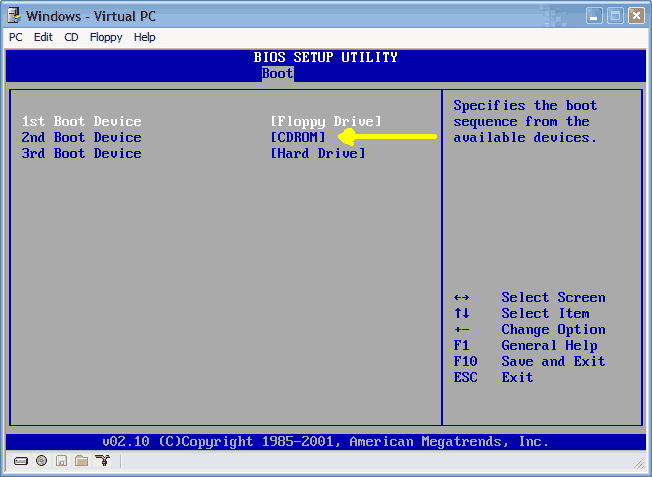
That sounds like it can't boot from the SCSI drive - have you checked BIOS settings for the startup disk?

inspired1
08-25-2005, 07:09 AM
Alright, I have several questions..... but first i'll explain the problem breifly.
I am experiencing the hal.dll error which you explain in the first post. After deleting some software it came back with this message.

Ok.. I have tried to do what was explained in your original post, but i'm afraid it wont work for me. I get the partition message instead of repair, at which point I stop. I would like to also state that my computer uses Windows XP Media Center Edition, which did'nt come with a cd. I was able to get a set but it doesnt do what was stated in the first post so as I stated, I just stop.

I am able to get to my c:\ prompt with my Nortorn Systemworks Cd. I would like to know if there is a way you can show me how to make a cd with the files needed on it so that i can copy them into my directories. I have MagicISO and am able to burn bootable cds, but im not sure what to do. When I take the Nortorn disk out and switch directories, it says General Failure reading drive A. I dont have a floppy so that is out the question.

The other thing is, can I use Knoppix to boot into my computer then copy the files into their proper places from there??? And I see another user used Winternals ERD 5, can this help me???

I cant loose my data!! The funny thing is most of it is backed up, and I was in the process of cleaning my computer up and backing things up when all of this happend. SORRY MY POST IS SO LONG.... :wave:

DoctorXX
08-25-2005, 05:50 PM
I recently tried to upgrade from Windows XP Home to Windows XP Pro. I started the setup before leaving work. When I came in the next day, I found that it was constantly restarting. It would show the windows xp logo with the little blue line underneath and then it would go to the blue setup screen and it said setup is being restarted............. Then it would go to a blank screen where all I can see is a mouse pointer. Then it restarts and starts all over again. I tried using going into safemode and all that and none of that works. When I boot with a boot disk or a bootable cd it doesnt show drive C. I tried this one program I found called active undelete and it showed the drive and all the files on it. I tried also using a boot disk and also a bootable cd and the C drive still doesnt show up. Anyone have any ideas? Please email me at Dave@wowcoolstuff.com or at DoctorXX@wi.rr.com. People who use yahoo IM can IM me, DoctorXX_98 or DoctorXX2000 with Aol Im.

dawsy
08-28-2005, 09:28 PM
Have read all the posts and tried all the suggestions that seemed appropriate to no avail. My Dell C600 laptop (XP Professional, 256 Mb RAM, 20Gb Hitachi HDD) stopped booting for no apparent reason. It circles through booting as far as the XP splash screen and then restarts. None of the Safe Mode options works either although booting with command lines shows that it gets as far as WINNT\SYSTEM32\DRIVERS\IOMDISK.SYS before restarting.

Have tried booting from the XP Pro disk. Can't do a fresh install as it says the partition has insufficient space (think there's about 4Gb free) or is too damaged to do so and suggests a reformat (trying to salvage some recent data files so don't want to do that if it's avoidable). Picking the Repair option gets me nowhere and the recovery console doesn't give me anything that makes a difference (FIXBOOT completed okay but made no difference.)

So.....HELP!!!! please. I really only want to recover some recent data files and am then happy to rebuild from scratch - but I can't access the file system to copy them. Any suggestions?

HoopaJoop
08-30-2005, 10:51 PM
Have read all the posts and tried all the suggestions that seemed appropriate to no avail. My Dell C600 laptop (XP Professional, 256 Mb RAM, 20Gb Hitachi HDD) stopped booting for no apparent reason. It circles through booting as far as the XP splash screen and then restarts. None of the Safe Mode options works either although booting with command lines shows that it gets as far as WINNT\SYSTEM32\DRIVERS\IOMDISK.SYS before restarting.

Have tried booting from the XP Pro disk. Can't do a fresh install as it says the partition has insufficient space (think there's about 4Gb free) or is too damaged to do so and suggests a reformat (trying to salvage some recent data files so don't want to do that if it's avoidable). Picking the Repair option gets me nowhere and the recovery console doesn't give me anything that makes a difference (FIXBOOT completed okay but made no difference.)

So.....HELP!!!! please. I really only want to recover some recent data files and am then happy to rebuild from scratch - but I can't access the file system to copy them. Any suggestions?


If that is an original dell install there are 2 partitions. One is a tiny fat partition that is for management and repair tools. The other one is the main system partition. Make sure you are trying to install on the correct partition.

There are kits you can get that can make your laptop drive an external usb drive. If you have another computer that could also be an option.

Post a reply, see related topics & more

Tip: Download Advanced SystemCare 3 Free - Clean, Repair, Protect & Optimize your PC.


 Top Technology News

Weekend Open Forum: Have you upgraded to Windows 7 yet? What is there to like/not?

Tech Tip of The Week: Turn Off your Display Using a Windows Shortcut and More

Nvidia's profits up 74% in third quarter

Intel finds X25-M firmware bug

Samsung announces new .6mm-thick NAND memory package

DFI intros MI P55-T36, the world's first P55-based mini-ITX board

Nvidia Tegra 2 to double performance, arrive next year?

Google touts privacy and transparency with Dashboard

More Tech News

  
 Software Downloads

GMABooster 2.1a

Power Plan Assistant for Windows 7 v1.2b

Picasa 3.5.0.79.81

Adobe Shockwave Player 11.5.2.602

FileZilla 3.3.0 RC1

DivX Player 7.2.1.1 for Windows

VSO Image Resizer 3.0.0.140

More Downloads


Copyright © 1998-2009 TechSpot.com. TechSpot is a registered trademark. All Rights Reserved.