XP SP2
on a dell pc
i had problems booting into windows so i went into the recovery console and the following from kellys-corner
"To replace the damaged registry hive and restore the backup copy of the hive from the Repair folder: Start your computer to the Recovery Console.
Determine if the file that is mentioned in the "Symptoms" section of this article is present, and if it is, rename it:
In Recovery Console, change to the c:\Windows folder.
Type cd system32\config , and then press ENTER.
Type dir system , and then press ENTER.
If you cannot run the preceding command successfully (because the file is missing), skip to step 3. If you can run the preceding command successfully, type ren system system.bak , and then press ENTER.
NOTE : If the message that you received referred to the software file, replace "system" with "software" in the preceding command. For example, you would type ren software software.bak (instead of ren system system.bak ), and then press ENTER.
Type copy c:\windows\repair\system , and then press ENTER"
i did this for the system and software
i now get into windows but i cant access word, outlook... and several desktop icons are gone
i looked on explorer and its created a new profile for me called chris.NONE.EC7A445E32
along side my 'real profile' chris, which is still there and contains all my required info
how do i get it back
all i want to do really is access my outlook to get hold of my old emails, but it it says 'this action is only valid for products that are currently installed'
alone-hacker
03-24-2006, 08:32 AM
I am going to try your guide
Ad
03-24-2006, 08:32 AM
Spooch
03-29-2006, 11:19 AM
OK, I know that I'm a little late to respond to this thread, but yesterday I just came across a serious issue. I just installed a new motherboard, a new 64bit athlon processor and am using the same HD, graphics card, RAM, etc. Now I am unable to boot windows. I can get in the BIOS and I tried to run from my Windows XP Pro CD, but no dice. I haven't tested the RAM yet, but I don't think they are the problem.
My hardware is all compatible but I just can't run Windows from a CD.
Please help!
Thanks
howard_hopkinso
03-29-2006, 12:08 PM
Hello and welcome to Techspot.
You need to reformat and reinstall Windows.
Your hard drive contains all the drivers for your old hardware and wont work with the new stuff.
Sometimes you can get away with a Windows repair and sometimes you can`t.
Regards Howard :wave: :wave:
swimsalot
03-30-2006, 12:55 AM
Ok guys, this is a duplicate post I have in the hardware side. Please help if able!
specs:
AMD64 3000
gigabyte K8N-Pro
2GB Crucial Pc3200
2X 80GB Western Digital SATA HD's in RAID Zero
Radeon 9800Pro
Windows XP Home SP2
A few extra fans
No OC
I get the missing/corrupt file for system32\hal.dll. when I boot up.
-I have read the thread on this topic, but it doesn't address RAID systems.
-I tried to boot from XP CD, wouldn't read from it, same error message.
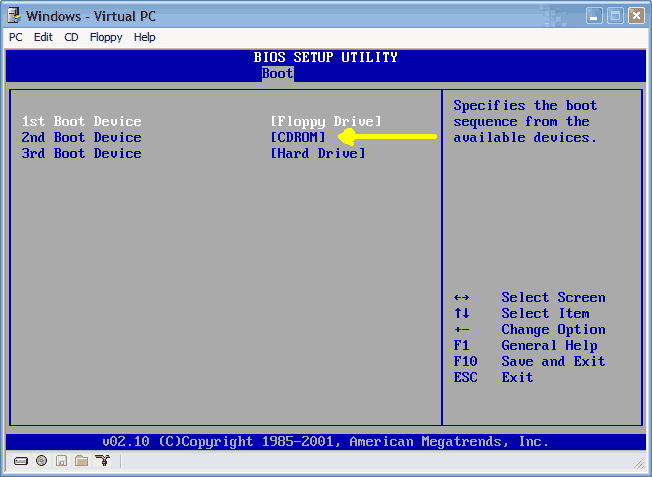
-I changed BIOS to have CDROM boot first; when prompted to hit any key to continue , I get same error message, it doesn't boot from CD.
-I Googled the problem, every link I get talks about using the CD to repair the problem. Since I can't do that I'm stuck.
I think that Windows is defaulting to an IDE setup, and is not "seeing" the RAID drives, so it won't go any farther in the process. I know that when you use the XP CD to repair, it will ask for the option of using a RAID floppy to set it up, but I can't get that far in the process.
I downloaded a NTSF Boot.iso disk form Bootdisk.com, but I don't have enough knowledge to work at that level.
Is there any way to "force" the BIOS to recognize the RAID setup during boot?
Is there any other way to install the missing/corrupted file without using the XP CD? Can I burn it onto a floppy or something?
I'm wide open to sugestions. Like many other mentally-challenged people, I don't have anything backed-up, and would rather not have to re-install everything. :dead:
akaivan
03-30-2006, 04:11 AM
Great thread!, great for me cause i have win2k :wave:
Spooch
03-31-2006, 11:00 AM
I realize that that is what I need to do, but my issue is when I attempt to boot from CD the startup either seizes up or it repetitively trys to boot from the CD without getting anywhere.
I just can't get the windows cd to boot on start up...
Steve puke:
Help_Needed
04-09-2006, 09:48 PM
I have:
Toshiba M205-S810 Tablet PC
MicroSoft windows XP
The original reboot disc
External DVD/CD
I have been:
downloading movies
I have installed in recent weeks:
Power ISO, Ace window?, and Nero
What happened:
After playing for the first time a few seconds of a recently downloaded copy of Disney's Bambi and quickly closing realplayer my computer made some horid knocking sounds with physical movement actually able to be felt (lower right corner). I clicked every pogram to close (but did not shut down or restart the computer) and left before I saw any results. I returned in approximately 20 minutes to find my computer in a loop of restarts. It was on the screen with "safe mode, Safe mode with networking...Start normally"
Next the windows XP screen comes on with the green bar, the blue screen then flashes for a 0.25 second then is gone.
After that the toshiba screen comes on then it eventually goes right back to the "safe mode start screen." If I leave it alone it starts over again in 30 seconds.
What I have tried:
I have read all 13 pages of this thread about 2 are similiar to my problem, but none are the same.
I have tried hitting F8, F3, "R" and a few other keys while the blue screen flashes by just to try and get a new screen. No avail.
I have held down C, F2, and other keys while starting it up to try to restart via the cd. It does not even acknowledge that I am attempting it.
I have enterd BIOS and rearranged the priority of start up putting the CD >LAN>HDD>FDD (and a few other combinations) with the original reboot disc in. Then I get the error PXE-E61 with the other one everyone gets saying to check the cable. It then goes automatically back to the "safe" pages.
Impression:
I have no idea!! Possibily a virus. I am not too computer savy. I can telll you that the knocking sound seemed to be coming from the lower right corner of the computer (if that helps?). I don't care about losing my work. I just need my computer back. PLEASE HELP!!!
Sorry for the novel.
sw123
04-12-2006, 11:12 PM
I have another question. I have these problems with windows like this screen:
------------------------------------------------------
Windows could not start because the following file is missing or corrupt:
<windows root>\system32\HAL.DLL
You can attempt to repair this by inserting your Windows CD and pressing 'r' at the first screen
Lets eliminate the Windows XP CD from there. Also, there is no hope of getting one from a friend. How do you repair this? I have an eMachines T2682 with Intel Celeron processor, 768 MB RAM, 80 GB western Digital HDD. I have a restore DVD, but it wipes all my work. I really dont like my save games lost, so HOW DO I REPAIR WINDOWS IN THIS SITUATION?
krmdjames
04-19-2006, 02:29 AM
i'M RUNNING XP AND IT WILL NOT BOOT ALL THE WAY.SO I TRIED TO GET A NEW OPERATING SYSTEM ON A NEW HARD DRIVE AND IT WILL NOT BOOT OR SETUP NEW OS. I TRY TO REFORMAT THE NEW HARD DRIVE WITH EVERY WINDOWS CD FROM 98 TO 2000 TO XP,I USED SYTEM RESTORE DISKS..IT ALWAYS FREEZES AT SOME POINT IN THE SETUP OR DISK CHECK OR WHATEVER. COULD IT BE THE MOTHERBOARD.
LAST HARDRIVE I ACTUALLY GOT IT TO BOOT MOST OF THE WAY BUT IT EVENTUALLY FROZE AGAIN AS ALL THE ICONS WERE APPEARING ON THE DESKTOP.
Ad
04-19-2006, 02:29 AM
mikex83x
04-20-2006, 05:14 AM
i am a pc technition myself and really stuck!
i keep getting the blue screen of death!
the message is always the same "page_fault_in_non_paged_area"
it wont let me start in any mode including safe mode
i have tried to repair my xp with the win cd
completly reboot
still the same problem.
i know the fault is with the page file.
i know the fix(right click on mycomputer, properties,advanced,performance,disable the page file, restart do the same process and enable it)
i cant even get into safemode!
i know i can fix this problem by formatting, but i dont want too loose my files
i have a 250 gig sata
with 3 partitions
boot
restore
and drivers
please can someone email me the fix as im always on the move
mikex83x@yahoo.co.uk
thanks
sw123
04-20-2006, 09:40 PM
Ummm...try booting from your recovery partition. Then transfer the drivers again. Then reformat your boot partition and transfer recovery files and drivers to boot partition.
Para-dice
04-28-2006, 02:09 AM
I've read through 10 pages of this thread without finding an answer to my WinXP repair problem - ultimately I can't install a new copy of WinXP on the original C: (new mobo now) since I no longer have access to Admin which resides on that drive - a wierd Boot up error: black screen with the Boot.ini page scrolling forever ... So I partitioned D: (20GB) to a 5GB E: to create a new OS, and try to repair the original OS from there.
At any rate ... when I work through the various options of booting from CDROM (like I said I read 10 pages of this thread and many other threads!), following various repair options from the WinXP CDROM, ultimately I run up against this:
Setup cannot setup the required Windows XP configuration information. This indicates an internal systen setup error.
Which may or may not be a result of the 'new to me' mobo.
Or,
Which may be related to a boot up error which is a locked black screen page scrolling the boot.ini text.
Or,
When I installed a new OS on E: I had to contact friggin MS for new authentification, to validate my ongoing new WinXP SP2 installation (this only effects SP2 users).
At any rate all I really want is this: To regain access to the Administrator's (me!) files in the "My Documents" folder on C:. Then I can move those personal doc's into "My Documents" folder on E:. Then I can simply format C: and use it for storage.
Ay help will be greatly appreciated since I have spent over 40 hours trying to either fix the installation, or simply copy my Admin files to the new drive.
System:
Award BIOS: v6.00PG
AMD Sempron 3300+
Gigabyte GA-K8NS F13 nForce3 mobo
nVidia 6600 GT
WinXP SP2.
- all drivers, BIOS, mobo etc are current.
Para-dice
04-28-2006, 03:01 AM
ZOMG problem solved:
How to take ownership of a file or folder in Windows XP
ownership of a file
http://support.microsoft.com/?id=308421
LOL TY "ask and u shall recieve" :)
Now I'll look up how to delete the old Winxp OS and uma happy that I have access to those docs! :)
ckoecher
05-03-2006, 07:54 PM
I must first start by apologizing, I am not able to get very much information about my computer at this time. For the last several weeks my computer has crashed to the blue screen of death, It would say "windows has encountered a serious error etc..." The problem appeared to be that my wireless network adapter (Linksys WUSBG) and my video card (NVIDIA GForce) weren't compatable. To make a long story short I stopped using the internet until I could buy a new wireless adapter, however my girlfriend decided to use it one day and it crashed with the same blue screen 5 times in a row, everytime she would open internet explorer it would crash. The last time it crashed, it took a dump. Now when I start the computer it gets to the windows xp logo, and then right as it is about to go to the login prompt the screen goes black, no error messages nothing, I have to do a cold re-boot to restart. So, I tried to start in safe mode, and I get these multiple lines of what appear to be codes followed by names of a bunch of dll files and then it stalls, cannot ctl-alt-del or anything, I have to cold re-boot. So I insert the WinXP pro cd, try to install windows again to get to the repair function, and it stalls at a blue window that says "starting windows"!! I am so depressed, as I was a complete ***** and didn't backup my music files or pictures. Any help would be great. P.S when my computer would encounter a serios error it read IRQL_NOT_LESS_OR_EQUAL. I would love to give more info, but seeing as how I cannot get into my pc to disect the log of errors I don't know what else to say.
Since I dont know if I am in the right thread to get my question answered, I am also going to start a new thread. Thanks for any help!!
CarlB
05-27-2006, 04:33 PM
Hi, I have been reading through some of these threads but can not see an answer to my problem. My missus PC wont boot, she bought it pre-installed with win XP a number of years ago and not get original disc's, she has a restore CD but as I can not get into Windows it's no help. Every time the PC boots she gets a message saying a device attached to the PC is not working proberly. I assumed (in my ignorance) that it was an OS problem but I am unable to fix the problem. I have read the thread about installing if xp wont boot etc (even from safe mode) but the original disc is required. I have a new DELL PC which again came pre installed. I have a restore CD also but when I try to boot from CD it doesn't work (although I have used t on my PC and it worked fine). I can not get into BIOS either, whoever built the computer pass word protected the BIOS.
Any suggestions would be very grateful.
sap
05-28-2006, 08:35 PM
hi friends
I am using Dell dimension 5150,in that i have removed
dell hard disk,and i am connecting new samung hard disk (power cable & ribbon cable)
(and i have removed master pin also from hard disk).since CD-rom is acting as master.
And in boot sequence i have changed the order
1. Onboard Or USB CD-ROM drive
2.Onboard IDE hard drive.
3. Onboard or USB Floppy drive.
4. Onboard SATA drive.
now i will place the cd(2000 server) in CD-rom and restart
but i am unable to get ...boot from CD why?
where is the mistake...
It says that
Drive 0 not found : serial ATA, SATA-0.
Drive 2 not found : parallel ATA, PATA-0 (Pri-IDE Master).
strike F1 to continue, F2 go to setup utility.
Argyle
05-31-2006, 11:52 PM
Carl, if this is for the old computer, you are probably in luck. Open your case, use a high power shopvac to remove the dust that makes your pci cards look like members of zz top, and look on the board for the jumper that has password written near it (directly below or above). Remove the jumper, plug everything back in, and power it back up. It should allow you to enter the BIOS. If it is for the newer computer, check with Dell or the previous owner. If that doesnt work, go to the manufacturer of the boards website, and download a BIOS flash. If that doesnt work, check out the specs on the board to find out how hard you have to throw it against a wall to break it. Anything beyond these two things are probably going to be time consuming and counter productive without having a super geek nearby.
Mictlantecuhtli
06-02-2006, 03:38 AM
(and i have removed master pin also from hard disk).since CD-rom is acting as master.
The hdd should be master and CD-ROM slave.
bxkeepinitreal2
06-06-2006, 02:56 PM
i jus have a quick question, i recently bought a laptop, the specs are on my profile, and i jus cant seem to boot it from a windows xp professional cd, i dont have any of the original cds avaiable, so what can i do to make my laptop work? the boot stops, and windows cant seem to copy some important files, so what would u suggest i do?thank you for your help.
bxkeepinitreal2
06-06-2006, 03:01 PM
the specs of my laptop are at:
http://laptopmag.com/Review/HP-Pavilion-ze4900.htm?Page=0
i jus have a question, i recetly bought a laptop from my friedn, but he did not give my any of the original cds. the laptop will not boot from a new windows xp professional cd because i belive it didnt have professional, but rather the originla xp version, blue scren pops up saying that windows cannot copy file sor find the, so what would u suggest i do?thank you for ur hlep
dinsdale
06-06-2006, 04:16 PM
Hi, I've been through all of this thread and spent most the day Googling answers but unfortunately have not yet found a solution to my XP problem and so would ask for your help and advice.
My problem sounds similiar to Anthonyarena's, posted on this thread back in April 04. Very briefly, I can't load XP in any mode. In Safe (and other modes) it appears to hang at AGP440 and so I disabled this to no effect. I have also disconnected everything other than the screen and keyboard, again with no effect. I have tried the the XP Recovery CD but get to exactly the same point as Anthonyarena where it issues a warning not to load two OS's on the same drive and so this scares me off progressing.
I have a Fujitsu Scaleo T 3.2gb desktop and did have a overheating problem which I fixed today by cleaning out the fan (the fan problems on these machines are well documented). I'm not sure if this is related but thought it might be useful to let you know.
Any advice would be appreciated.
Thanks,
Dinsdale
bxkeepinitreal2
06-06-2006, 08:23 PM
ur rite, we do have similar problems, i wish someone could help us, it would be greatly appreaciated because i reeally dont kno anytihn about computers, or laptops,
mehl
06-07-2006, 04:31 AM
Hello --
Using Win2000 on IBM T20 laptop ...
I followed the procedure through the last screen shot.
The install (Repair) seemed to be going OK, until the blue screen appeared, showing the STOP: 0x0000001E KMODE_EXCEPTION_NOT_HANDLED error.
I repeated the process several times, with the same result.
Does anyone know of resources from which I can learn about what in my system is causing the error?
The last message I recall seeing before the machine became un-bootable was something about the registry size needing to be increased. Is there a way to increase the size, perhaps using the Repair Console on the W2000 CD?
I browsed this thread only through page 4 of 14 pages, and posted this before quitting for the night, in the hopes that someone might respond overnight or early morning. I normally search an entire thread before posting, and will continue searching in the morning.
Thanks for any help or direction.
Larry Mehl
Marky84
06-08-2006, 02:10 PM
I'm getting desperate here.
I don't know whats wrong with my computer, according to diagnostics my hard drive is fine, but i cannot install windows.
everytime i try to run a windows installation i either get a BSoD or the computer restarts without warning.
I'm currently booting from a cd (bartpe ultimate boot disc for windows) as my windows xp disc doesn't have a setup from boot.
it's completely frustrating, i don't know what's causing the problem, i haven't installed any new hardware since i got the computer, but the computer just keeps restarting itself and not allowing me to install windows.
if anyone could offer any help that'd be fantastic.
wiseoldman2185
06-08-2006, 05:51 PM
Hello I am new and as everyone before me I've bene reading this post for hours. And I got nothin. I've seen a lot of similarities but none are my problem or I havent seen my solution. One day, I was playing music and songs started "skipping" I guess due to too much cpu usage. So I tried to restart and I got a blue screen error. It said your computer is being shut down.....blah blah....physical memory dump. I think we've all seen it. I restarted and when I did; before it got to the windows screen with the green bar, i got a small message on a black screen that said "disk read error press cntrl+alt+delete to restart". I tried restart again and got the same message. So I used the windows cd like in the tutorial on the 1st page. I first did recovery console (like a tard) and it ran fine, I even was able to type ckdsk and run a check disk and it said everything was fine. So then I tried to repair an existing windows install, identical to the tutorial. However after I press F8, it goes to the next screen but I do not have c:\windows. I have a partition and again as I've seen before it says I shouldnt install 2 OSes to the partition, it could cause errors. So like others before me I pressed esc and quit. This is where I am now. If i try to boot in safe mode it starts but then goes to a black screen and then automatically restarts, it will continue to do this for any type of windows boot (normal, safe mode, last know good config). So as of now I have tried everything I've seen so far and I am lost as to what to do next. I really dont want to have to reformat or lose any files, but it doesnt look good.
*I have to mention this is my 2nd hard drive on this laptop. My first one apparently melted or fried or something. Im hoping this is not a re-occurence.
Dell lattitude D600 Laptop
40g HD
512 mb ram
pentium M processor
or check dell.com for specs
DarnComputer
06-10-2006, 03:53 AM
Well I turn on my darn computer and everything appears fine, then it asks if i want to start computer in safe mode, safe mode with networking and so on but none of those settings work... when i select any of them windows "pretends" to be loading and then there's a flash and the computer restarts and I go through this process all over again. When i try to press F10, which is system recovery nothing happens and i get an error and they ask me to press f1 to setup and f2 to resume... i resume and the same thing happens. It's a compaq computer and xp home OS, i have no cd's for it... but my hp laptop came with an XP operating cd, and an application and driver recovery dvd... can any of these help me...
I want to try and fix it myself of course, I mean it's not like my computer can get any worse, it's already not working. Any help would be greatly appreciated. Thank you.
javeed.as
06-14-2006, 07:09 AM
javeed iqbal
I have some problems
1> In my outlook express a sender send me a email but one email i received
multiple times so how to stops and close perticular email ID.
2> I loadown a file name unknwn.unk it does not open hopefully you will
help me.
thanks.
javeed as
andheri, Mumbai.
spytrdr
06-15-2006, 02:28 AM
Try to backup your data before attempting any kind of repair to your system. Here is a simple and cheap suggestion. Buy an external USB hard drive enclosure, they can be found for around $29. This way, you can temporarily remove your hard drive from your computer, install it in the USB enclosure and connected via USB to any other system and copy over your data. Note if your file system is NTFS, as is the case most of the time with Windows XP and 2000, you won't be able to access the files if you plug it onto a Windows 9x/ME system.
The files you want to backup will likely be within your user(s) profile. After connecting the USB enclosure with your hard drive in it to another system preferably running Windows XP or 2000, it will assign a drive letter for it. You can then access that drive through “My Computer” or Windows Explorer. You might want to scan that drive for viruses before going any further. Once you open your drive, go to “Documents and Settings” folder then find your username folder, it may have your name or be called “Owner” or “User”.
Say the user has administrator privileges and is password-protected.
Either external enclosure or you install the hard drive (ntfs) as a second one in another computer with another XP Pro installation. How do you access his documents and settings in order to back them up?
SIRwILLETT
06-15-2006, 11:32 AM
but how are u going to read that if u cant get into windows. I know what ur going to say but my question still stands
spytrdr
06-19-2006, 04:58 AM
Are these instructions (the ones that initiate this thread) current and up-to-date?
With a Windows XP Professional with SP2 cd trying to perform a "repair-install" (also known as "in-place upgrade") on a SATA/150 hard drive (in perfect condition, just the OS was damaged after a power outage) I get slightly different messages and a few more steps, until I reach the step where one has to choose:
-format (of course not)
-leave current file system intact
What comes AFTER that step/screen? It detected before that a Windows installation is on the disk, but until that screen I am not yet given the option to REPAIR C:/WINDOWS. I don't want to continue until I have 100% certainty that my documents and settings on that disk won't be deleted after that.
Could someone advice on this?
becher03
06-20-2006, 08:18 PM
thank u Rick
LNK
06-23-2006, 11:28 PM
I'm having a problem. I had Windows XP SP2 and Fedora installed on my laptop as a dual-boot. I repartitoned my hard drive and it had the partition with XP as the boot drive so I thought it would be fine if I got rid of the Fedora partition. Now when I boot, I am sent into GNU Grub version 0.95. I'm not sure how to get into Windows. I have tried using the Recovery console, but after I was done using the repair of boot.ini or the process listed on the first page of this topic it would continue to boot into GNU Grub. I'm using the original cd that came from Dell which is a Reinstallation CD of Microsoft Windows XP Pro (w/ SP1). I'm guessing that I might need a CD with SP2, but I'm not sure where to get it. Any help would be greatly appreciated.
blackskimmer
06-27-2006, 10:38 PM
Hi guys im looking for a tad bit of help from some of you who know your error codes.
In short here is what happened
1)PS blew up
2)Surge took out mobo as well
3)replaced mobo and PS (Enermax 350w +asus p4p800mx with exsisting 1.7ghz P4
4)Once powered up wont boot into windows, not in safe mode not with XP disc not with custom boot disc (on CD rom) -note gunna try maxtor HD boot disc on floppy tomorrow see if that helps.
5)I get this error code shortly after choosing one of the safe mode/with networking/command prompt etc.
*SIDE NOTE: would like to recover data if i could off of HD (maxtor 40g) Its father in laws HD and he didnt back up anything :(
Any help would be appreciated thx guys!
blackskimmer
06-28-2006, 08:39 AM
update tried the maxtor tools, scanned all sectors, everything back good. Hmmm, maybe my Winxp boot disc is gonzo going to borrow friends today see what happens
iwario
06-30-2006, 10:53 PM
I have really had it with this trogen . I spent hours running virus scans .Now the computer keeps locking up. I want to just reinstall win xp. Here is my problem. The computer had windows ME originally. I purchased the XP upgrade and installed . Some time ago I deleted the windows ME off for more space. Now, I have the windows ME cd`s to reinstall but it won`t reinstall. I keep getting messages to restart computer.So I restart and it still won`t install windows ME so I can then use my upgrade windows XP . I need to get rid of the viruses and trogens and just want to reinstall what I had. I really need some directions to get a clean install without those nasty files (trogens and viruses) being saved. My XP cd is the upgrade and I don`t have money for new full xp. Thanks in advance. iwario
Spazeman85
07-01-2006, 11:31 AM
Hello... After attempting to install a pci usb 2.0 card I cannot boot into windows, even after removing the card. The computer freezes if I try to go into safe mode or the most recent configuration that worked. I would like to do the repair install, but my pc runs into a BSOD when attempting to boot from the cd (one about an ACPI incompatibility with my bios). Hitting F8 while loading from the cd has allowed me to get to the XP setup options, but "Repair Install" is not an option. I cannot get into recovery console to run tests either. When I try to do that, I got BSODs about "A driver corrupted pool memory used for holding pages destined for disk" (Stop: 0x000000DE (0x00000002, 0xE111C00C, 0x00000000, 0xD15598D4)) and "BAD_POOL_CALLER". Before going through the hassle of a complete reformat and reinstallation of XP, I was hoping to see if anyone had any ideas for what to do...
Thanks
-- I have: Iwill KK266-R mobo, 1 GB pc133 Kingston ram... yes, I know it's old, but it works (worked) for me.
--Oh yeah, my install cd is SP 1, but my install has been upgraded from SP 1 to SP 2... don't know if that would cause any problems...
Mictlantecuhtli
07-07-2006, 11:46 AM
I would like to do the repair install, but my pc runs into a BSOD when attempting to boot from the cd (one about an ACPI incompatibility with my bios).
You can press F5 in the beginning of text-mode setup to select a different HAL, choose "Standard PC" from the list (or something else if that doesn't work for some reason).
SingleBullet
07-19-2006, 06:05 PM
Hello..windows problems never end
and here's mine :
-I have this HDD wich has all my files and windows instelation folder...
-I can't boot into windows even safe mode..
-I can't repair it using Windows XP repair feature Becuse my OS doesn't appear in this screen to perform repairing !
http://www.geekstogo.com/misc/XPPressR.gif
- But when I choose to install a fresh copy it indicates that I have OS installed !
-I've installed windowsXP in other partition (different HDD) and here are the OS's
http://xs303.xs.to/xs303/06293/PB300320.JPG
-I don't want to install new windows and loosing 150GB of data I just want to get it repaired and keep all my personalized settings and installed programs as they originally were..
please help me out !
JemKillKillKill
07-24-2006, 08:29 AM
Maybe you guys could help me out before I burn my PC :(
Everything was fine with my WinXP Pro SP2 installation for the past couple of years, I haven't changed hardware (in about 12 months) but on Thursday when I turned on the machine it got to the logo screen and sat there with the blue bar moving away and refused to go any further.
I booted up into safe mode no problems, checked out the ntbtlog file (fat lot of use that is - lists what it loads then lists what it doesn't load but doesn't tell you if it hasn't loaded it for an error reason or not???).
I repeatedly tried to get into the system - I even had a system restore point from the day before (and the day before that) but neither of them made any difference. I then decided to go back to my original Win XP install disks (pre-SP2) and repair the installation folder.
It started out ok, then when it went to reboot it did the same thing - hung totally at the starting up screen. So back to safe mode again - except now of course I can't get into safe mode because it gives me a dialog saying Setup can't run in safemode, click OK to restart.... useful Microsoft!
So... by this stage I was a little errr disappointed :D and installed a new XP (no SP's) into a new folder on the same drive figuring if I could get it to boot I could swap back to the other install and try and suss out what's wrong. So I got that installed but got flumoxed by the Windows Update site refusing to upgrade my windows unless it was genuine - when it checked for genuine it crashed out with an error code and said it was unable to work it out... another useful Microsoft error...
So I tracked down an SP2 upgrade disk and manually upgraded. I then found a full SP2 install disk and tried to boot from it and again repair my original install. This time it got to entering the product key and got to 34 mins remaining before starting to complain about missing DLL's (started with cmprops.dll then about 100 more!!!).
The DLL's were all on the CD - I could even copy them to my Hard Drive and tried to point the installer at this folder but it still insisted it couldn't see them - what's that all about? I cancelled through the errors and of course when it rebooted it got to the logo and froze...
I thought it might be folder permissions so I booted into my good XP and gave ownership of the folders to Administrator and gave Everyone full control... re-ran XP2 setup... same problem. This time I noted down all the files.
I rebooted, deleted all the original files in case it was a write permissions thing and tried again - same stupid damn error about not being able to find the files.
So has anyone any ideas? After many many years of PC usage, but all my free time used up for the past 4 days, I am seriously a few hours off throwing this all out and buying a Mac :D :D I just can't work out why the setup won't copy the files :(
I really REALLY don't want to work from a fresh install - gawd knows what apps I can't replace.. plus I have 4 user accounts to re-configure for the family etc etc...
Any help at all would be appreciated!
rubennunes11
08-14-2006, 05:40 PM
i need help my laptop is a windows 200 and it doesnt boot properly what can i do i haven got the windos 2000 cd- rom either
mailpup
08-14-2006, 10:31 PM
What exactly do you mean by it doesn't boot properly?
rjmc27
10-05-2006, 02:07 PM
I'm peeved about following Rick's advise to repair XP on my computer because the entire operating system was reinstalled. Lost all my previous settings and software registry files. Now my PC boots up but years of work customizing and installing software will have to be redone.
Why was there so much reluctance to avoid the Recovery Console? Slogging through that application would have been much better than re-installing dozens of software applications.
howard_hopkinso
10-05-2006, 06:50 PM
Hello and welcome to Techspot.
I don`t know how running a Repair would reinstall the OS and wipe your data.
All I can say is I`m very surprised that would happen. Are you sure you followed the instructions correctly?
I`ve run a Windows repair on lots of systems without that ever happening. I don`t recall it happening to anyone else either.
Of course, as with any major undertaking, it`s wise to backup important data first in case something goes wrong.
Nontheless, I`m sorry you lost your data.
Regards Howard :wave: :wave:
BrendanK
10-14-2006, 09:28 PM
I've been reading through the posts, and I don't think I've found my particular problem, so here it is:
Today at about three, high winds caused a moment when the power fluxuated, causing the house's computers to turn off. However when my father's rebooted, he got the message:
Windows cannot start because the following is missing or corrupt
/windows/system32/config/system
The screen also suggested the Recovery system, which made perfect sense to me. I'm not sure where my father's origional Windows Install disk is, but I
knew exactly where my own computer's disk was (Had to install to a new system drive when my origional was damaged several months ago.)
I loaded the disk into my father's machine, rebooted from the CD, and it
loaded to the blue screen with the Windows Setup header, but the gray bar with "Press F6 if you need to install a third party SCSI or RAID driver..." did not appear. The system showed no response to anything except Ctrl,Alt,Del which rebooted the system.
Initially I suspected that there might be a hardware problem with the 3.5 floppy drive (Which has been on the fritz for years) because the last apparent thing that happened was the floppy drive briefly spun up. Cutting the power to the floppy initially seemed to block the setup from reaching the blue setup screen at all, but replacing the drive with one that worked did not solve the problem.
Afterward I searched and mannaged to find my father's Windows XP Install disk and tried it, and got the same error. I am completely baffled needless to say.
Update: After a long series of attempts I couldn't get the Setup started, so after checking procedures online, I pulled the systems harddrive and loaded it into an external drive enclosure. I then plugged it into my system, went to the problem directory and moved the files system, software, sam, security and default to the temp directory. I then set up temperary permission to access the System Volume Information folder, found a recent backup, copied the backed up system, software, sam, security and default files to /windows/system32/config/, and edited the backups to their proper name. I then disconected the enclosure, took out the drive and put it back into my father's computer, and the system booted up with no problems.
roypage
10-22-2006, 08:00 PM
Hi everyone. I have decided to register and join this forum because of all the explanations that I have heard on how to reinstall xp, this was the best. I am one of those that have to press F6 to have xp see my SATA drive. I have had a succesful reinstall. However, I have one small problem. When I turn on my machine I get a beep and the following on a black screen:
Drive 0 not found
Drive 2 not found
Drive 3 not found Serial ATA
Drive 4 not found Parallel ATA
Strike F1 to continue, F2 to run the set up utility.
When I press F1 the system boots into windows with no trouble but I have to do this each and everytime. It is irritating because I use a wireless keyboard and mouse but have to keep a wired keyboard connected to the computer just to hit the F1 key as the wireless keyboard is not enabled until windows loads. Also, would anyone know how I can skip the user screen and just have xp load. I am the only user and sometimes I walk away as it loads and dont hit the Andrew Sr log on. Thanks in advance and I look forward to enjoying and hopefully helping others on this site!
Whitey7787
10-26-2006, 10:24 PM
Hey guys major problem. 1st I am experiencing the BLUE SCREEN with a fatal stop error. I've tried to boot the reinstall cd but the burner won't read the disc. The cd works in other computers and the burner also works in other computers but for some reason it won't work for me. I was also told that by the computer that the Hard Drive was dirty ( no idea ). Any support on how to even get started would be great. Thanks. Brian
orkarn
10-29-2006, 07:33 AM
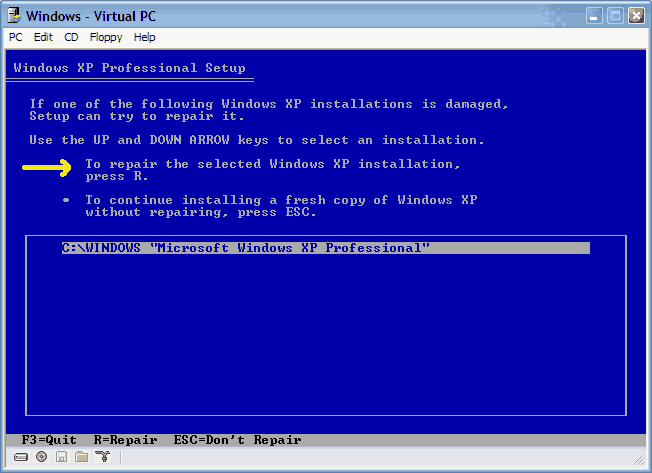
Yes, I have read the sticky post about not posting computer problems, but mine comes with a suggestion. This guide is lacking a solution to what to do if the "Repair" option does not appear in the list of installed OS's. Ideas?
howard_hopkinso
10-29-2006, 10:09 AM
Hello and welcome to Techspot.
This is a quote from the first post in this thread.
If no installations are found, then you will not be given the option to repair. This may happen if the data or partition on your drive is too corrupted.
If either of the above is true, then you`re only option may be to format and reinstall from scatch.
Regards Howard :wave: :wave:
Cuzer
11-10-2006, 08:44 PM
Hi all
First post to this forum and I'm calling a savior.
Going back to 2004?? This was posted on this forum, page 2 from memory.........
I tried to repair of my windows XP O/S and it got 3/4 of the way thorugh and hit a fatal error.
It says,
"An error has been encountered that prvents setup from continuing. One of the components that Windowes needs to continue setup could not be installed. Incorrect Function"
So I press OK to see the log and I get this.
Fatal error could not register OLE control C:\Windows\system32\rsaenh.dll because of the following error Load Library returned error 193(cl).
The signature for Windows XP Home edition Upgrade is invalid. The Error code is 800b0100.
This all happens on the Installing Windows part of the repair. I then press ok and the computer restarts and continues to do the same think.
Can any one help.
Thanks
-----------
This is exactly where I'm at now and despite ploughing through this forum I'm stumped! I had XP with no SP's installed on my PC, got a CD from our IT department at work which was XP with SP2 on it, with a key code. I've attempted to install this and all is well until it gets to around 75% of installing the files for Windows, the computer then crashes, reboots, restarts setup and does exactly the same thing over and over and over etc etc
I've tried safe mode etc but it appears no windows OS is installed now as I was 70% odd percent of the way through putting a newer version on. So reading this forum I lgot my PC to boot up the OS from the CD Rom option, got to the repair or install a fresh copy and repair fails to work, the only option left to me at the moment is to install a fresh copy, am I right in saying if I do this I will lose all the data on my hard drives? We're talking so many important documents, loads of money spent on itunes etc this would be a disaster of major proportion to me. What can I do?
Could it be I've got a bad copy CD of the XP SP2 from my IT dept? If I inserted another CD of XP may it get me past this 70% problem? And if it did would I still have my folders on my hard drives?
Any ideas would be soooooooooooo appreciated, this is an old PC I've updated over so many years and the information on here is bloody priceless frankly and just attempting a standard upgrade has knackered, potentialy, everything. Here's hoping somebody can help me in some way. I do have my original CD for XP by the way with NO SP's installed