Read on full site | Join TechSpot! (it's free) | Bookmark / Share this


How to install .key files?

BlackScarlet
12-01-2007, 06:49 PM
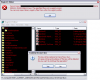
I have just installed a program, and while trying to install the .key files, I recieved an error message, shown in the screenshot below. It told me it was not a registry script and I could only import binary files from regedit. So I went into regedit and File>Import, and found the keys I wanted, but it told me that the key will be restored on top of the key that regedit was on when I opened it, deleting all subkeys. Obviously I don't want to do this, so how do I correctly install these?
Samstoned
12-01-2007, 09:34 PM
only keys I use go in a specific file for that software and on run the software finds it and loads to registry.
open key in txt editor open registry where key is compare may be you can modify.
back up reg first of course

Ad
12-01-2007, 09:34 PM
  

Nodsu
12-02-2007, 08:31 AM
Software piracy is bad. Please buy the software - you will receive detailed instructions on how to activate your purchase.

Thread closed.

Post a reply, see related topics & more

Tip: Download Advanced SystemCare 3 Free - Clean, Repair, Protect & Optimize your PC.


 Top Technology News

TechSpot Blog: Disable Windows automatic check for solutions after a program crashes

Tech Tip of the Week: Unearth Region-Specific Windows 7 Themes

Samsung intros 2TB, eSATA-packing Story Station Plus external HDD

Gartner: PC shipments to grow 2.8% in 2009, revenue down 11%

Microsoft issues warning for IE6, IE7 security hole

LG X120 netbook to launch in the US for $180 with two-year AT&T contract

Intel's six-core Gulftown processor benchmarked months early

Another iPhone worm spotted, this time it's dangerous

More Tech News

  
 Software Downloads

FlashGot 1.2.0.9

RemoveIT Pro XT - SE 23.11.2009

Vuze (Formerly Azureus) 4.3.0.4

RemoveIT Pro v7 Enterprise 23.11.2009

Aloaha PDF Suite 3.9.172

Blindwrite Suite 6.3.1.5

RemoveIT Pro v7 Ultra 23.11.2009

More Downloads


Copyright © 1998-2009 TechSpot.com. TechSpot is a registered trademark. All Rights Reserved.