Read with Formatting | Join TechSpot! (it's free)


C-Media Sound Driver Conflict

Pages : [1] 2

risingTide
01-17-2008, 12:31 AM
Greetings.

Summary: After a recent fresh install of Windows XP, the sound on my computer is no longer working.

Details: As you can see below my motherboard is a bit old, but still fine for my current purposes. I've been using it for about 6 years with no problems. I recently had to reinstall XP because of a hard drive upgrade. I installed all the drivers that came with the motherboard on CD and also installed all the updates from SOYO's site. At one point during my driver installation the sound WAS working, but at some point it stopped (unfortunately I do not know exactly when). When I try to install the C-Media Driver that is from Soyo's site (listed under the drivers for my specific motherboard) I receive this error: "Our audio chip provides mult-speaker surround and realistic sound effects. Due to the fact that your computer is not equipped with our audio chip, you can not avail yourself of these advanced features. For more information, please contact your computer dealer - C-Media Electronic Inc.

I have tried installing the latest drivers from C-Media's site (the CMI8738_WDM_0639XP.zip package), but receive a message during install that says "Waiting for audio driver......" that hangs indefintely until I click on Exit, which then restarts my computer, but still without sound. The PCI Audio Applications software installs successfully on reboot, but when I try to run it I receive: "Can not execute all the components of AudioRack. Please check program files and registry settings or just reinstall AudioRack."

There also seems to be an opensource driver available (CMIDriver-1.1.4-bin-x86.zip). However, when I try to install that I receive this error "Driver Installer (CMI 8738/8768) has encountered a problem and needs to close. We are sorry for the inconvenience." (complete with the handy Send Error Report business to Microsoft).

Thoughts: It seems to me there is some type of driver conflict going on somewhere but I do not know what else to do or try. There is a more detailed list of my system below. I'm also having random IE7 problems where it freezes and says it has to close and send Microsoft the famous error report, but I believe that my be unrelated (??) However, I am also receiving various BSODs at random times too, not always the same one either. I believe this is probably related.

Anyway, if anyone has any ideas on what I could try next I would truly appreciate it. I've spent a good bit of time at this myself but have come up quite dry. I have searched a quite a few forums and FAQs for all the associated software vendors involved but have found nothing there either. If there is any more specific information that is needed about my system, I will be more than happy to post it for you!

System Details:
Motherboard - SY-K7V Dragon+
Chipset - VIA KT266A / 8233 CE Version
Integrated Sound - CMI 8738 (No add-on sound card)
Windows XP SP2 (with all updates including IE7)

Sound Related Programs - PCI Audio Applications
Sound, video and game controllers -
- Audio Codecs
- Legacy Audio Drivers
- Legacy Video Capture Devices
- Media Control Devices
- Video Codecs

More Details about what I have tried/checked:

- There are no conflicts in device manager.
- The sound is enabled in the BIOS.
- When I open Volume Control I receive this message:
"There are no active mixer devices available. To install mixer devices, go to Control Panel, click Printers and Other Hardware, and then click Add Hardware. This program will now close."
- Windows Audio Entry is set to Automatic and started.
- The speaker volume option under Sounds and Audio Devices is actually grayed out completely (as is the Advanced button).
- There are no default devices for Sound Playback, Sound Recording, or MIDI music playback.
- Both my TDK CDRW241040B CD-Burner and my TOSHIBA DVD-ROM SD-M1612 are both enabled and at full volume.
- An Audio Codecs entry is under Hardware, but no "Audio Controller"
- There are 11 Audio Codecs listed with the Microsoft PCM Converter currently at 11th (and imaadp32.acm 1st).

Many thanks for even reading this far!
kimsland
01-17-2008, 02:58 AM
Direct link to sound driver
http://download.driverscollection.com/drivers/f95f6207863cc2ad1b7f0fdaa59d8509/478f09eb/S/SOYO/Motherboards/Audio_Rack.zip

link available for 5hrs after this post

Ad
01-17-2008, 02:58 AM

risingTide
01-17-2008, 11:18 AM
Kimsland,

I wasn't able to check this post until right now and apparently its been more than 5 hours. Could you open it back up again??

I'll check every hour until then!

Thanks so much for your help!

kimsland
01-17-2008, 05:41 PM
http://download.driverscollection.com/drivers/5e3f9ddaa7fec63bc7611484b5fd15b9/478fd914/S/SOYO/Motherboards/Audio_Rack.zip

Available for 5 Hrs from now

Umm did you get it
You were online when I started to reply
Then offline when I posted

risingTide
01-17-2008, 07:26 PM
Got it! Thanks so much!

However...

I installed it without complication...it asked for a restart which I did. Upon restart, I opened up the "Multi-Channel Audio Demo" from the Start Menu. The application opens fine but whenever I try to play a sound from it I receive this popup error:

Failed to open waveform output device.

There's a prompt to click OK, which clears the error but I get it every time I try to play a sound in the demo.

Also note that when I try to run Audiorack itself I get a popup error that says:

Can not execute all the components of AudioRack.
Please check program files and registry settings or just reinstall AudioRack.

Any ideas?

Thanks for your time, kimsland!

kimsland
01-18-2008, 06:20 AM
Hi risingTide,

The "Multi-Channel Audio Demo" I'm not aware of, it's a specific part of the Audio Rack software, that may not be required.

I'm interested in if sound is working (normally) or not.

Can not execute all the components of AudioRack
This may be due to having the old software or drivers loaded with the new (posted) software/drivers

I'd suggest un-installing Audio Rack
Then un-installing any other audio/driver software package (Not media player so forth) just any other audio driver package previously installed.
Then un-install any audio drivers still left in Device Manager - you may also need to click on View, then Show Hidden Devices, in Device Manager too, to fully remove all audio drivers.

Restart

And follow the Audio Rack software install again. (I am also aware that Windows may try to re-install the audio drivers automatically upon restart (if possible cancel this) otherwise continue.

risingTide
01-18-2008, 11:17 AM
Greetings kimsland, and thanks for your help.

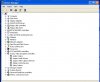
I've uninstalled Audio Rack and there don't seem to be any other previously installed driver packages that can be "uninstalled". Now, I'm at the point where I'm trying to uninstall any drivers still left in Device Manager. I have enabled the viewing of hidden devices and have enclosed a screenshot of my device manager at that point. I don't know exactly what to uninstall and, more fearfully, I don't want to uninstall too much!

27949

Any help you could give on exactly what to uninstall would be much appreciated!

kimsland
01-18-2008, 04:24 PM
Remove:
Legacy Audio Drivers
Media Control Devices

You may also want to check Device Manager in Safe mode

Also Start -> Run -> Services.msc
Scroll down to "Windows Audio" and confirm "automatic" startup

After a Restart (already done by going to safe mode)

Re-Install Audio Rack

Ad
01-18-2008, 04:24 PM

risingTide
01-18-2008, 05:58 PM
Well, I uninstalled AudioRack and removed the Legacy Audio Drivers and Media Control Devices (there were none under the former, only under the latter) including one Media Control Device that was hidden. I also checked things out in safe mode, but nothing extra was there. Windows Audio was already set to Automatic as well.

So I rebooted and as I was reinstalling AudioRack I received a nice BSOD. I rebooted again and it looks like only "half" of the install was complete because some components are there but it won't let me uninstall it, giving me this error when I try:

- The log file 'C:\Program Files\PCI Audio Applications\Uninst.isu' is not valid or the data has been corrupted. Uninstallation will not continue. -

So now I'm in a tight spot. I've enclosed the minidump of the BSOD in case that helps.

27963

What should I do next? Should I try using Microsoft's "Windows Install Clean-up" which I happen to have downloaded already? Or should I try to re-install over top of the bad version? Or does the minidump give any other clues that I should note? (I do have Microsoft's debugger installed as well.)

Thanks for helping me thus far!!

kimsland
01-18-2008, 07:59 PM
Damn power went off here (then on then off... so I turned off for awhile!)

DMP
Probably caused by : afd.sys
part of the TCP/IP stack in Microsoft Windows (Internet basically)

Just run CCleaner (http://www.ccleaner.com/)

risingTide
01-19-2008, 01:25 PM
I ran the Cleaner and Registry features on CCleaner and that worked fine. When I tried to run the uninstaller on the PCI Audio Applications I received the same error as before. I noticed there is also an option that says "Delete Entry" under that uninstaller tool...is that what I should do instead?

Eddy Rassy
01-19-2008, 01:55 PM
RisingTide
I recall 2 years back when I built a PC with Soyo board, I had similar problems (not exactly the same as yours) and my audio rack would not work. Then I found that the Vinyl AC97 codec combo driver was causing it. I then downloaded a new driver (6.14.1.4070) from VIA and the problem went away.
Is Vinyl AC97 listed in the device manager under sound? if it is then get the latest driver from VIA and try it.
Good Luck

risingTide
01-22-2008, 05:51 PM
kimsland,

Well, I just reinstalled AudioRack over the half-installed version since I couldn't uninstall it correctly. The install was successful but I still have the same results as last time when I try to use it:

Can not execute all the components of AudioRack.
Please check program files and registry settings or just reinstall AudioRack.

What should I try next?

(Eddy Rassy, I actually don't have the Vinyl AC97 codec driver at all...but thanks for the input!)

kimsland
01-22-2008, 06:29 PM
Another post today had a really horrible issue, that we worked on for days.
Eventually he tried this
http://www.techspot.com/vb/topic1094.html
And it worked perfectly.

I'm also starting to think we need to find the Audio Rack software again (from somewhere else) and try again. Please do another search for this (sorry I must go for awhile, have have a meeting I must attend.

risingTide
01-22-2008, 10:24 PM
kimsland,

I checked out that thread you posted and I was very hopeful. I changed the permissions of the registry value with this description:

CMI8738/C3DX PCI Audio Device

But alas, still nothing. I tried to reinstall the C-Media driver on the CD that came with my mobo after that, and the updated one on soyo's site, and an older one on Soyo's site but still nothing.

I then cleared the DriverCache/i386 folder as well and tried to reinstall but still nothing.

I also found the AudioRack on the CD that came with my mobo and another version of it on Soyo's site, but although it installs fine...it still doesn't work.
It also gives me a popup each time saying that

The log file 'C:\Program Files\PCI Audio Applications\Uninst.isu' is not valid or the data has been corrupted. Uninstallation will not continue.

But like I said, it still installs seemingly fine.

I also still have nothing under Legacy Audio Drivers and only one driver under Media Control Devices (mciqtz32.dll).

I'm at a real loss here...any other ideas?

Thanks so much for your patience!!

kimsland
01-23-2008, 12:02 AM
Here's something that I would try (at this stage)

Go to Users in Control Panel, create a new user with Administor privlidges, call it Audio (or what ever)

Once created Log out, then log on to the new user account
After a few moments of all the normal windows adjustments (ie cancel, cancel, cancel of all the popups.

setup your sound again, with the best driver you have.

Once setup, try sound

If it works, log back on to your original account and check there.

Try that

Ad
01-23-2008, 12:02 AM

turbo1
01-23-2008, 12:33 AM
risingTide

this driver CMI8738_WDM_0639XP is for integrated sound as well as for PCI sound cards.

try re-installing the driver you downloaded from C-media.double click the setup,but when you're in the installation wizard,before you proceed.click the radio button that says "8738 in motherboard".

the dialog box looks like this (http://www.kohryu.com/picture/cmedia/cmi8738.png),the one in the link is setting up the PCI sound card,dont do that.click "8738 in the motherboard" instead.then on the check box,the default is Line-in and rear speaker output share the same jack.dont put check on the "Disable MIDI port (device)" as well as the "Disable Game port (device)"...

then click install.

kimsland
01-23-2008, 01:02 AM
Here's the exact link to that file http://www.download.com/C-Media-CMI8738-WDM-Driver-Windows-XP-/3000-2120_4-10495782.html?tag=dir
This link has come from the cmedia home site, directing the download location to download.com

Yes it does display this screen that turbo1 has stated, but the default location now seems to be "In Motherboard" therefore nothing to change.

Please try this. I suppose this is where System Specs come in, they do help.

risingTide
01-23-2008, 10:00 AM
kimsland/turbo1,

Well, I tried creating a new Audio admin account and installing the drivers under that account. However, I receive the same error message noted in my first post above when I do that. Namely,

"Our audio chip provides mult-speaker surround and realistic sound effects. Due to the fact that your computer is not equipped with our audio chip, you can not avail yourself of these advanced features. For more information, please contact your computer dealer - C-Media Electronic Inc. - Website http://www.cmedia.com.tw"

This is also the problem that I have when trying to implement Turbo1's approach as well. The above message comes up before ANY OTHER prompts or anything and stops right there. It appears immediately after I click on the Setup.exe. Therefore I never get to the screen shot that Turbo1 posted.

HOWEVER, I tried downloading the drivers from the most recent link that kimsland posted above and I have gotten a bit further. When I click on the setup.exe from that download I actually get the screenshot that turbo1 shows above! This is the first time I've seen this screen. I've selected the options as turbo1 has indicated above and the install begins. However, this is what I receive:

The device driver will be installed now. It will take a few minutes to complete.

Please press [Install] to start.....

Starting installation process...
Copy necessary files...
Waiting for audio driver to be ready......................................

At this point it hangs indefinitely. Here is a screenshot: 28096. Eventually I just click Exit. It asks me if I want to restart...but when I do, I still have no sound; nothing has changed.

Any ideas? Thanks so much!!

Note: My System Specs are posted in my first post, but I've also posted them in my profile so that they are now more readily available.

kimsland
01-23-2008, 10:17 AM
You know we keep thinking driver (and possibly settings) but I'm starting to think hardware. Maybe the audio card just died. It would make more sense, as to why the driver does not find the card and install properly.
Glad to see the system specs by the way.

risingTide
01-23-2008, 12:57 PM
So how do I rule that out (or verify it)?

I would think so too actually, except for that fact that upon my fresh XP installation (when all this happened) the sound WAS working and then as I installed more drivers and other things it stopped at some point (although I unfortunately don't know when). Plus I still get random BSODs, some of which seem to have to do with a device driver conflict I believe. And I wasn't getting these before the sound stopped working.

risingTide
01-23-2008, 01:05 PM
Here's the latest dump by the way:

28100

turbo1
01-23-2008, 01:44 PM
"Our audio chip provides mult-speaker surround and realistic sound effects. Due to the fact that your computer is not equipped with our audio chip, you can not avail yourself of these advanced features. For more information, please contact your computer dealer - C-Media Electronic Inc. - Website http://www.cmedia.com.tw"

one thing i know with the error message is about the onboard sound chip.
if your onboard sound's driver is CMI8738,then your sound chipset should be:

CMI8738/6Ch or 4Ch C-Media Technology.

please download Everest Free Edition HERE (http://www.majorgeeks.com/download4181.html),install & run the program.when done,navigate to > Multimedia > PCI/Pnp Audio.

lets see what sound chip you have with the string value.

likewise go to device manager,navigate to >Sound,video and game controller.
find the onboard sound & that should match the value with the result from everest.

right click the onboard sound > properties.
on the details tab,you will see the Device instance ID.
the string value would be like PCI\VEN_xxxxx so & so.

post it back here as well as the result from everest (sound ).
providing those informations,we will see the real sound chipset that you have.

risingTide
01-23-2008, 02:54 PM
Here's a curious thing. Everest works fine except that it brings up a blank screen on BOTH PCI/Pnp Audio and Windows Audio. See 28115.

Also, I don't seem to have an onboard sound listed under Sound,video and game controllers in Device Manager (and this is with the hidden devices being shown). I have a screenshot listed above on posting #7 that shows it.

So what does that mean?

My motherboard manual lists this as the onboard sound chip for what it's worth: CMI8738/6Ch C-Media Technology.

risingTide
01-23-2008, 03:04 PM
Also, I have triple-checked, and my onboard sound is definitely enabled in my BIOS.

turbo1
01-23-2008, 03:47 PM
My motherboard manual lists this as the onboard sound chip for what it's worth: CMI8738/6Ch C-Media Technology.

just as i thought & that would explain it all.your sound chip not being detected.

ok,please go to Start > Help & support.under Pick a Task,select keep your computer up-to-date with Windows Update.

Download all that it tells you to download (updates) & install.

after installing all the updates,Run the driver CMI8738_WDM_0639XP & dont forget the basic things before you proceed in istalling the driver."8738 in Motherboard".if thats the default then leave things unchanged.

risingTide
01-23-2008, 04:26 PM
I try to keep my updates current, but I checked for updates and there were three. None of which were high priority. 2 software (Root Certificate and Silverlight) and 1 hardware (VIA Rhine II Fast Ethernet Adapter).

I tried to reinstall the driver again with the appropriate selections, but it still hangs like before.

Thanks so much for your help turbo1/kimsland...I really am at a tight spot!

What next?

kimsland
01-23-2008, 04:48 PM
One option is to really confirm what you have
Please download Unknown Devices
http://www.halfdone.com/ukd/UKD_14-20_Beta.zip
Also update the detections from right clicking on this, and selecting Save As:
http://members.datafast.net.au/dft0802/downloads/pcidevs.txt
Unknown Devices helps you find what those unknown devices in Device Manager really are

Full info here http://halfdone.com/ukd

risingTide
01-23-2008, 05:32 PM
Nice program.

Here's the results in a .txt file 28119.

kimsland
01-23-2008, 06:23 PM
Well I did get something from this.
McAfee installed, I wonder if you are able to fully un-install (temporarily of course) this product then try the audio driver install again
Note: you will require all your registrations - so forth, actually better to have it ready for re-install.

Also I started searching around for drivers again, but gave up thinking you have a few already ! But I came across a board (I closed the page without copying the link) that stated that he could not install the Soyo CMI8738 fully until he removed all USB devices (he thought it was keyboard - and attached a PS2 keyboard) and successffully installed them.

The drivers still concern me a little, I think you may want to search for a few others with your Windows version - I usually use driverguide.com that site is very good, but I have never posted a link because free registration is required to download the drivers (using your email address) you may want to check that too, as a first reference to these drivers Soyo Technology Corp Ltd CMI8738/C3DX PCI Audio for your Windows.

Well there's another 3 ideas !

I would like you to continue posting here to, ie don't format or not respond, I'd like to know the really simple answer to all this !!

risingTide
01-23-2008, 07:11 PM
Okay...well I did the online driverscan on DriverGuide.com and it says that I have the latest driver for CMI8783...

Now I'm on to trying the USB issue...will post back.

kimsland
01-23-2008, 07:22 PM
And McAfee after that !

I may be away again (I'm in and out a lot, but I like letting people know)

I'll check replies later - you know the reply that says I solved it :)

risingTide
01-23-2008, 07:26 PM
I removed all USB devices and tried to reinstall the driver but it just hangs like before.

And as far as the McAfee goes...I had this problem BEFORE I had it or any other virus software installed. (As a general rule I reinstall all device drivers first before software when I do a fresh install.)

So, I hate to say it but I'm kind of back to square one. I really don't want re-install XP...

kimsland
01-23-2008, 07:40 PM
Uninstall all the sound again in add/remove in device manager (also show hidden devices from view in the device manager toolbar)

You really should try another sound driver download for your OS (i keep forgetting to look - i think Xp) from driverguide

Once I had a strange one like this, I installed another sound card, then uninstalled the sound card, then the original sound card worked.
Something must have reset somewhere

Hmmm. Maybe more minds may help here.

risingTide
01-23-2008, 08:15 PM
kimsland,

I started second guessing myself as to whether or not I really had McAfee installed or not when I was trying the sound drivers before. So I bit the bullet and uninstalled it and tried to install the sound drivers then (note that all USB devices were still disconnected). Alas, same thing happened with the hang on install.

So, I uninstalled all the sound in device manager again (which was only the mciqtz32.dll actually). And then tried three separate C-Media Sound Drivers:

cmi8738_WDM_0639XP (the one you linked to from downloads.com earlier)
cmi8738_win_xp_0644
cmi8738_w2k_xp_me-630

You can find the latter two here on Soyo's site SY-K7VSoyo Dragon+ (http://www.soyousa.com/content/Downloads/155/&c=35&p=21&l=English)

The first one gives me the nice "8738 in motherboard" box to choose from first...and then installs and hangs.

The second one just gives the

"Our audio chip provides mult-speaker surround and realistic sound effects. Due to the fact that your computer is not equipped with our audio chip, you can not avail yourself of these advanced features. For more information, please contact your computer dealer - C-Media Electronic Inc. - Website http://www.cmedia.com.tw"

message and closes. And the third one is similar to the first but just skips straight to the hanging without asking me for the "8738 in motherboard" selection box.

Whew. Thanks for hanging in there with me!! What's next?

turbo1
01-23-2008, 08:37 PM
after reading your unknown devices,it appears that:

Sound, video and game controllers (19/5/0/0)
Audio Codecs
CMI8738/C3DX PCI Audio Device
C-Media Electronics Inc CMI8738/C3DX PCI Audio Device
Soyo Technology Corp Ltd CMI8738/C3DX PCI Audio Device

and after getting through to your boards manual,you have the SPK5 Audio Connector Card & One Flat Cable for Audio Card.

in C-Media site,none was listed as CMI8738 for mainboards except CMI8738 for PCI sound.

as im thinking that you need that SPK5 to run the C-Media 6 channel solution.

lets have kimsland suggestion,un-install the sound driver in Add/Remove or you can run the un-install program that comes with the CMI8738 driver.

install again the sound driver using your motherboard's CD.
if nothing happens,use the one you downloaded from C-Media (CMI8738_WDM_639XP) driver.

but this time when you double click the setup.exe,before you proceed with the installation,tick the radio button that says "8738 in sound card (rear speakers jack individually)".
your SPK5 card has the sockets for CENTER/BASS,REAR_L/R,OPTICAL_INPUT,SPDIF_INPUT,OPTICAL_OUTPUT & SPDIF_OUTPUT.

this feature is already a functionality of a PCI sound card.

try it.

risingTide
01-23-2008, 09:55 PM
Okay, I tried to un-install the sound driver/applications that I have.

However, when I click on any of the "Uninstall.exe" files for any of the CM8738 drivers nothing happens.

Also, when I try to uninstall the AudioRack application (either through the Add/Remove Menu or the Program Menu shown here 28125) I receive this screen 28122. Now, no matter what I check off (the default is all of them), when I click continue the screen just flashes and the prompt comes back up. It will do it indefinitely until I click on the Cancel button.

Also, when I choose "Uninstall Device Drivers and Applications" from the Program Menu (see screen shot above) and try to uninstall the driver I receive this 28123.

So it seems like I don't have a driver installed, but I do have AudioRack installed and can't uninstall it. Isn't that a problem?

Anyway, I continued onward and tried to install the driver from my mobo CD. Everything looks like it installs correctly, it asks for a reboot, but when I reboot nothing has been installed. So then I tried the CMI8738_WDM_639XP driver as suggested, but with the option "8738 in sound card (rear speakers jack individually)" checked instead, but I receive the same result...the hang.

Hmm...

turbo1
01-23-2008, 11:21 PM
you cant have a fresh install of the driver unless you solved the un-installation problem.

this maybe the conflict now,your sound chip not being detected.that's why it hangs.it cant find anything.

find something that will un-install the driver,use a third party utility software that can be downloaded free.

risingTide
01-24-2008, 05:30 PM
With turbo1's help I've managed to completely uninstall AudioRack with Revo Uninstaller (http://www.revouninstaller.com/) and then ran CCleaner afterwards to make sure that everything is really gone. I've also tried a few more versions of the CMedia driver but none complete installation...I mostly receive the ""Our audio chip provides mult-speaker surround..." error listed multiple times below.

I also tried another install of AudioRack (thanks for the file turbo1), but alas, I simply receive this error on install 28172.

Still stumped.

kimsland
01-24-2008, 05:34 PM
New sound card sounds good !
Also may help (as stated above)

turbo1
01-24-2008, 07:22 PM
with all the solution hunting that you've tried,still,your sound chip dont respond to all the drivers known for CMI8738 model.

if it doesn't switch back on,then i guess your sound chip just served its purpose.

kimsland's solution would be it,time for a new add-on sound card now.and I want to say well done for getting this far. :)

risingTide
01-25-2008, 04:04 PM
kimsland/turbo1,

Thanks so much for the help. I'm going to try to borrow a sound card from a friend and see if it works. I'll post back to keep the thread updated for other folks. 2 questions until then though:

1) When I use my friend's PCI sound card should I disable my onboard one in the BIOS first? I would think yes, but since kimsland said something about it making the onboard one mysteriously work I just wanted to make sure I shouldn't leave it on.

2) Here's another BSOD 28203 ...is it related?

Thanks!

kimsland
01-25-2008, 05:54 PM
1.
Yes disable in bios - I'm hoping that the Windows software (registry/system files) may change something. The hardware device, can be disabled during this. And then re-enabled later on - after removing the PCI sound card.
Firstly just make sure you get sound, from the next card.

2.
BugCheck 1000000A, {d0f605e8, 2, 0, 804dc25d}
Probably caused by : srv.sysSrv.sys
is the network server device driver that controls network connections to a machine
May have just been a one off glitch, but I would suggest checking for updates on your network driver too.

The hardware on the machine is falling apart ! lol

risingTide
01-31-2008, 01:42 PM
kimsland/turbo1,

After a brief hiatus I am back...with an unexpected development (at least in my opinion).

First of all, as far as #2 goes above...I have the latest updates so hopefully it was just a fluke (although I have had quite a few BSODs of various sorts as mentioned earlier).

Okay, so I turned off the onboard sound in my BIOS and I borrowed a PCI sound card from my friend (Creative SB Live! Player 1024 Sound Card). I installed it and fired up XP and received the usual Found New Hardware balloon at the bottom right. So it pops up a few more balloons there and then I get a prompt asking me to insert my XP CD. I do that and I get another prompt about "do you really want to install these SoundBlaster drivers even though they are unsigned" to which I clicked Continue. A few seconds later I receive this error 28317. So I click Finish (my only option) and then immediately receive another prompt about installing something else for the SB card (I think drivers but I can't remember the exact wording). Anyway, it was the usual prompt about "choosing from a specific location, or just searching" so I just did the search (since I don't actually have the drivers nor does my friend) and it searched the XP CD for awhile and eventually seemed to find it and did the folder copy icon bit like it was installing them. However, in the middle of that I received an error that it couldn't find some file called "gamenum" and I was asked to insert my XP2 upgrade CD to search for it on there. Well, I do actually have an XP2 upgrade CD ($4 from microsoft) and I inserted that CD, but apparently that file wasn't on there because it couldn't find it so I had to just click cancel for that file. It continued copying for a little bit and then ended.

So I basically received an error on the install of the Multimedia Audio Controller and then another during the drivers right?

My device manager currently looks like this 28318 and before trying another else I figured I would post to get some advice on the next step. Honestly, I was expecting this card to work just fine, thus proving I had a bad onboard audio chip. However, that first error seems to indicate something else may be awry than a bad chip, right?

I was thinking that I should try to make this PCI card work in other ways first before coming to that conclusion, is that correct? Any help on that would be very much
appreciated (as usual)!

I really want to get to the bottom of this...

kimsland
01-31-2008, 04:17 PM
Please look at all the info numbers and part numbers on your new sound card, and go to google and add the word driver to a search.
It may be that the drivers you have are not for your Windows version.

Sorry very brief I must rush off.
Also I was wondering if you should open a new thread under audio forum. You may get better advice.

This one is a week old now.

turbo1
02-01-2008, 12:05 AM
I do that and I get another prompt about "do you really want to install these SoundBlaster drivers even though they are unsigned" to which I clicked Continue.

you are trying to install a driver that does not contain a Microsoft digital signature.perhaps its for win 98 or 2000.

& for the model creative SB live! series (except 24-bit/external),creative Labs dont support the driver anymore,it's service has ended up.

unless you can find & try a OEM driver for EMU 10k1 (sound chip) 16-bit signal processor for winXP version.but no guarantee it will work.

risingTide
02-01-2008, 01:47 PM
Well, when I start to install that driver everything looks real good until I get an error that says "The file 'gameenum.sys' on Windows XP Professional Service Pack 2 CD is needed. Type the path where the file is located and then click OK.' Here's the screenshot 28343. I've tried searching from both my Original XP CD and my XP SP2 upgrade CD but that file isn't on either one. So I have to just click Cancel. It continues the installation for about 2 seconds and finishes, but nothing changes.

Where can I obtain that file?

kimsland
02-01-2008, 05:05 PM
Yes I have that file in C:\WINDOWS\ServicePackFiles\i386 it's a microsoft file.

I will edit this, when I work out where it comes from (SP2 disc?; sound driver?)

Hmm DirectX 9.0C is looking good http://www.microsoft.com/downloads/details.aspx?FamilyID=9226a611-62fe-4f61-aba1-914185249413&DisplayLang=en

Edit: (Home page drivers)

These drivers from here: http://www.soyo.com/content/Downloads/155/&c=35&p=21&l=English

cmi8738_win_xp_v0644
http://www.soyo.com/uploads/downloads/drivers/c-media/audio/cmi8738_win_xp_v0644.exe

C-Media v6.30(old drivers).
http://www.soyo.com/uploads/downloads/drivers/k7vx/cmi8738_w2k_xp_me-630.zip

Audio Rack
http://www.soyo.com/uploads/downloads/drivers/k7vx/Audio_Rack.zip

---

risingTide
02-01-2008, 06:06 PM
I've tried those drivers numerous times and always get the errors that have been posted previously. I actually started with those drivers in the beginning (I usually go straight to the company's site if I can).

Guess I'm a little confused...why is the newest Directx looking good?

Thank you to both of you again as you help.

kimsland
02-01-2008, 06:19 PM
Because it's a Microsoft file.

It's either in DirectX or SP2 or in the full version of the Xp CD

 Tech News

 Downloads
Copyright © 1998-2008 TechSpot.com. TechSpot is a registered trademark. All Rights Reserved.