Protection control panel and system integrity scan wizard

bigguy2008

Posts: 6   +0
I'm new to this site, but I think you have the answer. I have a very similar problem to the one already on this thread. I get pop ups on my desktop saying that it needs to do a scan from System Integrity Scan Wizard, Protection Control Panel and the trojandownloader.xs. I'll attach my hijackthis file so you can help me. Thanks for being a computer genius!
 
This infection has been very common lately as you noticed. When you attach your logs make sure they are .txt or .log files not .doc I do not like opening .docs from infected machines

Malwarebytes' Anti-Malware

  • Please download Malwarebytes' Anti-Malware to your desktop.
  • Double-click mbam-setup.exe and follow the prompts to install the program.
  • At the end, be sure a checkmark is placed next to
    • Update Malwarebytes' Anti-Malware
    • and Launch Malwarebytes' Anti-Malware
  • then click Finish.
  • If an update is found, it will download and install the latest version.
  • Once the program has loaded, select Perform full scan, then click Scan.
  • When the scan is complete, click OK, then Show Results to view the results.
  • Be sure that everything is checked, and click Remove Selected.
  • When completed, a log will open in Notepad. please copy and paste the log into your next reply
    • If you accidently close it, the log file is saved here and will be named like this:
    • C:\Documents and Settings\Username\Application Data\Malwarebytes\Malwarebytes' Anti-Malware\Logs\mbam-log-date (time).txt


Combofix
  • Download Combofix to your desktop.
  • Double click combofix.exe & follow the prompts.
  • A window will open with a warning.
  • When the scan completes it will open a text window. Please attach that log back here together with a fresh HJT log.
Caution - do not touch your mouse/keyboard until the scan has completed. The scan will temporarily disable your desktop, and if interrupted may leave your desktop disabled. If this occurs, please reboot to restore the desktop. Combofix is a very powerful tool so please do NOT do anything without instruction

Combofix will automatically save the log file to C:\combofix.txt
 
k try this then. since it won't let me upload it again it is in this other thread saved as a .txt document.

Infected with PC-Antispyware, Downloader, and "Protection Control Panel"
page 2

Thanks
 
I am very busy - can you please go to Edit profile in the blue bar above -> go to attachments in the bottom of the left pane -> remove all attachments then reattach it here.
 
Your not wasting my time, I just can't go looking through other threads for your logs

Disable Avast real time protection.

Disable Teatimer
  • Right click the Spybot -SD Resident Icon located in your system tray, Select Exit Spybot - S&D Resident
  • Open Spybot S&D
  • Click on Mode at the top and make sure that Advanced is checked
  • Expand the Tools tab in the left pane
  • Single click on the Resident Icon also in the left pane
  • Uncheck Resident "TeaTimer" (Protection of over-all system settings) Active
  • Close spybot


Combofix
  • Download Combofix to your desktop.
  • Double click combofix.exe & follow the prompts.
  • A window will open with a warning.
  • When the scan completes it will open a text window. Please attach that log back here together with a fresh HJT log.
Caution - do not touch your mouse/keyboard until the scan has completed. The scan will temporarily disable your desktop, and if interrupted may leave your desktop disabled. If this occurs, please reboot to restore the desktop. Combofix is a very powerful tool so please do NOT do anything without instruction

Combofix will automatically save the log file to C:\combofix.txt
 
Viewpoint Manager is considered as foistware instead of malware since it is installed without user's approval but doesn't spy or do anything "bad". This may change, read Viewpoint to Plunge Into Adware.
I recommend that you remove the Viewpoint products; however, decide for yourself. To uninstall the the Viewpoint components :
  1. Click Start, point to Settings, and then click Control Panel.
  2. In Control Panel, double-click Add or Remove Programs.
  3. In Add or Remove Programs, highlight >>Viewpoint component<< , click Remove.


    How to prevent it from being recreated every time you run the AOL software:
    • Open AOL
    • Go to Help on the toolbar
    • Select About AOL
    • Hit Ctrl D and a secret panel can be accessed which will allow you to disable all desktop and IM features associated with Viewpoint.
----------------------------------------------------------------------------------------------

Download\install 'SuperAntiSpyware Home Edition Free Version' from HERE
  • Launch SuperAntiSpyware and click on 'Check for updates'.
  • Once the updates have been installed,exit SuperAntiSpyware.

Scan with SuperAntiSpyware
  • Start SuperAntiSpyware.
  • On the main screen click on 'Scan your computer'.
  • Check: 'Perform Complete Scan then Click 'Next' to start the scan.
  • Superantispyware will now scan your computer,when it's finished it will list all/any infections found.
  • Make sure everything found has a checkmark next to it,then press 'Next'.
  • Click on 'Finish' when you've done.

    It's possible that the program will ask you to reboot in order to delete some files.

    Obtain the SuperAntiSpyware log as follows:
    Click on 'Preferences'.
    Click on the 'Statistics/Logs' tab.
    Under 'Scanner Logs' double click on 'SuperAntiSpyware Scan Log'.
    It will then open in your default text editor,such as Notepad.
    Attach the notepad file here on your next reply
---------------------------------------------------------------------------------------------

CFScript

Open notepad and copy/paste the text in the code box below into it:
NOTE* make sure to only highlight and copy what is inside the quote box nothing out side of it.
Also ..

Pay particular attention to this :-

Make sure the word File:: is on the first line of the text file you save (no blank line above it, & no space in front of it)
File::
C:\WINDOWS\system32\khfFYSjk.dll
C:\WINDOWS\system32\vtUlJyXn.dll
C:\WINDOWS\system32\opnkhhhH.dll
C:\WINDOWS\unins000.dat
C:\WINDOWS\unins000.exe

Folder::
C:\Documents and Settings\All Users\Application Data\ufyhizkz

Registry::
[-HKEY_LOCAL_MACHINE\~\Browser Helper Objects\{0B03DC0B-72C4-45EB-BBD1-33D6D37B58A3}]
[-HKEY_LOCAL_MACHINE\~\Browser Helper Objects\{2C5F1D30-C42B-49EE-A375-FFFD0A88FC75}]
[-HKEY_LOCAL_MACHINE\~\Browser Helper Objects\{E180B8BA-A28B-4B04-AE84-037B5F8FF5F1}]
[HKEY_LOCAL_MACHINE\software\microsoft\windows\currentversion\policies\explorer\run]
"NnD3s4TCjE"=-
[HKEY_CURRENT_USER\software\microsoft\windows\currentversion\policies\explorer\run]
"NnD3s4TCjE"=-

Save this as CFScript.txt

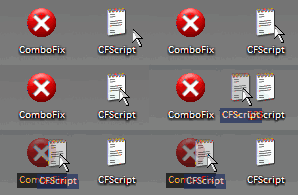
Then drag the CFScript.txt into ComboFix.exe as you see in the screenshot below.

CFScript.gif


This will start ComboFix again. After reboot, (in case it asks to reboot), post the contents of Combofix.txt in your next reply together with a fresh HJT log.
--------------------------------------------------------------------------

Download to your Desktop this self-extracting ZIP archive FixPolicies.exe

• Double-click FixPolicies.exe
• Click the Install button on the bottom toolbar of the box that will open.
• The program will create a new Folder called FixPolicies
• Double-click to Open the new Folder, and then double-click the file named Fix_Policies.cmd
• A black box will briefly appear and then close. This will enable your Control Panel, Task Manager and stop any Administrative warnings.
-----------------------------------------------------------------------------------

Download and Run ATF Cleaner
Download ATF Cleaner by Atribune to your desktop.

Double-click ATF Cleaner.exe to open it.

Under Main choose:
Windows Temp
Current User Temp
All Users Temp
Cookies
Temporary Internet Files
Prefetch
Java Cache

*The other boxes are optional*
Then click the Empty Selected button.

Firefox or Opera:
Click Firefox or Opera at the top and choose: Select All
Click the Empty Selected button.
NOTE: If you would like to keep your saved passwords, please click NO at the prompt.

Click Exit on the Main menu to close the program.
---------------------------------------------------------------------------------

Run Kaspersky Online AV Scanner

Order to use it you have to use Internet Explorer.
Go to Kaspersky and click the Accept button at the end of the page.

Note for Internet Explorer 7 users: If at any time you have trouble with the accept button of the licence, click on the Zoom tool located at the right bottom of the IE window and set the zoom to 75 %. Once the license accepted, reset to 100%.
  • Read the Requirements and limitations before you click Accept.
  • Allow the ActiveX download if necessary.
  • Once the database has downloaded, click Next.
  • Click Scan Settings and change the "Scan using the following antivirus database" from standard to extended and then click OK.
  • Click on "My Computer"
  • When the scan has completed, click Save Report As...
  • Enter a name for the file in the Filename: text box and then click the down arrow to the right of Save as type: and select text file (*.txt)
  • Click Save - by default the file will be saved to your Desktop, but you can change this if you wish.
Attach the report into your next reply
 
heres most of the stuff. Do i need to keep all of these programs after it is cleaned? The popups havent been coming up so i think it might be gone.
 
Keep everything for now, I will post specific instructions for when to remove them.

Looking through logs will post back soon
 
Viewpoint Manager is considered as foistware instead of malware since it is installed without user's approval but doesn't spy or do anything "bad". This may change, read Viewpoint to Plunge Into Adware.
I recommend that you remove the Viewpoint products; however, decide for yourself. To uninstall the the Viewpoint components :
  1. Click Start, point to Settings, and then click Control Panel.
  2. In Control Panel, double-click Add or Remove Programs.
  3. In Add or Remove Programs, highlight >>Viewpoint component<< , click Remove.

    How to prevent it from being recreated every time you run the AOL software:
    • Open AOL
    • Go to Help on the toolbar
    • Select About AOL
    • Hit Ctrl D and a secret panel can be accessed which will allow you to disable all desktop and IM features associated with Viewpoint.
------------------------------------------------------------------------------------------

CFScript

Open notepad and copy/paste the text in the code box below into it:
NOTE* make sure to only highlight and copy what is inside the quote box nothing out side of it.
Also ..

Pay particular attention to this :-

Make sure the word File:: is on the first line of the text file you save (no blank line above it, & no space in front of it)
File::
C:\WINDOWS\system32\khfFYSjk.dll
C:\WINDOWS\system32\vtUlJyXn.dll
C:\WINDOWS\system32\opnkhhhH.dll
C:\WINDOWS\unins000.exe
C:\WINDOWS\unins000.dat

Folder::
C:\Documents and Settings\All Users\Application Data\ufyhizkz

Registry::
[-HKEY_LOCAL_MACHINE\~\Browser Helper Objects\{0B03DC0B-72C4-45EB-BBD1-33D6D37B58A3}]
[-HKEY_LOCAL_MACHINE\~\Browser Helper Objects\{2C5F1D30-C42B-49EE-A375-FFFD0A88FC75}]
[-HKEY_LOCAL_MACHINE\~\Browser Helper Objects\{E180B8BA-A28B-4B04-AE84-037B5F8FF5F1}]
[HKEY_LOCAL_MACHINE\software\microsoft\windows\currentversion\policies\explorer\run]
"NnD3s4TCjE"=-
[HKEY_CURRENT_USER\software\microsoft\windows\currentversion\policies\explorer\run]
"NnD3s4TCjE"=-

Save this as CFScript.txt

Then drag the CFScript.txt into ComboFix.exe as you see in the screenshot below.

CFScript.gif


This will start ComboFix again. After reboot, (in case it asks to reboot), post the contents of Combofix.txt in your next reply together with a fresh HJT log.
-------------------------------------------------------------------------------------

I still didn't see kaspersky log, there is one infection I am specifically looking for that I know kaspersky will show if there. So please follow the above instructions then run kaspersky and attach both logs here
 
Back