TechSpot
 
Go Back   TechSpot OpenBoards > OS & Software > Security and the Web
Forgot?

Welcome to the TechSpot OpenBoards. Please read the FAQ if you have any questions. Login to participate.

Another Infected with PC-Antispyware, Downloader, and "Protection Control Panel"

Reply
 
Thread Tools Search this Thread
  #1  
Old 05-09-2008, 09:11 AM
labib labib is offline
Newcomer, in training
 
Member since: May 2008, 4 posts
Another Infected with PC-Antispyware, Downloader, and "Protection Control Panel"

Hi all,

came across another thread with the same problem that was fixed by one of the guys on here....hoping you could help me. Dont know how or when this managed to get onto my system but its annoying the hell out of me now, AVG, Spybot and others dont seem to have removed it yet..

Here is an attachment of a log report from hijackthis - thanks
Attached Files
File Type: log hijackthis.log (15.8 KB, 3 views)
Reply With Quote
  #2  
Old 05-09-2008, 05:27 PM
labib labib is offline
Newcomer, in training
 
Member since: May 2008, 4 posts
anyone please?
Reply With Quote
You can remove this banner by registering, join the TS Community for free.
  #3  
Old 05-10-2008, 11:25 AM
Blind Dragon's Avatar
Blind Dragon Blind Dragon is offline
TechSpot Guru
 
Location: Tampa FL
Member since: Oct 2007, 2,296 posts
System specs
Disable Teatimer
  • Right click the Spybot -SD Resident Icon located in your system tray, Select Exit Spybot - S&D Resident
  • Open Spybot S&D
  • Click on Mode at the top and make sure that Advanced is checked
  • Expand the Tools tab in the left pane
  • Single click on the Resident Icon also in the left pane
  • Uncheck Resident "TeaTimer" (Protection of over-all system settings) Active
  • Close spybot


Malwarebytes' Anti-Malware
  • Please download Malwarebytes' Anti-Malware to your desktop.
  • Double-click mbam-setup.exe and follow the prompts to install the program.
  • At the end, be sure a checkmark is placed next to
    • Update Malwarebytes' Anti-Malware
    • and Launch Malwarebytes' Anti-Malware
  • then click Finish.
  • If an update is found, it will download and install the latest version.
  • Once the program has loaded, select Perform full scan, then click Scan.
  • When the scan is complete, click OK, then Show Results to view the results.
  • Be sure that everything is checked, and click Remove Selected.
  • When completed, a log will open in Notepad. please attach this log with your reply
    • If you accidently close it, the log file is saved here and will be named like this:
    • C:\Documents and Settings\Username\Application Data\Malwarebytes\Malwarebytes' Anti-Malware\Logs\mbam-log-date (time).txt


Combofix
  • Download Combofix to your desktop.
  • Double click combofix.exe & follow the prompts.
  • A window will open with a warning.
  • When the scan completes it will open a text window. Please attach that log back here together with a fresh HJT log.
Caution - do not touch your mouse/keyboard until the scan has completed. The scan will temporarily disable your desktop, and if interrupted may leave your desktop disabled. If this occurs, please reboot to restore the desktop. Combofix is a very powerful tool so please do NOT do anything without instruction

Combofix will automatically save the log file to C:\combofix.txt


Attach the MBAM log with combofix.txt
Reply With Quote
  #4  
Old 05-11-2008, 08:31 AM
labib labib is offline
Newcomer, in training
 
Member since: May 2008, 4 posts
Thanks for the advice

have run malwarebytes and combofix and attached the logs as required.
Attached Files
File Type: txt combofixlog.txt (17.9 KB, 2 views)
File Type: log hijackthis.log (15.3 KB, 0 views)
File Type: txt mbam-log-5-11-2008 (00-25-16).txt (2.1 KB, 2 views)
Reply With Quote
  #5  
Old Yesterday, 10:48 PM
Blind Dragon's Avatar
Blind Dragon Blind Dragon is offline
TechSpot Guru
 
Location: Tampa FL
Member since: Oct 2007, 2,296 posts
System specs
CFScript

Open notepad and copy/paste the text in the code box below into it:
NOTE* make sure to only highlight and copy what is inside the quote box nothing out side of it.
Also ..

Pay particular attention to this :-

Make sure the word File:: is on the first line of the text file you save (no blank line above it, & no space in front of it)
Quote:
File::

Folder::
C:\ProgramData\rzsuwbxc
C:\ProgramData\woaprnvp
C:\ProgramData\kdalslmx
C:\ProgramData\wbyhmbso
C:\ProgramData\jvztkorq
C:\ProgramData\mucghzvq
C:\ProgramData\kkazfoib

Registry::
[-HKEY_CLASSES_ROOT\clsid\{1392b8d2-5c05-419f-a8f6-b9f15a596612}]
[-HKEY_CLASSES_ROOT\clsid\{1392b8d2-5c05-419f-a8f6-b9f15a596612}]
[HKEY_CURRENT_USER\SOFTWARE\Microsoft\Windows\CurrentVersion\Run]
"emq4ScKh7E"=-
"rzsuwbxc"=-

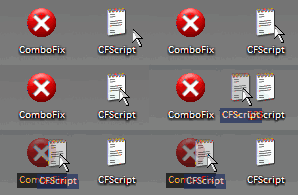
Save this as CFScript.txt

Then drag the CFScript.txt into ComboFix.exe as you see in the screenshot below.


This will start ComboFix again. After reboot, (in case it asks to reboot), post the contents of Combofix.txt in your next reply together with a fresh HJT log.
Reply With Quote
Reply


Thread Tools Search this Thread
Search this Thread:

Advanced Search

Posting Rules
You may not post new threads
You may not post replies
You may not post attachments
You may not edit your posts

vB code is On
Smilies are On
[IMG] code is On
HTML code is Off
Forum Jump

Similar Threads
Thread Thread Starter Forum Replies Last Post
Infected with PC-Antispyware , Downloader, and "Protection Control Panel" bdjdell4 Security and the Web 1 05-07-2008 08:09 PM
Infected with PC-Antispyware, Downloader, and "Protection Control Panel" moderate Security and the Web 26 05-07-2008 09:13 AM
Infected with popups for PC Antispyware and System Protection control panel recoil Security and the Web 7 05-06-2008 09:48 AM
Infected with PC-Antispyware, Downloader, and Protection Control Panel nufather Security and the Web 16 04-04-2008 02:28 AM
I really Need Help! Infected with PC-Antispyware , Downloader, and "Protection Contr NeedHelpNow Security and the Web 2 03-30-2008 02:43 PM


All times are GMT -4. The time now is 06:18 PM.


  TechSpot  The PC Enthusiast Resource    |    News    |    Reviews    |    Guides    |    Downloads    |    Drivers    |    Forums    |    Pricewatch    |    News Archive    |    RSS Feeds
  Our Blog    |    Tech Deals    |   vb Sitemap    |    User Gallery    |    Startup Radar    |    Icons by Foood    |    Powered by StoryTeller    |    TechSpot in Spanish

  Copyright © 1998-2008 TechSpot.com. TechSpot is a registered trademark. All Rights Reserved.
Privacy policy.
Advertising | About TechSpot 
TechSpot Pricewatch TechSpot Hot Deals
Windows Startup Radar Tips & Tricks (blog) Guides & Tweaks Windows updates
News Archive TechSpot Blog TechSpot RSS Feeds User Picture Gallery Techspot's IRC# (Chat) TechSpot in Spanish