My PNY Geforce 7900 GS, Its a PCI-e card I just bought but when I start my computer I get nothing on screen. It doesn't have the right port for my monitor either on the back of the card, but it has this converter thing with it that allows me to pludg it in to the back of my video card. My problem is my screen never shows at all unless I take the video card out again. is there something I have to do prior to installing the card into my PC?
You are using an out of date browser. It may not display this or other websites correctly.
You should upgrade or use an alternative browser.
You should upgrade or use an alternative browser.
Having troubles installing Geforce 7900GS
- Thread starter PSO Gamer
- Start date

there no way to check because my other pc has just PCI slots. I noticed something else earlier though. not only does my monitor have the orange light instead of green, my keyboard doesn't function either. Yes I know I cant see the screen but my num lock always lights up when I normally boot my PC and now it doesn't(with the card in) doesn't light up when I press it either. So my PC is turned on but it appears its refusing to even boot up at all.
I did and its this one http://www.newegg.com/Product/Product.aspx?Item=N82E16817371006&Tpk=Antec+Earthwatts+EA430
this is my card http://www.futurepowerpc.com/scripts/product.asp?PRDCODE=VCPN-G7900SXPB&REFID=FR
This is my PC setup via CPU-Z
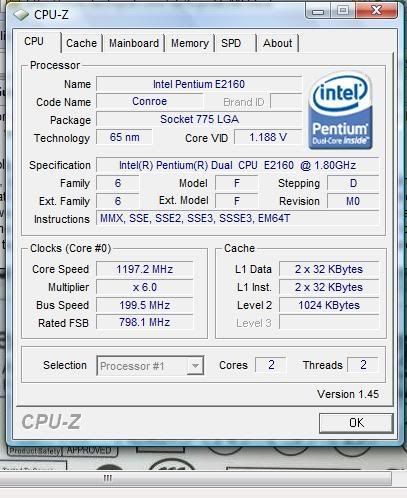
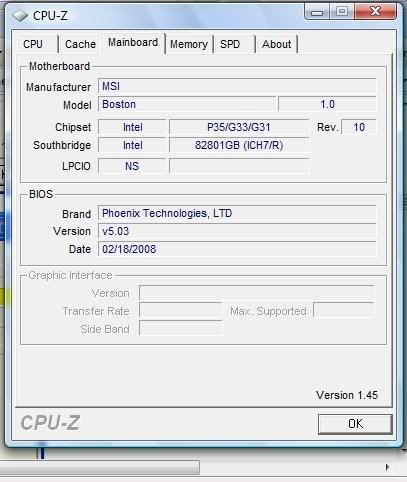
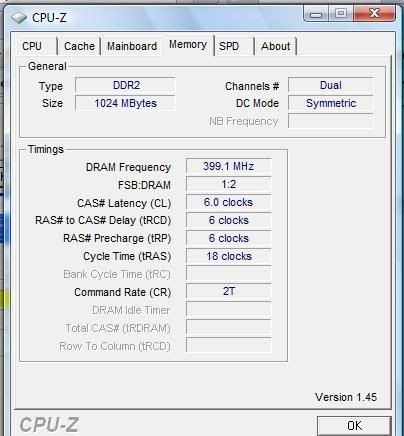
Is there anything else you need from me? I'm just trying to figure out what the problem may be.
this is my card http://www.futurepowerpc.com/scripts/product.asp?PRDCODE=VCPN-G7900SXPB&REFID=FR
This is my PC setup via CPU-Z
Is there anything else you need from me? I'm just trying to figure out what the problem may be.
I could try my mom's pc but I wouldn't be able to do that until Monday. I think her PSU sucks too though. I don't know never looked at it.
I was told it may be my current power supply because my card says it needs 350w with a 12v rating of 20a.
But he says my current power supply is a 430w that has two 12v rails with 17a each. he told me to connect my two rails into the y connector thing that came with my power supply(which I had tried once before), but still nothing.
I'll just buy a new PSU Monday probably from Best Buy instead of Newegg and if it my card doesn't work with this one http://www.bestbuy.com/site/olspage...=product&tab=5&id=1156203858494#productdetail I'll return it to the store. Maybe I should have done this from the start. Not sure If I can return the one I bought from newegg the other day....and I paid for next day shipping too =(
I was told it may be my current power supply because my card says it needs 350w with a 12v rating of 20a.
But he says my current power supply is a 430w that has two 12v rails with 17a each. he told me to connect my two rails into the y connector thing that came with my power supply(which I had tried once before), but still nothing.
I'll just buy a new PSU Monday probably from Best Buy instead of Newegg and if it my card doesn't work with this one http://www.bestbuy.com/site/olspage...=product&tab=5&id=1156203858494#productdetail I'll return it to the store. Maybe I should have done this from the start. Not sure If I can return the one I bought from newegg the other day....and I paid for next day shipping too =(
Oh, a different problem now.
I redid my PSU's connections this morning and now the PC posts with my videocard in the slot. However when the 6-pin connector is in it doesn't. I take it out and the pc works but it will not detect my card. I'll have to fool wiith it a bit more when I'm off from work which isn't for like another 10 hrs, but can anyone figure out what the problem maybe this time?
Its good I can get the pc to actually run with the card in the slot now, but if its not detecting it still defeats the purpose.
I redid my PSU's connections this morning and now the PC posts with my videocard in the slot. However when the 6-pin connector is in it doesn't. I take it out and the pc works but it will not detect my card. I'll have to fool wiith it a bit more when I'm off from work which isn't for like another 10 hrs, but can anyone figure out what the problem maybe this time?
Its good I can get the pc to actually run with the card in the slot now, but if its not detecting it still defeats the purpose.

Aolish
Posts: 187 +29
can you log into windows with the 7900gs installed? If so, its most likely a psu problem, the fact that you say plugging in the 6pin doesn't make the system boot makes it a sure bet your psu might not be sufficient enough to power the card.
well like i said before a 430w should be enough to power a 7900gs. I ran that card with an antec 430w not to long ago. I just recently upgraded to a rocketfish 700w because i'm planning on getting an 8800gt soon. Anyway 430w is fine. However this can depend on what you hooked up to it. If you got LOTS of stuff hooked up that can drain your 430w. I don't have that much stuff hooked up to my system. at least from my perspective. But yeah your issue sounds more like a psu issue then anything else.
PSO Gamer said:I was told it may be my current power supply because my card says it needs 350w with a 12v rating of 20a.
But he says my current power supply is a 430w that has two 12v rails with 17a each. he told me to connect my two rails into the y connector thing that came with my power supply(which I had tried once before), but still nothing.
I'll just buy a new PSU Monday probably from Best Buy instead of Newegg and if it my card doesn't work with this one http://www.bestbuy.com/site/olspage...=product&tab=5&id=1156203858494#productdetail I'll return it to the store. Maybe I should have done this from the start. Not sure If I can return the one I bought from newegg the other day....and I paid for next day shipping too =(
well like i said before a 430w should be enough to power a 7900gs. I ran that card with an antec 430w not to long ago. I just recently upgraded to a rocketfish 700w because i'm planning on getting an 8800gt soon. Anyway 430w is fine. However this can depend on what you hooked up to it. If you got LOTS of stuff hooked up that can drain your 430w. I don't have that much stuff hooked up to my system. at least from my perspective. But yeah your issue sounds more like a psu issue then anything else.
http://www.newegg.com/Product/Product.aspx...N82E16817371015
Just got this power supply. Having the exact same problem though, even though it surpasses the 20A rating(min req) on the 12v.
PC works without the 6-pin in the back of my card but card isn't detected. With it in, It doesn't boot. I'm really thinking my video card is defective, but how can I tell without another PC to use it in?
Just got this power supply. Having the exact same problem though, even though it surpasses the 20A rating(min req) on the 12v.
PC works without the 6-pin in the back of my card but card isn't detected. With it in, It doesn't boot. I'm really thinking my video card is defective, but how can I tell without another PC to use it in?
Sorry for the double post but here's an update.
The video card's customer support finally got back at me and told me that this video card isn't compatible with my motherboard. Called my computer's manufacturer and they tell me it should work. This isn't helping too much lol. I gotta get to my mom's pc and try the video card and hopefully I'll have the real answer.
If it works in my mom's PC that means it is my motherboard. My PC's manufacturer says that it may be possible that my PCI-e port itself could be faulty. If thats the case they said they'll take care of it. anyway here's a link to what my PC is supposed to be setup.
http://h10025.www1.hp.com/ewfrf/wc/...6897&cc=us&dlc=en&lc=en&jumpid=reg_R1002_USEN
Maybe someone can figure out the real issue here.
The video card's customer support finally got back at me and told me that this video card isn't compatible with my motherboard. Called my computer's manufacturer and they tell me it should work. This isn't helping too much lol. I gotta get to my mom's pc and try the video card and hopefully I'll have the real answer.
If it works in my mom's PC that means it is my motherboard. My PC's manufacturer says that it may be possible that my PCI-e port itself could be faulty. If thats the case they said they'll take care of it. anyway here's a link to what my PC is supposed to be setup.
http://h10025.www1.hp.com/ewfrf/wc/...6897&cc=us&dlc=en&lc=en&jumpid=reg_R1002_USEN
Maybe someone can figure out the real issue here.
Aolish
Posts: 187 +29
thats pretty much the only thing you can do, try ur best to test that card at another pc if possible. Stupid suggestion, might want to try it. Have you tried updating the drivers for your mobo? Specifically the chipset on it? Maybe a driver update will fix the problem. I doubt it but you can give it a shot.
Similar threads
- Replies
- 0
- Views
- 171

- Replies
- 0
- Views
- 53

Latest posts
-
The end of uBlock Origin in Chrome is now weeks away, not months
- daffy duck replied
-
Solar generation beats coal in the US for the first time ever
- daffy duck replied


-
TechSpot is dedicated to computer enthusiasts and power users.
Ask a question and give support.
Join the community here, it only takes a minute.