I ran SmitfraudFix and it cleaned my computer perfectly however when I boot up just before the password panel in windows I get a panel right in the middle of the screen with an "OK" button. There is no description of why it is there other than what appears to arabic (or some similar language) which gives a short blurb at the top. After I click "ok" my password panel comes up and everything is fine but this panel pops up in every reboot. Any idea how I can get rid of it ?
You are using an out of date browser. It may not display this or other websites correctly.
You should upgrade or use an alternative browser.
You should upgrade or use an alternative browser.
After SmitfraudFix everything is ok but I get this pop up panel in startup
- Thread starter friend2u
- Start date

Blind Dragon
Posts: 3,774 +4
Here is my HJT log in two posts (due to length)
I ran all Smitfraud options except the french language option.
Here is a screenshot of my Startup Monitor asking me if I will allow the entry. It tries to register sporadically..sometimes every 5 mins sometimes much longer. I never allow it to make the change of course.

Logfile of Trend Micro HijackThis v2.0.2
Scan saved at 1:44:04 PM, on 5/21/2008
Platform: Windows XP SP1 (WinNT 5.01.2600)
MSIE: Internet Explorer v6.00 SP1 (6.00.2800.1106)
Boot mode: Normal
Running processes:
C:\WINDOWS\System32\smss.exe
C:\WINDOWS\system32\winlogon.exe
C:\WINDOWS\system32\services.exe
C:\WINDOWS\system32\lsass.exe
C:\WINDOWS\system32\svchost.exe
C:\WINDOWS\System32\svchost.exe
C:\Program Files\Common Files\Symantec Shared\ccSetMgr.exe
C:\Program Files\Common Files\Symantec Shared\ccEvtMgr.exe
C:\Program Files\Common Files\Symantec Shared\SPBBC\SPBBCSvc.exe
C:\WINDOWS\system32\spoolsv.exe
C:\Program Files\Symantec AntiVirus\DefWatch.exe
C:\Program Files\Executive Software\DiskeeperLite\DKService.exe
C:\Program Files\Google\Common\Google Updater\GoogleUpdaterService.exe
C:\WINDOWS\System32\svchost.exe
C:\Program Files\Symantec AntiVirus\Rtvscan.exe
C:\WINDOWS\System32\WgaTray.exe
C:\WINDOWS\Explorer.EXE
C:\WINDOWS\System32\ezSP_Px.exe
C:\WINDOWS\System32\hkcmd.exe
C:\WINDOWS\AGRSMMSG.exe
C:\Program Files\Hotkeycontrol XP\hkcontrol.exe
C:\WINDOWS\System32\kmw_run.exe
C:\Program Files\Microsoft IntelliType Pro\type32.exe
C:\WINDOWS\StartupMonitor.exe
C:\WINDOWS\System32\spool\DRIVERS\W32X86\3\E_FATIAIA.EXE
C:\WINDOWS\System32\KMW_SHOW.EXE
C:\Program Files\Common Files\Symantec Shared\ccApp.exe
C:\PROGRA~1\SYMANT~1\VPTray.exe
C:\Program Files\MUSICMATCH\MUSICMATCH Jukebox\mm_tray.exe
C:\Program Files\QuickTime\qttask.exe
C:\Program Files\PeerGuardian2\pg2.exe
C:\Program Files\Eraser\eraser.exe
C:\Program Files\Siber Systems\AI RoboForm\RoboTaskBarIcon.exe
C:\Program Files\Google\Google Updater\GoogleUpdater.exe
C:\Program Files\Internet Explorer\iexplore.exe
D:\Program Files\firefox.exe
C:\Program Files\TechSmith\SnagIt 8\SnagIt32.exe
C:\Program Files\TechSmith\SnagIt 8\TSCHelp.exe
C:\WINDOWS\System32\rundll32.exe
C:\WINDOWS\system32\taskmgr.exe
C:\WINDOWS\System32\rundll32.exe
D:\Program Files\Trend Micro\HijackThis\HijackThis.exe
R0 - HKCU\Software\Microsoft\Internet Explorer\Main,Start Page = http://www.voyeurweb.com/
R0 - HKCU\Software\Microsoft\Internet Explorer\Main,Local Page =
R0 - HKLM\Software\Microsoft\Internet Explorer\Main,Local Page =
F2 - REG:system.ini: Shell=
F2 - REG:system.ini: UserInit=C:\WINDOWS\system32\userinit.exe,ndqrmqk.exe
O3 - Toolbar: &Radio - {8E718888-423F-11D2-876E-00A0C9082467} - C:\WINDOWS\system32\msdxm.ocx
O3 - Toolbar: SnagIt - {8FF5E183-ABDE-46EB-B09E-D2AAB95CABE3} - C:\Program Files\TechSmith\SnagIt 8\SnagItIEAddin.dll
O3 - Toolbar: (no name) - {E0E899AB-F487-11D5-8D29-0050BA6940E3} - (no file)
O3 - Toolbar: EPSON Web-To-Page - {EE5D279F-081B-4404-994D-C6B60AAEBA6D} - C:\Program Files\EPSON\EPSON Web-To-Page\EPSON Web-To-Page.dll
O3 - Toolbar: &RoboForm - {724d43a0-0d85-11d4-9908-00400523e39a} - C:\Program Files\Siber Systems\AI RoboForm\roboform.dll
O3 - Toolbar: (no name) - {DD8FEC5A-8976-438D-B6C9-F10CE205D78F} - (no file)
O4 - HKLM\..\Run: [NvCplDaemon] RUNDLL32.EXE C:\WINDOWS\System32\NvCpl.dll,NvStartup
O4 - HKLM\..\Run: [ezShieldProtector for Px] C:\WINDOWS\System32\ezSP_Px.exe
O4 - HKLM\..\Run: [IgfxTray] C:\WINDOWS\System32\igfxtray.exe
O4 - HKLM\..\Run: [HotKeysCmds] C:\WINDOWS\System32\hkcmd.exe
O4 - HKLM\..\Run: [AGRSMMSG] AGRSMMSG.exe
O4 - HKLM\..\Run: [VAIO Recovery] C:\Windows\Sonysys\VAIO Recovery\PartSeal.exe
O4 - HKLM\..\Run: [Hotkeycontrol] C:\Program Files\Hotkeycontrol XP\hkcontrol.exe
O4 - HKLM\..\Run: [kmw_run.exe] kmw_run.exe
O4 - HKLM\..\Run: [nwiz] nwiz.exe /installquiet
O4 - HKLM\..\Run: [type32] "C:\Program Files\Microsoft IntelliType Pro\type32.exe"
O4 - HKLM\..\Run: [Run StartupMonitor] StartupMonitor.exe
O4 - HKLM\..\Run: [EPSON Stylus Photo R220 Series] C:\WINDOWS\System32\spool\DRIVERS\W32X86\3\E_FATIAIA.EXE /P30 "EPSON Stylus Photo R220 Series" /O6 "USB001" /M "Stylus Photo R220"
O4 - HKLM\..\Run: [ccApp] "C:\Program Files\Common Files\Symantec Shared\ccApp.exe"
O4 - HKLM\..\Run: [vptray] C:\PROGRA~1\SYMANT~1\VPTray.exe
O4 - HKLM\..\Run: [MMTray] C:\Program Files\MUSICMATCH\MUSICMATCH Jukebox\mm_tray.exe
O4 - HKLM\..\Run: [QuickTime Task] "C:\Program Files\QuickTime\qttask.exe" -atboottime
O4 - HKLM\..\Run: [Adobe Reader Speed Launcher] "C:\Program Files\Adobe\Reader 8.0\Reader\Reader_sl.exe"
O4 - HKCU\..\Run: [PeerGuardian] C:\Program Files\PeerGuardian2\pg2.exe
O4 - HKCU\..\Run: [Eraser] C:\Program Files\Eraser\eraser.exe -hide
O4 - HKCU\..\Run: [RoboForm] "C:\Program Files\Siber Systems\AI RoboForm\RoboTaskBarIcon.exe"
O4 - HKCU\..\Run: [swg] C:\Program Files\Google\GoogleToolbarNotifier\GoogleToolbarNotifier.exe
O4 - HKUS\S-1-5-21-2077072018-1643805373-1770717636-1005\..\Run: [PeerGuardian] C:\Program Files\PeerGuardian2\pg2.exe (User '?')
O4 - HKUS\S-1-5-21-2077072018-1643805373-1770717636-1005\..\Run: [Eraser] C:\Program Files\Eraser\eraser.exe -hide (User '?')
O4 - HKUS\S-1-5-21-2077072018-1643805373-1770717636-1005\..\Run: [RoboForm] "C:\Program Files\Siber Systems\AI RoboForm\RoboTaskBarIcon.exe" (User '?')
O4 - HKUS\S-1-5-21-2077072018-1643805373-1770717636-1005\..\Run: [swg] C:\Program Files\Google\GoogleToolbarNotifier\GoogleToolbarNotifier.exe (User '?')
O4 - HKUS\S-1-5-18\..\Run: [MySpaceIM] C:\Program Files\MySpace\IM\MySpaceIM.exe (User '?')
O4 - HKUS\S-1-5-18\..\RunOnce: [RunNarrator] (User '?')
O4 - HKUS\.DEFAULT\..\Run: [MySpaceIM] C:\Program Files\MySpace\IM\MySpaceIM.exe (User 'Default user')
O4 - HKUS\.DEFAULT\..\RunOnce: [RunNarrator] (User 'Default user')
O4 - Global Startup: Google Updater.lnk = C:\Program Files\Google\Google Updater\GoogleUpdater.exe
O8 - Extra context menu item: &ieSpell Options - res://C:\Program Files\ieSpell\iespell.dll/SPELLOPTION.HTM
O8 - Extra context menu item: Check &Spelling - res://C:\Program Files\ieSpell\iespell.dll/SPELLCHECK.HTM
O8 - Extra context menu item: Customize Menu - file://C:\Program Files\Siber Systems\AI RoboForm\RoboFormComCustomizeIEMenu.html
O8 - Extra context menu item: E&xport to Microsoft Excel - res://C:\PROGRA~1\MI1933~1\OFFICE11\EXCEL.EXE/3000
O8 - Extra context menu item: Fill Forms - file://C:\Program Files\Siber Systems\AI RoboForm\RoboFormComFillForms.html
O8 - Extra context menu item: IE Zoom &In - C:\PROGRA~1\IEZOOM~1\IE Zoom In.htm
O8 - Extra context menu item: IE Zoom O&ut - C:\PROGRA~1\IEZOOM~1\IE Zoom Out.htm
O8 - Extra context menu item: IE Zoomer Help... - C:\PROGRA~1\IEZOOM~1\IE Zoomer Help.htm
O8 - Extra context menu item: Open in IE &Zoomer - C:\PROGRA~1\IEZOOM~1\Open in IE Zoomer.htm
O8 - Extra context menu item: RoboForm Toolbar - file://C:\Program Files\Siber Systems\AI RoboForm\RoboFormComShowToolbar.html
O8 - Extra context menu item: Save Forms - file://C:\Program Files\Siber Systems\AI RoboForm\RoboFormComSavePass.html
I ran all Smitfraud options except the french language option.
Here is a screenshot of my Startup Monitor asking me if I will allow the entry. It tries to register sporadically..sometimes every 5 mins sometimes much longer. I never allow it to make the change of course.
Logfile of Trend Micro HijackThis v2.0.2
Scan saved at 1:44:04 PM, on 5/21/2008
Platform: Windows XP SP1 (WinNT 5.01.2600)
MSIE: Internet Explorer v6.00 SP1 (6.00.2800.1106)
Boot mode: Normal
Running processes:
C:\WINDOWS\System32\smss.exe
C:\WINDOWS\system32\winlogon.exe
C:\WINDOWS\system32\services.exe
C:\WINDOWS\system32\lsass.exe
C:\WINDOWS\system32\svchost.exe
C:\WINDOWS\System32\svchost.exe
C:\Program Files\Common Files\Symantec Shared\ccSetMgr.exe
C:\Program Files\Common Files\Symantec Shared\ccEvtMgr.exe
C:\Program Files\Common Files\Symantec Shared\SPBBC\SPBBCSvc.exe
C:\WINDOWS\system32\spoolsv.exe
C:\Program Files\Symantec AntiVirus\DefWatch.exe
C:\Program Files\Executive Software\DiskeeperLite\DKService.exe
C:\Program Files\Google\Common\Google Updater\GoogleUpdaterService.exe
C:\WINDOWS\System32\svchost.exe
C:\Program Files\Symantec AntiVirus\Rtvscan.exe
C:\WINDOWS\System32\WgaTray.exe
C:\WINDOWS\Explorer.EXE
C:\WINDOWS\System32\ezSP_Px.exe
C:\WINDOWS\System32\hkcmd.exe
C:\WINDOWS\AGRSMMSG.exe
C:\Program Files\Hotkeycontrol XP\hkcontrol.exe
C:\WINDOWS\System32\kmw_run.exe
C:\Program Files\Microsoft IntelliType Pro\type32.exe
C:\WINDOWS\StartupMonitor.exe
C:\WINDOWS\System32\spool\DRIVERS\W32X86\3\E_FATIAIA.EXE
C:\WINDOWS\System32\KMW_SHOW.EXE
C:\Program Files\Common Files\Symantec Shared\ccApp.exe
C:\PROGRA~1\SYMANT~1\VPTray.exe
C:\Program Files\MUSICMATCH\MUSICMATCH Jukebox\mm_tray.exe
C:\Program Files\QuickTime\qttask.exe
C:\Program Files\PeerGuardian2\pg2.exe
C:\Program Files\Eraser\eraser.exe
C:\Program Files\Siber Systems\AI RoboForm\RoboTaskBarIcon.exe
C:\Program Files\Google\Google Updater\GoogleUpdater.exe
C:\Program Files\Internet Explorer\iexplore.exe
D:\Program Files\firefox.exe
C:\Program Files\TechSmith\SnagIt 8\SnagIt32.exe
C:\Program Files\TechSmith\SnagIt 8\TSCHelp.exe
C:\WINDOWS\System32\rundll32.exe
C:\WINDOWS\system32\taskmgr.exe
C:\WINDOWS\System32\rundll32.exe
D:\Program Files\Trend Micro\HijackThis\HijackThis.exe
R0 - HKCU\Software\Microsoft\Internet Explorer\Main,Start Page = http://www.voyeurweb.com/
R0 - HKCU\Software\Microsoft\Internet Explorer\Main,Local Page =
R0 - HKLM\Software\Microsoft\Internet Explorer\Main,Local Page =
F2 - REG:system.ini: Shell=
F2 - REG:system.ini: UserInit=C:\WINDOWS\system32\userinit.exe,ndqrmqk.exe
O3 - Toolbar: &Radio - {8E718888-423F-11D2-876E-00A0C9082467} - C:\WINDOWS\system32\msdxm.ocx
O3 - Toolbar: SnagIt - {8FF5E183-ABDE-46EB-B09E-D2AAB95CABE3} - C:\Program Files\TechSmith\SnagIt 8\SnagItIEAddin.dll
O3 - Toolbar: (no name) - {E0E899AB-F487-11D5-8D29-0050BA6940E3} - (no file)
O3 - Toolbar: EPSON Web-To-Page - {EE5D279F-081B-4404-994D-C6B60AAEBA6D} - C:\Program Files\EPSON\EPSON Web-To-Page\EPSON Web-To-Page.dll
O3 - Toolbar: &RoboForm - {724d43a0-0d85-11d4-9908-00400523e39a} - C:\Program Files\Siber Systems\AI RoboForm\roboform.dll
O3 - Toolbar: (no name) - {DD8FEC5A-8976-438D-B6C9-F10CE205D78F} - (no file)
O4 - HKLM\..\Run: [NvCplDaemon] RUNDLL32.EXE C:\WINDOWS\System32\NvCpl.dll,NvStartup
O4 - HKLM\..\Run: [ezShieldProtector for Px] C:\WINDOWS\System32\ezSP_Px.exe
O4 - HKLM\..\Run: [IgfxTray] C:\WINDOWS\System32\igfxtray.exe
O4 - HKLM\..\Run: [HotKeysCmds] C:\WINDOWS\System32\hkcmd.exe
O4 - HKLM\..\Run: [AGRSMMSG] AGRSMMSG.exe
O4 - HKLM\..\Run: [VAIO Recovery] C:\Windows\Sonysys\VAIO Recovery\PartSeal.exe
O4 - HKLM\..\Run: [Hotkeycontrol] C:\Program Files\Hotkeycontrol XP\hkcontrol.exe
O4 - HKLM\..\Run: [kmw_run.exe] kmw_run.exe
O4 - HKLM\..\Run: [nwiz] nwiz.exe /installquiet
O4 - HKLM\..\Run: [type32] "C:\Program Files\Microsoft IntelliType Pro\type32.exe"
O4 - HKLM\..\Run: [Run StartupMonitor] StartupMonitor.exe
O4 - HKLM\..\Run: [EPSON Stylus Photo R220 Series] C:\WINDOWS\System32\spool\DRIVERS\W32X86\3\E_FATIAIA.EXE /P30 "EPSON Stylus Photo R220 Series" /O6 "USB001" /M "Stylus Photo R220"
O4 - HKLM\..\Run: [ccApp] "C:\Program Files\Common Files\Symantec Shared\ccApp.exe"
O4 - HKLM\..\Run: [vptray] C:\PROGRA~1\SYMANT~1\VPTray.exe
O4 - HKLM\..\Run: [MMTray] C:\Program Files\MUSICMATCH\MUSICMATCH Jukebox\mm_tray.exe
O4 - HKLM\..\Run: [QuickTime Task] "C:\Program Files\QuickTime\qttask.exe" -atboottime
O4 - HKLM\..\Run: [Adobe Reader Speed Launcher] "C:\Program Files\Adobe\Reader 8.0\Reader\Reader_sl.exe"
O4 - HKCU\..\Run: [PeerGuardian] C:\Program Files\PeerGuardian2\pg2.exe
O4 - HKCU\..\Run: [Eraser] C:\Program Files\Eraser\eraser.exe -hide
O4 - HKCU\..\Run: [RoboForm] "C:\Program Files\Siber Systems\AI RoboForm\RoboTaskBarIcon.exe"
O4 - HKCU\..\Run: [swg] C:\Program Files\Google\GoogleToolbarNotifier\GoogleToolbarNotifier.exe
O4 - HKUS\S-1-5-21-2077072018-1643805373-1770717636-1005\..\Run: [PeerGuardian] C:\Program Files\PeerGuardian2\pg2.exe (User '?')
O4 - HKUS\S-1-5-21-2077072018-1643805373-1770717636-1005\..\Run: [Eraser] C:\Program Files\Eraser\eraser.exe -hide (User '?')
O4 - HKUS\S-1-5-21-2077072018-1643805373-1770717636-1005\..\Run: [RoboForm] "C:\Program Files\Siber Systems\AI RoboForm\RoboTaskBarIcon.exe" (User '?')
O4 - HKUS\S-1-5-21-2077072018-1643805373-1770717636-1005\..\Run: [swg] C:\Program Files\Google\GoogleToolbarNotifier\GoogleToolbarNotifier.exe (User '?')
O4 - HKUS\S-1-5-18\..\Run: [MySpaceIM] C:\Program Files\MySpace\IM\MySpaceIM.exe (User '?')
O4 - HKUS\S-1-5-18\..\RunOnce: [RunNarrator] (User '?')
O4 - HKUS\.DEFAULT\..\Run: [MySpaceIM] C:\Program Files\MySpace\IM\MySpaceIM.exe (User 'Default user')
O4 - HKUS\.DEFAULT\..\RunOnce: [RunNarrator] (User 'Default user')
O4 - Global Startup: Google Updater.lnk = C:\Program Files\Google\Google Updater\GoogleUpdater.exe
O8 - Extra context menu item: &ieSpell Options - res://C:\Program Files\ieSpell\iespell.dll/SPELLOPTION.HTM
O8 - Extra context menu item: Check &Spelling - res://C:\Program Files\ieSpell\iespell.dll/SPELLCHECK.HTM
O8 - Extra context menu item: Customize Menu - file://C:\Program Files\Siber Systems\AI RoboForm\RoboFormComCustomizeIEMenu.html
O8 - Extra context menu item: E&xport to Microsoft Excel - res://C:\PROGRA~1\MI1933~1\OFFICE11\EXCEL.EXE/3000
O8 - Extra context menu item: Fill Forms - file://C:\Program Files\Siber Systems\AI RoboForm\RoboFormComFillForms.html
O8 - Extra context menu item: IE Zoom &In - C:\PROGRA~1\IEZOOM~1\IE Zoom In.htm
O8 - Extra context menu item: IE Zoom O&ut - C:\PROGRA~1\IEZOOM~1\IE Zoom Out.htm
O8 - Extra context menu item: IE Zoomer Help... - C:\PROGRA~1\IEZOOM~1\IE Zoomer Help.htm
O8 - Extra context menu item: Open in IE &Zoomer - C:\PROGRA~1\IEZOOM~1\Open in IE Zoomer.htm
O8 - Extra context menu item: RoboForm Toolbar - file://C:\Program Files\Siber Systems\AI RoboForm\RoboFormComShowToolbar.html
O8 - Extra context menu item: Save Forms - file://C:\Program Files\Siber Systems\AI RoboForm\RoboFormComSavePass.html
Part 2
O9 - Extra button: (no name) - {08B0E5C0-4FCB-11CF-AAA5-00401C608501} - C:\Program Files\Java\jre1.5.0_09\bin\ssv.dll
O9 - Extra 'Tools' menuitem: Sun Java Console - {08B0E5C0-4FCB-11CF-AAA5-00401C608501} - C:\Program Files\Java\jre1.5.0_09\bin\ssv.dll
O9 - Extra button: ieSpell - {0E17D5B7-9F5D-4fee-9DF6-CA6EE38B68A8} - C:\Program Files\ieSpell\iespell.dll
O9 - Extra 'Tools' menuitem: ieSpell - {0E17D5B7-9F5D-4fee-9DF6-CA6EE38B68A8} - C:\Program Files\ieSpell\iespell.dll
O9 - Extra button: (no name) - {1606D6F9-9D3B-4aea-A025-ED5B2FD488E7} - C:\Program Files\ieSpell\iespell.dll
O9 - Extra 'Tools' menuitem: ieSpell Options - {1606D6F9-9D3B-4aea-A025-ED5B2FD488E7} - C:\Program Files\ieSpell\iespell.dll
O9 - Extra button: Fill Forms - {320AF880-6646-11D3-ABEE-C5DBF3571F46} - file://C:\Program Files\Siber Systems\AI RoboForm\RoboFormComFillForms.html
O9 - Extra 'Tools' menuitem: Fill Forms - {320AF880-6646-11D3-ABEE-C5DBF3571F46} - file://C:\Program Files\Siber Systems\AI RoboForm\RoboFormComFillForms.html
O9 - Extra button: Save - {320AF880-6646-11D3-ABEE-C5DBF3571F49} - file://C:\Program Files\Siber Systems\AI RoboForm\RoboFormComSavePass.html
O9 - Extra 'Tools' menuitem: Save Forms - {320AF880-6646-11D3-ABEE-C5DBF3571F49} - file://C:\Program Files\Siber Systems\AI RoboForm\RoboFormComSavePass.html
O9 - Extra button: Messenger - {4528BBE0-4E08-11D5-AD55-00010333D0AD} - C:\Program Files\Yahoo!\Messenger\yhexbmes0521.dll
O9 - Extra 'Tools' menuitem: Yahoo! Messenger - {4528BBE0-4E08-11D5-AD55-00010333D0AD} - C:\Program Files\Yahoo!\Messenger\yhexbmes0521.dll
O9 - Extra button: RoboForm - {724d43aa-0d85-11d4-9908-00400523e39a} - file://C:\Program Files\Siber Systems\AI RoboForm\RoboFormComShowToolbar.html
O9 - Extra 'Tools' menuitem: RoboForm Toolbar - {724d43aa-0d85-11d4-9908-00400523e39a} - file://C:\Program Files\Siber Systems\AI RoboForm\RoboFormComShowToolbar.html
O9 - Extra button: Research - {92780B25-18CC-41C8-B9BE-3C9C571A8263} - C:\PROGRA~1\MI1933~1\OFFICE11\REFIEBAR.DLL
O9 - Extra button: Related - {c95fe080-8f5d-11d2-a20b-00aa003c157a} - C:\WINDOWS\web\related.htm
O9 - Extra 'Tools' menuitem: Show &Related Links - {c95fe080-8f5d-11d2-a20b-00aa003c157a} - C:\WINDOWS\web\related.htm
O9 - Extra button: (no name) - {CD67F990-D8E9-11d2-98FE-00C0F0318AFE} - (no file)
O9 - Extra button: FlashGet - {D6E814A0-E0C5-11d4-8D29-0050BA6940E3} - C:\WINDOWS\System32\shdocvw.dll
O9 - Extra 'Tools' menuitem: &FlashGet - {D6E814A0-E0C5-11d4-8D29-0050BA6940E3} - C:\WINDOWS\System32\shdocvw.dll
O9 - Extra button: Messenger - {FB5F1910-F110-11d2-BB9E-00C04F795683} - C:\Program Files\Messenger\MSMSGS.EXE
O9 - Extra 'Tools' menuitem: Windows Messenger - {FB5F1910-F110-11d2-BB9E-00C04F795683} - C:\Program Files\Messenger\MSMSGS.EXE
O14 - IERESET.INF: START_PAGE_URL=http://www.sony.com/vaiopeople
O16 - DPF: {17492023-C23A-453E-A040-C7C580BBF700} (Windows Genuine Advantage Validation Tool) - http://go.microsoft.com/fwlink/?linkid=39204
O16 - DPF: {2BC66F54-93A8-11D3-BEB6-00105AA9B6AE} (Symantec AntiVirus scanner) - http://security.symantec.com/sscv6/SharedContent/vc/bin/AvSniff.cab
O16 - DPF: {30528230-99F7-4BB4-88D8-FA1D4F56A2AB} (YInstStarter Class) - C:\Program Files\Yahoo!\Common\yinsthelper.dll
O16 - DPF: {48DD0448-9209-4F81-9F6D-D83562940134} (MySpace Uploader Control) - http://lads.myspace.com/upload/MySpaceUploader1006.cab
O16 - DPF: {644E432F-49D3-41A1-8DD5-E099162EEEC5} (Symantec RuFSI Utility Class) - http://security.symantec.com/sscv6/SharedContent/common/bin/cabsa.cab
O16 - DPF: {BD8667B7-38D8-4C77-B580-18C3E146372C} (Creative Toolbox Plug-in) - http://ak.imgag.com/imgag/cp/install/Crusher.cab
O21 - SSODL: vbksrofa - {D787717D-47E4-49EB-B5CF-50FAA34D4769} - (no file)
O23 - Service: ASP.NET State Service (aspnet_state) - Unknown owner - C:\WINDOWS\Microsoft.NET\Framework\v2.0.50727\aspnet_state.exe (file missing)
O23 - Service: Symantec Event Manager (ccEvtMgr) - Symantec Corporation - C:\Program Files\Common Files\Symantec Shared\ccEvtMgr.exe
O23 - Service: Symantec Proxy Service (ccPxySvc) - Symantec Corporation - (no file)
O23 - Service: Symantec Settings Manager (ccSetMgr) - Symantec Corporation - C:\Program Files\Common Files\Symantec Shared\ccSetMgr.exe
O23 - Service: Symantec AntiVirus Definition Watcher (DefWatch) - Symantec Corporation - C:\Program Files\Symantec AntiVirus\DefWatch.exe
O23 - Service: Diskeeper - Executive Software International, Inc. - C:\Program Files\Executive Software\DiskeeperLite\DKService.exe
O23 - Service: Google Updater Service (gusvc) - Google - C:\Program Files\Google\Common\Google Updater\GoogleUpdaterService.exe
O23 - Service: InstallDriver Table Manager (IDriverT) - Macrovision Corporation - C:\Program Files\Common Files\InstallShield\Driver\11\Intel 32\IDriverT.exe
O23 - Service: LiveUpdate - Symantec Corporation - C:\PROGRA~1\Symantec\LIVEUP~1\LUCOMS~1.EXE
O23 - Service: NVIDIA Driver Helper Service (NVSvc) - NVIDIA Corporation - C:\WINDOWS\System32\nvsvc32.exe
O23 - Service: Pml Driver HPZ12 - HP - C:\WINDOWS\System32\HPZipm12.exe
O23 - Service: Remote Packet Capture Protocol v.0 (experimental) (rpcapd) - CACE Technologies - C:\Program Files\WinPcap\rpcapd.exe
O23 - Service: SAVRoam (SavRoam) - symantec - C:\Program Files\Symantec AntiVirus\SavRoam.exe
O23 - Service: Symantec Network Drivers Service (SNDSrvc) - Symantec Corporation - C:\Program Files\Common Files\Symantec Shared\SNDSrvc.exe
O23 - Service: Symantec SPBBCSvc (SPBBCSvc) - Symantec Corporation - C:\Program Files\Common Files\Symantec Shared\SPBBC\SPBBCSvc.exe
O23 - Service: Sony SPTI Service (SPTISRV) - Sony Corporation - C:\PROGRA~1\COMMON~1\SONYSH~1\AVLib\Sptisrv.exe
O23 - Service: Symantec AntiVirus - Symantec Corporation - C:\Program Files\Symantec AntiVirus\Rtvscan.exe
--
End of file - 12696 bytes
O9 - Extra button: (no name) - {08B0E5C0-4FCB-11CF-AAA5-00401C608501} - C:\Program Files\Java\jre1.5.0_09\bin\ssv.dll
O9 - Extra 'Tools' menuitem: Sun Java Console - {08B0E5C0-4FCB-11CF-AAA5-00401C608501} - C:\Program Files\Java\jre1.5.0_09\bin\ssv.dll
O9 - Extra button: ieSpell - {0E17D5B7-9F5D-4fee-9DF6-CA6EE38B68A8} - C:\Program Files\ieSpell\iespell.dll
O9 - Extra 'Tools' menuitem: ieSpell - {0E17D5B7-9F5D-4fee-9DF6-CA6EE38B68A8} - C:\Program Files\ieSpell\iespell.dll
O9 - Extra button: (no name) - {1606D6F9-9D3B-4aea-A025-ED5B2FD488E7} - C:\Program Files\ieSpell\iespell.dll
O9 - Extra 'Tools' menuitem: ieSpell Options - {1606D6F9-9D3B-4aea-A025-ED5B2FD488E7} - C:\Program Files\ieSpell\iespell.dll
O9 - Extra button: Fill Forms - {320AF880-6646-11D3-ABEE-C5DBF3571F46} - file://C:\Program Files\Siber Systems\AI RoboForm\RoboFormComFillForms.html
O9 - Extra 'Tools' menuitem: Fill Forms - {320AF880-6646-11D3-ABEE-C5DBF3571F46} - file://C:\Program Files\Siber Systems\AI RoboForm\RoboFormComFillForms.html
O9 - Extra button: Save - {320AF880-6646-11D3-ABEE-C5DBF3571F49} - file://C:\Program Files\Siber Systems\AI RoboForm\RoboFormComSavePass.html
O9 - Extra 'Tools' menuitem: Save Forms - {320AF880-6646-11D3-ABEE-C5DBF3571F49} - file://C:\Program Files\Siber Systems\AI RoboForm\RoboFormComSavePass.html
O9 - Extra button: Messenger - {4528BBE0-4E08-11D5-AD55-00010333D0AD} - C:\Program Files\Yahoo!\Messenger\yhexbmes0521.dll
O9 - Extra 'Tools' menuitem: Yahoo! Messenger - {4528BBE0-4E08-11D5-AD55-00010333D0AD} - C:\Program Files\Yahoo!\Messenger\yhexbmes0521.dll
O9 - Extra button: RoboForm - {724d43aa-0d85-11d4-9908-00400523e39a} - file://C:\Program Files\Siber Systems\AI RoboForm\RoboFormComShowToolbar.html
O9 - Extra 'Tools' menuitem: RoboForm Toolbar - {724d43aa-0d85-11d4-9908-00400523e39a} - file://C:\Program Files\Siber Systems\AI RoboForm\RoboFormComShowToolbar.html
O9 - Extra button: Research - {92780B25-18CC-41C8-B9BE-3C9C571A8263} - C:\PROGRA~1\MI1933~1\OFFICE11\REFIEBAR.DLL
O9 - Extra button: Related - {c95fe080-8f5d-11d2-a20b-00aa003c157a} - C:\WINDOWS\web\related.htm
O9 - Extra 'Tools' menuitem: Show &Related Links - {c95fe080-8f5d-11d2-a20b-00aa003c157a} - C:\WINDOWS\web\related.htm
O9 - Extra button: (no name) - {CD67F990-D8E9-11d2-98FE-00C0F0318AFE} - (no file)
O9 - Extra button: FlashGet - {D6E814A0-E0C5-11d4-8D29-0050BA6940E3} - C:\WINDOWS\System32\shdocvw.dll
O9 - Extra 'Tools' menuitem: &FlashGet - {D6E814A0-E0C5-11d4-8D29-0050BA6940E3} - C:\WINDOWS\System32\shdocvw.dll
O9 - Extra button: Messenger - {FB5F1910-F110-11d2-BB9E-00C04F795683} - C:\Program Files\Messenger\MSMSGS.EXE
O9 - Extra 'Tools' menuitem: Windows Messenger - {FB5F1910-F110-11d2-BB9E-00C04F795683} - C:\Program Files\Messenger\MSMSGS.EXE
O14 - IERESET.INF: START_PAGE_URL=http://www.sony.com/vaiopeople
O16 - DPF: {17492023-C23A-453E-A040-C7C580BBF700} (Windows Genuine Advantage Validation Tool) - http://go.microsoft.com/fwlink/?linkid=39204
O16 - DPF: {2BC66F54-93A8-11D3-BEB6-00105AA9B6AE} (Symantec AntiVirus scanner) - http://security.symantec.com/sscv6/SharedContent/vc/bin/AvSniff.cab
O16 - DPF: {30528230-99F7-4BB4-88D8-FA1D4F56A2AB} (YInstStarter Class) - C:\Program Files\Yahoo!\Common\yinsthelper.dll
O16 - DPF: {48DD0448-9209-4F81-9F6D-D83562940134} (MySpace Uploader Control) - http://lads.myspace.com/upload/MySpaceUploader1006.cab
O16 - DPF: {644E432F-49D3-41A1-8DD5-E099162EEEC5} (Symantec RuFSI Utility Class) - http://security.symantec.com/sscv6/SharedContent/common/bin/cabsa.cab
O16 - DPF: {BD8667B7-38D8-4C77-B580-18C3E146372C} (Creative Toolbox Plug-in) - http://ak.imgag.com/imgag/cp/install/Crusher.cab
O21 - SSODL: vbksrofa - {D787717D-47E4-49EB-B5CF-50FAA34D4769} - (no file)
O23 - Service: ASP.NET State Service (aspnet_state) - Unknown owner - C:\WINDOWS\Microsoft.NET\Framework\v2.0.50727\aspnet_state.exe (file missing)
O23 - Service: Symantec Event Manager (ccEvtMgr) - Symantec Corporation - C:\Program Files\Common Files\Symantec Shared\ccEvtMgr.exe
O23 - Service: Symantec Proxy Service (ccPxySvc) - Symantec Corporation - (no file)
O23 - Service: Symantec Settings Manager (ccSetMgr) - Symantec Corporation - C:\Program Files\Common Files\Symantec Shared\ccSetMgr.exe
O23 - Service: Symantec AntiVirus Definition Watcher (DefWatch) - Symantec Corporation - C:\Program Files\Symantec AntiVirus\DefWatch.exe
O23 - Service: Diskeeper - Executive Software International, Inc. - C:\Program Files\Executive Software\DiskeeperLite\DKService.exe
O23 - Service: Google Updater Service (gusvc) - Google - C:\Program Files\Google\Common\Google Updater\GoogleUpdaterService.exe
O23 - Service: InstallDriver Table Manager (IDriverT) - Macrovision Corporation - C:\Program Files\Common Files\InstallShield\Driver\11\Intel 32\IDriverT.exe
O23 - Service: LiveUpdate - Symantec Corporation - C:\PROGRA~1\Symantec\LIVEUP~1\LUCOMS~1.EXE
O23 - Service: NVIDIA Driver Helper Service (NVSvc) - NVIDIA Corporation - C:\WINDOWS\System32\nvsvc32.exe
O23 - Service: Pml Driver HPZ12 - HP - C:\WINDOWS\System32\HPZipm12.exe
O23 - Service: Remote Packet Capture Protocol v.0 (experimental) (rpcapd) - CACE Technologies - C:\Program Files\WinPcap\rpcapd.exe
O23 - Service: SAVRoam (SavRoam) - symantec - C:\Program Files\Symantec AntiVirus\SavRoam.exe
O23 - Service: Symantec Network Drivers Service (SNDSrvc) - Symantec Corporation - C:\Program Files\Common Files\Symantec Shared\SNDSrvc.exe
O23 - Service: Symantec SPBBCSvc (SPBBCSvc) - Symantec Corporation - C:\Program Files\Common Files\Symantec Shared\SPBBC\SPBBCSvc.exe
O23 - Service: Sony SPTI Service (SPTISRV) - Sony Corporation - C:\PROGRA~1\COMMON~1\SONYSH~1\AVLib\Sptisrv.exe
O23 - Service: Symantec AntiVirus - Symantec Corporation - C:\Program Files\Symantec AntiVirus\Rtvscan.exe
--
End of file - 12696 bytes
Blind Dragon
Posts: 3,774 +4
Please attach logs instead of copy and paste.
Right click on Norton in your system tray and select "disable real time monitoring"
After Norton is disabled:
Please download ComboFix from Here or Here to your Desktop.
**Note: In the event you already have Combofix, this is a new version that I need you to download. It is important that it is saved directly to your desktop**
Right click on Norton in your system tray and select "disable real time monitoring"
After Norton is disabled:
Please download ComboFix from Here or Here to your Desktop.
**Note: In the event you already have Combofix, this is a new version that I need you to download. It is important that it is saved directly to your desktop**
- Please, never rename Combofix unless instructed.
- Close any open browsers.
- Close/disable all anti virus and anti malware programs so they do not interfere with the running of ComboFix.
[center]-----------------------------------------------------------[/center]- Very Important! Temporarily disable your anti-virus, script blocking and any anti-malware real-time protection before performing a scan. They can interfere with ComboFix or remove some of its embedded files which may cause "unpredictable results".
- Click on this link to see a list of programs that should be disabled. The list is not all inclusive. If yours is not listed and you don't know how to disable it, please ask.
[center]-----------------------------------------------------------[/center]
- Close any open browsers.
- WARNING: Combofix will disconnect your machine from the Internet as soon as it starts
- Please do not attempt to re-connect your machine back to the Internet until Combofix has completely finished.
- If there is no internet connection after running Combofix, then restart your computer to restore back your connection.
- Double click on combofix.exe & follow the prompts.
- When finished, it will produce a report for you.
- Please post the "C:\ComboFix.txt" along with a new HijackThis log for further review.
Blind Dragon
Posts: 3,774 +4
This is kind of complicated. Looks like you have 2 issues to resolve. 1)you have a morphing infection that has been creating random file names and 2)it has attached itself to a security key in your registry allowing anonymous connections from itself.
Let's see what we can do with this.
Run CFScript
Open notepad and copy/paste the text in the code box below into it:
NOTE* make sure to only highlight and copy what is inside the quote box nothing out side of it.
Also ..
Pay particular attention to this :-
Make sure the word File:: is on the first line of the text file you save (no blank line above it, & no space in front of it)
Save this as CFScript.txt
Then drag the CFScript.txt into ComboFix.exe as you see in the screenshot below.
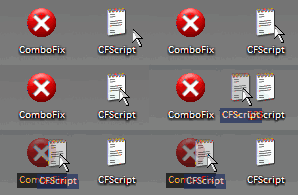
This will start ComboFix again. After reboot, (in case it asks to reboot), post the contents of Combofix.txt in your next reply together with a fresh HJT log.
Let's see what we can do with this.
Run CFScript
Open notepad and copy/paste the text in the code box below into it:
NOTE* make sure to only highlight and copy what is inside the quote box nothing out side of it.
Also ..
Pay particular attention to this :-
Make sure the word File:: is on the first line of the text file you save (no blank line above it, & no space in front of it)
File::
C:\WINDOWS\system32\hkqtprrl.dll
C:\WINDOWS\system32\xmjvsqsm.dll
C:\WINDOWS\system32\fkvgcteh.dll
C:\WINDOWS\system32\cpalfadw.dll
C:\WINDOWS\system32\wdaflapc.ini
C:\WINDOWS\system32\csgvhhsp.dll
C:\WINDOWS\oadkxrts.exe
C:\WINDOWS\system32\vtUoLBUN.dll
C:\WINDOWS\System32\cbXQHxWM.dll
Folder::
C:\WINDOWS\System32\cbXQHxWM
Registry::
[-HKEY_LOCAL_MACHINE\~\Browser Helper Objects\{B6AB05BB-EB31-433F-8895-29C34D8549C2}]
[-HKEY_LOCAL_MACHINE\~\Browser Helper Objects\{EF4CC146-43C9-4741-8D21-EB5035A4EBEC}]
[hkey_local_machine\software\microsoft\windows\currentversion\explorer\shellexecutehooks]
"{EF4CC146-43C9-4741-8D21-EB5035A4EBEC}"=-
[-HKEY_LOCAL_MACHINE\software\microsoft\windows nt\currentversion\winlogon\notify\vtUoLBUN]
Save this as CFScript.txt
Then drag the CFScript.txt into ComboFix.exe as you see in the screenshot below.
This will start ComboFix again. After reboot, (in case it asks to reboot), post the contents of Combofix.txt in your next reply together with a fresh HJT log.
Blind Dragon
Posts: 3,774 +4
still some bad entries in there, but getting better
Download and Install SDFix
Boot into Safe Mode
Run SDFix
Download and Install SDFix
- Download SDFix and save it to your Desktop.
- Double click SDFix.exe and it will extract the files to %systemdrive%
(Drive that contains the Windows Directory, typically C:\SDFix)
Boot into Safe Mode
- Restart your computer and start pressing the F8 key on your keyboard.
- Select the Safe Mode option when the Windows Advanced Options menu appears, and then press ENTER.
Run SDFix
- Open the extracted SDFix folder and double click RunThis.bat to start the script.
- Type Y to begin the cleanup process.
- It will remove any Trojan Services and Registry Entries that it finds then prompt you to press any key to Reboot.
- Press any Key and it will restart the PC.
- When the PC restarts the Fixtool will run again and complete the removal process then display Finished, press any key to end the script and load your desktop icons.
- Once the desktop icons load the SDFix report will open on screen and also save into the SDFix folder as Report.txt
- Attach Report.txt back here
Blind Dragon
Posts: 3,774 +4
We're looking better. Are you still getting that error at startup
Remove bad HijackThis entries
Run Kaspersky Online AV Scanner
Order to use it you have to use Internet Explorer.
Go to Kaspersky and click the Accept button at the end of the page.
Note for Internet Explorer 7 users: If at any time you have trouble with the accept button of the licence, click on the Zoom tool located at the right bottom of the IE window and set the zoom to 75 %. Once the license accepted, reset to 100%.
Remove bad HijackThis entries
- Run HijackThis
- Click on the System Scan Only button
- Put a check beside all of the items listed below (if present):
R0 - HKCU\Software\Microsoft\Internet Explorer\Main,Start Page = http://www.voyeurweb.com/
R0 - HKLM\Software\Microsoft\Internet Explorer\Main,Start Page = http://www.voyeurweb.com/
R0 - HKCU\Software\Microsoft\Internet Explorer\Main,Local Page = \blank.htm
O3 - Toolbar: (no name) - {E0E899AB-F487-11D5-8D29-0050BA6940E3} - (no file)
O3 - Toolbar: (no name) - {DD8FEC5A-8976-438D-B6C9-F10CE205D78F} - (no file)
- Close all open windows and browsers/email, etc...
- Click on the "Fix Checked" button
- When completed, close the application.
Run Kaspersky Online AV Scanner
Order to use it you have to use Internet Explorer.
Go to Kaspersky and click the Accept button at the end of the page.
Note for Internet Explorer 7 users: If at any time you have trouble with the accept button of the licence, click on the Zoom tool located at the right bottom of the IE window and set the zoom to 75 %. Once the license accepted, reset to 100%.
- Read the Requirements and limitations before you click Accept.
- Allow the ActiveX download if necessary.
- Once the database has downloaded, click Next.
- Click Scan Settings and change the "Scan using the following antivirus database" from standard to extended and then click OK.
- Click on "My Computer"
- When the scan has completed, click Save Report As...
- Enter a name for the file in the Filename: text box and then click the down arrow to the right of Save as type: and select text file (*.txt)
- Click Save - by default the file will be saved to your Desktop, but you can change this if you wish.
Blind Dragon
Posts: 3,774 +4
Do you use Internet explorer for browsing the web? I recommend switching to Firefox or Opera if so. I am also going to suggest you remove an IE plugin that stores passwords for you. Firefox has these features built in and you won't be at risk of giving up passwords. You are also way behind on updates from Microsoft, so once you are clean you need to get updated.
-----------------------------------------------------------------------------
First - you need to delete everything from symantec's quarantine, there are some nasties in there. If you can't figure how to do it, you can simply navigate to the quarantine folder and delete it's contents:
C:\Documents and Settings\All Users\Application Data\Symantec\Symantec AntiVirus Corporate Edition\7.5\Quarantine
-----------------------------------------------------------------------------
Next - Print this section or copy and paste it to notepad and save it to your desktop, until completed.
Please re-open HiJackThis and scan. Check the boxes next to all the entries listed below.
O2 - BHO: (no name) - {724d43a9-0d85-11d4-9908-00400523e39a} - C:\Program Files\Siber Systems\AI RoboForm\roboform.dll
O3 - Toolbar: &RoboForm - {724d43a0-0d85-11d4-9908-00400523e39a} - C:\Program Files\Siber Systems\AI RoboForm\roboform.dll
O4 - HKCU\..\Run: [RoboForm] "C:\Program Files\Siber Systems\AI RoboForm\RoboTaskBarIcon.exe"
O8 - Extra context menu item: Customize Menu - file://C:\Program Files\Siber Systems\AI RoboForm\RoboFormComCustomizeIEMenu.html
O8 - Extra context menu item: Fill Forms - file://C:\Program Files\Siber Systems\AI RoboForm\RoboFormComFillForms.html
O8 - Extra context menu item: RoboForm Toolbar - file://C:\Program Files\Siber Systems\AI RoboForm\RoboFormComShowToolbar.html
O8 - Extra context menu item: Save Forms - file://C:\Program Files\Siber Systems\AI RoboForm\RoboFormComSavePass.html
O9 - Extra button: Fill Forms - {320AF880-6646-11D3-ABEE-C5DBF3571F46} - file://C:\Program Files\Siber Systems\AI RoboForm\RoboFormComFillForms.html
O9 - Extra 'Tools' menuitem: Fill Forms - {320AF880-6646-11D3-ABEE-C5DBF3571F46} - file://C:\Program Files\Siber Systems\AI RoboForm\RoboFormComFillForms.html
O9 - Extra button: Save - {320AF880-6646-11D3-ABEE-C5DBF3571F49} - file://C:\Program Files\Siber Systems\AI RoboForm\RoboFormComSavePass.html
O9 - Extra 'Tools' menuitem: Save Forms - {320AF880-6646-11D3-ABEE-C5DBF3571F49} - file://C:\Program Files\Siber Systems\AI RoboForm\RoboFormComSavePass.html
O9 - Extra button: RoboForm - {724d43aa-0d85-11d4-9908-00400523e39a} - file://C:\Program Files\Siber Systems\AI RoboForm\RoboFormComShowToolbar.html
O9 - Extra 'Tools' menuitem: RoboForm Toolbar - {724d43aa-0d85-11d4-9908-00400523e39a} - file://C:\Program Files\Siber Systems\AI RoboForm\RoboFormComShowToolbar.html
Now close all windows other than HiJackThis, then click Fix Checked. Close HiJackThis. Reboot into safe mode.
Restart your computer and as soon as it starts booting up again continuously tap F8. A menu should come up where you will be given the option to enter Safe Mode.
Please go to Start > Control Panel > Add/Remove Programs and remove the following (if present):
AI RoboForm
ConnectionServices
Please note any other programs that you don't recognize in that list in your next response.
Using Windows Explorer (to get there right-click your Start button and go to "Explore"), please delete these folders (if present):
C:\Documents and Settings\MR\Desktop\Shortcut CIty\AI_Roboform_Pro_v6[1].9.82
C:\Program Files\Siber Systems\AI RoboForm
C:\Program Files\ConnectionServices
Using Windows Explorer (to get there right-click your Start button and go to "Explore"), please delete these files (if present):
D:\Incomplete\T-3200824-07 Track 7 (house).wma
After that, Reboot, and post a new HijackThis log here in a reply
-----------------------------------------------------------------------
I will have a look through the updated Hijackthis log then if everything looks good we can clean up a bit and secure the work that you have done.
-----------------------------------------------------------------------------
First - you need to delete everything from symantec's quarantine, there are some nasties in there. If you can't figure how to do it, you can simply navigate to the quarantine folder and delete it's contents:
C:\Documents and Settings\All Users\Application Data\Symantec\Symantec AntiVirus Corporate Edition\7.5\Quarantine
-----------------------------------------------------------------------------
Next - Print this section or copy and paste it to notepad and save it to your desktop, until completed.
Please re-open HiJackThis and scan. Check the boxes next to all the entries listed below.
O2 - BHO: (no name) - {724d43a9-0d85-11d4-9908-00400523e39a} - C:\Program Files\Siber Systems\AI RoboForm\roboform.dll
O3 - Toolbar: &RoboForm - {724d43a0-0d85-11d4-9908-00400523e39a} - C:\Program Files\Siber Systems\AI RoboForm\roboform.dll
O4 - HKCU\..\Run: [RoboForm] "C:\Program Files\Siber Systems\AI RoboForm\RoboTaskBarIcon.exe"
O8 - Extra context menu item: Customize Menu - file://C:\Program Files\Siber Systems\AI RoboForm\RoboFormComCustomizeIEMenu.html
O8 - Extra context menu item: Fill Forms - file://C:\Program Files\Siber Systems\AI RoboForm\RoboFormComFillForms.html
O8 - Extra context menu item: RoboForm Toolbar - file://C:\Program Files\Siber Systems\AI RoboForm\RoboFormComShowToolbar.html
O8 - Extra context menu item: Save Forms - file://C:\Program Files\Siber Systems\AI RoboForm\RoboFormComSavePass.html
O9 - Extra button: Fill Forms - {320AF880-6646-11D3-ABEE-C5DBF3571F46} - file://C:\Program Files\Siber Systems\AI RoboForm\RoboFormComFillForms.html
O9 - Extra 'Tools' menuitem: Fill Forms - {320AF880-6646-11D3-ABEE-C5DBF3571F46} - file://C:\Program Files\Siber Systems\AI RoboForm\RoboFormComFillForms.html
O9 - Extra button: Save - {320AF880-6646-11D3-ABEE-C5DBF3571F49} - file://C:\Program Files\Siber Systems\AI RoboForm\RoboFormComSavePass.html
O9 - Extra 'Tools' menuitem: Save Forms - {320AF880-6646-11D3-ABEE-C5DBF3571F49} - file://C:\Program Files\Siber Systems\AI RoboForm\RoboFormComSavePass.html
O9 - Extra button: RoboForm - {724d43aa-0d85-11d4-9908-00400523e39a} - file://C:\Program Files\Siber Systems\AI RoboForm\RoboFormComShowToolbar.html
O9 - Extra 'Tools' menuitem: RoboForm Toolbar - {724d43aa-0d85-11d4-9908-00400523e39a} - file://C:\Program Files\Siber Systems\AI RoboForm\RoboFormComShowToolbar.html
Now close all windows other than HiJackThis, then click Fix Checked. Close HiJackThis. Reboot into safe mode.
Restart your computer and as soon as it starts booting up again continuously tap F8. A menu should come up where you will be given the option to enter Safe Mode.
Please go to Start > Control Panel > Add/Remove Programs and remove the following (if present):
AI RoboForm
ConnectionServices
Please note any other programs that you don't recognize in that list in your next response.
Using Windows Explorer (to get there right-click your Start button and go to "Explore"), please delete these folders (if present):
C:\Documents and Settings\MR\Desktop\Shortcut CIty\AI_Roboform_Pro_v6[1].9.82
C:\Program Files\Siber Systems\AI RoboForm
C:\Program Files\ConnectionServices
Using Windows Explorer (to get there right-click your Start button and go to "Explore"), please delete these files (if present):
D:\Incomplete\T-3200824-07 Track 7 (house).wma
After that, Reboot, and post a new HijackThis log here in a reply
-----------------------------------------------------------------------
I will have a look through the updated Hijackthis log then if everything looks good we can clean up a bit and secure the work that you have done.
At this time I do not want to eliminate roboform from IE. The types of passwords I have stored are not the type that would do me damage (mostly forums etc.) I have set firefox to store passwords and have already saved a few with FF.
I have tried everything under the sun to install SP2 and have consistently gotten error numbers which mean "insufficient disk storage space" when in fact I have over 5GB of space available. After reviewing many forums I see that I am not alone by a long shot.
I have not tried the slipstream method yet and I wonder if I could even do it since the CD's that I have are not just Win XP but rather CD's which contain everything Sony had pre-loaded on my computer before shipping.
I also understand that there are some people who are just not going to be able to deal with SP2 because they are running apps which will never run properly with SP2.
I now understand that SP3 is out but I dont see where to get it. I tried loading SP2 both from CD and from download both failed. The download seemed to progress further before the "insufficient storage" error message.
Thanks for your help I learned a lot. I also installed Online Armours free firewall which I understand withstood a leak test and better than Commodo 2.4 and a $40 Pro firewall.
I have tried everything under the sun to install SP2 and have consistently gotten error numbers which mean "insufficient disk storage space" when in fact I have over 5GB of space available. After reviewing many forums I see that I am not alone by a long shot.
I have not tried the slipstream method yet and I wonder if I could even do it since the CD's that I have are not just Win XP but rather CD's which contain everything Sony had pre-loaded on my computer before shipping.
I also understand that there are some people who are just not going to be able to deal with SP2 because they are running apps which will never run properly with SP2.
I now understand that SP3 is out but I dont see where to get it. I tried loading SP2 both from CD and from download both failed. The download seemed to progress further before the "insufficient storage" error message.
Thanks for your help I learned a lot. I also installed Online Armours free firewall which I understand withstood a leak test and better than Commodo 2.4 and a $40 Pro firewall.
Blind Dragon
Posts: 3,774 +4
Uninstall Combofix
* Click START then RUN
* Now type Combofix /u in the runbox
* Make sure there's a space between Combofix and /u
* Then hit Enter.
* The above procedure will:
* Delete the following:
* ComboFix and its associated files and folders.
* Reset the clock settings.
* Hide file extensions, if required.
* Hide System/Hidden files, if required.
* Set a new, clean Restore Point.
-----------------------------------------------------------------------
Cleanup using OTMoveit2 by OldTimer
Now we can clear out the rest of the programs we've been using to clean up your computer, they are not suitable for general malware removal and could cause damage if launched accidentally.
Download OTMoveIt2 by OldTimer OTMoveIt2.exe and place it on your desktop.
1. Double click OTMoveIt2.exe to launch it.
If using Vista Right-Click OTMoveIt and choose Run As Administrator
2. Click on the CleanUp! button.
3. OTMoveIt2 will download a list from the Internet, if your firewall or other defensive programs alerts you, allow it access.
4. Click YES at the next prompt (list downloaded, Do you want to begin cleanup process?)
* When finished exit out of OTMoveIt2
---------------------------------------------------------------------------
Now that you are clean, please follow these simple steps in order to keep your computer clean and secure:
here are some additional utilities that will enhance your safety
* Click START then RUN
* Now type Combofix /u in the runbox
* Make sure there's a space between Combofix and /u
* Then hit Enter.
* The above procedure will:
* Delete the following:
* ComboFix and its associated files and folders.
* Reset the clock settings.
* Hide file extensions, if required.
* Hide System/Hidden files, if required.
* Set a new, clean Restore Point.
-----------------------------------------------------------------------
Cleanup using OTMoveit2 by OldTimer
Now we can clear out the rest of the programs we've been using to clean up your computer, they are not suitable for general malware removal and could cause damage if launched accidentally.
Download OTMoveIt2 by OldTimer OTMoveIt2.exe and place it on your desktop.
1. Double click OTMoveIt2.exe to launch it.
If using Vista Right-Click OTMoveIt and choose Run As Administrator
2. Click on the CleanUp! button.
3. OTMoveIt2 will download a list from the Internet, if your firewall or other defensive programs alerts you, allow it access.
4. Click YES at the next prompt (list downloaded, Do you want to begin cleanup process?)
* When finished exit out of OTMoveIt2
---------------------------------------------------------------------------
Now that you are clean, please follow these simple steps in order to keep your computer clean and secure:
- Set correct settings for files
- Click Start > My Computer > Tools menu (at top of page) > Folder Options > View tab.
- Under "Hidden files and folders" if necessary select Do not show hidden files and folders.
- If unchecked please check Hide protected operating system files (Recommended)
- If necessary check "Display content of system folders"
- If necessary Uncheck Hide file extensions for known file types.
- Click OK
clear system restore points
This is a good time to clear your existing system restore points and establish a new clean restore point:- Go to Start > All Programs > Accessories > System Tools > System Restore
- Select Create a restore point, and Ok it.
- Next, go to Start > Run and type in cleanmgr
- Select the More options tab
- Choose the option to clean up system restore and OK it.
- Make your Internet Explorer more secure - This can be done by following these simple instructions:
- From within Internet Explorer click on the Tools menu and then click on Options.
- Click once on the Security tab
- Click once on the Internet icon so it becomes highlighted.
- Click once on the Custom Level button.
- Change the Download signed ActiveX controls to Prompt
- Change the Download unsigned ActiveX controls to Disable
- Change the Initialize and script ActiveX controls not marked as safe to Disable
- Change the Installation of desktop items to Prompt
- Change the Launching programs and files in an IFRAME to Prompt
- Change the Navigate sub-frames across different domains to Prompt
- When all these settings have been made, click on the OK button.
- If it prompts you as to whether or not you want to save the settings, press the Yes button.
- Change the Download signed ActiveX controls to Prompt
- Next press the Apply button and then the OK to exit the Internet Properties page.
- Use an AntiVirus Software - It is very important that your computer has an anti-virus software running on your machine. This alone can save you a lot of trouble with malware in the future.
See this link for a listing of some online & their stand-alone antivirus programs:
Virus, Spyware, and Malware Protection and Removal Resources
- Update your AntiVirus Software - It is imperitive that you update your Antivirus software at least once a week (Even more if you wish). If you do not update your antivirus software then it will not be able to catch any of the new variants that may come out.
- Use a Firewall - I can not stress how important it is that you use a Firewall on your computer. Without a firewall your computer is succeptible to being hacked and taken over. I am very serious about this and see it happen almost every day with my clients. Simply using a Firewall in its default configuration can lower your risk greatly.
For a tutorial on Firewalls and a listing of some available ones see the link below:
Understanding and Using Firewalls
- Visit Microsoft's Windows Update Site Frequently - It is important that you visit http://www.windowsupdate.com regularly. This will ensure your computer has always the latest security updates available installed on your computer. If there are new updates to install, install them immediately, reboot your computer, and revisit the site until there are no more critical updates.
- Install Spybot - Search and Destroy - Install and download Spybot - Search and Destroy with its TeaTimer option. This will provide realtime spyware & hijacker protection on your computer alongside your virus protection. You should also scan your computer with program on a regular basis just as you would an antivirus software.
A tutorial on installing & using this product can be found here:
Using Spybot - Search & Destroy to remove Spyware , Malware, and Hijackers
- Install Ad-Aware - Install and download Ad-Aware. ou should also scan your computer with program on a regular basis just as you would an antivirus software in conjunction with Spybot.
A tutorial on installing & using this product can be found here:
Using Ad-aware to remove Spyware, Malware, & Hijackers from Your Computer
- Install SpywareBlaster - SpywareBlaster will added a large list of programs and sites into your Internet Explorer settings that will protect you from running and downloading known malicious programs.
A tutorial on installing & using this product can be found here:
Using SpywareBlaster to protect your computer from Spyware and Malware
- Update all these programs regularly - Make sure you update all the programs I have listed regularly. Without regular updates you WILL NOT be protected when new malicious programs are released.
here are some additional utilities that will enhance your safety
- IE/Spyad <= IE/Spyad places over 4000 websites and domains in the IE Restricted list which will severely impair attempts to infect your system. It basically prevents any downloads (Cookies etc) from the sites listed, although you will still be able to connect to the sites.
- MVPS Hosts file <= The MVPS Hosts file replaces your current HOSTS file with one containing well know ad sites etc. Basically, this prevents your coputer from connecting to those sites by redirecting them to 127.0.0.1 which is your local computer
- Google Toolbar <= Get the free google toolbar to help stop pop up windows.
- Winpatrol <= Download and install the free version of Winpatrol. a tutorial for this product is located here:
Using Winpatrol to protect your computer from malicious software
Similar threads

- Replies
- 8
- Views
- 782

- Replies
- 0
- Views
- 374


Latest posts
-
The end of uBlock Origin in Chrome is now weeks away, not months
- daffy duck replied
-
Solar generation beats coal in the US for the first time ever
- daffy duck replied


-
TechSpot is dedicated to computer enthusiasts and power users.
Ask a question and give support.
Join the community here, it only takes a minute.