TechSpot
 
Go Back   TechSpot OpenBoards > OS & Software > Security and the Web
Forgot?

Welcome to the TechSpot OpenBoards. Please read the FAQ if you have any questions. Login to participate.

Malware ral and Safe mode problem

Reply
 
Thread Tools Search this Thread
  #1  
Old 05-22-2008, 01:57 PM
rmarcante rmarcante is offline
Newcomer, in training
 
Member since: May 2008, 10 posts
Malware ral and Safe mode problem

Hi to everybody,

I'm Riccardo and this is my first post here, so I apologize in advance should this not be the right forum to post this message.

In order to solve the problem I'm having since 3 days with google slowing down probably redirecting elsewhere, I'm following the preliminary removal instructions I've found here.
But a problems never goes alone: when I came to point 13 I've found out that I can't boot on safe mode, no matter how I try (and you can bet I've tried hard).

Can I solve this? Or could it be another consequence of a malware? I've heard about worm Bagle (or something similar) but I didn't seen any of the folders typical for it.

If I can't solve this, could I run in normal mode through the end of the removal process or I'll waste my time?

Additional info: I use a Dell Latitude 630 with Windows XP SP3 (but no recovery cd).

Thank you in advance for your attention

Riccardo

Last edited by rmarcante : 05-22-2008 at 01:59 PM.
Reply With Quote
  #2  
Old 05-22-2008, 04:07 PM
Blind Dragon's Avatar
Blind Dragon Blind Dragon is offline
TechSpot Evangelist
 
Location: Tampa FL
Member since: Oct 2007, 3,118 posts
System specs
Do what you can, however you can. Then get us the logs. If you were able to run Combofix then it should show if safe mode has been disabled or corrupted. We can then reinstall safe mode.
Reply With Quote
You can remove this banner by registering, join the TS Community for free.
  #3  
Old 05-23-2008, 03:17 AM
rmarcante rmarcante is offline
Newcomer, in training
 
Member since: May 2008, 10 posts
Hi BD and thank you for your quick reply,

yesterday I've tried for third consecutive night to get rid off this problem and I've followed all steps included in V/S/M preliminary removal instructions.
At the end, for the very first time, none of the tools I've used warned me about problems, which I consider a good point.
Anyway, since I don't wanna get too happy, here are my logs together with a couple of info since the no-safe mode problem had forced me to a kind of workaround:

1) on step 2: mcAfee Virus Scan Enterprise 8.5.0 is resident on my PC so I have not downloaded AVG nor Avast antivirus. After this bad experience, in your opinion, would it be safe to change my AV?

2) still on step 2: regarding firewall, I'm using Windows Firewall. Again, would it be better to use ZoneAlarm?

3) on step 10: I could not run SmFraudfix on safe mode. On normal mode, none of the three tools have found anything.

4) on step 13: as I told you, no safe mode allowed on my PC. As a workaround, I've used a BART PE environment. Once started on BART PE, I've run Sophos Antivirus (from command prompt): Sav32Cli -f -remove which, I suppose, has performed a full scan and removal. No viruses found though.

5) on step 14: same thing: no safe mode. In normal mode, nor SS&D and AdAware had something bad to say.

Ok, that's it.
Here attached you'll find HJT and Combofix logs. I hope you can give me good news.

Thank you again

Riccardo
Attached Files
File Type: txt ComboFix.txt (23.5 KB, 2 views)
File Type: log hijackthis.log (12.3 KB, 4 views)

Last edited by rmarcante : 05-23-2008 at 09:27 AM.
Reply With Quote
  #4  
Old 05-23-2008, 09:31 AM
Blind Dragon's Avatar
Blind Dragon Blind Dragon is offline
TechSpot Evangelist
 
Location: Tampa FL
Member since: Oct 2007, 3,118 posts
System specs
I will work up some further instructions for you but in the mean time.

1) I recommend Avira Antivir, it is just as good as paid programs but uses a lot less resources and its free. It also has a resident protection and excellent detection rates, but this is up to you.

If you decide to remove Mcafee please do it this way.
Remove Mcafee products
1. Click Start, Settings, Control Panel.
2. Double-click Add or Remove Programs.
3. Select the McAfee SecurityCenter product.
4. Click Remove and follow the steps provided.
5. Download the Mcafee removal tool from http://download.mcafee.com/products/...tches/MCPR.exe
6. Click Save and save the file to your desktop
7. Make sure all McAfee windows are closed.
8. Double-click MCPR.exe to run the removal tool. (Vista users need right click and run as administrator)
9. Restart your computer after receiving the message CleanUp Successful.


2) Use a Firewall - It is very important that you use a Firewall on your computer. If you use the Windows Firewall you might think that's enough but it only controls inbound traffic. Simply using a Firewall in its default configuration can lower your risk greatly. Here are some firewalls which are free for personal use and most commonly used:
Comodo (Vista Compatible)
Kerio
Online Armor
Zonealarm (Vista Compatible)


3) I see some cracks / keygens in the logs this is more than likely where you picked up this problem. P2P programs and torrents are also well known to spread infection.
Reply With Quote
  #5  
Old 05-23-2008, 10:09 AM
rmarcante rmarcante is offline
Newcomer, in training
 
Member since: May 2008, 10 posts
Thank you BD.

Waiting for your final advice:

1) I'll download Avira, no doubt about that (although I thought you'd suggest AVG)

2) I've already downloaded ZA, tonight I'll update my PC

3) as a matter of facts, I've downloaded one or two keygens 10/15 days ago to run a very known CD burner (probably the most famous one) and I had immediately some doubts about them. Unfortunately it was too late. I have just one (silly?) question about this: is there any tool able to warn me just in case it happens again (I mean using keygens)? Or the only thing I can do is run any SS&D or SAS after the damage is done?

Thank you again

R
Reply With Quote
  #6  
Old 05-23-2008, 10:34 AM
Blind Dragon's Avatar
Blind Dragon Blind Dragon is offline
TechSpot Evangelist
 
Location: Tampa FL
Member since: Oct 2007, 3,118 posts
System specs
Well the obvious answer would be not to use keygens But I will suggest some software once you are clean to help keep you that way. Please be patient as I work up your next set of instructions I am at work at my real job so it may take a bit.
Reply With Quote
  #7  
Old 05-24-2008, 07:44 PM
Blind Dragon's Avatar
Blind Dragon Blind Dragon is offline
TechSpot Evangelist
 
Location: Tampa FL
Member since: Oct 2007, 3,118 posts
System specs
I didn't get to see your SUPERantispyware log either please attach it for me.

Can you explain this also before we proceed

O17 - HKLM\System\CCS\Services\Tcpip\Parameters: Domain = ad.mirabilandia.it
O17 - HKLM\Software\..\Telephony: DomainName = ad.mirabilandia.it
O17 - HKLM\System\CS1\Services\Tcpip\Parameters: Domain = ad.mirabilandia.it
O17 - HKLM\System\CS2\Services\Tcpip\Parameters: Domain = ad.mirabilandia.it
O17 - HKLM\System\CS3\Services\Tcpip\Parameters: Domain = ad.mirabilandia.it
Reply With Quote
  #8  
Old 05-26-2008, 03:35 AM
rmarcante rmarcante is offline
Newcomer, in training
 
Member since: May 2008, 10 posts
Hi BD,

please find here attached my last SAS log.
Furthermore, mirabilandia is the company where I work.
I suppose those parameters are requested to log into the domain.

If they may bother, I could ask IT dept. whether they can remove them.

Thank you again

Riccardo
Attached Files
File Type: log SUPERAntiSpyware Scan Log - 05-23-2008 - 00-04-16.log (464 Bytes, 2 views)
Reply With Quote
  #9  
Old 05-28-2008, 01:05 AM
Blind Dragon's Avatar
Blind Dragon Blind Dragon is offline
TechSpot Evangelist
 
Location: Tampa FL
Member since: Oct 2007, 3,118 posts
System specs
Those entries are fine as long as it is somewhere you trust.

Run Kaspersky Online AV Scanner

Order to use it you have to use Internet Explorer.
Go to Kaspersky and click the Accept button at the end of the page.

Note for Internet Explorer 7 users: If at any time you have trouble with the accept button of the licence, click on the Zoom tool located at the right bottom of the IE window and set the zoom to 75 %. Once the license accepted, reset to 100%.
  • Read the Requirements and limitations before you click Accept.
  • Allow the ActiveX download if necessary.
  • Once the database has downloaded, click Next.
  • Click Scan Settings and change the "Scan using the following antivirus database" from standard to extended and then click OK.
  • Click on "My Computer"
  • When the scan has completed, click Save Report As...
  • Enter a name for the file in the Filename: text box and then click the down arrow to the right of Save as type: and select text file (*.txt)
  • Click Save - by default the file will be saved to your Desktop, but you can change this if you wish.
Attach the report into your next reply
Reply With Quote
You can remove this banner by registering, join the TS Community for free.
  #10  
Old 05-28-2008, 06:21 AM
rmarcante rmarcante is offline
Newcomer, in training
 
Member since: May 2008, 10 posts
hi BD,

please find here attached Kaspersky log.

I've read through it and I've noticed, beside all those locked files, three locations where it seems to find something bad:

- the recycler bin: these are rots from previous operations. I've emptied the bin after this log;
- nero trials versions, which I've downloaded from official site. I've googled to find something about AdTool.Win32.MyWebSearch.bm and I've seen that it's related to some toolbar (I can't remember which one) Nero suggests to install with it;
- smitfraudfix, but I think this is the virus it uses to test my resident AV.

In any case, I wait for your reply (also about Safe Mode, if you can).

Thank you again

Riccardo
Attached Files
File Type: txt kaspersky log.txt (36.0 KB, 1 views)
Reply With Quote
  #11  
Old 05-28-2008, 09:37 AM
Blind Dragon's Avatar
Blind Dragon Blind Dragon is offline
TechSpot Evangelist
 
Location: Tampa FL
Member since: Oct 2007, 3,118 posts
System specs
Everything in your log looks ok. Aside from the keygens like I said earlier

Let's check a few things now before we clean up:

First:
Go to Start -> Run -> type msconfig -> go to boot.ini -> check the boxes for safeboot and minimal -> then restart when it asks.

see if it boots into safe mode if yes come let me know, if no continue to next option

-----------------------------------------------------------

Next:
Download to your Desktop this self-extracting ZIP archive FixPolicies.exe

• Double-click FixPolicies.exe
• Click the Install button on the bottom toolbar of the box that will open.
• The program will create a new Folder called FixPolicies
• Double-click to Open the new Folder, and then double-click the file named Fix_Policies.cmd
• A black box will briefly appear and then close. This will enable your Control Panel, Task Manager and stop any Administrative warnings.

Afterwards attempt restarting to safe mode, if it works let me know if not continue

---------------------------------------------------------------------------

If that doesn't work:
I had an option to reinstall safe mode for XP SP2 but you have SP3 so I am not sure that it will work, I will look into it further
Reply With Quote
  #12  
Old 05-28-2008, 11:21 AM
rmarcante rmarcante is offline
Newcomer, in training
 
Member since: May 2008, 10 posts
I've tried first 2 tools:

msconfig:

1st try:- after reboot, it didn't stop at black screen with blinking white line on left upper corner, but it showed me windows splash screen and then nothing else: the screen has remained black without getting the usual login page;
2nd try: I've pressed F8 to try with safe mode at prompt: no way: usual black screen immediately;
3rd try: last good configuration: before getting into Windows it said that volume was corrupted and went through a scandisk (or something similar); on the next automatic reboot, we were back to situation 1 (splash screen only)
4th try: after a BartPE to restore boot.ini, I went through a normal boot and everything was fine. So i tried second option

fixpolicies.exe
no way: usual black screen

safeboot.zip
I didn't register those changes because I've seen they're related to SP2. Now, I've SP3 installed. May I go through it as well or not?

All and all, the thing which is concerning me the most is the corruption of the volume right after 1st try.

Thank you very much for your comprehension

Riccardo
Reply With Quote
  #13  
Old 05-28-2008, 11:59 AM
Blind Dragon's Avatar
Blind Dragon Blind Dragon is offline
TechSpot Evangelist
 
Location: Tampa FL
Member since: Oct 2007, 3,118 posts
System specs
I am going to ask one of the other helpers that is better at this side of it to step in, then I will go through the clean up process with you.

Most of my tools are for sp2, so be patient while I send the link to them.
Reply With Quote
  #14  
Old 05-28-2008, 04:57 PM
kimsland kimsland is offline
TechSpot Guru
 
Member since: Dec 2007, 5,978 posts
Quote:
I use a Dell Latitude 630 with Windows XP SP3 (but no recovery cd).
This concerns me a lot, because if any Virus/Trojan/Malware has infected your Windows system files (and then later removed the infected file) It is possible that Windows will require a repair (using the correct Operating System disc)
You can also contact Dell and purchase your missing recovery CD at a significantly reduced cost.

Quote:
Most of my tools are for sp2
This won't matter.
Running tools meant for SP2 (likely the original version of your Windows) will help your system not hurt it (used under fault condition)

Presently (through using BartPE disc) you are able to get to Normal mode, is that correct?
Also you are still not able to get to Safe mode, whatever you try?

If so

In Normal mode go to Add/Remove programs and remove Windows Service Pack 3.
This will take your computer back to the original SP2 (and shouldn't ask for any CD)
Once Windows Service Pack 2 is back, restart your computer back to Normal mode.

At this stage reply back
Reply With Quote
  #15  
Old 05-28-2008, 08:55 PM
Blind Dragon's Avatar
Blind Dragon Blind Dragon is offline
TechSpot Evangelist
 
Location: Tampa FL
Member since: Oct 2007, 3,118 posts
System specs
So what do you think about merging a new safe boot into the registry? Don't follow this without the ok from kimsland, but this was going to be my 3rd suggestion

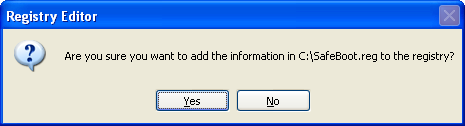
Download the ZIP file, extract the SafeBoot-for-Windows-XP-SP2.reg file and merge it into the registry by double-clicking it:
SafeBoot.zip

Click YES on the following screen
Reply With Quote
  #16  
Old 05-29-2008, 03:08 AM
rmarcante rmarcante is offline
Newcomer, in training
 
Member since: May 2008, 10 posts
I'm sorry but I'm getting a little confused now.
Let me recap.

1) It seems that I'm almost clean, since BD told me my logs were ok, isn't it? If this is correct, I suppose having eliminated all malwares I had

2) I'm having no problems booting on normal mode, using Windows as it's meant to be used. I needed BartPE because I was stuck, having changed my boot.ini with /safemode /minimal parameters. Once restored my old boot.ini I had no problems with normal mode, but still no safe mode

3) I've followed BD suggestions about fixpolicies.exe but nothing has changed.
Now I was ready to apply safeboot.zip but I'm a little concerned since it's intended for SP2.

I don't want to be insolent, but I understand that kimisland solution (downgrade to SP2) was intended to restore normal mode, which should not be the main issue.

Correct if I'm wrong: should I apply safeboot.zip on SP3, which is the worst thing that could happen? I think at worst I won't boot on safe mode. Or could it get worse?

By the way, I've read yesterday a couple of threads where this "SP3 no safe mode" problem was discussed. Although the symptoms are not exactely the same, I've seen that Microsoft itself had something to say about graphics board interferences.
Furthermore, someone's suggesting Safe Mode Fixer by MoonValleySoft.com:
http://www.techspot.com/vb/topic15202.html

Thank you again

Riccardo

Last edited by rmarcante : 05-29-2008 at 03:10 AM.
Reply With Quote
  #17  
Old 05-29-2008, 08:01 AM
kimsland kimsland is offline
TechSpot Guru
 
Member since: Dec 2007, 5,978 posts
Quote:
I'm having no problems booting on normal mode
Yes that's right. I know. Don't worry I'll question you if I don't know.

@Blind Dragon

Good find, actually it is slightly different for SP3.

Your SafeBoot Reg file is missing the following, for SP3 (Disregard the spaces, just being the limit of allowed characters)

Quote:
[HKEY_LOCAL_MACHINE\SYSTEM\CurrentControlSet\Control\SafeBoot\Minimal\v ds]
@="Service"

[HKEY_LOCAL_MACHINE\SYSTEM\CurrentControlSet\Control\SafeBoot\Minimal\{ 533C5B84-EC70-11D2-9505-00C04F79DEAF}]
@="Volume shadow copy"

[HKEY_LOCAL_MACHINE\SYSTEM\CurrentControlSet\Control\SafeBoot\Network\P SEXESVC]
@="Service"

[HKEY_LOCAL_MACHINE\SYSTEM\CurrentControlSet\Control\SafeBoot\Network\U ploadMgr]
@="Service"
As I happen to have the SP3 reg file, I'll attach it. (done )


@rmarcante, forget about uninstalling SP3 (ok we all learn new things)

Please download the attachment SafeBoot-SP3.zip Extract and double click on SafeBoot-SP3.reg file, then select Yes

Restart your computer, and repeatively press F8 key, then go to Safe Mode

If you can now do this, please reply back

By the way, don't purchase anything just yet
Attached Files
File Type: zip SafeBoot-SP3.zip (1.6 KB, 7 views)

Last edited by kimsland : 05-29-2008 at 08:43 AM. Reason: tidying up a bit
Reply With Quote
  #18  
Old 05-29-2008, 08:05 AM
Blind Dragon's Avatar
Blind Dragon Blind Dragon is offline
TechSpot Evangelist
 
Location: Tampa FL
Member since: Oct 2007, 3,118 posts
System specs
Thanks kimsland, would you mind if I download and re-use this as well?
Reply With Quote
  #19  
Old 05-29-2008, 08:39 AM
kimsland kimsland is offline
TechSpot Guru
 
Member since: Dec 2007, 5,978 posts
Actually it's from my system, there is the smallest of possibilities (less than a percentage) that it's not the absolute clean default
(ie I would need to install Xp clean, then SP3 to absolutely confirm)

But I'm 99.99999% sure it's ok (anyway mine works)
So yes, take whatever you like with attachments/downloads on a public forum
Reply With Quote
  #20  
Old 05-29-2008, 08:54 AM
rmarcante rmarcante is offline
Newcomer, in training
 
Member since: May 2008, 10 posts
I'm sorry guys but it still doesn't work.
The last driver I could read on the bottom of my screen was mup.sys, so I've googled a little and I've found out that I'm not alone (and I feel better, I must confess).
But still I see a lot of different opinions about it: someone says mup.sys is not the failing point but simply the last one being called by boot procedure, someone else says that I should disconnect all my USB devices (but I only have mouse connected, should I really disconnect it?), someone else says that's a SP3 bug and we should wait for a patch by MS.

If you don't have any other ideas, I think I'll give up on this subject, waiting for any definitive solutions by MS. But, of course, should you have some ideas, I'll give it a shot.

@kimisland
thank you very much anyway

@BD
BD, before this "no safe boot" deviation, you were mentioning something about cleaning my PC...

Thank you very much for your patience

Riccardo
Reply With Quote
Reply